

Environment Requirements
There are two VPCs as illustrated in the diagram below. The VPC-1 CIDR is 10.0.0.0/16 and the VPC-2 CIDR is 172.19.0.0/16. The Site2Cloud connection is between a VGW in VPC-1 and an Aviatrix gateway in VPC-2.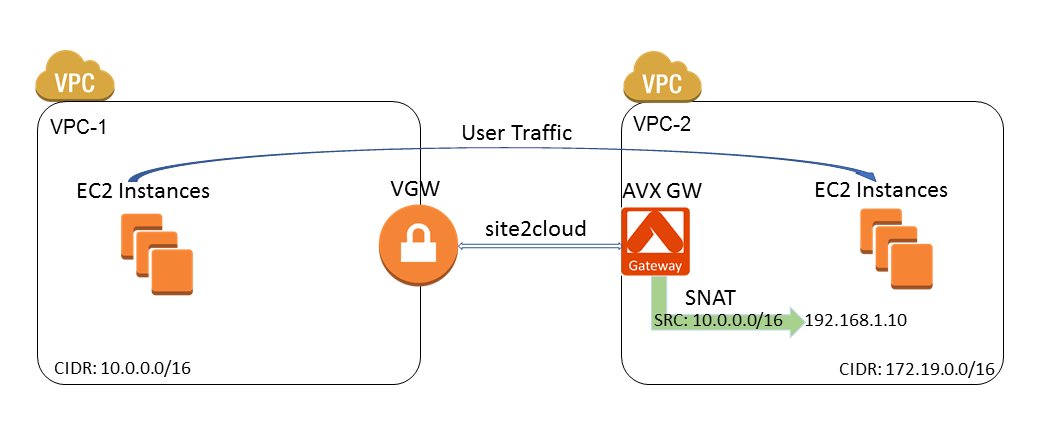
Steps to Configure Site2Cloud Connection and SNAT
- Install an Aviatrix gateway in VPC-2 by following these instructions.
-
Create an Unmapped external connection between the VGW in VPC-1 and the
Aviatrix gateway in VPC-2.
When creating the connection, select Generic for Remote Device Type.
-
Update VPC-1 Route Tables at AWS portal to ensure that traffic with VPC-2
(172.19.0.0/16) as the destination takes the VGW as “Target”:
-
Configure Customized SNAT at the Aviatrix gateway.
a. In Aviatrix CoPilot, go to Cloud Fabric > Gateways > Spoke Gateways.
b. Select the Aviatrix gateway created in VPC-2.
c. On the Settings tab, expand Network Address Translation (NAT) section.
d. Set Source NAT toggle On.
e. Select Customized SNAT.
f. Configure the following SNAT rule.
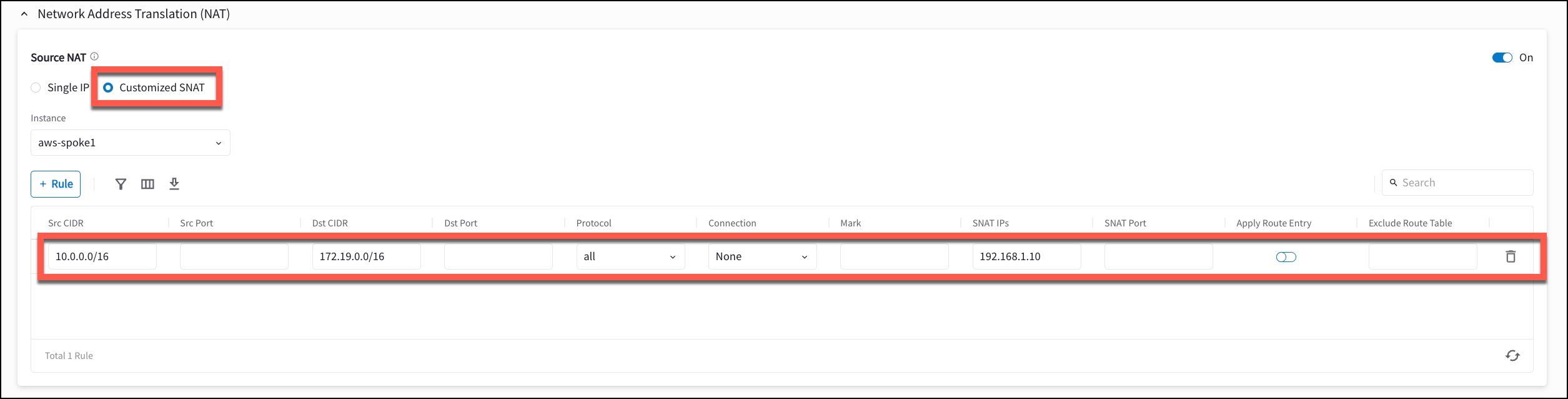 g. Click Save. The rule appears in the table. h. Set Apply Route Entry toggle On to commit the rule.SNAT Port left blank means the gateway preserves the original source port where possible and only remaps it on port collision (within the same port tier; for example, ports 1024+ remain 1024+). This follows the standard Linux kernel SNAT behavior documented in the iptables-extensions man page (SNAT target section). To force dynamic port allocation, specify a port range in SNAT Port.
Test Site2Cloud Connection and SNAT
Use the following tools to test the connection and verify the source IP NAT to the IP selected.- Go to Diagnostics > Cloud Routes > External Connections to verify that the external connection status is Up.
- Ping from an Ubuntu VM in VPC-1 to another Ubuntu VM in VPC-2.
- Turn on “tcpdump icmp -n” at the Ubuntu VM in VPC-2. Verify the source IP of the pings is 192.168.1.10.