Connect Networks With Overlapping CIDRs
The Scenario
This document illustrates an example solution to a use case where a customer needs to:- Connect certain on-prem hosts to certain virtual machine (EC2/GCE) instances in a VPC/VNet over an IPsec tunnel over the Internet
- Their on-prem network range overlaps with the VPC/VNet CIDR range
- No NAT function will be performed on the customer side
- Traffic can be initiated from either side
This solution works for specific hosts and virtual machine instances on each
side.
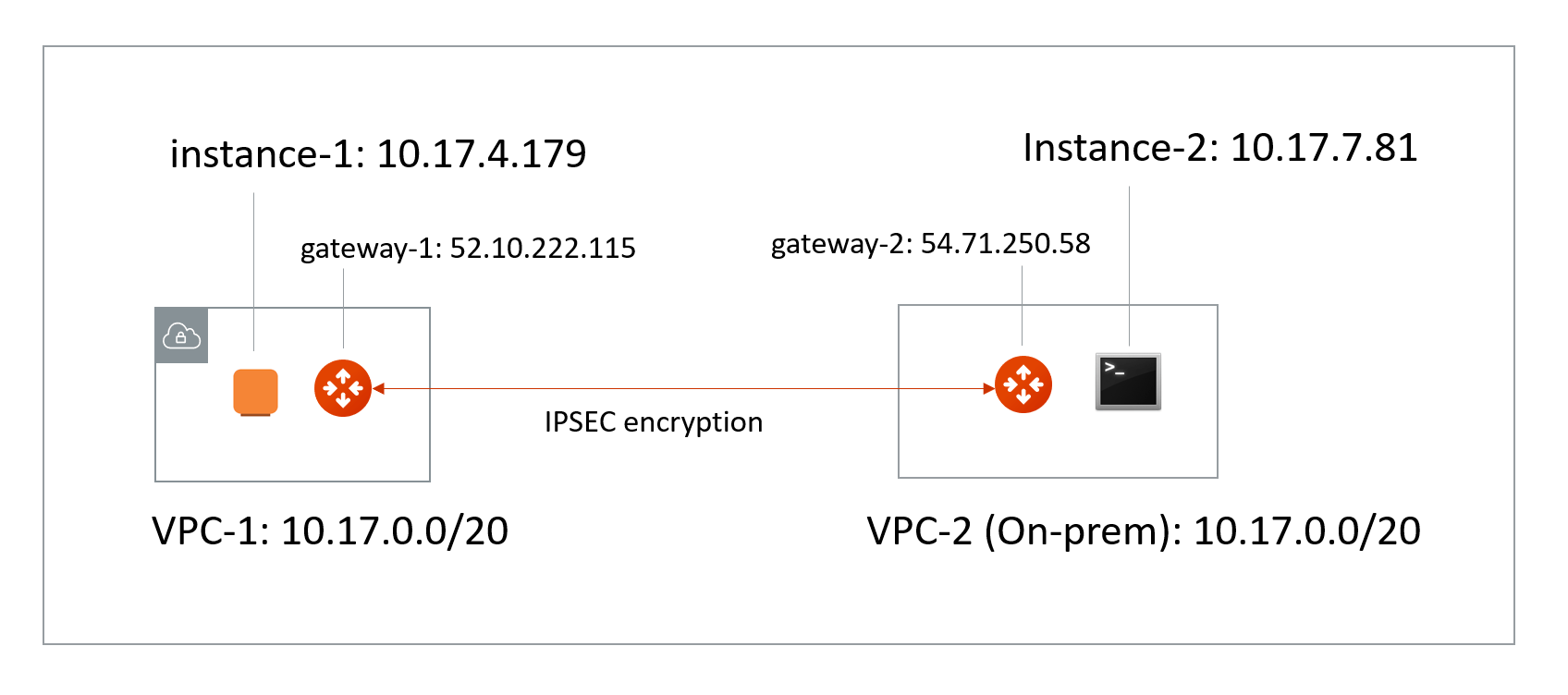
- VPC/VNet-1 CIDR = 10.17.0.0/20; instance-1 in VPC/VNet-1 has an IP address 10.17.4.179.
- VPC/VNet-2 CIDR = 10.17.0.0/20; instance-2 in VPC/VNet-2 has an IP address 10.17.7.81.
The Solution
The solution is to build a Site2Cloud IPsec tunnel between VPC/VNet-1 and VPC/VNet-2 and apply both source NAT (SNAT) and destination NAT (DNAT) on VPC/VNet-1 gateway. The packet flow is demonstrated as below:- instance-1 sends a packet to instance-2 with a virtual destination IP address, for example 172.16.0.43. From instance-1’s point of view, the destination instance is a virtual address - 172.16.0.43.
- When the packet arrives at the VPC/VNet-1 gateway, the gateway does DNAT on the packet to translate the virtual destination IP address to 10.17.7.81 which is the instance-2 physical IP address.
- The gateway at VPC/VNet-1 then translates the packet source IP address (10.17.4.179) to a virtual source IP address (for example, 192.168.0.43).
- The packet then arrives at VPC/VNet-2 with destination IP address 10.17.7.81 and source IP address 192.168.0.43. From instance-2’s point of view, instance-1’s address is a virtual IP address - 192.168.0.43.
- When instance-2 sends a packet to instance-1, the destination is the virtual IP address 192.168.0.43.
- When the packet arrives at the VPC/VNet-1 gateway over the IPsec tunnel, the VPC/VNet-1 gateway translates its destination IP address from virtual address 192.168.0.43 to 10.17.4.179.
- The VPC/VNet-1 gateway then translates the source IP address of the packet from 10.17.7.81 to virtual address 172.16.0.43.
The Configuration Steps
Launch Gateways
Create a Spoke Gateway . Leave optional parameters unchecked.Creating External Connections
- Create a Static Route-Based (Mapped) external connection for VPC-1/Gateway-1 using the following information:
Leave optional parameters Off (Over Private Network/IKEv2/Algorithms). You can
add a secondary Connection (instance) for HA if required.
- Click Save.
- Create an Unmapped external connection for VPC/VNet-2 Gateway-2 using one of these options:
- Click Save.
- Go to Diagnostics > Cloud Routes > External Connections tab to check the tunnel status.
You do not need to download the configuration because both ends of the network are on the VPC/VNet.Make sure the pre-shared Keys are the same for both ends. In the above example,
“Aviatrix101#” can be used as the pre-shared key.
Configuring DNAT on Gateway-1
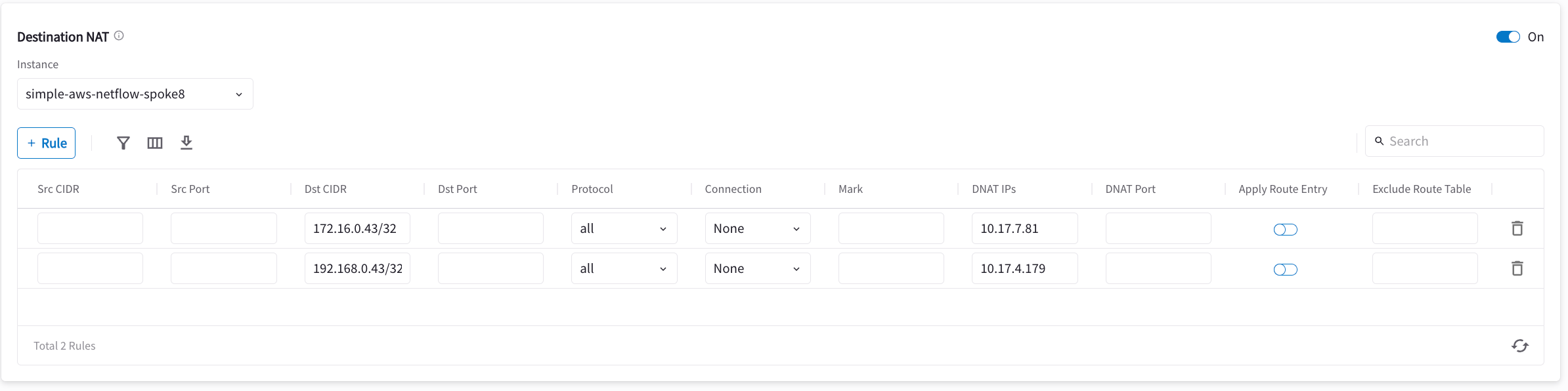
You now configure the gateway to translate the destination IP address 172.16.0.43 to the real private IP address 10.17.7.81, before routing happens.- Go to Cloud Fabric > Gateways > Spoke Gateways.
- Click the name of the gateway you created earlier in this document.
- Click the Settings tab and expand the Network Address Translation (NAT) area.
- Turn On Destination NAT.
- Add rules as per the screenshot below.
- Turn On Apply Route Entry for each rule to commit the rule(s).
Configuring SNAT on Gateway-1
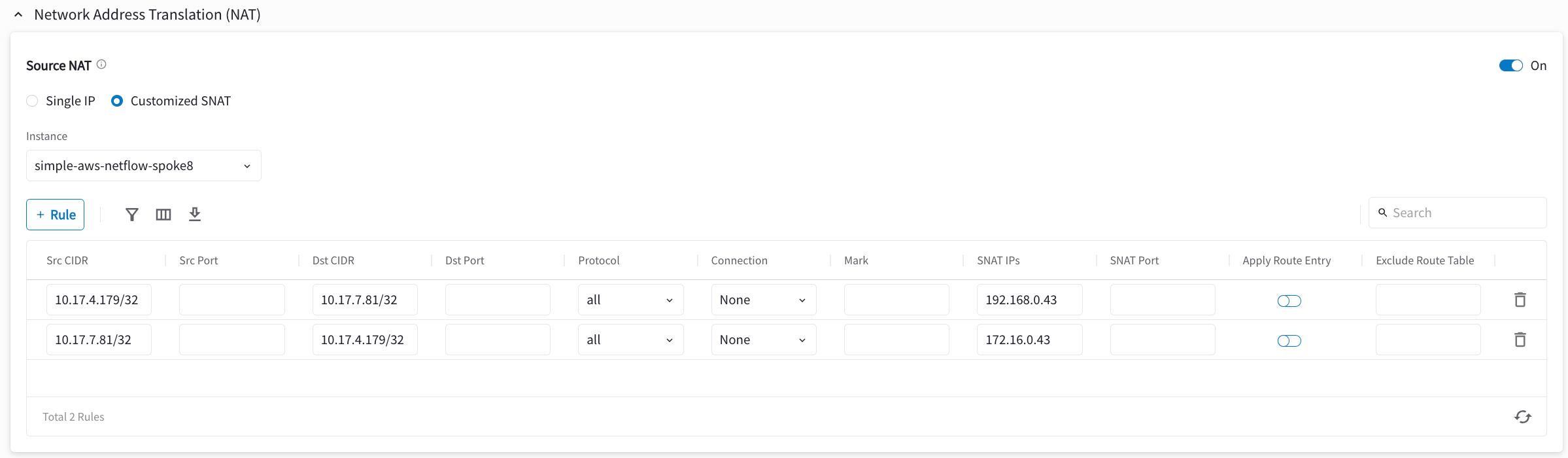
This step is to translate the packet source IP address after routing happens. In this example, the address is translated from 10.17.7.81 to 172.16.0.43 for packets going from on-prem (VPC/VNet-2) to VPC/VNet-1, and 10.17.4.179 to 192.168.4.43 for packets going from VPC/VNet-1 to on-prem (VPC/VNet-2). On the same VPC/VNet-1 gateway, configure SNAT as shown below (turn On Source NAT and then click Customized SNAT). You can enter “Dst CIDR” as qualifier to reduce the scope of the rule as a good practice. The reason that the address is 10.17.7.81/32 is that the destination has already been translated after the DNAT rule before routing happens.