

Edge Gateway Image Upgrade
Edge Gateway VM Image Upgrade (Aviatrix Edge Platform)
To upgrade your Edge Gateway VM image, see Upgrade your Controller and Gateways to the Latest Aviatrix Supported Images (AWS Only).Edge Gateway VM image upgrade is required for Controller release version
7.1.3958 or later.
Edge Gateway VM Image Upgrade (Equinix and Self Managed Platforms)
The Edge Gateway VM image upgrade is not supported for Equinix and Self Managed platforms. If you have Edge Gateways deployed on VMware ESXi or KVM self-managed hypervisor or Equinix Network Edge, you will need to delete and re-deploy your Edge gateways after you upgrade the Avaitrix Controller to the latest supported images. For instructions on Edge Gateway deployment, see:- Deploy an Edge Spoke Gateway on Equinix Network Edge
- Edge Spoke Gateway Deployment Workflow on Self-Managed VMware ESXi and KVM
Edge Gateway Selective Upgrade (Equinix and Self Managed Platforms)
Aviatrix Hybrid Cloud Edge does not support selective gateway image update and software rollback for Equinix and Self Managed platforms.Edge Gateway Post-Upgrade Tasks
After you upgrade to the lastest Aviatrix Controller version, perform the following post-upgrade tasks for Edge gateways.Upgrading the Edge Gateway’s Platform Type
You only need to perform this post-upgrade task if you are upgrading from
Controller release versions prior to 7.1.3958 release.
- Go to Cloud Fabric > Hybrid Cloud > Edge Gateways tab.
- Click Spoke Gateways.
-
In the table, locate the Edge Spoke Gateway that was migrated and verify the
gateway’s Platform Type is Self-Managed.
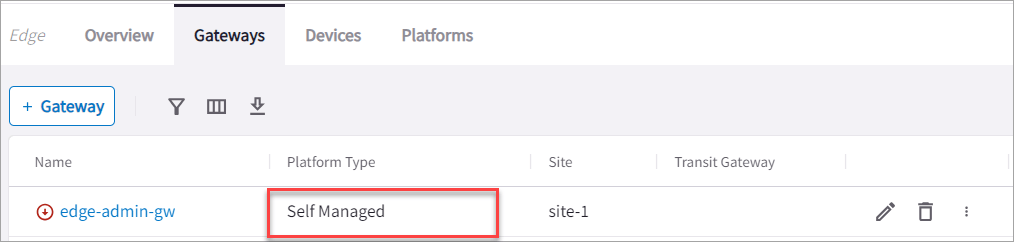
- Click the gateway’s Edit icon on the right side of the row.
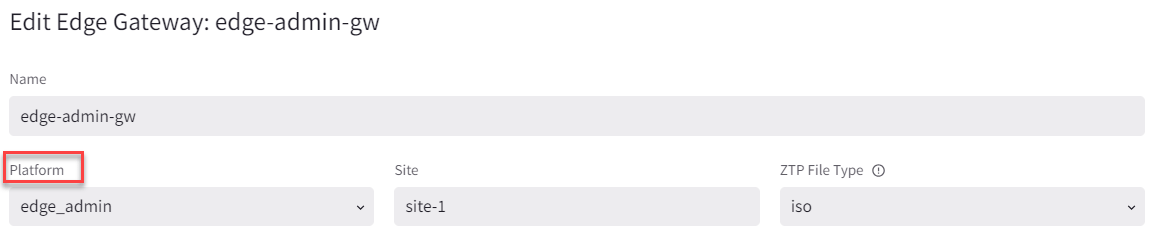
-
In Edit Spoke Gateway, verify Platform is edge_admin.
- Go to Cloud Fabric > Hybrid Cloud > Platforms tab.
- Click +Platform.
- In Name, enter a name to identify the Equinix platform account.
- In Type, select Network Service Provider (NSP).
- From the Existing Self Managed Equinix Gateways dropdown menu, select the Edge Spoke Gateway that was migrated and click Save. This adds a new Equinix platform account to the existing Edge platform accounts and updates the platform account for the Edge Spoke Gateway that was migrated to the new Equinix platform account.
Upgrading Active-Standby Edge Gateways
There are changes with the auto-upgrade of Aviatrix Edge Spoke Gateways from Aviatrix Controller 7.0 and 7.1 release to the latest version of Controller 7.1. Due to an architecture change, if you have two Edge Spoke Gateways that are deployed in active-standby mode in the same edge site and perform an upgrade, the Edge Spoke Gateways are upgraded to active-active mode. If the active-standby gateways were originally in non-preemptive mode, then after the upgrade they will become preemptive. The primary Edge Spoke Gateway becomes the active gateway, and to avoid traffic disruption, the Controller prepends the AS-PATH of the second Edge Spoke Gateway, which causes the gateways to function in preemptive failover mode.This behavior is different from an active-standby Edge deployment. You can
continue to run the Edge Spoke Gateways in active-active mode, however, you
may not be able to scale the gateways.