

If you launch CoPilot from the Controller user interface, you must manually
add the CoPilot public IP address to the Controller’s security group.
Otherwise, the SAML Provider option will not be visible to CoPilot users on
the CoPilot login page.
-
(Pre-requisite) Set up SAML login for Aviatrix Controller. This procedure
assumes you have already set up your IdP configuration in the IdP application
and associated the configuration in your Controller.
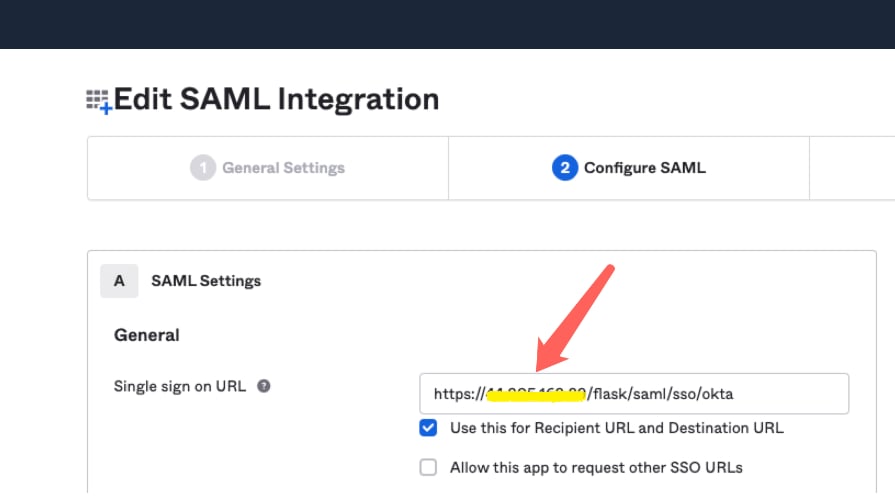
In your IdP application, take note of the value specified for the Single
sign on URL SAML setting to see if the SSO URL contains your Controller’s
public IP address or your Controller’s FQDN (either one can be used but this
value must match the value set in a later step).
-
In Aviatrix CoPilot > Settings > Configuration locate the Controller Public
IP/FQDN field.

- Verify the value of the Controller Public IP/FQDN field matches the value of the public IP address or the FQDN of your Controller — depending on which one is set in the SSO URL in the SAML settings (these values must match). If needed, update the field and click Save.
-
Verify your Controller is associated with your CoPilot. In Controller
Settings > CoPilot > CoPilot Association, verify the slider is set to Enabled and the correct IP address of the CoPilot instance is specified.
- IP Address/Hostname field Enter the static IP address for your running CoPilot instance/virtual machine. This can be the private or public IP address of your CoPilot instance/virtual machine. The IP address specified here is used for connectivity between Controller and CoPilot for intra-platform communication (such as API message exchanges). If CoPilot is located in the same VPC/VNet as your Controller, specifying a private IP can increase operational bandwidth and potentially save on cost. If you enter the private IP address here, and you want to be able to open CoPilot in your web browser directly from your Controller, then specify the public IP address in the Public IP (Optional) field.
- Public IP (Optional) field If you specified the private IP address of your CoPilot instance in the “IP Address/Hostname” field, enter the public IP address of your CoPilot instance here if you want to be able to open CoPilot in your web browser directly from your Controller.