

- Aviatrix Multicloud Transit Network architecture
- Aviatrix Gateway High-Availability
- Virtual LAN networking concepts
- Virtual Router Redundancy Protocol (VRRP) concepts
VLAN and VRRP support is only available on the Aviatrix Edge Platform and
Self-Managed Platform. It is not available on the Equinix Platform.
VLAN TOPOLOGY
Single VLAN Topology
The topology below illustrates an Edge site with a single VLAN, Virtual Router Redundancy Protocol (VRRP), and the Edge Spoke Gateway deployed as the default LAN router.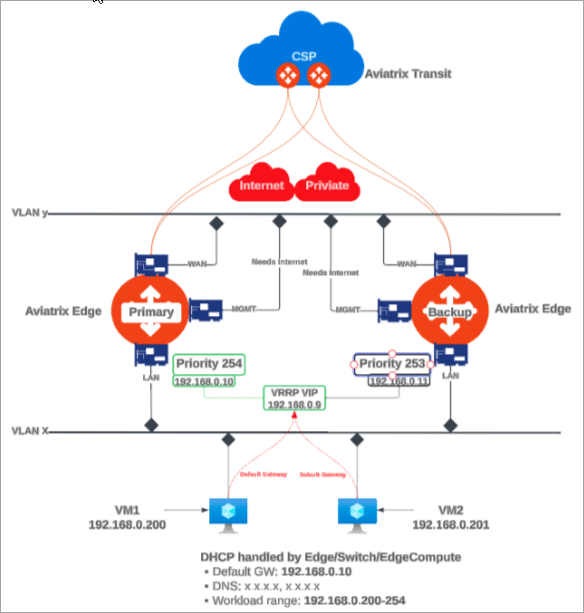
- The VRRP and VLAN segment is configured on the primary Edge Spoke Gateway.
- The VLAN segment is automatically created symmetrically on the secondary Edge Spoke Gateway.
- The VRRP Virtual IP is used by the LAN hosts as the Default Gateway IP.
- VRRP support requires that the Edge Spoke Gateway is created with Active-Active high availability peering connection to the Transit Gateway(s).
- The Edge Spoke Gateways advertise the CIDRs associated with the LAN and VLAN sub-interfaces to the Aviatrix Transit Gateway(s). You can disable CIDR propagation, if not needed. See Disabling LAN and VLAN CIDR Propagation to the Transit Gateway.
Multiple VLAN Topology
The topology below illustrates an edge site with multiple VLANs, Virtual Router Redundancy Protocol (VRRP), and Edge Spoke Gateway deployed as the default LAN router.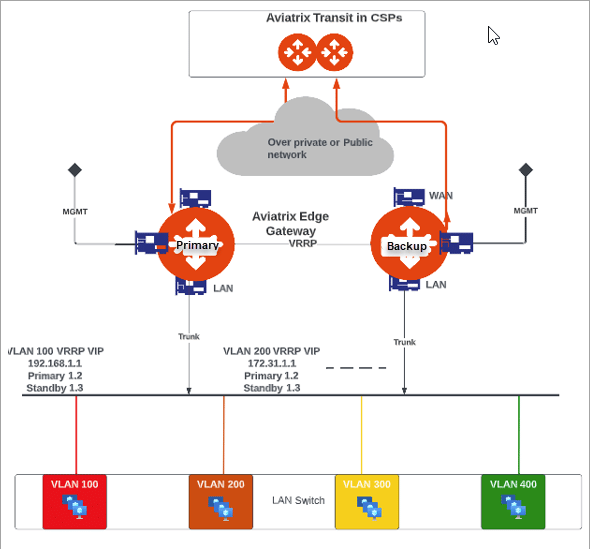
- The VRRP and VLAN segments are configured on the primary Edge Spoke Gateway.
For multiple Edge Spoke Gateways deployed on an edge site, you configure the
VLAN segments on each primary Edge Spok Gateway. The VLAN segments must be
configured with the same VLAN ID and CIDR across all the Edge Spoke Gateways
on the Edge site.
- The VLAN segments are automatically created symmetrically on the secondary Edge Spoke Gateway(s).
- The VRRP Virtual IP is used by the LAN hosts as the Default Gateway IP for the VLAN segments.
- The Edge Spoke Gateway provides the trunk interface connectivity to the LAN side switch.
- VRRP support requires that the Edge Spoke Gateway is created with Active-Active high availability peering connection to the Transit Gateway.
- The Edge Spoke Gateways advertise the CIDRs associated with the LAN and VLAN sub-interfaces to the Aviatrix Transit Gateway(s). You can disable CIDR propagation, if not needed. See Disabling LAN and VLAN CIDR Propagation to the Transit Gateway.
Extending On-Premises VLAN Segmentation into Cloud
To extend on-premises VLAN segmentation into cloud involves these two steps.Configuring VLAN Interfaces on the Edge Spoke Gateway
You can configure VLAN interfaces on the Edge Spoke Gateway during or after the gateway is created. To configure VLANs for a new Edge Spoke Gateway, follow the instructions for:- Create the Primary and Secondary Edge Spoke Gateway (Aviatrix Edge Platform)
- Creating the ZTP ISO for the Edge Gateway (Self-Managed Platform)
- In Aviatrix CoPilot, go the Cloud Fabric > Hybrid Cloud > Edge Gateways tab.
- Click Spoke Gateways.
- In the table, locate the Edge Spoke Gateway and click the Edit icon on right side of the row.
- In Edit Edge Spoke Gateway, click Next to go to Interface Configuration step.
- Click LAN and enable VRRP, if applicable.
- Click + VLAN Interface to add one or more VLAN sub-interfaces.
If high availability is enabled, the VLAN configurations are added to the
secondary Edge Spoke Gateway. If the properties are shared, the fields are
disabled on the secondary gateway and non-editable.
- If multiple Edge Spoke Gateways are deployed on the edge site, repeat the steps above for each primary Edge Spoke Gateway.
- VLAN segments must be configured with the same VLAN ID and CIDR across all the Edge Spoke Gateways for the edge site.
- You cannot edit the VLAN ID after it is configured. To edit the VLAN sub-interface attributes, it is highly recommended to delete and recreate the VLAN sub-interface configuration.
Associating VLANs to Aviatrix Network Domains
Aviatrix Edge Spoke Gateway enables you to segment your on-premises network traffic through network domains and connection policies. The Edge Spoke Gateway routes on-premises and inter-VLAN traffic flow based on the network domain connection policies. To segment the on-premises network traffic, you associate the VLAN segment and its workload in the CSP to the same network domain. For example, the diagram below illustrates on-premises network traffic flow between the yellow and orange domains that are segmented.- VLAN 100 is associated to the same network domain as its workload in the CSP.
- VLAN 200 is associated to the same network domain as its workload in the CSP.
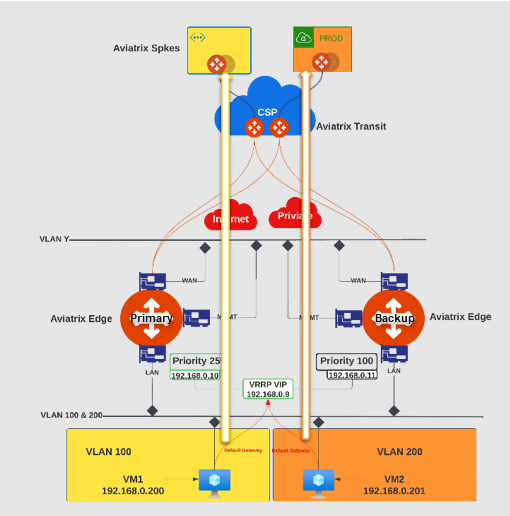
- The VLANs for an edge site must be created before the network domain association is configured.
- The VLANs must be configured with the same VLAN identifier (ID) and CIDR across all the Edge Spoke Gateways on the edge site before the network segmentation is configured.
If VLANs are created or added after the network domain association is created, the association must be removed and reconfigured.
- Remove the VLAN association with the network domain.
- Ensure the new VLAN is configured with the same VLAN ID and CIDR across all the Edge Spoke Gateways on the edge site.
- Re-create the VLAN association with the network domain.
- In Aviatrix CoPilot, go to Networking > Network Segmentation > Network Domains tab.
- To add a new network domain, click + Network Domain.
- Click Save.
Disabling LAN and VLAN CIDR Propagation to the Transit Gateway
The Aviatrix Edge Spoke Gateway exchanges routes with the Transit Gateways. The Edge Spoke Gateway advertises the CIDRs associated with the LAN and VLAN interfaces to the Transit Gateway, by default. If you do not need LAN CIDR propagation, you can disable this feature.If there are workloads on the LAN or the VLAN CIDR, then disabling LAN and
VLAN interface CIDR propagation may cause network traffic to be dropped, since
Transit Gateway will not have learned the LAN or VLAN CIDRs.
- In Aviatrix CoPilot, go to Cloud Fabric > Hybrid Cloud > Edge Gateways tab.
- Click Spoke Gateways.
- Select the Edge Spoke Gateway for which to disable LAN CIDR propagation.
- In the Edge Spoke Gateway’s Settings tab, expand the Routing section.
- Set LAN/VLAN Interface CIDR Propagation toggle to Off.