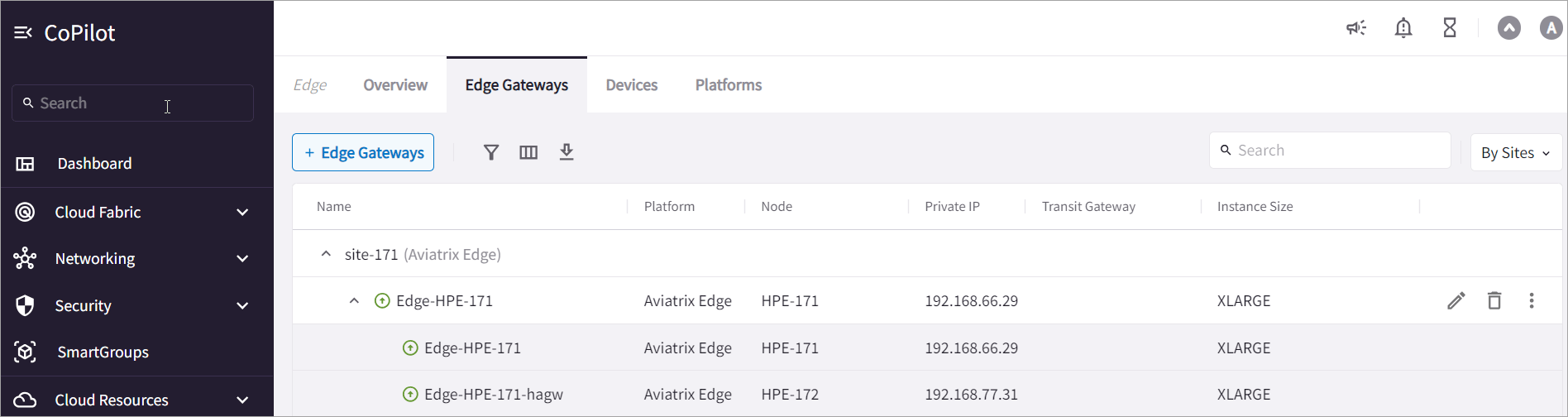
Topology
The Edge Spoke Gateways support active-active and active-standby peering connections for high availability.High Availability Modes
Aviatrix Edge Gateways are associated with an edge site.Active-Standby Edge
In an active-standby configuration, an edge site can consist of only two Edge Gateways with one active peering and one standby peering. Only the primary Edge Gateway actively forwards network traffic. The secondary Edge Gateway takes over when the primary gateway is down. In an active-standby deployment, you can set Preemptive mode to automatically switch back to using the primary gateway when the gateway connection is back up. By default, the network continues to use the secondary gateway even after the primary gateway is back up.Active-Active Edge
In an active-active configuration, both the primary and secondary gateways have active peerings. Network traffic is load balanced and forwarded across both active peerings by using Equal Cost Multi Path (ECMP) routing. In an active-active configuration, an edge site can consist of multiple Edge Gateways. You can deploy multiple gateways to scale your Edge Gateways for throughput. For more information, see Edge Spoke Gateway Horizontal Scaling .About Edge Spoke Gateway to Transit Gateway High Availability
For high availability between Edge Spoke Gateway and Transit Gateway in the cloud, you can deploy Edge Spoke Gateway in active-active configuration. This feature is supported on all Edge platforms .About Edge Spoke Gateway to LAN High Availability
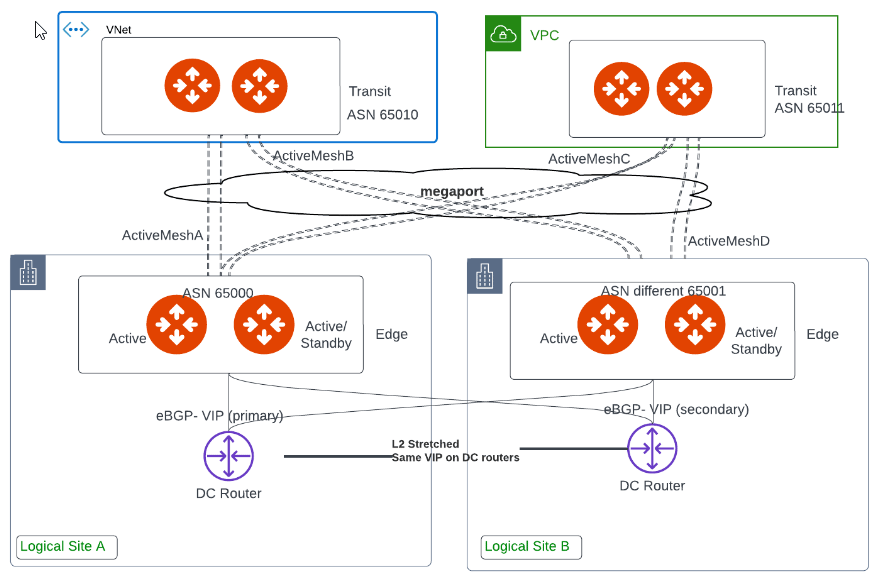
Edge Spoke Gateways can connect to a LAN side router using BGP over LAN or to an external device such as a server or firewall using static routes. Edge Spoke Gateways support active-active and active-standby connections to provide LAN side high availability. This feature is supported on all Edge platforms . This diagram shows Edge Spoke Gateways deployed on multiple edge sites with active and standby peering connections to different LAN routers.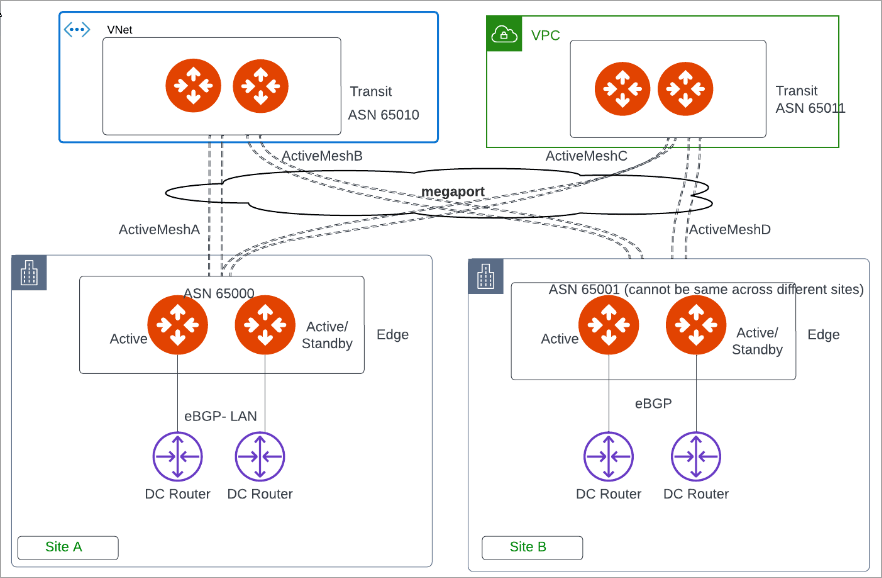
About Edge Spoke Gateway to VRRP High Availability
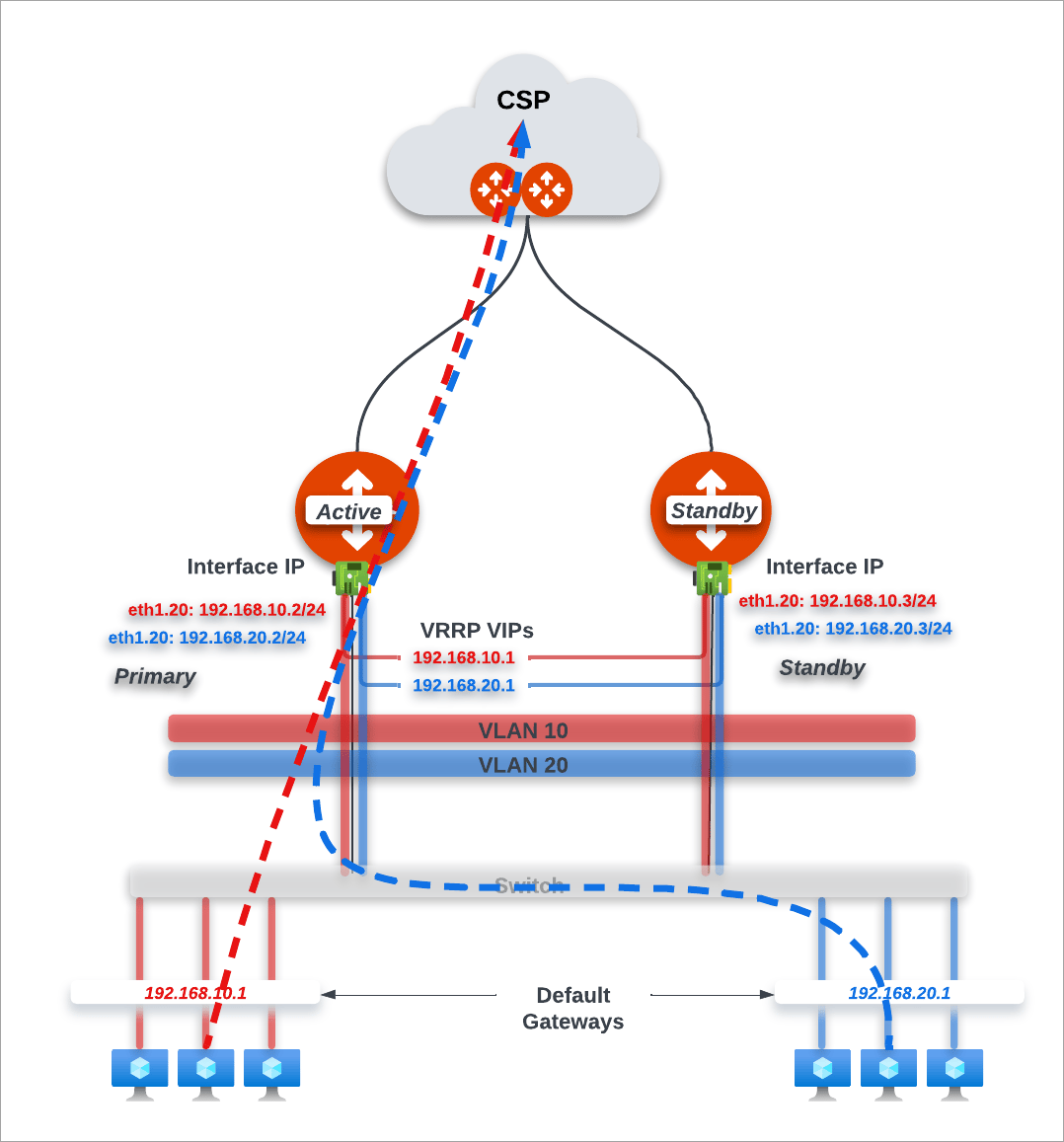
Edge Spoke Gateways support Virtual Router Redundancy Protocol (VRRP) protocol to provide high availability for Virtual Local Area Network (VLAN) connectivity. You can deploy Edge Spoke Gateways in on-premises locations with the VRRP protocol enabled. This feature is supported on the Aviatrix Edge Platform and Self Managed platforms.If you deploy an Edge Spoke Gateway with VRRP enabled, then all Edge Spoke
Gateways in the same edge site must be created in active-active high
availability mode.
About Creating Highly Available Edge Gateways
The steps to deploy highly available Edge Spoke Gateways is different depending on the Edge platform.Aviatrix Edge Platform
To deploy high availability Edge Spoke Gateways in the Aviatrix Edge Platform, you must first onboard the devices where you want to deploy the gateways (see Installing Edge OS and Onboarding Dell Hardware ). When you create an Edge Spoke Gateway for an edge site, you have the option to enable High Availability (HA) mode as active-active mode or active-standby mode. The primary and secondary HA gateways are then created in the primary and secondary devices that you configure.- If your LAN network uses VRRP configuration, then High Availability mode must be set to active-active mode.
- High Availability mode cannot be changed after the primary and secondary (HA) Edge Spoke Gateways are created. To change the High Availability mode, you must first delete the HA Edge Gateway.
Network Service Provider and Self Managed Platforms
To deploy high availability Edge Spoke Gateways in a Network Service Provider (NSP) platform (Equinix or Megaport) or Self Managed platform, the high-level steps are as follows:-
Create the primary Edge Spoke Gateway, which generates a ZTP cloud-init
file. in VM.
High Availability mode is always off when creating the primary gateway.
- Deploy the cloud-init file in the Edge VM on the NSP platform.
-
After the primary Edge Spoke Gateway is up, edit the primary Edge Spoke
Gateway configuration and set the HA mode to active-active mode or
active-standby mode. This generates a cloud-init file for the HA Edge Spoke
Gateway.
- (Self Managed platform only) If your LAN network uses VRRP configuration, then High Availability mode must be set to active-active mode. * High Availability mode cannot be changed after the primary and secondary (HA) Edge Spoke Gateways are created. To change the High Availability mode, you must first delete the HA Edge Spoke Gateway.
- Deploy the cloud-init file for the HA Edge Spoke Gateway in another Edge VM on the NSP platform.
<primary-gateway-name-hagw>.