

Business Challenge
When a firewall change needs a ticket, security becomes the bottleneck and teams route around it. When many teams edit one policy, changes collide and no one can say who changed a rule or why. Analysts also spend time translating a question such as “which workloads can reach this database?” into console clicks and exports.The Business Case for Security Automation
Risk Mitigation
- Reviewed changes. Teams review, test, and approve rule changes in a pipeline before they reach production.
- An audit trail. You can see who changed which policy object and when.
- Unsafe rules rejected. Admission policy engines can block a Kubernetes rule that is too broad before it takes effect.
- Evidence for change control. An auditor can follow a change from request to rollout.
Operational Efficiency
- Safe delegation. Multiple teams manage their own policy sections without overwriting each other.
- Policy next to the workload. Application teams declare egress rules alongside their deployments instead of filing a ticket.
- Faster answers. Engineers and agents query Aviatrix data through the Aviatrix MCP server instead of navigating the console.
Strategic Value
- Repeatable onboarding. New accounts, clusters, and teams adopt policy through the same pipelines and Terraform modules, so growth does not add a ticket queue for the security team.
- Fewer workarounds. Teams that can change policy through their pipeline do not route around security.
How Aviatrix Addresses Operational Scale
Teams write policy through Terraform or Kubernetes resources, the Controller distributes it, and audit, visibility, and AI-assisted questions come back out.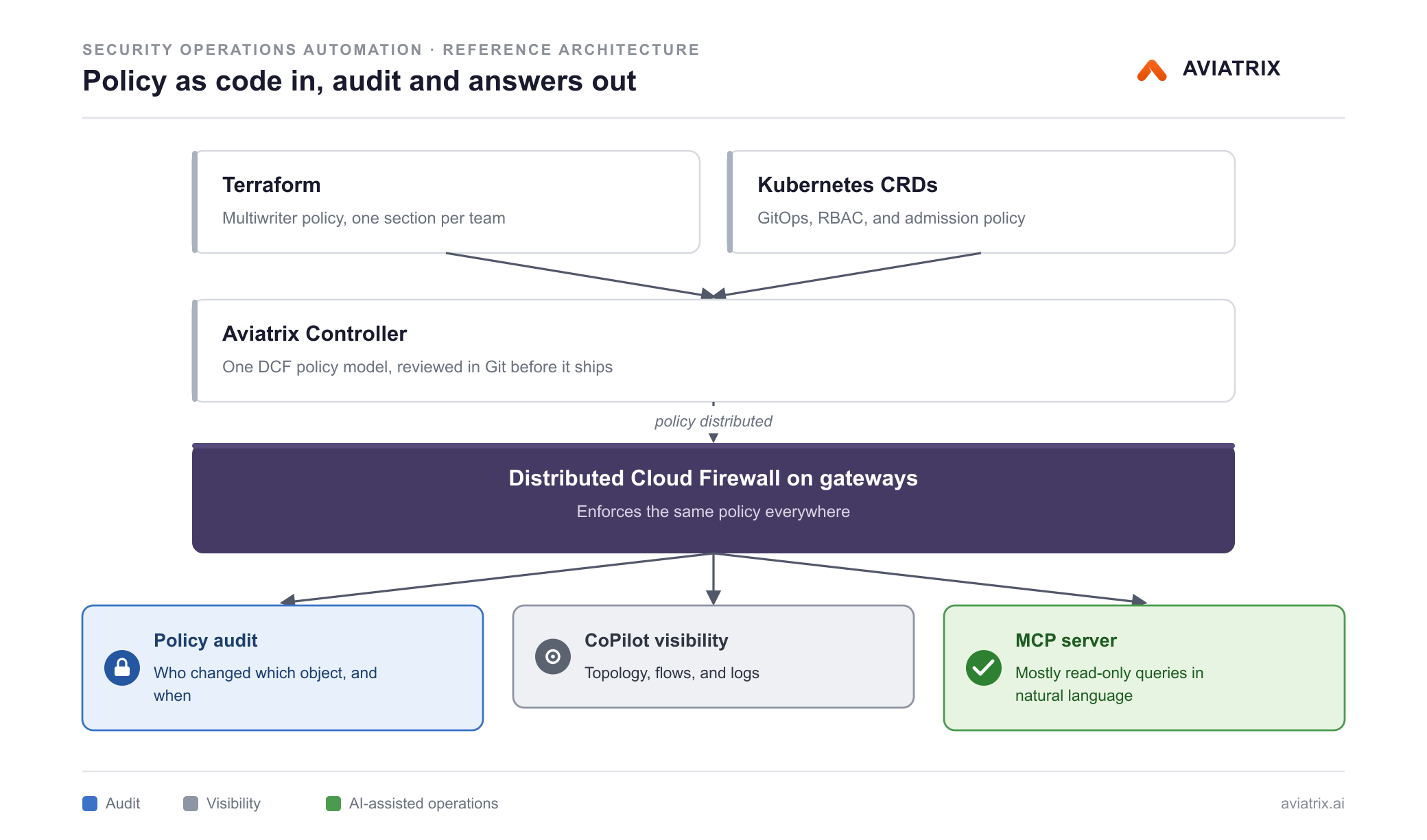
Manage Policy With Terraform
The Aviatrix Terraform provider manages SmartGroups, WebGroups, and Distributed Cloud Firewall (DCF) rules. Multiwriter policy lets several Terraform configurations or teams own separate policy groups in the same ruleset, so a platform team and an application team can each manage their part.Use GitOps for Kubernetes
TheFirewallPolicy and WebgroupPolicy custom resources let application teams
declare egress policy next to their workloads. Kubernetes RBAC, Git review, and
admission policy engines control and validate those changes.
Audit Every Change
DCF policy audit records changes to policy objects and shows what changed. You can use it to review rollouts or demonstrate change control.Ask Questions With MCP
The Aviatrix MCP server for enterprise fabrics gives an MCP-capable assistant access to Aviatrix Controller and CoPilot information, so you can ask about topology, policy, and status in natural language. Almost all of its tools are read-only, and the few that change state need write permission. A separate MCP server serves Aviatrix documentation to your assistant.Key Components
Terraform Provider
Declares SmartGroups, WebGroups, and DCF rules as code.
Multiwriter Policy
Lets several teams own separate sections of DCF policy.
CoPilot
Shows topology, flow visibility, and the audit view of policy changes.
MCP for Enterprise Fabrics
Gives natural-language access to Aviatrix Controller and CoPilot data.
Related Documentation
Use these documents to plan and implement security automation.Configuration Guides
- Multiwriter Policy With Terraform — split policy ownership across teams.
- DCF Policy Audit — review the history of policy changes.
- MCP for Enterprise Fabrics — connect an assistant to your Controller and CoPilot. Confirm the tools available for your Controller version before you rely on them in a runbook.
- MCP for Aviatrix Docs — give your assistant access to Aviatrix documentation.
Reference
- Terraform Provider — resources and data sources.
- Kubernetes CRD Reference — fields, RBAC, and GitOps guidance.
- MCP Suggested Use Cases — example prompts for operations and troubleshooting.