

- VPC/VNets & Subnets
Purpose
The VPC/VNets & Subnets page displays and manages all Virtual Private Clouds (VPCs) and Virtual Networks (VNets) across cloud providers, showing their configuration details, network information, associated subnets, and resources. You can create new VPC/VNets from this page.Elements
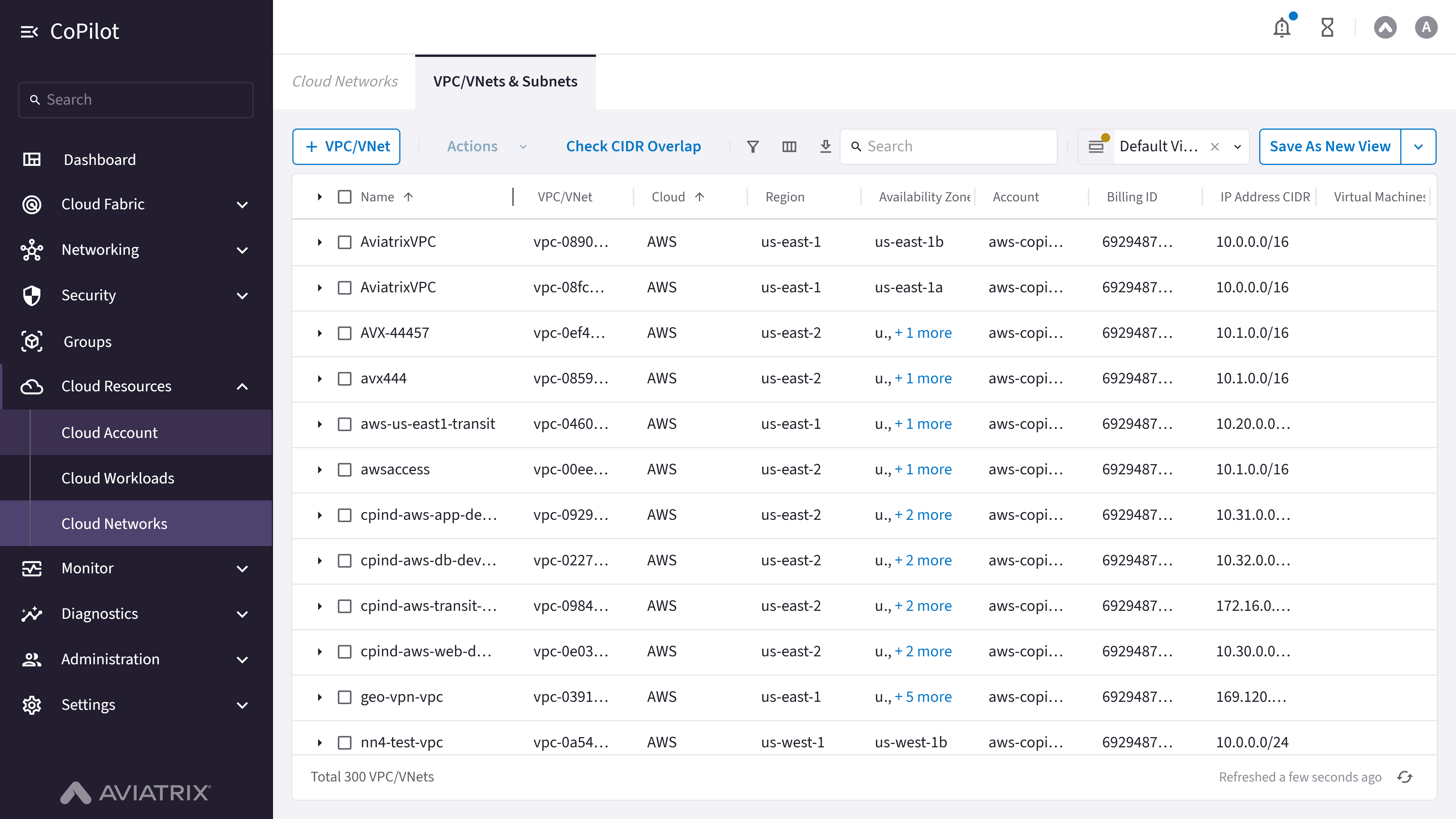
- + VPC/VNet button: Opens the Create VPC/VNet dialog to create a new VPC/VNet.
- VPC/VNets & Subnets table: Shows a list of all VPC/VNet instances with their details including name, cloud provider, region, availability zones, account, billing ID, IP address CIDR, virtual machines count, and management status.
- Actions button: Creates a SmartGroup from the selected VPC/VNets or subnets (disabled until at least one row is selected).
- Show filters button: Button to show or hide filter options for the table.
- Select columns button: Button to select which columns to display in the table.
- Export button: Button to export VPC/VNets & Subnets data.
- Search box: Search box for filtering VPC/VNets and subnets in the table.
- Default View dropdown: Dropdown to select or manage default view settings for the table.
- Clear button: Button to clear current view settings.
- Open button: Button to open a saved view.
- Save As New View button: Button to save the current view configuration as a new view.
- More Options button: Button to access additional view management options.
- Table row checkboxes: Checkboxes for selecting individual VPC/VNets or subnets.
- Table header checkbox: Checkbox in table header to select all VPC/VNets or subnets.
- Row actions menu: Menu with actions for individual table rows (accessed via ellipsis icon).
- Total count display: Text showing total number of VPC/VNets (e.g., “Total 18 VPC/VNets”).
- Refresh status: Text showing last refresh time with a refresh button.
- Check CIDR Overlap button: Opens the CIDR overlap workflow so you can compare VPC/VNet CIDR ranges in your inventory and find conflicts before they affect routing or peering.
Actions
View VPC/VNets and Subnets
View VPC/VNets and Subnets
To view VPC/VNets and subnets:
- Go to Cloud Resources > Cloud Networks.
- The VPC/VNets & Subnets page appears with the table listing all VPC/VNet instances.
- Optionally, use Search, Show filters, Select columns, or Default View to customize the view.
- Optionally, use Open, Save As New View, or Clear to manage view settings.
- Optionally, click Export to export data or use the refresh control to refresh the table.
- Select rows with Table row checkboxes or Table header checkbox to use Actions for bulk operations, or use the Row actions menu for a single row. Click VMs on a row to view associated virtual machines.
Parameter Details
Create VPC/VNet
Create VPC/VNet
To create a new VPC/VNet:
- Go to Cloud Resources > Cloud Networks.
- Click + VPC/VNet to open the Create VPC/VNet dialog.
- Enter Name (must begin with a letter; letters, numbers, underscores, and dashes only; max 30 characters).
- Select Cloud (AWS, Azure, GCP, OCI, or Alibaba), Account, and Region.
- Specify VPC/VNet IPv4 CIDR and, if applicable, IPv6 Allocation (AWS and Azure only).
- Select VPC Function (Default or Transit + FireNet).
- Optionally, configure Advanced Settings (Subnet Size, Number of Subnet Pair(s)).
- Save the configuration to create the VPC/VNet.
Parameter Details
Check CIDR Overlap
Check CIDR Overlap
Use Check CIDR Overlap on the VPC/VNets inventory page to see whether any IP Address CIDR blocks used by your VPCs or VNets overlap. Overlapping CIDRs can break or complicate connectivity, peering, and firewall policy design.To run a CIDR overlap check:
- Go to Cloud Resources > Cloud Networks > VPC/VNets & Subnets.
- Click Check CIDR Overlap button.
- (Optional) Enable the Background Polling option to auto discover new VPC/VNets in your inventory.
- On the VPC/VNet CIDR field, enter the VPC/VNet CIDR to check for overlaps.
- (Optional) Click the Refresh CIDR Data button to get the latest CIDR data.
- Click Check button to run the check.