

Topology
The following diagram shows an example of network connectivity for Edge Transit Gateway to Transit Gateways in the cloud and Edge Spoke Gateway at remote site.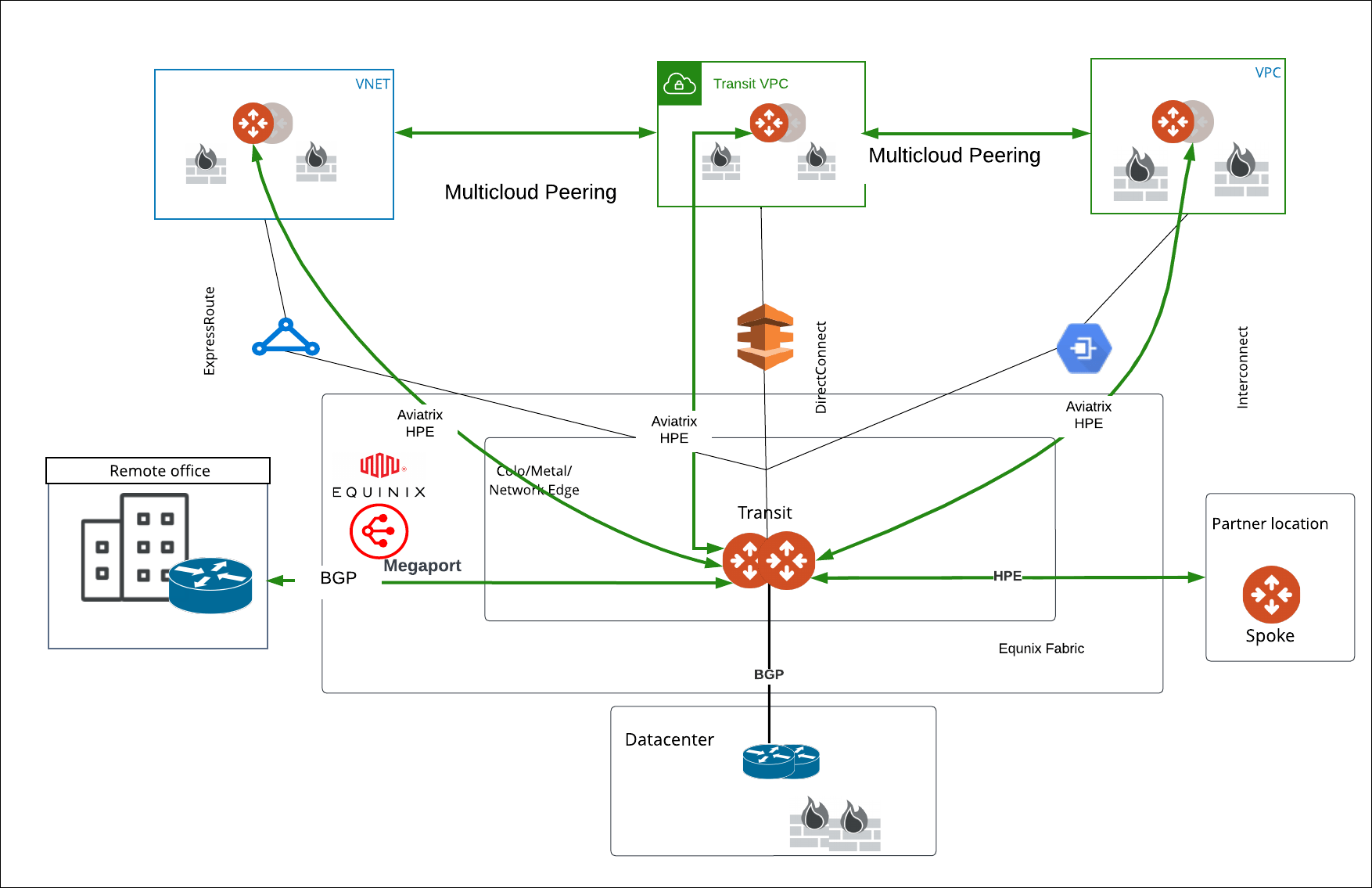
Prerequisites
Before you deploy an Edge Transit Gateway on the Equinix platform, ensure the prerequisite steps are complete.Deploy the Primary Edge Transit Gateway (Equinix)
To deploy an Edge Transit Gateway, first you need to generate the cloud-init file in CoPilot, then deploy the Edge gateway in Equinix using the cloud-init file:- Create the Primary Edge Transit Gateway cloud-init ZTP file.
- Deploy the Edge Transit Gateway in Equinix using the cloud-init ZTP file.
- Verify the Edge Transit Gateway creation.
Modify the Edge Transit Gateway (Equinix)
Some fields cannot be changed once a gateway is created. Fields that cannot
be changed are disabled.
Step 1: Gateway Configuration
Step 2: Interface Configuration
WAN Interface
WAN BGP
MGMT Interface
Step 3: Interface Mapping
The Interface Mapping shows how the Edge Gateway’s logical interface names maps to the Edge Gateway’s Linux interface names. These interface names are used in the Aviatrix log files and error messages. The mapping is provided for your reference when performing any diagnostic or troubleshooting on the Aviatrix Platform.Next Steps
- For high availability (HA) and redundancy, you can create and deploy HA Edge Transit Gateway. See Deploy a HA Edge Transit Gateway (Equinix).
- For hybrid, multicloud, or LAN-side connectivity, you can attach the Edge Transit Gateway to multiple Aviatrix gateways. See Edge Gateway Attachments.
- For remote site connectivity, you can connect the Edge Transit Gateway to remote devices. See Edge Gateway External Connection.