

Enable the Distributed Cloud Firewall (DCF) feature to avail the WebGroups.
See
Distributed Cloud Firewall Overview
for more information.
To filter HTTP or HTTPS traffic with a URL-based WebGroup, TLS Decryption must be enabled in the rule where the WebGroup is used.Non-TLS or non-HTTP traffic will not match the rule that uses the WebGroup and
will be evaluated against later rules.
Considerations
-
A TLS packet with no SNI header will only match the All-Web default WebGroup.
You can create a DCF rule that uses a URL-type WebGroup to capture the packet,
but only exact match URLs are supported at this time.
As an alternative to using a URL-based WebGroup, you can configure an L4 rule without WebGroups to allow the traffic based on IP address, and insert it before the first L7 rule.
-
For non-TLS encrypted HTTP traffic, there is no SNI header. The following
values are used instead:
- Domain-based WebGroups: the value of the HTTP Host Header.
- URL-based WebGroups: the URL value, as it would be for HTTPS (as long as TLS Decryption is enabled).
- Non-TLS, non-HTTP traffic will not match any WebGroup.
-
Wildcard support varies by Controller version and WebGroup type:
- Domain-based WebGroups: Full wildcards (for example,
*.example.com) are supported on all supported Controller versions. - URL-based WebGroups: Wildcard support is limited. On Controller 7.x and
8.0, the Create Web Group dialog rejects URL entries that contain
wildcards (including the
*.example.comexample shown in the in-product help); use a domain-based WebGroup if you need wildcard matching on these versions. On Controller 8.1 and later, hostname-style wildcards (such as*.example.com) are accepted in URL-based WebGroups, but more complex patterns with wildcards in the URL path (such ashttps://www.example.com/*/dashboard) may be rejected by the Controller with an[AVXERR-SMARTGROUP-0007]error; use a simpler URL pattern or a domain-based WebGroup in these cases.
- Domain-based WebGroups: Full wildcards (for example,
WebGroup Syntax Reference
When you enter domains or URLs into a WebGroup, the entries must follow the syntax described below. Malformed entries cause the Controller to reject the WebGroup.Allowed Characters
A domain or URL entry can use only the following characters:- Alphanumeric (a-z, A-Z, and 0-9)
- Dots (
.) - Dashes (
-) - Underscores (
_) - Asterisks (
*)
Wildcard Patterns
The asterisk (*) is a wildcard. Where wildcards are supported (see
Considerations for the per-type and per-version rules), the
following patterns are valid:
Consecutive asterisks (for example,
**.example.com) are not supported. If the
Controller detects malformed wildcard usage, the WebGroup is not created and you
must correct the entry before saving.
URL Examples
The following URL entries are valid for URL-based WebGroups:github.com/AviatrixFieldEng/https://www.example.com/*/dashboardhttps://downloads.example.com/*.ziphttps://*.updates.example.com/
Wildcards inside the URL path (for example,
/*/dashboard) are not supported
on every Controller version. See Considerations for the
version-specific behavior and error messages.System-Defined WebGroup
When you navigate to Security > Distributed Cloud Firewall > WebGroups, a system-defined WebGroup, ‘All-Web’, has already been created for you (if no other WebGroups exist). This predefined WebGroup cannot be deleted.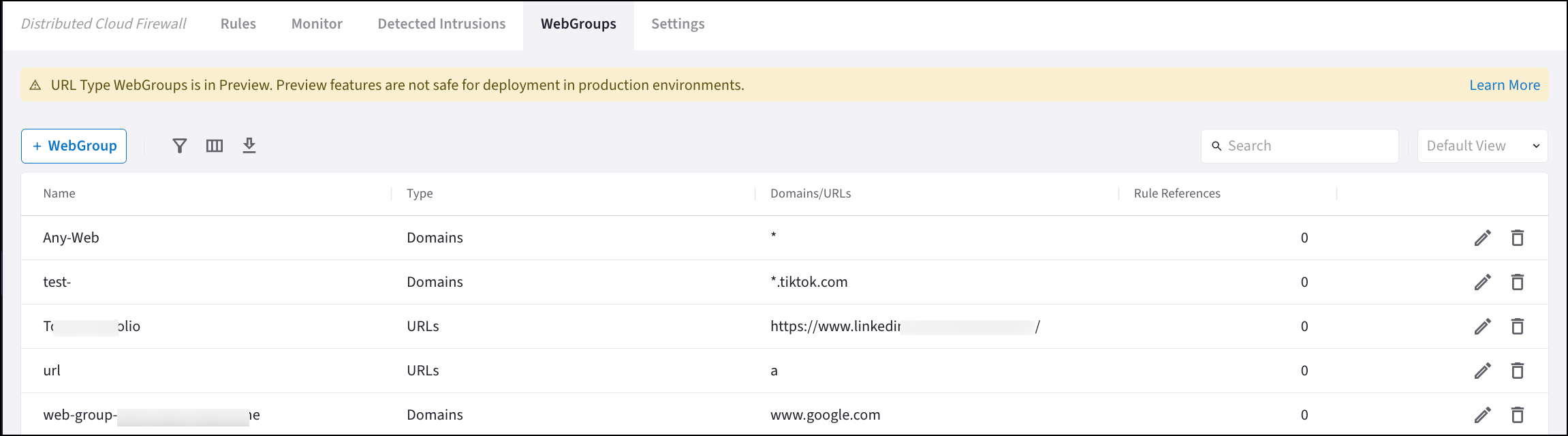
Prior to Release 7.1.3006, the default WebGroup was named ‘Any-Web’ and was
created by CoPilot. If you still have this WebGroup, you can modify it (if it
is being used by Distributed Cloud Firewall rules) or delete it (if it is not
used by any Distributed Cloud Firewall rules) so that it is not confused with
the default ‘Any-Web’ WebGroup created by Controller.
SNI Verification
SNI Verification is only present if using Controller 8.0 or later.