

SmartGroups Use Case 1
Alex creates three SmartGroups:- Smart Group 1 = Data_Analytics
- Smart Group 2 = Customer_Relationships
- Smart Group 3 = Public CIDR of Hosted Cloud_Service
- Allow Data Analytics and Customer Relationships to communicate with the Cloud Service on port 443.
- Deny all traffic between Data Analytics and Customer Relationships.
- Builds firewalling policies that allow traffic from Smart Group 1 and 2 to communicate on port 443 with Smart Group 3.
- Creates a Deny All Policy for Smart Group 1 to communicate with Smart Group 2. Note that after a SmartGroup is part of a policy, all traffic for that SmartGroup is denied unless explicitly allowed by DCF rules.
SmartGroup Use Case 2 (External Connection)
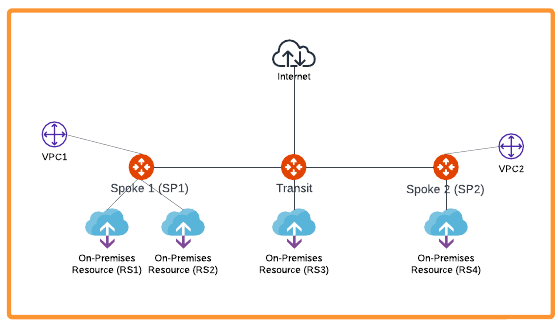
- Create a SmartGroup for RS1 (Remote Site 1).
- Create a SmartGroup for RS2 (Remote Site 2).
- Create a DCF rule to allow traffic from RS1 to VPC2.
- Create a DCF rule to deny traffic from RS2 to VPC2.
- Create a DCF Egress rule to allow specific web domains from RS1 to the Internet.
- Create a DCF rule to allow TCP/22 traffic from VPC1 to RS2.
SmartGroup Use Case 3 (Kubernetes)
Taylor manages a Kubernetes cluster with multiple node groups for different workloads. Taylor creates two SmartGroups:- Smart Group 1 = K8s-Prod-Nodes (includes all nodes labeled as “environment=production”)
- Smart Group 2 = K8s-Dev-Nodes (includes all nodes labeled as “environment=development”)
- Go to CoPilot Home > Security > SmartGroups.
- Click Create SmartGroup.
- For K8s-Prod-Nodes, select Kubernetes Node as the resource type and set
the label filter to
environment=production. - For K8s-Dev-Nodes, select Kubernetes Node as the resource type and set
the label filter to
environment=development. - Save each SmartGroup.
- Allow only specific traffic (e.g., port 443) from K8s-Dev-Nodes to K8s-Prod-Nodes for application testing.
- Deny all other traffic between development and production nodes.
- Monitor network usage between these node groups for auditing.
- Go to CoPilot Home > Security > Distributed Cloud Firewall.
- Create a rule to allow TCP traffic on port 443 from SmartGroup K8s-Dev-Nodes (source) to SmartGroup K8s-Prod-Nodes (destination).
- Create a rule to deny all other traffic from K8s-Dev-Nodes to K8s-Prod-Nodes.
- (Optional) Add a rule to log or monitor all traffic between these SmartGroups for auditing purposes.