

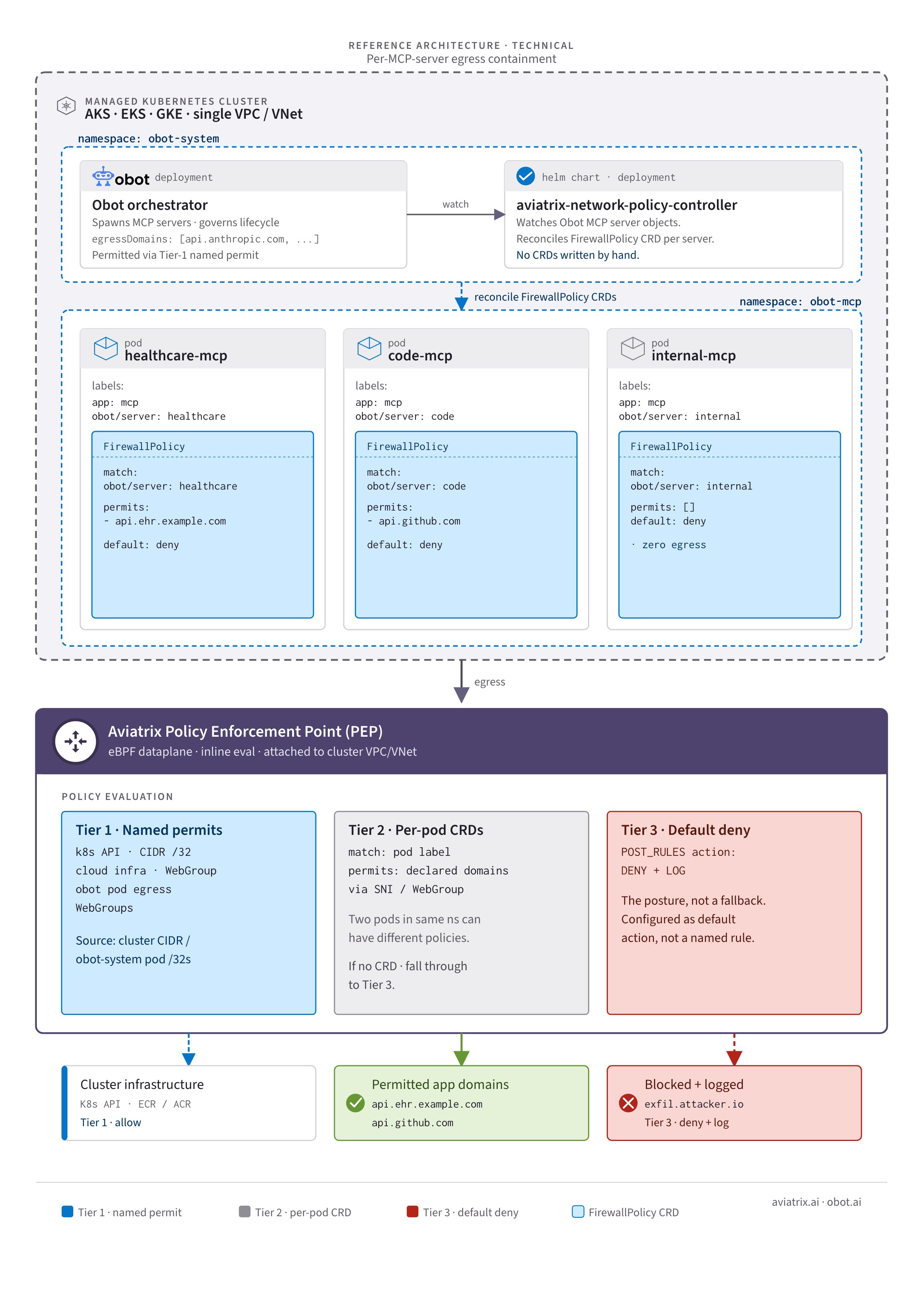
FirewallPolicy CRDs, enforced at the VPC boundary by
the Aviatrix spoke gateway. When a server is removed, its policy is removed with
it.
For the business case and architecture overview, see MCP Server Security
Through Containment Architecture. For the complete Terraform reference
implementation, see the
obot-mcp-egress-aws blueprint.
Prerequisites
- Aviatrix Controller 8.2 or later
- CoPilot 4.31 or later
- DCF for Kubernetes enabled with Log Enrichment turned on
- A cloud account onboarded in CoPilot for the AWS account hosting the EKS cluster
- Obot 0.21.0 or later (earlier versions do not include MCPNetworkPolicy support)
Procedure
- CoPilot UI
- Terraform
1
Deploy an Aviatrix spoke gateway in the cluster VPC
An Aviatrix spoke gateway in the same VPC as your Kubernetes cluster is the
enforcement point where the Aviatrix controller applies containment policy to
MCP server egress traffic.
- In CoPilot, navigate to Cloud Fabric > Gateways > Spoke Gateways and click + Spoke Gateway.
-
Provide the following details:
- In the Instances section, select a subnet in the cluster VPC for the gateway instance.
- Click Save.
2
Confirm network topology
The spoke gateway must be deployed in the public subnet, with the EKS
cluster in the private subnet of the same VPC. Pod egress routes via the
node subnet route table to the gateway. Confirm your VPC CIDR, subnet
assignments, and gateway placement before continuing.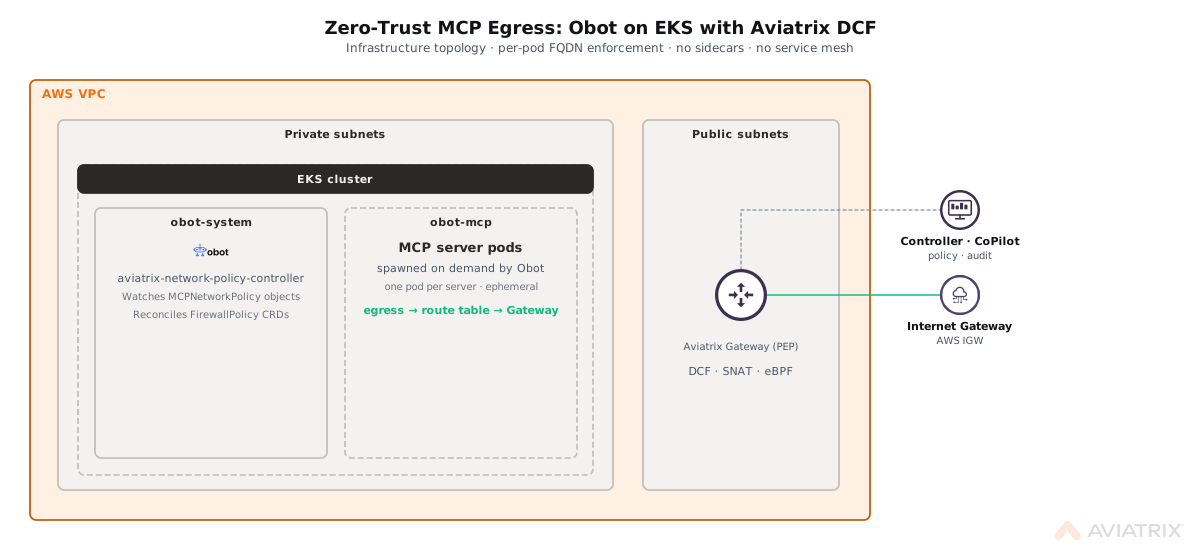
3
Install the Aviatrix Kubernetes Firewall Helm chart
The Aviatrix Kubernetes Firewall Helm chart deploys the in-cluster components
that allow the Aviatrix controller to reconcile and enforce containment policies
on the cluster.Run the following command against the target cluster, replacing
<chart-version> with the current chart version from the
Aviatrix k8s-firewall-charts repository:4
Verify Aviatrix CRD installation
The Helm chart installs two Aviatrix CRDs on the cluster. Verify both are
present before continuing:Expected output:If either CRD is missing, re-run the Helm installation and check the output for
errors.
5
Onboard the Kubernetes cluster to Aviatrix DCF
- Navigate to Cloud Resources > Cloud Assets > Kubernetes Clusters.
- Click Onboard next to the target cluster.
-
Choose the appropriate access method for your cloud provider:
- AWS (EKS): Select Terraform or Command Line, apply the generated access entry and RBAC configuration, check the confirmation box, then click Onboard.
- Azure (AKS): Select Permissions on Cloud Account if the Aviatrix service principal has the required permissions, or Kubeconfig File to upload a kubeconfig. Click Onboard.
- Wait for the cluster status to show Yes (green) on the Kubernetes Clusters tab.
EKS clusters require a
view-nodes ClusterRole so the Controller can discover
node metadata. The CoPilot onboarding dialog generates the required YAML
automatically — apply it before clicking Onboard.6
Configure V1 DCF policies and default deny
Before enabling default deny, configure V1 infrastructure permit rules so the
cluster continues to function. These rules allow node-level traffic (ECR image
pulls, AWS platform services) that must be permitted independently of per-pod
MCP containment policies.Create SmartGroupsNavigate to Security > Distributed Cloud Firewall > Groups > SmartGroups and
create:
eks-vpc: source for infrastructure rules- Match type: CIDR
- CIDR: the EKS VPC CIDR (for example,
10.0.0.0/16)
obot-system: Obot orchestration pods- Match type: Kubernetes
- Namespace: the Obot system namespace (for example,
obot-system)
eks-infra-egress: EKS infrastructure domains required by all nodes and
podsobot-pod-egress: domains required by Obot orchestration podscharts.obot.ai,api.anthropic.com,github.com,*.github.com,raw.githubusercontent.com,*.githubusercontent.com
Enable default denyNavigate to Security > Distributed Cloud Firewall > Policy > Default Action
and set the default action to Deny with Logging enabled.
Default deny must be set at POST_RULES level, not as a V1 policy rule. A V1
deny evaluates before the Kubernetes CRD enforcement block (K8S_POLICY_LIST).
Setting deny in V1 would block all
FirewallPolicy PERMIT rules generated by
the network policy controller.7
Configure Obot with the Aviatrix network policy provider
Add the Aviatrix network policy provider configuration to your Obot Helm
release. Obot’s PostStart hook reads these values and deploys the
Replace
aviatrix-network-policy-controller chart into the cluster automatically.<npc-version> with the current chart version from
charts.obot.ai.OBOT_SERVER_MCPDEFAULT_DENY_ALL_EGRESS=true ensures any MCP server deployed
without declared egress domains starts with zero outbound access. Without this
setting, servers with no egress declaration inherit the environment’s default
posture.After the upgrade, verify the network policy controller is running:On EKS, Kubernetes label-based SmartGroups (used by
FirewallPolicy
selectors) may register as Partial in the Aviatrix controller due to a
current limitation in the asset discovery watcher. The FirewallPolicy CRDs
are created and the default deny rule provides the baseline block. If strict
per-pod permit enforcement is required before this limitation is resolved,
contact Aviatrix support for the CIDR-based enforcement workaround.8
Declare egress destinations per MCP server
Egress destinations are declared in the Obot server catalog, not in Kubernetes
manifests. Each MCP server’s allowed domains are part of its configuration in
Obot.Via the Obot admin UI:When adding or editing an MCP server in the Obot admin catalog, set the Egress
Domains field to a list of permitted destinations, for example
Domain rules:Generated policy names follow the pattern
api.github.com and *.githubusercontent.com.Via the Obot API:- Bare hostname or leading wildcard only:
api.example.comor*.example.com - No protocols, paths, ports, or IP addresses
localhost,*.svc, and bare*are rejected- Empty
egressDomainswithOBOT_SERVER_MCPDEFAULT_DENY_ALL_EGRESS=trueresults in zero outbound access for that server
FirewallPolicy CRD targeting that server’s pods. Inspect generated policies:obot-<mnp-id>-fw. Pod labels use an
internal server ID (app: <server-id>, for example app: ms16mfzb), not the
human-readable server name. This is expected.9
Verify containment
-
Deploy an MCP server through Obot and confirm a
FirewallPolicywas generated: -
Check that the policy was applied successfully:
A successful apply produces an event with
Reason: UpdatePolicyListSuccess. - In CoPilot, navigate to Security > Distributed Cloud Firewall and select the cluster. Confirm the server’s containment policy appears with the correct egress allow-list.
- To confirm egress blocking is active, attempt a connection from an MCP server pod to a destination not in its declared domains and verify it is denied. In CoPilot per-connection logs, a denied connection appears with Action: Deny. If no entry appears within a few seconds, verify that the spoke gateway is in the egress data path for the cluster’s node subnet.