

This document does not cover Product Security Assessments, Information
Security Policy, Compliance Standards, vulnerability assessments, penetration
testing, or source code review. Those materials are available separately under
NDA.
Recommended Hardening Actions
The following checklist summarizes the actions you should take to reach a fully hardened deployment:- Restrict Controller/CoPilot inbound access. Limit TCP/443 to corporate VPN or WAF source CIDRs instead of the default internet-open security group. See Reduce Surface Area.
- Deploy a WAF in front of the Controller. Use AWS WAF, Azure App Gateway WAF, or GCP Cloud Armor. See Reduce Surface Area.
- Replace the self-signed certificate. Import a corporate CA-issued certificate. See Use Signed Certificates.
- Remove less secure TLS versions. Only support TLSv1.2 and above. See Remove Less Secure Versions of TLS.
- Federate authentication via SAML or LDAP. Integrate with your identity provider and enable 2FA. See User Authentication to Controllers.
- Harden password policy. Tune password length, complexity, and expiration to corporate standards. See Harden Password Requirements.
- Rely on account lockout for repeated failed logins. Local accounts lock automatically, per source IP address, after repeated failed password attempts. See Account Lockout After Failed Login Attempts.
- Lock down egress security groups. Use the Outbound Connection Tables to allow-list only required destinations for Controllers, Gateways, and CoPilot.
- Add defense-in-depth for Gateways. Layer NACLs (AWS) or subnet-level NSGs (Azure) on top of the default security groups. See Azure Gateway Security Controls and AWS Gateway Security Controls.
- Enable Gateway Subnet Monitoring (AWS). Prevent unauthorized instances in Gateway subnets. See Monitor Gateway Subnet.
- Deploy Controller HA. Use the provided HA templates and verify recovery. See Controller High Availability in AWS and Azure.
- Configure CoPilot SAML and least-privilege service accounts. Avoid
all_write; use feature-scoped permission groups. See Securing CoPilot. - Keep software up to date. Subscribe to PSIRT advisories and apply patches per your cadence. See Post-Release Vulnerability and Patch Management.
Background
The Aviatrix Controller and Gateway communicate over a management/control plane channel that uses public IP addresses. This secure channel is established during Gateway creation and handles:- Gateway health checks
- Route and policy updates from the Controller
- Gateway statistics
- Keepalives in both directions
- Diagnostic requests from the Controller
Outbound Connection Tables
The following tables list outbound connections initiated by each Aviatrix component. Use them to configure egress security groups.Spoke and Transit Gateway Outbound
Controller Outbound
CoPilot Outbound
Gateway Deployment
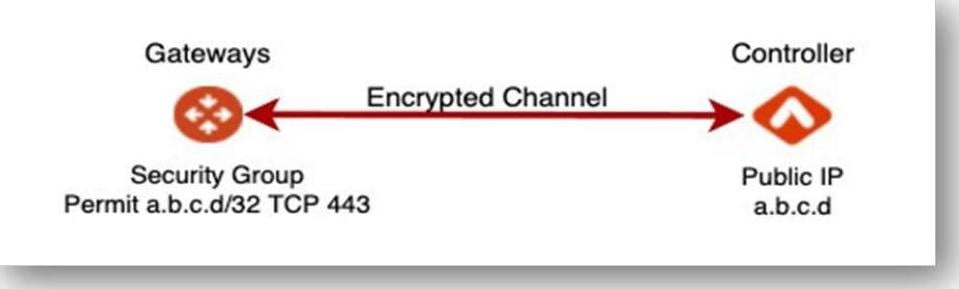
The Aviatrix Controller leverages CSP APIs to deploy Gateways into VPCs and VNETs. During deployment, the management/control plane channel is created.- The Controller pushes the necessary software packages and begins bi-directional communication.
- The Controller updates the security group of the instance to only allow TCP/443 from the Controller public IP address, ensuring only the Controller can reach the Gateway over its public IP.
- IP Forwarding is enabled on the Gateway instance for packet forwarding.
Azure Spoke Design Options
Aviatrix supports two spoke design options in Azure: with and without Spoke Gateways.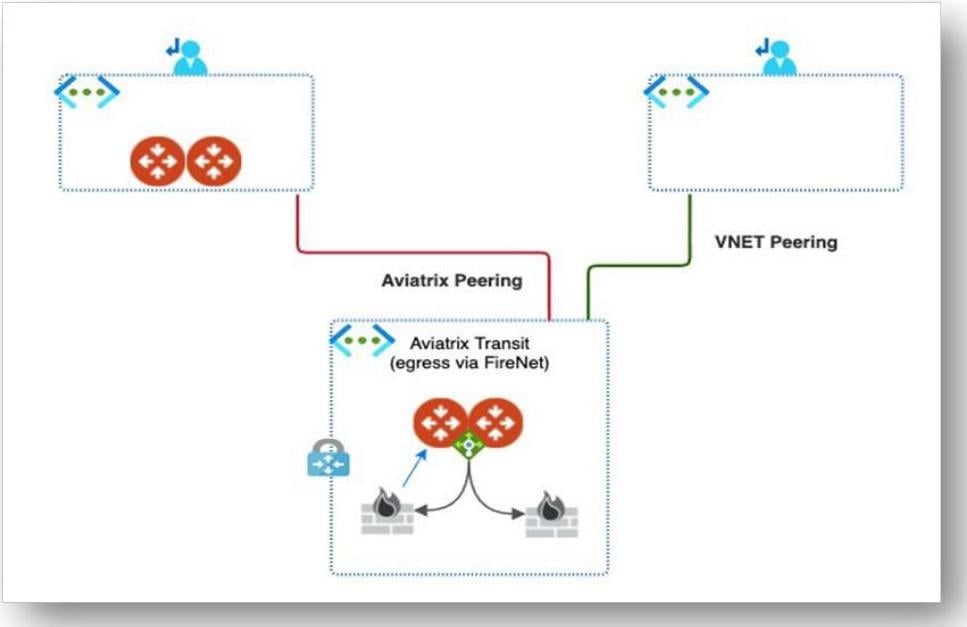
Choose between these options based on your spoke requirements. Each option has
tradeoffs in terms of feature availability and deployment complexity.
Azure Gateway Security Controls
Aviatrix has compiled several techniques and best practices for securing public IP usage in Azure. These techniques are designed to be layered within your environment to maximize security.Azure Management Groups
Azure management groups allow you to group multiple subscriptions and apply policy at the management group level. Work with Aviatrix to fine-tune Azure policy and simplify policy management within your Azure environment.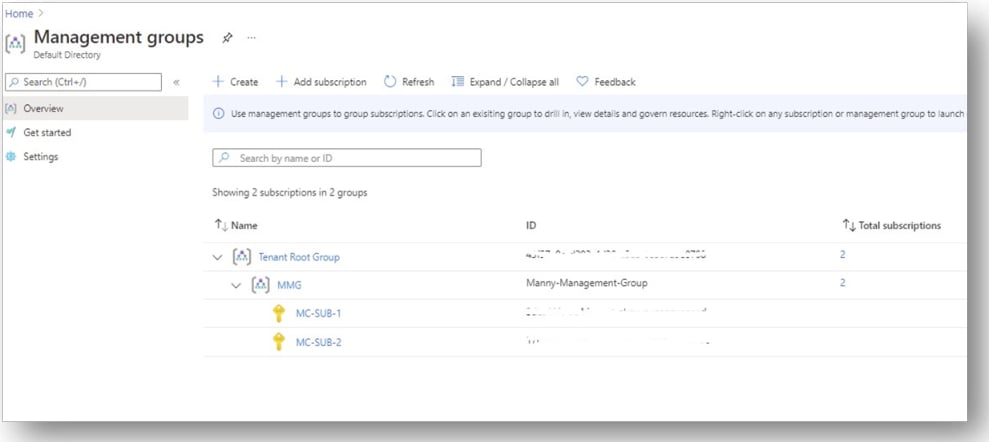
Azure Subnet Level Security Group
Azure offers network security groups (NSGs) at the vNIC level and at the subnet level for instance egress protection. You can apply NSGs at the subnet level to specify permitted public IPs for allowing internet egress. NSGs at the vNIC level and the subnet level are combined when determining policy enforcement, and a deny policy at the subnet level blocks the communication regardless of the NSG at the vNIC level.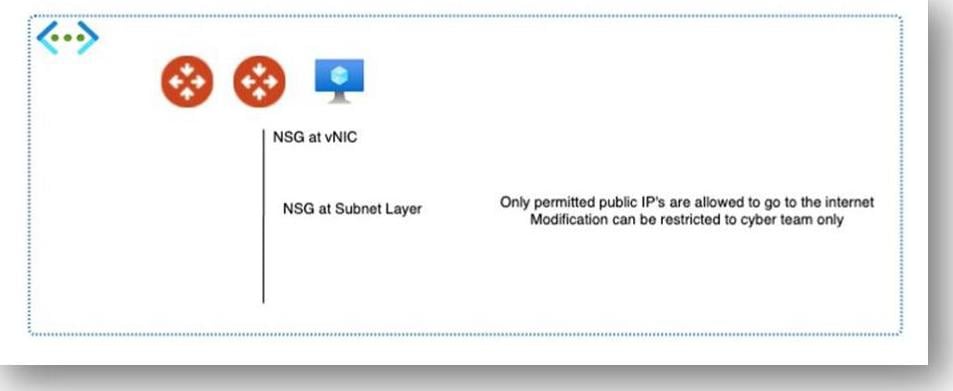
- Aviatrix Gateway public IP a.a.a.a is permitted to go to the internet gateway
- Aviatrix Gateway public IP b.b.b.b is permitted to go to the internet gateway
- All other public IPs are denied to go to the internet gateway
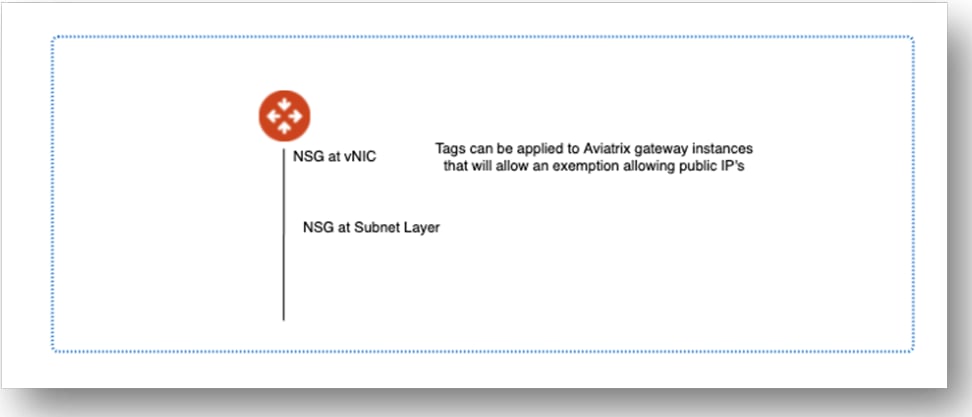
AWS Gateway Security Controls
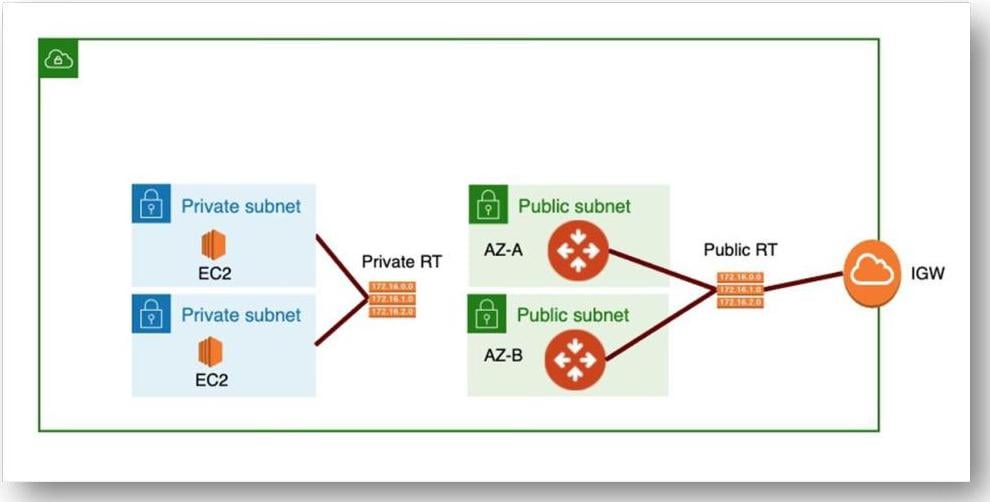
Aviatrix has developed features on the Controller and different AWS techniques that allow the use of public IP addresses on Gateways but do not allow any other internet connectivity.Monitor Gateway Subnet (Controller Feature)
For Aviatrix Spoke Gateways deployed in AWS, the Controller has a built-in feature called Monitor Gateway Subnets. This feature tells the Controller to monitor the subnet where the Gateways are deployed, and if another instance is deployed within that subnet, shut it down.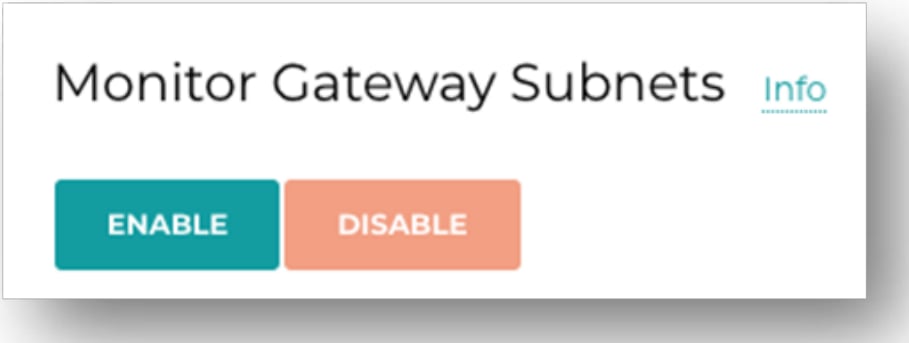
AWS Security Groups
For Aviatrix Gateways deployed in AWS, a security group is created along with the instance and applied to the ENI of the Gateway. By default, the security group has restricted access to only the Controller public IP address on TCP/443.AWS Access Control Lists
For Aviatrix Gateways deployed in AWS, you can use a network access control list (ACL) in addition to the security group to further restrict public access.Post-Release Vulnerability and Patch Management
- Make ongoing plans for periodic updates to the latest image and software versions.
- For critical security vulnerabilities such as zero-day exploits, pre-authentication flaws, or remote code execution, Aviatrix releases a hotfix or security patch within industry-standard SLAs. The Aviatrix Product Security Incident Response Team (PSIRT) provides guidance on implementing compensating controls where applicable.
- Aviatrix continuously leverages multiple industry-leading vulnerability scanning tools to identify CVEs and detect potentially malicious third-party dependencies. All findings are reviewed by the Product Security team to assess impact and prioritize remediation.
- For each vulnerability, the Aviatrix PSIRT determines whether there is any risk to the Confidentiality, Integrity, or Availability (CIA) of the overall architecture. If there is any risk, the PSIRT Incident Response Process begins.
Software Architecture
- Aviatrix software runs on a standard Ubuntu Linux operating system that is closed, locked down, and hardened to CIS hardening standards.
Deployment Security
- Aviatrix Enterprise deployment operates within your environment. Aviatrix has no access to your data.
- If you need Aviatrix Customer Support to assist in resolution of an issue, initiate this through the dedicated customer support functionality in the product. You can terminate this access at any time.
Configuration Hardening
- All Aviatrix Controller commands at the console or REST API and events are logged to rsyslog.
- All Aviatrix Gateway events are logged to rsyslog.
- SSH access to Controller, CoPilot and Gateway instances is restricted and not exposed by default. If port 22 is manually enabled for troubleshooting purposes, it is the customer’s responsibility to limit access to trusted source CIDRs.
- The Controller web interface (tcp/443) is, by default, available to the internet. Use security groups to limit access to the Controller to known internal IP addresses.
- Images are hardened to CIS Server Level 1.
Software Update Security
- Software is only updated from the Aviatrix software repository server when you request a specific command at the Aviatrix Controller.
- All communication between you and the Aviatrix Controller is protected through TLS.
Securing the Aviatrix Controller
Enable Additional Controls to Access Controller
Reduce Surface Area
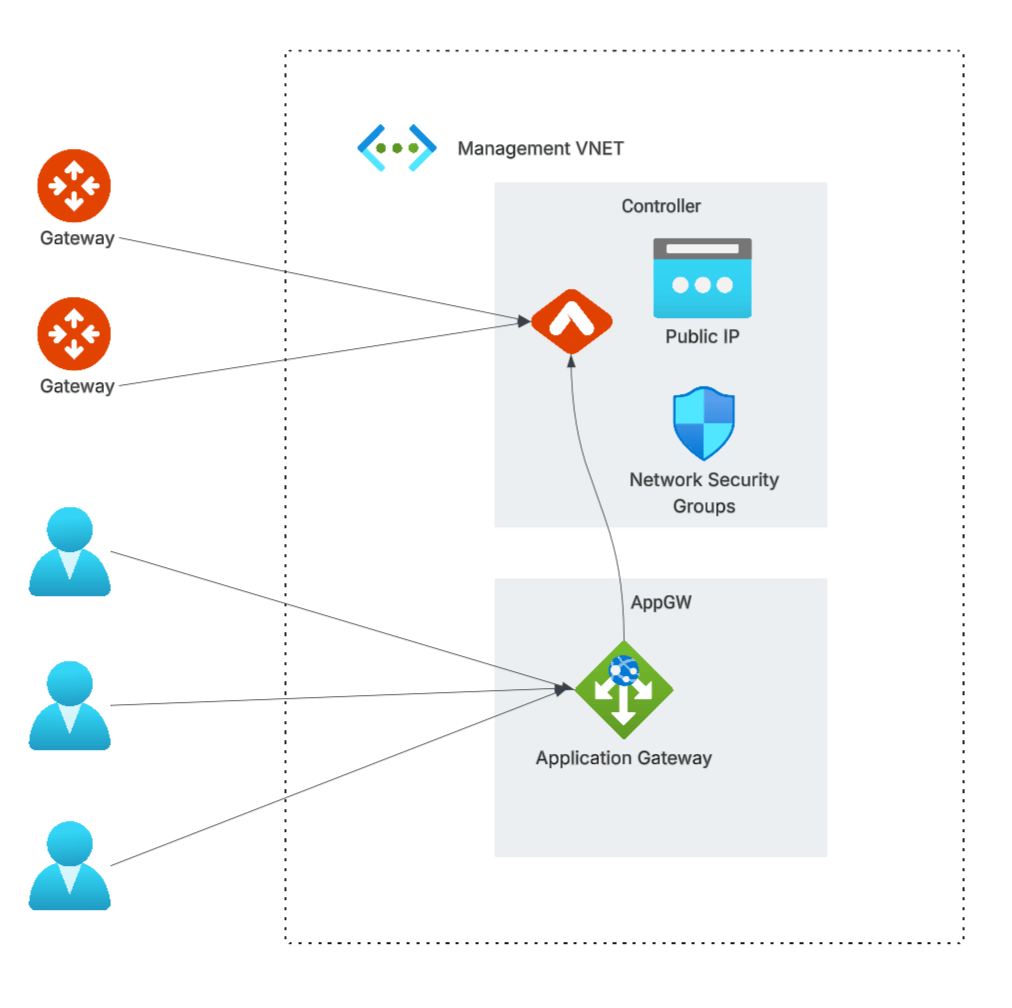
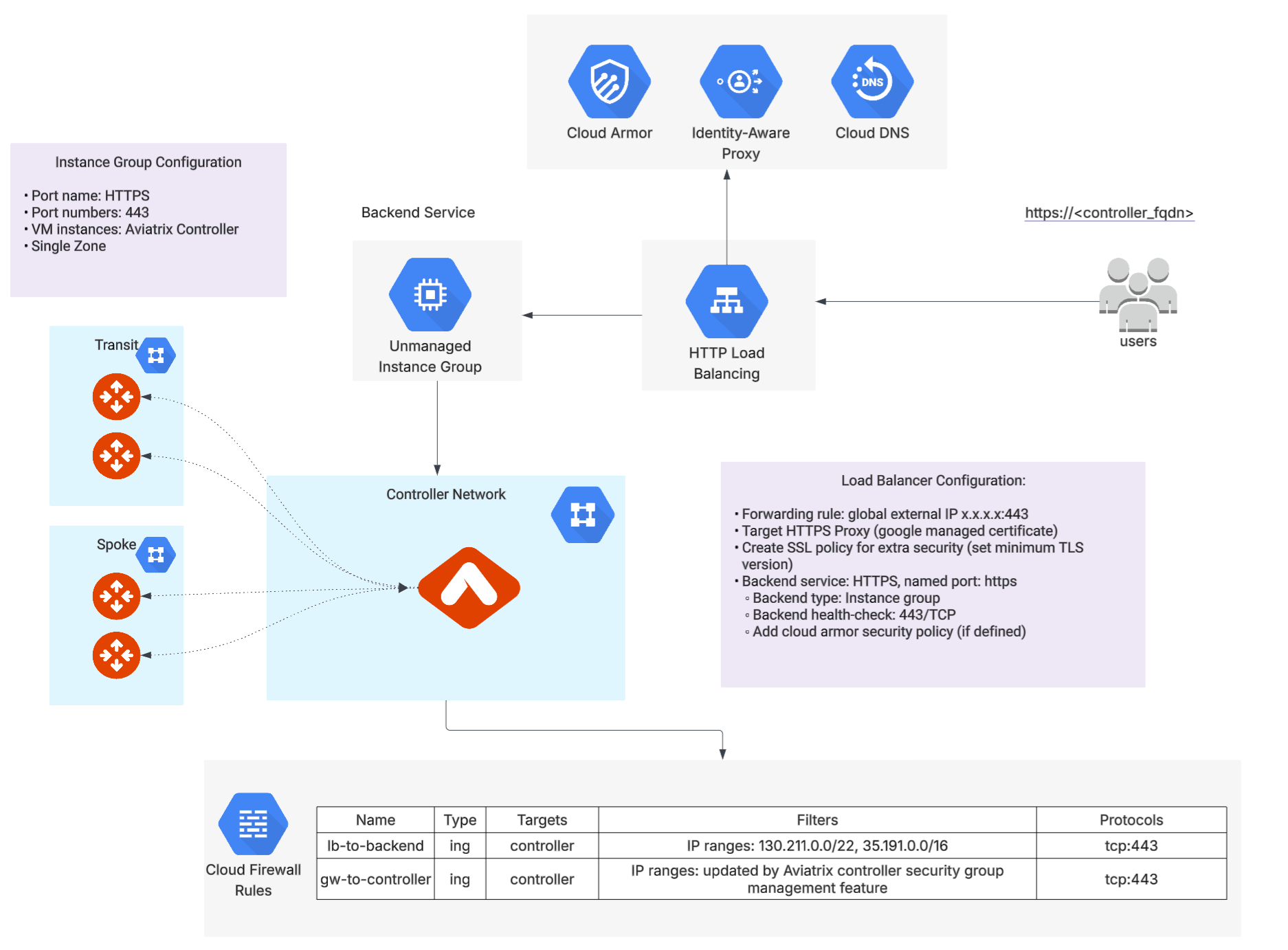
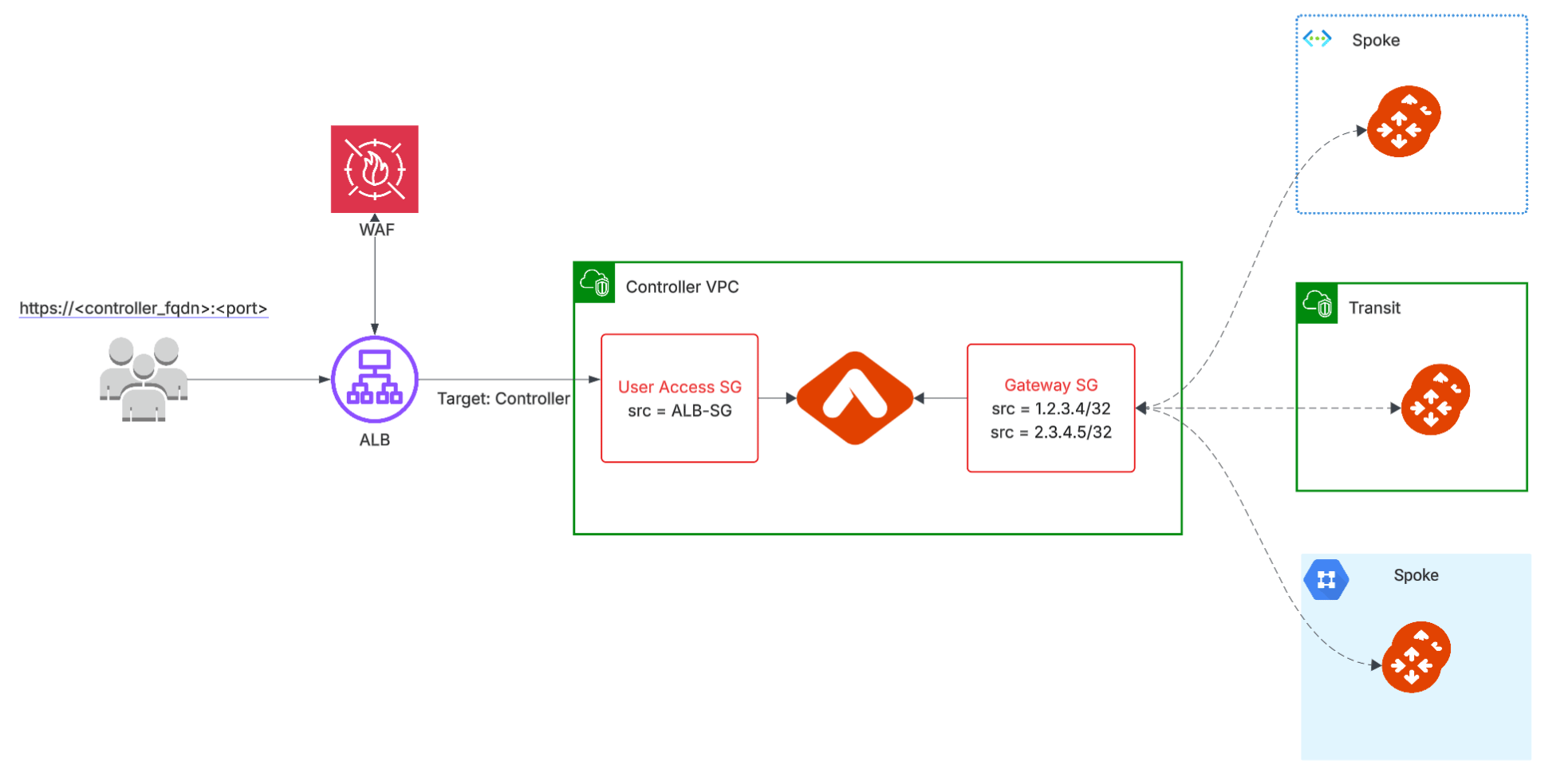
- Only allow TCP/443 from the most limited inbound IPs or CIDR blocks as possible. By default this is open to the internet; reduce this in the CSP Security Groups.
- Restrict access to the Controller UI to the corporate VPN. If you use Aviatrix VPN, you can whitelist user IPs to allow VPN clients to reach the Controller UI.
- Deploy a WAF in front of the Controller UI to provide additional application-layer protection and enforce strict access policies.
- Gateways must have a public IP and their security group must be restricted to the public IP address of the Controller.
- Use a load balancer and/or WAF in front of the Controller. In Azure, use WAF with Azure Managed rules on Application Gateway to limit usual web attacks against the Controller.
Automatic Security Group Management
- This feature automatically manages the Controller instance inbound rules from the Gateways.
- When enabled, the Controller immediately creates security groups and allows only specific Aviatrix Gateway to Controller communication.
- Edit the security rules that are outside the Gateway public IP address to limit the source address range.
Use Signed Certificates
- Aviatrix Controller ships with a self-signed certificate which provides browser warnings for an insecure site (Untrusted Certificate).
- Replace the self-signed certificate by generating a CSR and importing a certificate, or by importing a certificate with key.
Remove Less Secure Versions of TLS
- Only support TLSv1.2 and above.
- Disable access from browsers that support TLSv1.0 or TLSv1.1.
User Authentication to Controllers
The Controller supports a variety of options for user login. Integrate into your identity platform such as Active Directory, LDAP, or SAML providers. If username and password are required, harden the password requirements and enable 2FA.Enable LDAP Integration for Controller Login
- Replace standard username/password of local accounts with corporate directory access.
- Navigate to Settings > Controller > LDAP Login.
Enable SAML Login
- Instructions: CoPilot SAML Authentication
Harden Password Requirements
- Navigate to Settings > Advanced > Password Management.
- Change minimum and maximum password length.
- Reflect corporate password requirements for upper/lower-case, numeric, and special characters.
- Define the maximum number of days the password is valid.
- Define the number of passwords in the Password History.
- Aviatrix Password Management Documentation
Account Lockout After Failed Login Attempts
- The Controller tracks failed login attempts per combination of account and source IP address.
- After 5 consecutive failed password attempts from the same source IP, the Controller locks that account for login attempts from that IP for 15 minutes.
- A successful login from a given source IP resets the failed-attempt counter for that account-and-IP combination.
- Login attempts for the same account from a different source IP are not affected by a lockout triggered from another IP.
- Restarting the Controller also clears all lockout state, because the failed-attempt counters are held in memory.
- This behavior applies to local Controller accounts and does not require configuration.
Enable Duo 2FA
- Use Duo authentication if relying on username/password authentication.
- Navigate to Settings > Controller > 2FA.
- Aviatrix Duo 2FA Authentication Documentation
Use Role-Based Access Controls (RBAC)
- Create capabilities in the application required for different role personas to complete their job responsibilities.
- RBAC limits attack surface area and reduces the potential for catastrophic errors by reducing the operations a specific user can perform.
- If an account is compromised, the attacker only has access to those capabilities, not the full capabilities of the entire system.
Encrypt EBS Volumes
- Ensure that all non-ephemeral storage is encrypted using CSP-provided capabilities such as AWS EBS volume encryption.
Securing Gateways
Public Subnet Requirements
- Use security best practices to only open connectivity to the Gateway from an approved allow list.
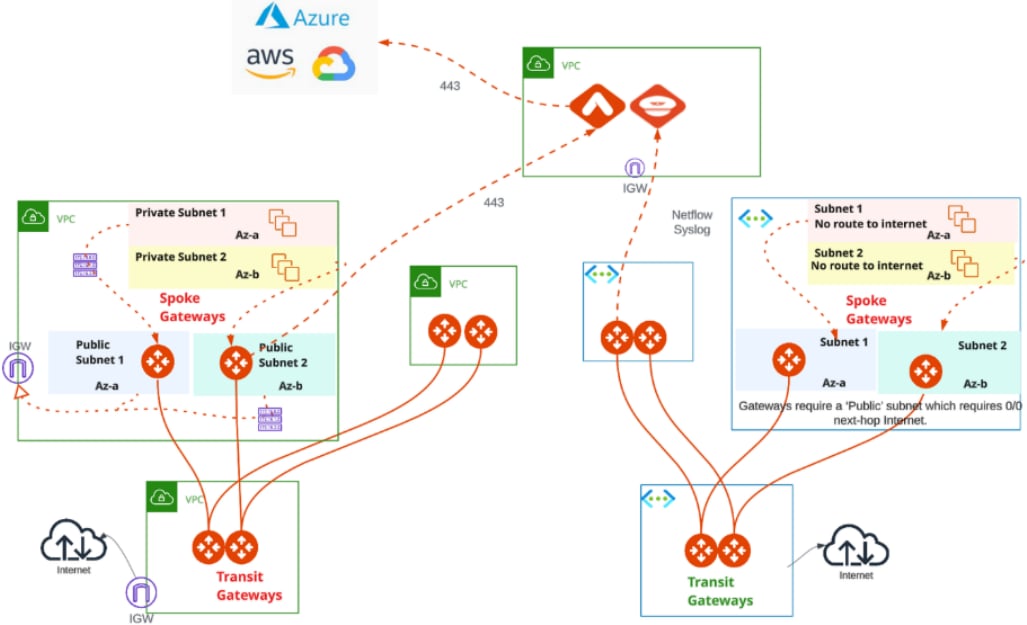
- While deploying transit solutions, CSPs require vendor Gateways to be deployed on public subnets.
- Aviatrix Transit Gateways in the Transit VPC/vNET establish secure IPSEC tunnels with Spoke VPCs over public IP whether the Spoke VPC/vNET deployed a vendor Gateway or VGW.
- Although the connectivity patterns leverage public IPs, the path never hits public internet and is routed within the CSP backbone.
- When the Controller communicates with Gateways or Gateways communicate across Cloud Provider boundaries, this communication is secured at the application layer or uses IPSec as needed.
Securing Public Subnets
- Enable Gateway Subnet Monitoring.
- When enabled, the Aviatrix Controller monitors selected public subnets periodically.
- When it detects any instances launched on these subnets, the Controller alerts the admin and stops the instances.
Gateway Security Groups and Ports
- The Aviatrix Gateway instance has strict security group allowances that are
only open to the Controller IP on tcp/443 (https).
- tcp/443 (https) for upgrades from the Controller and diagnostic purposes.
Gateway to Gateway IPSec
- Gateway to Gateway IPSec tunnels require two incoming ports:
- udp/4500 (Data Channel for IPSec NAT Traversal)
- udp/500 (Control Traffic for IPSec - ISAKMP)
Securing CoPilot
Associate Controller with Your CoPilot
Enable the Controller to manage CoPilot Security Groups:- Navigate to Settings > CoPilot > CoPilot Security Group Management.
- UDP port 5000 - Enable syslog for CoPilot Egress and Audit Data from each Gateway. Gateways send remote syslog data to CoPilot.
- TCP port 31284 - Enable logs for CoPilot Egress and Audit Data from each Gateway. Gateways send remote logs data to CoPilot.
- TCP port 5000 (default) - Private Mode Only - Enable Syslog for CoPilot Egress FQDN and Audit Data (from each Gateway). Gateways send remote syslog to CoPilot.
- UDP port 31283 (default, configurable) - Enable Netflow for CoPilot FlowIQ Data (from each Gateway). Gateways send Netflow data to CoPilot.
Configure SAML
Enhance the login protections to your CoPilot instance using the corporate Identity Provider. See Set Up SAML Login for CoPilot . Additionally, by using the Identity Provider, you can ensure that employees who no longer have access to CoPilot are revoked the moment they are revoked from the Identity Provider. Using username/password requires manual intervention from the corporate IT team or other team managing access to CoPilot.CoPilot Service Accounts
All CoPilot installations require Service Accounts to perform operations with other components of the Aviatrix System. Some of these permissions must be created by the CoPilot system administrator to have minimal permissions to the features:- CoPilot ThreatIQ and Distributed Firewalling require CoPilot service to have
minimum
all_firewall_network_write(Firewall Network permission group) permissions. - CoPilot Gateway Scanning requires
all_gateway_write(Gateway permission group) permissions.
all_write
(AllWrite permission group), however, this is not best practice as it gives a
service account more permissions than needed and does not comply with the
principle of least privilege.