Offboard an Azure Cloud Account
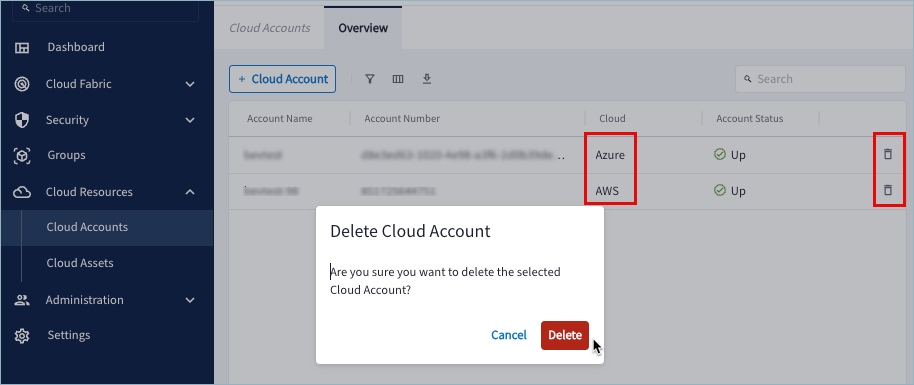
- In Aviatrix PaaS console, go to Cloud Resources > Cloud Accounts.
-
Locate the cloud account to be removed and click Delete

-
Click Delete in the verification popup. The cloud account is removed from
the Cloud Accounts list.
Offboard an AWS Cloud Account
If you want to permanently offboard an AWS account from Aviatrix PaaS console, you can remove from AWS the resources created by the CloudFormation onboarding template.Removing these resources is optional, unless you intend to onboard the same
AWS account to Aviatrix PaaS console again. In that case, you must remove
the CloudFormation template, two IAM roles, and a policy before onboarding the
same account again.
- In Aviatrix PaaS console, go to Cloud Resources > Cloud Accounts.
-
Locate the cloud account to be removed and click Delete
-
Click Delete in the verification popup. The cloud account is removed from
the Cloud Accounts list.
-
If you want to delete the CloudFormation stack, do the following in the AWS
console:
- Go to CloudFormation > Stacks and select the stack to delete. The
default name is aviatrix-onboard-aws, but the name could have been
modified.

- Click Delete.
- Read the AWS warning and click Delete. The stack status changes to DELETE_COMPLETE after several seconds. If you refresh the Stacks pane, the stack name disappears.
- Go to CloudFormation > Stacks and select the stack to delete. The
default name is aviatrix-onboard-aws, but the name could have been
modified.
- To remove the roles, go to AWS IAM > Access Management > Roles and select and delete the following:
- aviatrix-platform-app
aviatrix-role-ec2-<long-id>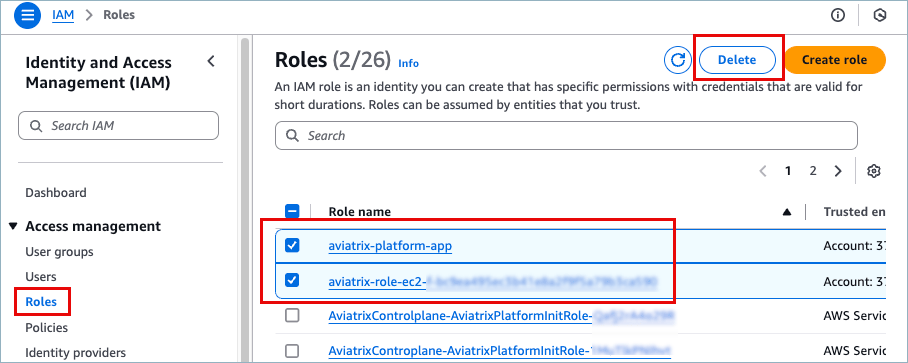
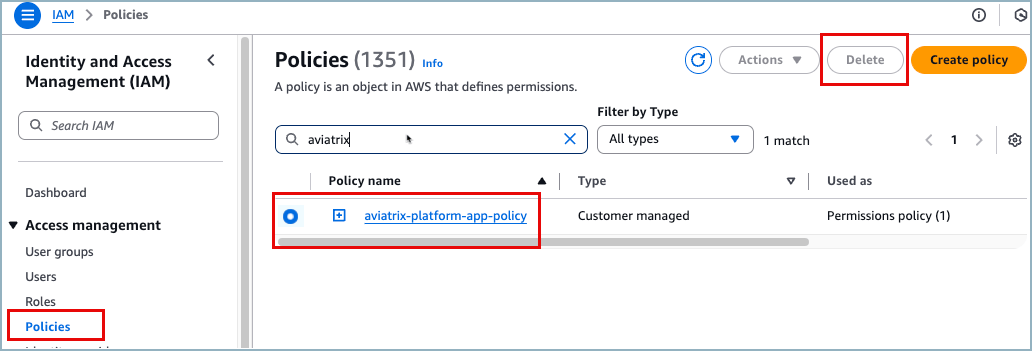
- To remove the policy, go to Access Management > Policies and then search for and delete the following:
- aviatrix-platform-app-policy