

- Single IP and Customized SNAT on Edge Spoke Gateway - For network traffic initiated from the edge location towards the CSP.
- DNAT on Edge Spoke Gateway - For network traffic initiated from the edge location towards Transit Gateway in cloud or CSP.
Customized SNAT on Edge Spoke Gateway is not supported when VLAN segmentation
is also configured in the same network domain.
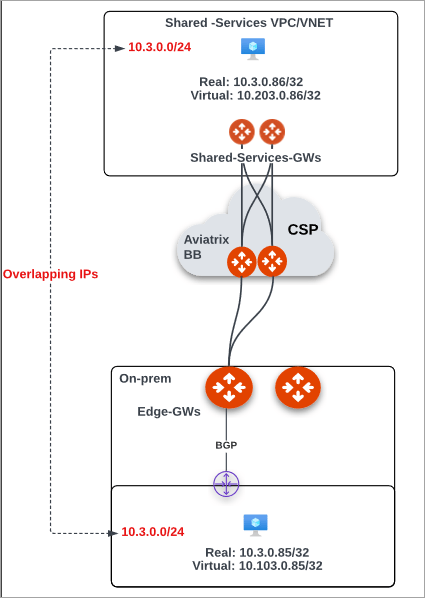
- Create a mapping of the Real CIDR to Virtual CIDR for both the cloud instances and on-premises hosts or workloads. For example:
- Configure DNAT on Edge Spoke Gateway for traffic initiated from on-premises to cloud. a. In Aviatrix CoPilot, go to Cloud Fabric > Hybrid Cloud > Edge Gateways tab. b. Click Spoke Gateways c. Select the Edge Spoke Gateway for which you want to enable DNAT. d. In the Edge Spoke Gateway’s Settings tab, expand the Network Address Translation (NAT) section. e. Set the Destination NAT toggle to On. f. In Destination NAT, from the Instance dropdown menu, select the Edge Spoke Gateway. g. Click + Rule and provide the following information.
- Configure a Manual BGP Advertised CIDR List to advertise the DNAT virtual IP from the Edge Spoke Gateway to on-premises via BGP. a. In the Edge Spoke Gateway’s Settings tab, expand the Border Gateway Protocol (BGP) section. b. In Manual BGP Advertised CIDR List, enter the following information.
- Configure SNAT on the Edge Spoke Gateway for traffic initiated from cloud to on-premises. a. In the Edge Gateway’s Settings tab, expand the Network Address Translation (NAT) section. b. Click the Source NAT switch to On, then click Customized SNAT. c. From the Instance dropdown menu, select the Edge Spoke Gateway. d. Click + Rule and provide the following information.