

Aviatrix does not currently support duplicated CIDRs that cross domains or
Transit networks. Overlapping CIDRs advertised from on-prem to different Spoke
network domains connected to one Aviatrix Transit gateway is not supported.
About Network Domains
When you identify groups of Spoke and Edge VPC/VNets in your infrastructure with the same requirements from a networking point of view (network reachability), you may want to group them so that you can apply connection policies at the group level. You can group them as members of an Aviatrix network domain. A network domain is an Aviatrix enforced network of one or more Spoke or Edge VPC/VNets. You use the network domains with connection policies. This achieves the network isolation for inter-VPC/VNet connectivity that you want for your network. You can have up to 200 network domains on each Aviatrix Transit Gateway. The following diagram shows two network domains, one named Blue and one named Green.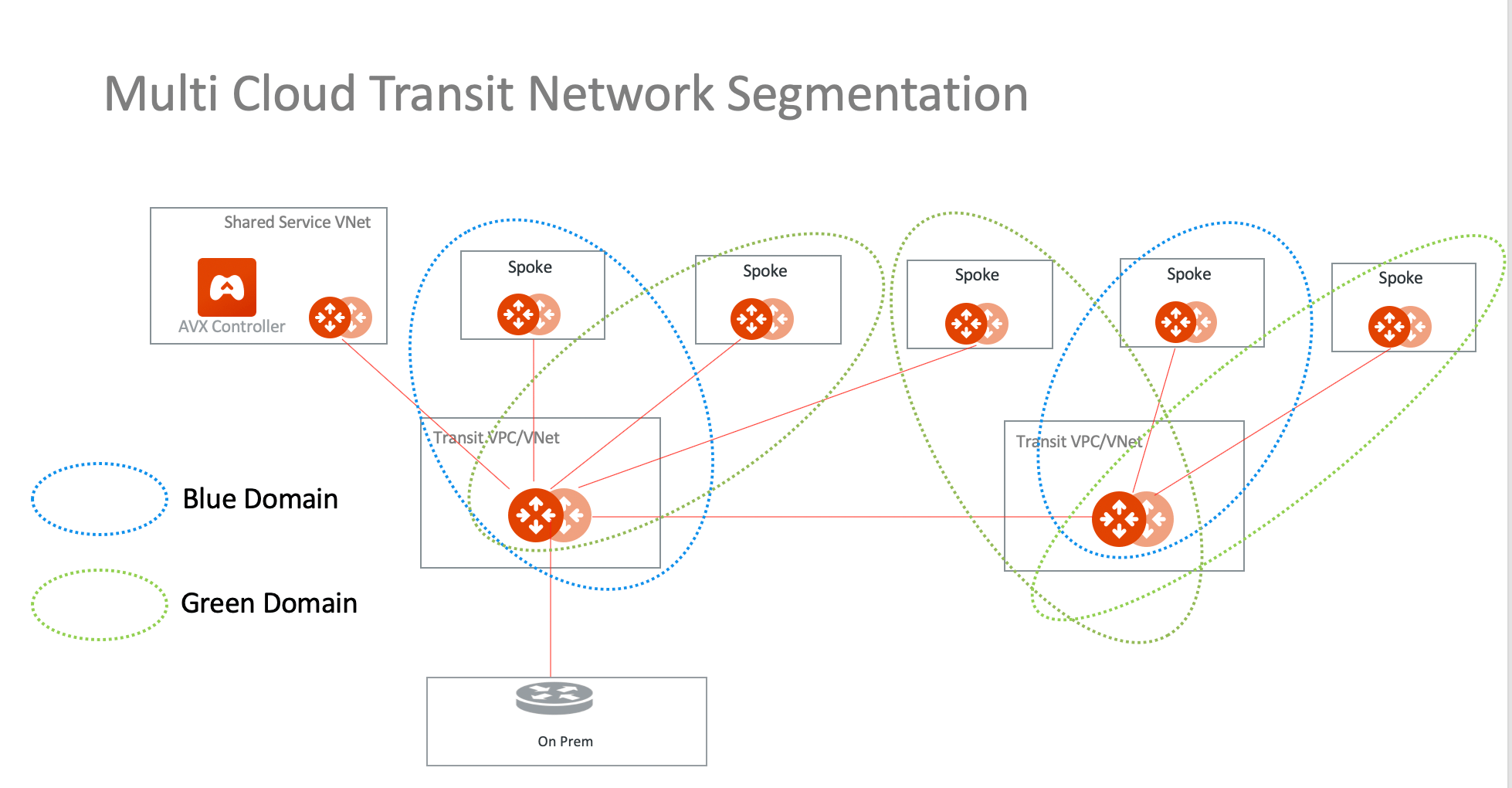
This segmentation works with Azure native Spoke VNets.
Configuring Network Segmentation for Inter-VPC/VNet Connectivity
- In CoPilot, go to Networking > Network Segmentation or search for Network Segmentation in the navigation search.
- Enable network segmentation on each of the Aviatrix Transit Gateways in your network that will route traffic between network-domain members.
- Create your network domains and connection policies.
- Verify that your network segmentation.
Enabling Network Segmentation on the Transit Gateway
This section describes how to enable network segmentation for inter-VPC/VNet connectivity using network domains. You must enable network segmentation on all Transit Gateways that will route traffic between the Aviatrix network domains. These instructions apply if you are using the Aviatrix CoPilot user interface to build network segmentation.You can enable network segmentation on a Transit FireNet gateway that is
configured for inspection, or inspection with egress. However, you cannot
enable network segmentation on a Transit FireNet gateway that is configured
for egress only.
- In CoPilot, go to Networking > Network Segmentation or search for Network Segmentation in the navigation search.
- In the Network Domain view, click Transit Gateways.
- Toggle the network segmentation option to Enabled for each Transit Gateway in your infrastructure that will route traffic for the Spoke and Edge VPC/VNets that will be members of your network domains.
- Click Save. The selected Transit Gateways are now enabled for network segmentation.
Creating the Network Domain and Connection Policy
Create a network domain to be used for network segmentation, which will also create a connection policy and associate a Spoke/Edge Gateway to the network domain. See also About Network Domains.Before creating an Aviatrix network domain, verify
that you have enabled network segmentation on the Transit Gateways that will route traffic for its members.TGW Domains only display in the Associations list if anAWS TGW has been attached to a Transit Gateway
.
- In CoPilot, go to Networking > Network Segmentation or search for Network Segmentation in the navigation search.
- In the Network Domain view, click + Network Domain.
- In the Create Network Domain dialog, configure the following:
In the Associations drop down list, the associated Transit Gateway name is
displayed beneath the name of the Spoke/Edge Gateway or AWS TGW that you
select.
- Click Save. When you save the network domain configuration, Aviatrix Controller dynamically programs and updates the applicable VPC/VNet route tables so that instances in different Spoke and Edge VPC/VNets in the same network domain (and in connected network domains, if applicable) can communicate with each other.
Network Domain Connections
It may be easiest to create network domains first, and then click the Edit icon
Verifying the Network Segmentation Configuration
-
In CoPilot, refer to the Networking > Network Segmentation > Logical,
Physical, or Regional View visualizations. You should see your network
domains. See
Network Segmentation Visualizations
for a description of the visualizations.
If there are no network domains configured, or there are no gateways attached to network domains, you see a message to this effect on the Overview tab.
- Log in to compute instances that are running in separate Spoke and Edge VPC/VNets that are members of the same network domain and verify they are allowed to connect to each other and not allowed to connect to Spoke and Edge VPC/VNets that are not members of the network domain.
- Log in to compute instances that are running in different Spoke and Edge VPC/VNets that are members of different network domains that have a connection relationship and verify they are allowed to connect to each other.
Managing the Network Segmentation Configuration
Editing Your Network Segmentation Configuration
To edit a network domain:- On the Networking > Network Segmentation > Network Domains tab, click the
Edit icon.
- In the Edit Network Domain dialog, configure the following:
Note the following points about changing a network segmentation configuration:
- For Transit Gateways that route traffic in your segments, you can disable them from network segmentation. You should only do this if there are no longer network domains relying on them for connectivity.
- For a given network domain, you can change its members (disassociate a Spoke or Edge gateway from it or associate new Spoke or Edge Gateways to it) and connection relationships to other domains at any time.
- If you decide to switch network domains for a given Spoke or Edge Gateway, you must first disassociate the Spoke or Edge Gateway from the network domain it is currently a member of before associating it with another network domain. For example, if you want a Spoke to be in Domain_Dev instead of Domain_Prod, you must first remove the Spoke from the associations list of Domain_Prod and save the domain, and then add the Spoke to the associations list of Domain_Dev and save the domain.
- Currently, you cannot change the name of a network domain after it has been saved. If you want to use a different name for an existing network segment, you must disassociate all Spoke and Edge Gateways and connection relationships from them and create a new network domain with those configurations with the new name.
Disassociating Network Domains
You can click the Edit icon next
to an existing network domain to remove an association or a network domain
connection.
Deleting Network Domains
You can click the Delete icon to
delete the network domain. This is only possible if the network domain does not
contain any associations or connections.
icon to
delete the network domain. This is only possible if the network domain does not
contain any associations or connections.