

Aviatrix Public IP Requirement
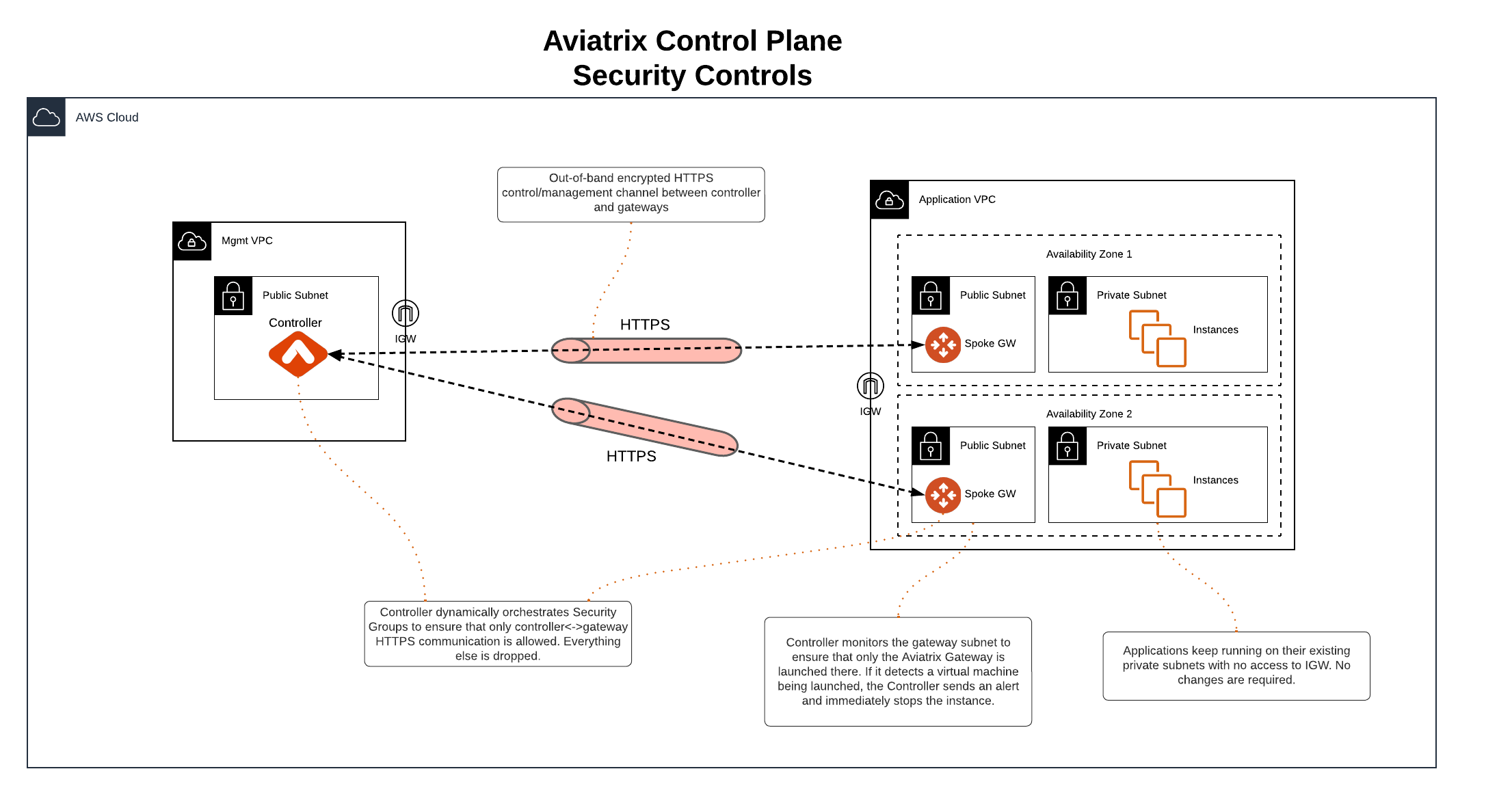
Aviatrix architecture provides a clear separation between control and data plane functions. The Aviatrix control plane uses public IPs and the HTTPS protocol to establish an out-of-band encrypted connection between the Aviatrix Controller and gateways to exchange configuration and state data. This ensures that control functions, such as software upgrades, can be performed without impacting service, while configuration and state changes in the data plane do not affect the control plane.Control Plane Security Controls
Aviatrix offers several security controls to protect the control plane:- Security Group Management: Ensures that only Controller and gateway IPs can connect to each other on TCP/443 for control plane purposes. Security groups are dynamically updated whenever a new gateway is created or deleted, or if there is a change to the Controller IP. See Enable Security Groups for more information.
- Isolated Gateway Subnets: Applications can remain in their existing private subnets, while Aviatrix gateways are deployed in isolated public subnets for control plane connectivity. Access to these subnets or the Internet Gateway (IGW) can be restricted via IAM policies.
- Gateway Subnet Monitoring (Controller only): If one of your company policies is that no VM instances can be launched on public subnets, this feature allows you to enforce that no unauthorized virtual machine (EC2/VM/GCE) instances are being launched on the gateway subnet. The Controller periodically monitors the selected subnet, sends alerts, and stops unauthorized instances if detected.
Aviatrix gateways must be launched on a public subnet (AWs, GCP, OCI).
- In the Controller UI, go to the Gateway page.
- Select a gateway and click Edit.
- Scroll down to Monitor Gateway Subnets.
- Click Enable.
- If necessary, enter the instance ID(s) to exclude. Only do this if you need to deploy instances in the gateway subnet.
- Click OK when finished.