

- Minimum downtime during migration.
- No change to existing VPC infrastructure.
- Minimum change to on-prem network.
This document assumes you have already
deployed Aviatrix CoPilot
.
The Solution
There are multiple ways to migrate. For example, you can simply detach a spoke VPC from the existing TGW and attach it to Aviatrix-managed TGW and then build hybrid connection if necessary. In this implementation, the migrated spoke VPCs can communicate with the not yet migrated VPCs during migration process, and in addition the migrated spoke VPCs can communicate with on-prem network, thus reducing the downtime, as shown in the migration architecture below.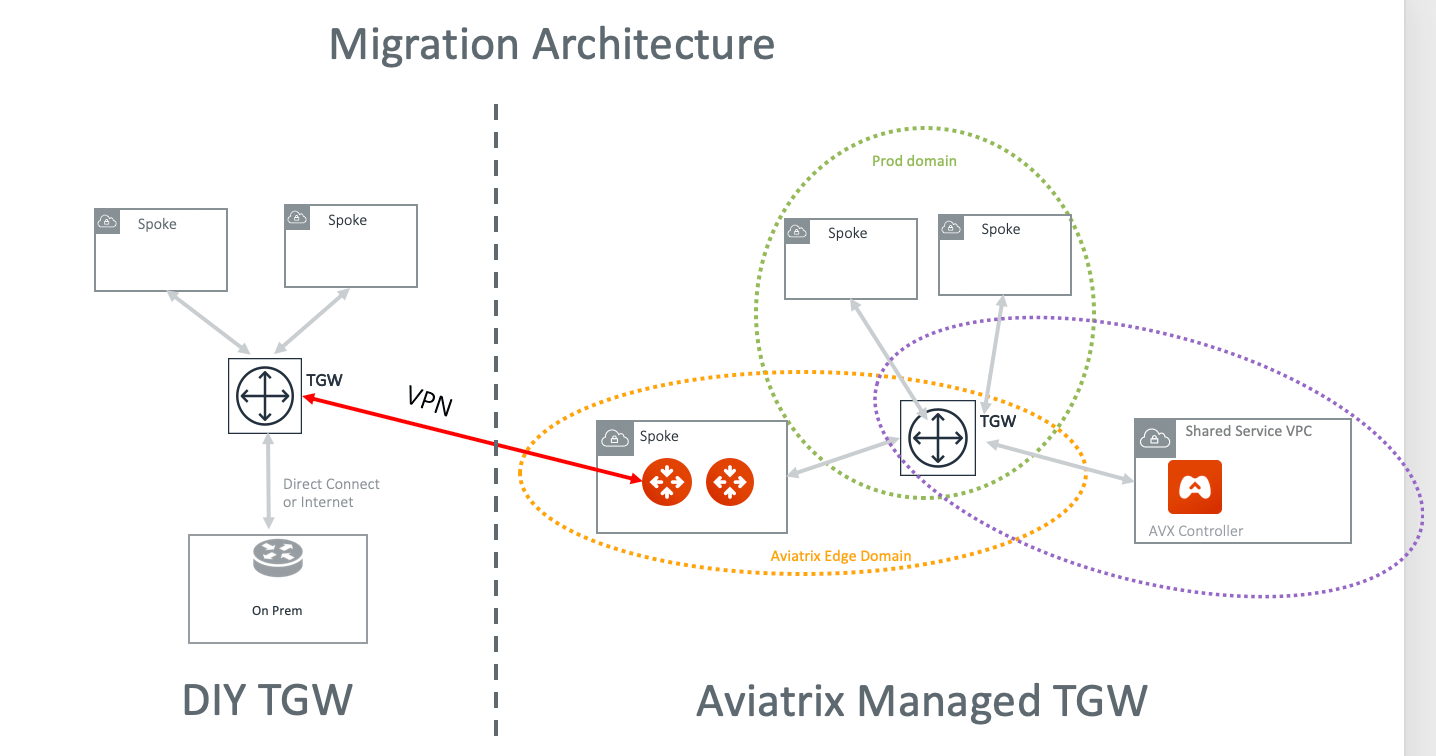
- Launch a new AWS Transit Gateway .
- If you have plans for custom network domains, create new network domains . Then, build your domain connection policies. If you do not intend to build custom network domains, skip this section.
- Launch an Aviatrix Transit GW and enable HA in the Transit Hub VPC . As a best practice, create a new Transit Hub VPC to deploy the Aviatrix Transit GW.
Creating TGW VPN Attachment
- Create a VPN attachment.
- After the attachment is created, download your VPN file. Make sure you select Vendor Generic and download the configuration text file.
Creating VPN on Aviatrix Transit Gateway
This step is to create the other end of the VPN tunnel that terminates on the Aviatrix Transit GW.- Create an external connection using the information from the downloaded VPN file.
- Select BGP as the connection type.
- Use the downloaded VPN file to enter the following information: