

Problem: Long Latency or Unstable Internet Connectivity
Traditionally enterprises host their IT applications in their own data center or at a co-location. Remote sites typically connect to the data center via an Internet-based IPsec VPN tunnel or MPLS based private network. Such a hub and spoke architecture has been prevalent in the last 15 years. A problem with this deployment architecture is long latency or unstable Internet connectivity suffered by remote sites, especially between those in different continents. This can cause application time out, resulting in lost productivity and an unhappy user experience. The solution to this pain point has been to deploy some form of WAN optimization in both the remote sites and data center to reduce application latency and reduce data bandwidth. These gears are complex, expensive and not every enterprise can afford them, and in some cases, they don’t always work well.Solution: Bring Application to User
With the many regions in the world available brought by public cloud providers, such as AWS and Azure, the application latency issue can now be solved in a brand-new way. By placing applications in a region of public cloud that your remote sites are closer to than to the data center, the long latency issue is eliminated altogether. In addition, by moving servers to the cloud, you can reduce remote sites’ footprint and the amount of hardware to manage, thus reducing cost for ongoing maintenance. The comparison between the two deployment architectures is described below: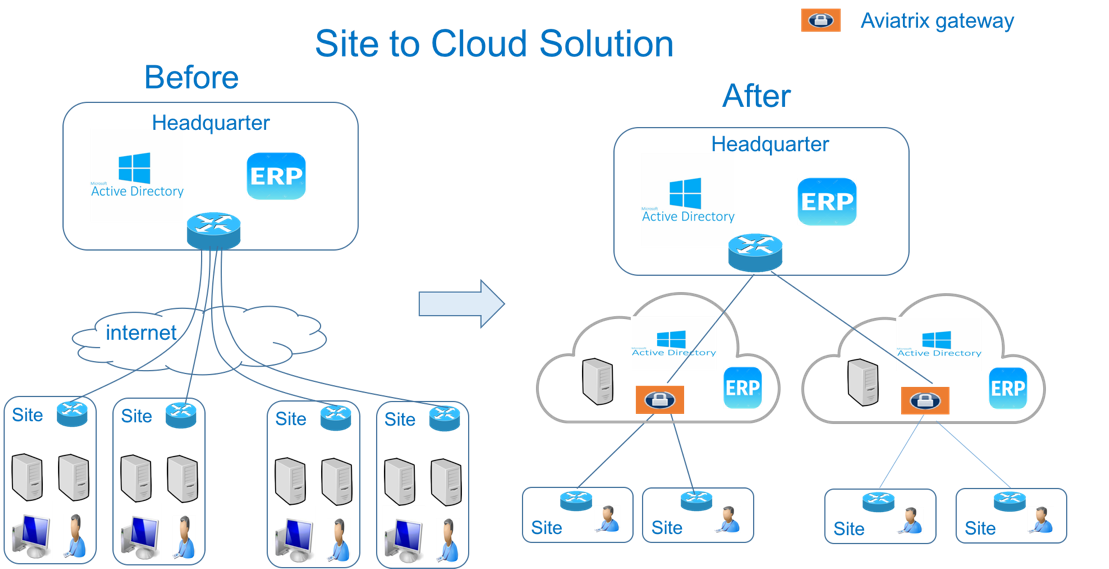
Use Cases for Site2Cloud
Here are common use cases:- SaaS provider to its customer site: If you need to move data continuously and securely from customer or partner sites to your SaaS service hosted in AWS, Azure, or Google, building an encrypted tunnel between the customer site and your SaaS service is required.
- Branch offices to cloud: If you have branch offices that need to access applications hosted in AWS or Azure, using Site2Cloud is the most economical way to build a secure tunnel. You can use your existing Internet connection and not have to pay extra to SD-WAN vendors to go through their cloud.
- Overlapping IP addresses We run a SaaS operation, the CIDR blocks at your customer sites are not controlled by us. If a customer CIDR block overlaps with our operation VPC/VNet CIDR, we have to find a way to NAT the address. The cloud provider native solution is not usable in this case. For solutions to solving overlapping IP addresses, see Configuring Overlapping Networks with Customized SNAT and DNAT.
- Traffic Black Hole When the tunnel on the primary gateway is down, VPC/VNet route entry still points to the primary gateway, it does not point to the backup gateway.
- AWS VPN Gateway Limitation AWS VPN gateway supports 10 connections per VPC. I have more than 10 sites, the native solution is not usable.
- Azure VPN Gateway Limitation Azure VPN gateway supports only 1 VPN connection for IKEv1. My office firewall device only supports IKEv1.
- No Visibility Cloud provider’s VPN gateway is a black box, there is no visibility for troubleshooting.
- No Manual I have to configure and manage hundreds or thousands of IPsec tunnels, the manual way by using traditional vendors such as Cisco ASA and CSR is not possible. For configuration to external devices, see Site2Cloud Configurations with External Devices.
- Encryption Algorithm Mismatch As SaaS operators, we cannot control what VPN device a customer wishes to use. My end of VPN termination needs to have the flexibility to interoperate with customer equipment. The native solution does not have that flexibility.
- Too Slow to Onboard a Customer VPN runs on UDP port 500/4500, my customers have to request corporate firewall ports to open, is there a way to run IPsec tunnel on TCP 443?
- Traffic Direction Problem My SaaS service requires traffic to be initiated from the cloud to the customer site, AWS VPN gateway cannot support this traffic pattern. We have to set up a separate machine to constantly ping to keep the tunnel up!
- Downtime Problem Some appliances force all IPsec tunnels to reset and go down when a new tunnel is being established, which affects business continuity and is not acceptable when the number of sites go beyond 10.
- Skill Problem We don’t have a team of CCIEs to handle the load.
Site2Cloud Frequently Asked Questions
Does Site2Cloud support HA?
You can enable high-availability when you configure a Site2Cloud connection.What are the encryption algorithms supported?
| Type | Value |
|---|---|
| Phase 1 Authentication | SHA-1, SHA-512, SHA-384, SHA-256 |
| Phase 1 DH Groups | 1, 2, 5, 14, 15, 16, 17, 18, 19, 20, 21 (20 & 21 IKEv2 Only) |
| Phase 1 Encryption | AES-256-CBC, AES-256-GCM-64, AES-256-GCM-96, AES-256-GCM-128, AES-192-CBC, AES-128-CBC, AES-128-GCM-64, AES-128-GCM-96, AES-128-GCM-128, 3DES |
| Phase 2 Authentication | HMAC-SHA-1, HMAC-SHA-512, HMAC-SHA-384, HMAC-SHA-256, NO-AUTH |
| Phase 2 DH Groups | 1, 2, 5, 14, 15, 16, 17, 18, 19, 20, 21 (20 & 21 IKEv2 Only) |
| Phase 2 Encryption | AES-128-CBC, AES-192-CBC, AES-256-CBC, AES-256-GCM-64, AES-256-GCM-96, AES-256-GCM-128, AES-128-GCM-64, AES-128-GCM-96, AES-128-GCM-128, 3DES, NULL-ENCR |
Site2Cloud supports AES-256-GCM and DH21 that comply with the NIST encryption standards.