

Preview in Controller 9.0. IPv6 support on the Aviatrix platform is in Preview in Controller 9.0. The controller-level Support for IPv6 toggle in Settings > Configuration > General is labeled Preview in CoPilot. Use IPv6 in non-production environments and contact Aviatrix support before enabling it on production deployments.
Benefits of IPv6
- Address Exhaustion: The limited address space of IPv4 is nearly depleted. IPv6 offers a much larger address pool.
- Compliance and Mandates: Federal agencies and global enterprises require IPv6 adoption to meet regulatory and operational goals.
- Future-Proofing: IPv6 ensures long-term scalability for cloud and hybrid environments.
IPv6 Support in Controller 8.2
Controller 8.2 introduced the foundational IPv6 capabilities for AWS and Azure:- Dual-stack for AWS and Azure
- FireNet with Palo Alto Networks for AWS
- Network Segmentation
- BGP over IPSec and BGP over LAN (AWS and self-managed networks)
- Edge support for AEP and ESXi platforms
IPv6 Support in Controller 9.0
Controller 9.0 expands the IPv6 foundation with the following additions. All Controller 9.0 IPv6 capabilities are in Preview:- GCP transit and spoke gateway IPv6
- Government Cloud (AWS GovCloud and Azure Government)
- Equinix Edge IPv6 (LAN interface for Edge Spoke; WAN interface for Edge Transit)
- Global IPv6 route summarization
- Unique Local Address (ULA)
fd00::/8automatic management (RFC 4193) - Bidirectional Forwarding Detection (BFD) for IPv6 BGP
- BGP over LAN for Azure (parity with AWS in Controller 8.2)
- BGP over GRE for IPv6 site-to-cloud connections
- Fortinet and Checkpoint FireNet IPv6 support
- IKEv2 enforced for IPv6 BGP over IPSec
- IPv6 diagnostic tooling enhancements
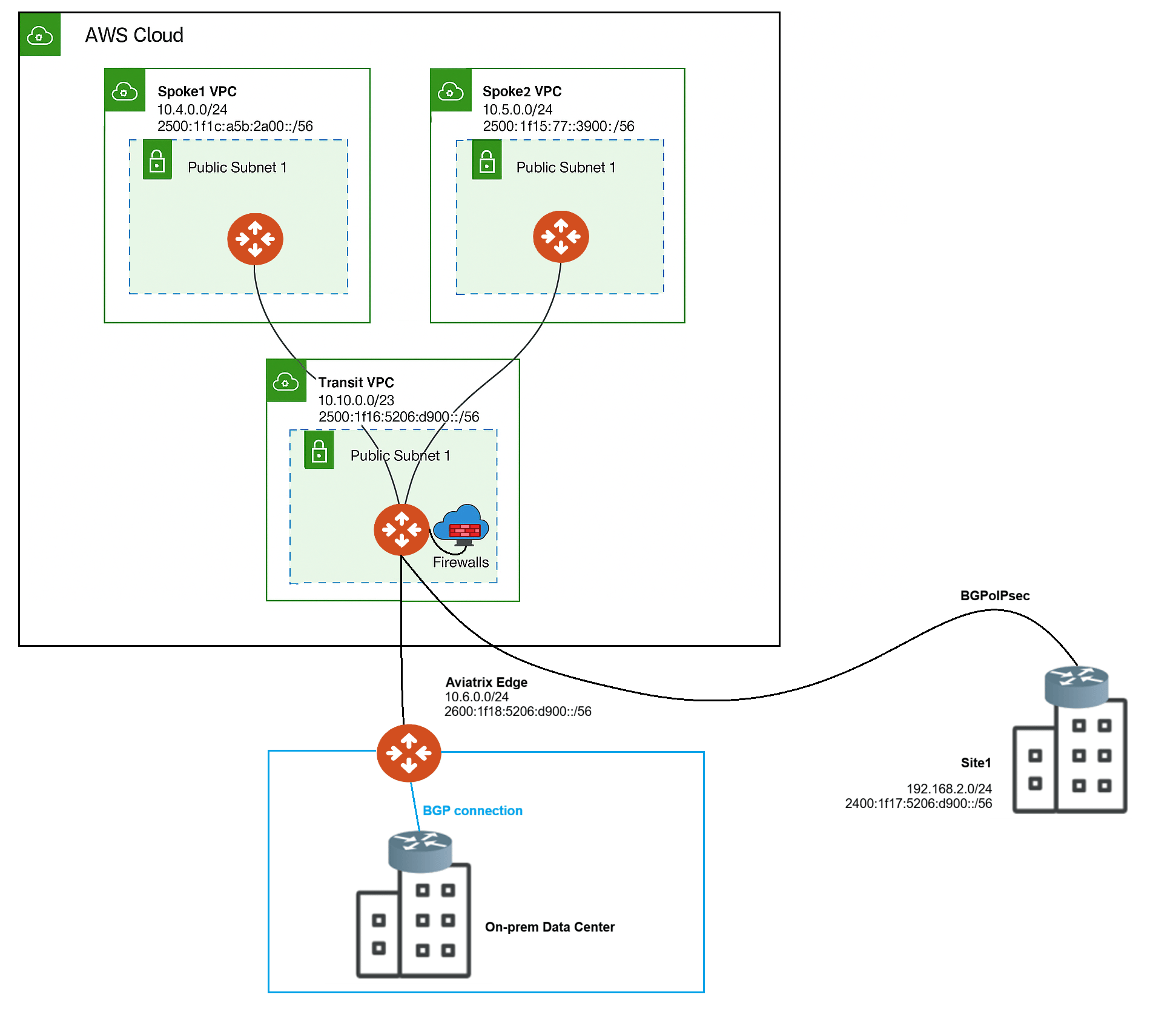
Key IPv6 Features in Aviatrix Platform
- Dual-Stack Support: Enable both IPv4 and IPv6 on VPC/VNet, Transit, and Spoke Gateways on AWS, Azure, and GCP (GCP IPv6 Gateways in Controller 9.0).
- Site2Cloud Connectivity: IPv6 support for BGP over IPsec (BGPoIPSec) and BGP over LAN (BGPoLAN) to secure S2C connections.
- Edge Enablement: IPv6 connectivity for Aviatrix Edge gateways to support on-premises to cloud traffic.
- Global IPv6 Route Summarization: Controller-wide setting that advertises summarized IPv6 routes instead of individual host prefixes, reducing route table size.
- Unique Local Address (ULA) Support: Automatic management of fd00::/8 summary routes (RFC 4193) when IPv6 is enabled on a Gateway.
- FireNet Integration: IPv6 traffic inspection for east-west and north-south flows in centralized firewall architectures.
- Terraform Automation: Management of IPv6 configurations through Terraform.
IPv6 Operational Considerations
The following sections describe the operational considerations for IPv6 in the Aviatrix platform.Global Configuration
Before making IPv6-related changes on the Aviatrix platform, turn On Support for IPv6 in CoPilot. The toggle is labeled Preview in Controller 9.0. To turn On the Support for IPv6 toggle:- In CoPilot, go to Settings > Configuration > General.
- Turn On the Support for IPv6 toggle (labeled Preview).
- Click Save.
Enable IPv6 on Gateways
Before enabling IPv6 on gateways, ensure the VPC/VNet of the Gateway supports IPv6.Enable IPv6 on New Gateways
To enable IPv6 on new gateways:- Turn On the Support for IPv6 toggle in CoPilot to enable global IPv6 settings.
- Create a new VPC/VNet that supports IPv6.
If the VPC/VNet already supports IPv6, skip this step. - Create a new Gateway on the new VPC/VNet.
- Ensure to turn On the Support for IPv6 toggle while creating the Gateway.
Ensure the Controller and CoPilot VPC/VNet are IPv4-only.
Enable IPv6 on Existing Gateways
To enable IPv6 on existing gateways:- Turn On the Support for IPv6 toggle in CoPilot to enable global IPv6 settings.
- If the VPC/VNet of the Gateway does not support IPv6:
- Create a new VPC/VNet that supports IPv6.
- Create a new Gateway on the new IPv6 VPC/VNet.
Refer to Enable IPv6 on New Gateways for more details.
- If the VPC/VNet of the Gateway supports IPv6, edit the Gateway and turn On the Support for IPv6 toggle.
Routing, Diagnostics, and Visibility
IPv6-related information is available in the route tables, diagnostic tools, Topology, and Dashboard sections. See the following pages for more details:- Gateway Routes
- VPC/VNet Route Tables
- Gaining Visibility into Your Network Topology
- Troubleshooting - Diagnostic Results
Limitations
- IPv6-only mode is not supported; dual-stack deployments are required.
- Contact Aviatrix support before enabling Edge as a Transit (EaT) with IPv6.
- For BGP over IPsec connections with IPv6 enabled, the Controller enforces
IKEv2.
IKEv1 is not supported for IPv6 BGPoIPSec.