

- Aviatrix strongly recommend customers stay on the latest release to resolve features and bug issues. All fixes are in the new release; Aviatrix does not patch older release versions.
- Customers are strongly recommended to perform image migration 2x a year. The migration process provides the latest system level security patch.
- All known software vulnerabilities are submitted to Mitre for CVE-ID references by Aviatrix Systems.
- Aviatrix publishes Field Notices and send alerts to Controller Admin in the Controller console when security related issues are published.
CVE-2026-98432 (Linux Kernel TCP Vulnerability)
Date 11/05/2026 CVE # CVE-2026-98432: Race condition in the Linux kernel IPv4 TCP networking subsystem.- Risk Rating: CVSS 9.8 (Critical), as rated by the Linux kernel security team.
- Description: CVE-2026-98432 is a race condition in the Linux kernel’s IPv4 TCP networking subsystem. Aviatrix Controllers, Gateways, and CoPilot run the Linux kernel and are affected.
- Impact: A remote, unauthenticated attacker could trigger a use-after-free memory error on an affected Controller, Gateway, or CoPilot instance. This type of memory error can lead to remote code execution and privilege escalation.
A vulnerability scanner might still report CVE-2026-98432 after you complete
these steps. Gateways run a customized kernel and receive a mitigation instead
of a kernel update, and scanners differ in how they detect this. Your
Controller and Gateways are protected after you complete the steps below, even
if a scanner reports otherwise.
- Make sure you can sign in to CoPilot. Controllers 8.x and 9.x that do not use CoPilot can use the Controller UI instead.
- Make sure you can sign in to your cloud service provider (CSP) console to reboot the Controller.
- Schedule a maintenance window for the Controller reboot in step 2. The reboot does not impact traffic flow.
- Schedule a maintenance window to upgrade the Controller and then the Gateways. You do not need to wait for it to complete steps 1 to 3.
1
Check the Controller kernel version
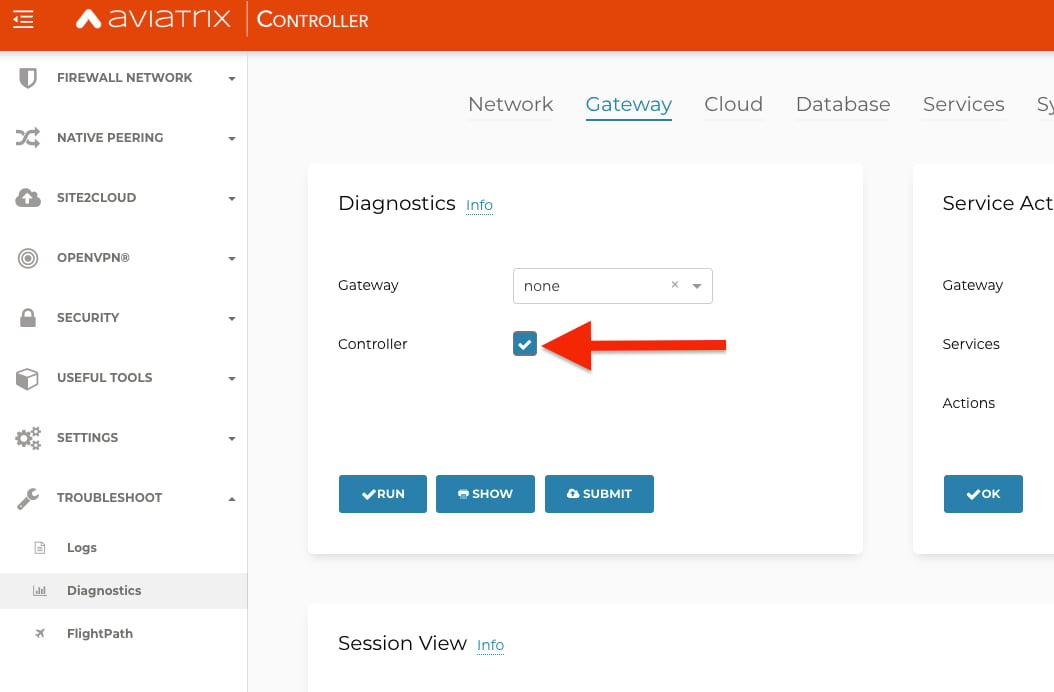
Run the Controller diagnostics and find the kernel version in the output.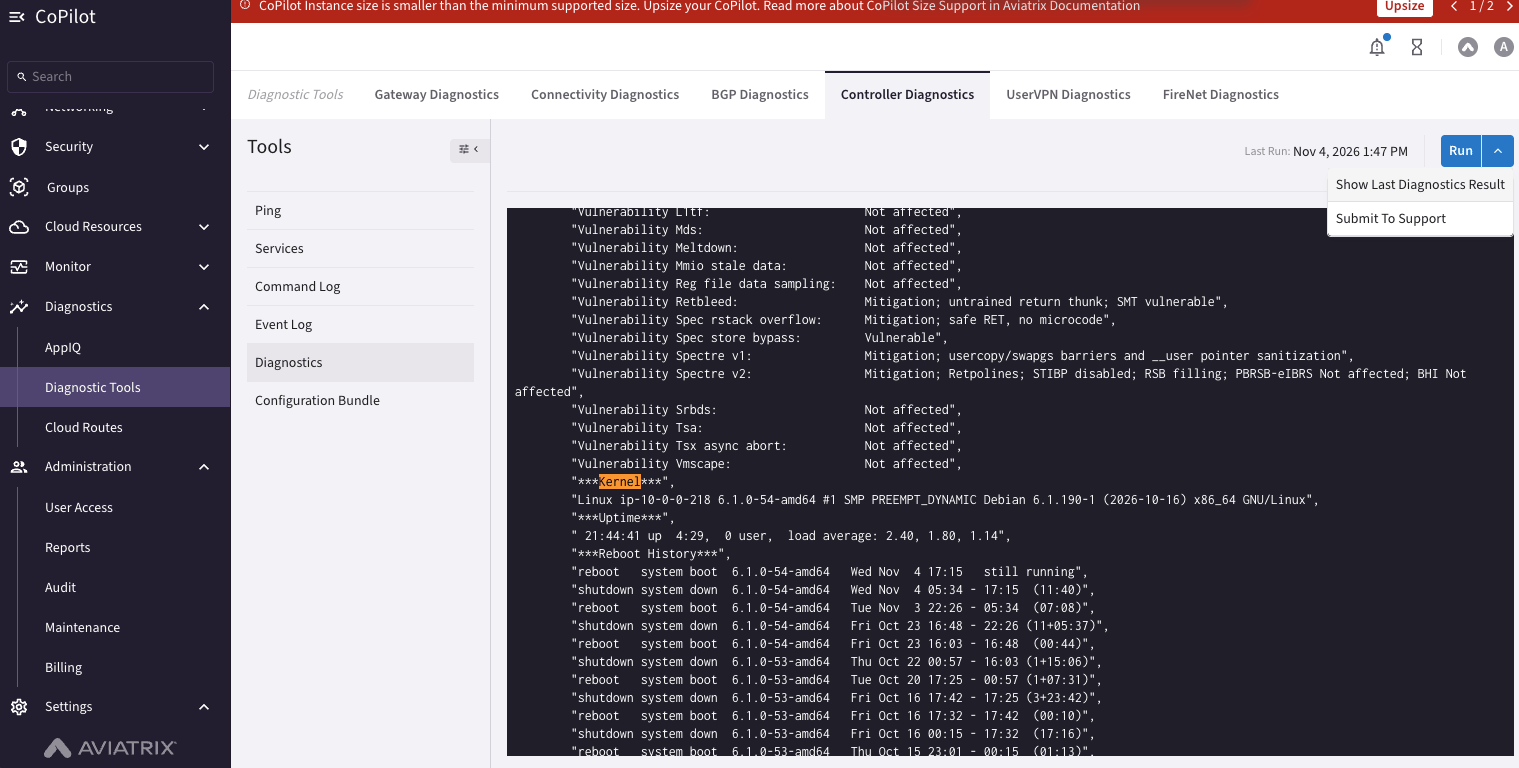
- CoPilot
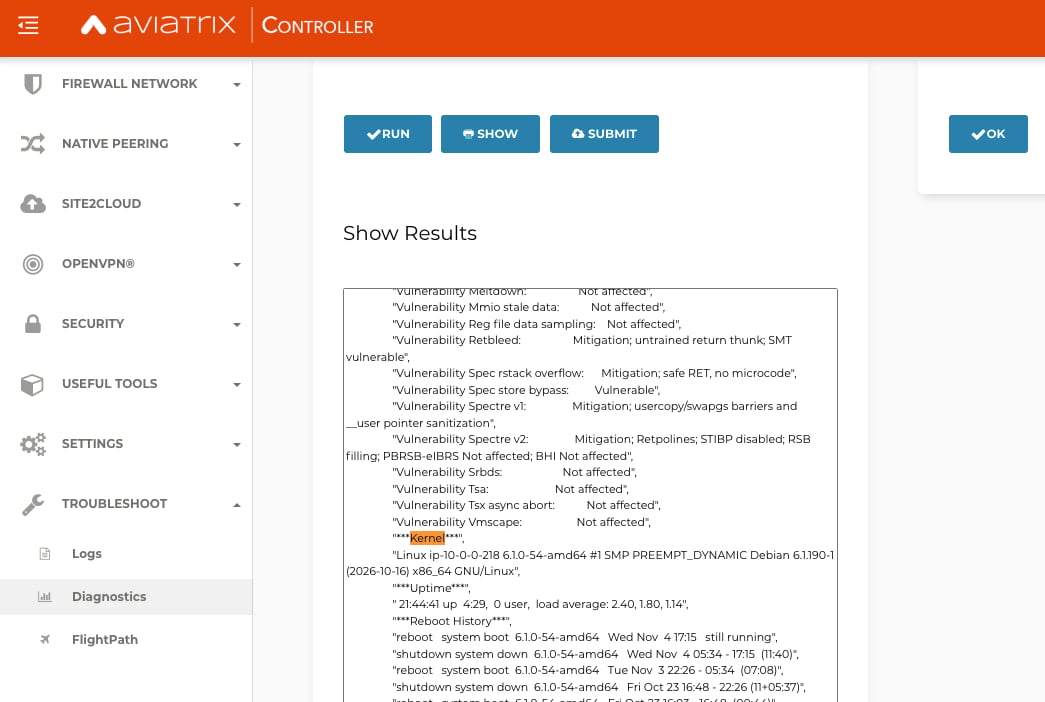
- Controller UI (8.x and 9.x)
- Go to Diagnostics > Diagnostic Tools > Controller Diagnostics.
- In the Tools list, select Diagnostics.
- Click Run. To show the results of the last run instead, click the arrow next to Run and select Show Last Diagnostics Result.
- In the output, find the Kernel section. The line below it starts with
Linuxand includes the Debian kernel package version, for exampleDebian 6.1.190-1.
If the kernel version is one of the fixed versions, skip to step 4. If it is
not, continue with step 2.
2
Reboot the Controller
Use your cloud service provider (CSP) console, such as the AWS, Azure, or GCP
console, to reboot the Controller during the maintenance window that you
scheduled.
Unattended upgrades install the kernel update on Controllers running 8.x, 9.x,
and 10.x, but the kernel does not take effect until the Controller reboots.
This kernel update does not depend on an Aviatrix software release, so reboot
as soon as you can. For more information, see the
Unattended Upgrades
page.
3
Verify the kernel version
After the Controller is available again, repeat step 1 and confirm that the
kernel version matches one of the fixed package versions for your Controller:
- Controllers 8.x and 9.x (Debian 12):
6.1.190-1or6.12.113-1~deb12u1 - Controllers 10.x (Debian 13):
6.12.113-1
4
Upgrade the Controller and Gateway software
Aviatrix advises all customers running 8.0 or earlier to upgrade to a release
that has the mitigation. Follow the instructions below to upgrade to one of the
fixed releases. For the upgrade paths, see the Upgrade your
Controller and Gateways to the Latest Aviatrix Supported Images (AWS and Azure
Only) page.When you have a maintenance window, upgrade the Controller and then the Gateways
to the fixed release for your version, using the standard software upgrade
procedure. Upgrade the Controller first, because it must run the same release
as, or a later release than, its Gateways. Upgrade every Gateway in your
deployment. Gateways running 8.1.x or later are protected as soon as the
Controller is upgraded, but Gateways that are not upgraded may prevent future
Controller upgrades. On the 8.0.x to 8.1.x and 9.0.x to 10.0.x upgrade paths,
upgrade the Gateways with an image upgrade, as described on the upgrade paths
page above. For the procedure, see Upgrade Your
Controller and GatewaysThe fixed release for your version:
Multiple PHP CVEs: CVE-2026-109618, CVE-2026-109619 (PHP2Shell), and CVE-2026-115560
Date 10/27/2026 CVE # CVE-2026-109618 and CVE-2026-109619 (“PHP2Shell”): Remote code execution vulnerabilities in PHP core that an unauthenticated attacker can trigger.- Risk Rating: CVSS v4.0 9.2 (Critical) for each CVE.
- Description: The Aviatrix Controller uses PHP to serve its web UI and API, so Aviatrix treats the Controller as affected by both CVEs. Aviatrix Gateways and CoPilot do not include or run PHP and are not affected.
- Impact: A successful attack would allow an unauthenticated attacker to execute arbitrary code on the Controller.
Aviatrix is not aware of any successful exploitation of these vulnerabilities
against Aviatrix Controllers. Aviatrix strongly recommends applying the patch
as soon as possible and, until then, keeping the Controller off the internet.
- Restrict inbound access to the Controller and CoPilot so they are reachable only from trusted networks, such as your corporate CIDR ranges, a VPN, or a bastion/jump host. Until a Controller update is installed, this is the most effective way to protect your Controller, because these vulnerabilities can be exploited only by someone who can reach it.
- Review the Platform Security Hardening Guidelines , which cover this and other platform best practices.
- Description: PHP’s advisory states this issue can be triggered only when
an application sets
session.serialize_handlertophp_binaryorphp_serialize, changes it tophpat runtime, and makes that change before starting the session. The Aviatrix Controller does not use this pattern, so the conditions for exploitation are not met.
CVE-2026-111497 (Brotli Decoder) and Related Node.js CVEs in Aviatrix CoPilot
Date 10/27/2026 CVE # CVE-2026-111497: Out-of-bounds write in the Brotli decoder bundled with Node.js.- Risk Rating: High.
- Description: Aviatrix CoPilot is affected, but only an attacker who is already authenticated could reach the vulnerable code. An attacker who can supply Brotli data that CoPilot decompresses could corrupt process memory, which can lead to a crash, memory disclosure, or remote code execution.
- Impact: An authenticated attacker could crash the CoPilot process, disclose memory contents, or execute arbitrary code.
Aviatrix is not aware of any successful exploitation of this vulnerability
against Aviatrix CoPilot. The fix is already included in CoPilot 4.38.1,
released October 26, 2026, and CoPilot updates automatically, so no action is
required.
libbrotli1 on gateways. The package is
present only as a transitive dependency, and no gateway component decompresses
Brotli data from untrusted sources, so the vulnerability is not reachable.
Gateways version 8.1.0 and later install operating system updates automatically;
no Aviatrix release is required. Allow time for the update to install, then
rescan to confirm the finding has cleared.
Compromised eMudhra Intermediate Certificate Authorities
Date 10/27/2026 CVE # None assigned- Risk Rating: Low for Aviatrix products.
- Description: On October 17, 2026, it was reported that the private keys for eight eMudhra intermediate certificates had been compromised. These keys could allow an attacker to issue fraudulent TLS certificates for websites they do not control. Trust store maintainers have since removed the eMudhra root certificate that signed the affected intermediates. See Protecting Firefox users following the compromise of eMudhra intermediate certificates.
-
Impact: An attacker who can intercept a TLS connection could use a
fraudulent certificate to impersonate a server that the connection trusts
through the operating system trust bundle. On Aviatrix systems the exposure is
limited:
- Communication between Aviatrix components uses an Aviatrix internal certificate authority, and calls to Aviatrix services use mutual TLS with pinned Aviatrix keys. These connections do not rely on public certificate authorities and cannot be impersonated with the compromised certificates.
- Very few connections made by Aviatrix systems rely on the system trust bundle. An attack on those connections would also require the attacker to intercept traffic on the network path between the Aviatrix system and the destination, which is difficult to achieve.
- Operating system trust bundle: Unattended upgrades should already have updated the operating system trust bundle on all CoPilots, Controllers running 8.0 or later, and Gateways running 8.1 or later, removing the eMudhra certificates. No action is required. For more information, see Unattended Upgrades
- Gateways running 8.0.x: These gateways do not receive unattended operating system updates. Image upgrade them to 8.1 or later to remove the eMudhra certificates.
- Container images: The next scheduled Aviatrix release will fully remove the eMudhra certificates from the system, including all container images. Upgrade to that release when it is available.
Multiple Vulnerabilities in Aviatrix Controllers
Date 06/26/2025 CVE # CVE-2025-2171 - Lack of password reset rate limiting exposes accounts to brute-force attacks.- Risk Rating: CVSS 7.8 (High) CVSS:4.0/AV:N/AC:L/AT:N/PR:N/UI:N/VC:H/VI:L/VA:H/SC:N/SI:N/SA:N/E:P
- Description: Currently, there is no rate limiting or maximum attempts on a password reset. This means an attacker could request a reset token, and then brute force the token.
The registered email address for the account will receive an email with
the password reset request, alerting you to the possibility of attack.
- Impact: A successful attack would allow the attacker to reset the password for any account, including the administrator account.
- Risk Rating: CVSS 6.6 (Medium) CVSS:4.0/AV:N/AC:H/AT:N/PR:H/UI:N/VC:H/VI:H/VA:H/SC:N/SI:N/SA:N/E:P
- Description: A vulnerability could allow an authenticated admin user to execute arbitrary command against Aviatrix Controllers.
- Impact: A successful attack would allow arbitrary commands to be executed as root on the controller by an authenticated admin user.
Aviatrix recommends following the
Controller IP Access
guidance and ensuring that the controller does not have port 443 exposed to
the internet.
After initial application of patch, if an upgrade has been done to a version
prior to 7.2.5090 or 7.1.4208 or 8.0.0 the patch must be reapplied.
Applying a Security Patch
You can use either the Controller UI or CoPilot to apply the patch: Controller UI- Backup your Aviatrix Controller. For more information, see Controller Backup and Restore .
- Navigate to Settings > Maintenance > Security Patches and click Update Available Patches followed by the refresh button.
- Filter for CVE-2025-2171 and CVE-2025-2172 - Controller Security Vulnerabilities. If it is not presented in the table click the refresh button again.
- Click CVE-2025-2171 and CVE-2025-2172 - Controller Security Vulnerabilities.
- Click Actions.
- Click Apply Patch.
- Confirm that the patch shows Patched.
- Backup your Aviatrix Controller again to save the new configuration.
- Backup your Aviatrix Controller. For more information, see Back Up and Restore Your Controller on Controller UI .
- Apply the security or software patch on the controller. From the Aviatrix Controller, navigate to Settings > Maintenance > SecurityPatches and click UpdateAvailablePatches. You should see the new patch in the display.
- Apply the patch by clicking on the icon on the right and selecting Apply Patch from the popup menu.
- Validate the update by clicking on the icon on the right and selecting Patch Status and scrolling down to bottom of page.
- Backup your Aviatrix Controller again to save the new configuration.
Remote Code Execution Vulnerability in Aviatrix Controllers
Date 01/07/2025 CVE # CVE-2024-50603 Risk Rating: CVSS 9.9 (Critical) for Aviatrix ControllersAV:N/AC:L/PR:N/UI:N/S:C/C:H/I:H/A:H
Description: A vulnerability could allow an unauthenticated user to execute
arbitrary command against Aviatrix Controllers. Aviatrix has seen indications
that bad actors are attempting to exploit this vulnerability, and strongly
recommends that you take action to protect your controllers.
Impact: A successful attack would allow arbitrary commands to be executed on
the controller by an unauthenticated user.
Affected Products: All supported versions of Aviatrix Controller prior to
7.2.4996 or 7.1.4191
Solution: Install security patch CVE-2024-50603 - Critical Vulnerability
Security Patch or update the Controller to either 7.1.4191 or 7.2.4996.
Additionally, Aviatrix recommends following the
Controller IP Access
guidance and ensuring that the controller does not have port 443 exposed to the
Internet.
To apply the patch, follow the standard procedure for Applying a Security Patch
(see above section).
Acknowledgment:
Aviatrix would like to thank Louis Dion-Marcil of Mandiant for the responsible
disclosure of this vulnerability. The technical writeup can be found at
Google Cloud Blog - Trix Shots: Remote Code Execution on Aviatrix Controller.
Aviatrix Egress FQDN Firewall Security Misconfiguration
Date 04/02/2024 CVE # CVE-2023-52087 Risk Rating 5.5 (Medium)AV:L/AC:L/PR:L/UI:N/S:U/C:H/I:N/A:N
Description
Aviatrix discovered a security issue related to the Aviatrix Egress FQDN
Firewall. In prior releases, the firewall would ALLOW traffic on TLS ports for
non-TLS traffic or for TLS traffic which did not have SNI headers.
The current release will change the default behavior to DENY for non-TLS
traffic.
This is a breaking change from prior releases, so be sure to see the Solutions
section of this advisory if this functionality must be preserved.
Impact
Packets that should be blocked by the Egress FQDN Firewall will be allowed
through unexpectedly.
Affected Products
All versions before:
- 7.1.3006
- 7.0.2239
- 6.9.822
- 6.8.1826
- Aviatrix Controller > Security > Egress Control > 3. Egress FQDN Filter > Global Config (CLICK).
- ENABLE “non-TLS traffic over HTTPS port” under Global Settings. For release 7.0.2239 and 7.1.3006 this can be done from the Controller UI. For release 6.9.822 or 6.8.1826 this cannot be done from the UI.
- If you choose to revert back to the old default behavior in release 6.9.822 or 6.8.1826, contact Aviatrix Support, who can help you toggle to ALLOW for this feature.
Aviatrix Egress FQDN Firewall High-Availability Security Misconfiguration
Date 04/02/2024 CVE # CVE-2023-52087 Risk Rating 5.5 (Medium)AV:L/AC:L/PR:L/UI:N/S:U/C:H/I:N/A:N
Description
If an Aviatrix Egress FQDN HA gateway is launched after an Egress FQDN tag is
attached to the main gateway, then the HA gateway is launched in non-enforcing
mode. The non-enforcing setting is clearly visible on the Controller UI. In this
configuration, when the primary drops, the secondary will not enforce as
expected.
Impact
The secondary Egress FQDN Firewall may come up in non-enforcing mode. This will
potentially allow traffic through the Egress FQDN Firewall unexpectedly.
Affected Products
All versions before:
- 7.1.3006
- 7.0.2239
- 6.9.822
- 6.8.1826
- If you are running affected Aviatrix software releases and have existing HA Egress Firewall Gateways, temporarily remove the Egress FQDN Filter tag from the primary gateway and then re-add it.
- If you are running affected Aviatrix software releases and creating new HA Egress Firewall Gateways, create the HA gateway before assigning an Egress FQDN Filter tag.
- The latest Aviatrix software revisions have resolved this issue and no action is needed.
Remote Code Execution
Date 05/27/2022 Risk RatingAV:N/AC:L/PR:N/UI:N/S:C/C:H/I:H/A:H (10.0)
Description Several vulnerabilities could be combined by an attacker to
abuse a Gateway command mechanism that would allow arbitrary remote code
execution. This vulnerability is not known to be exploited.
Impact An unauthenticated attacker to run arbitrary commands against
Aviatrix gateways.
Affected Products Aviatrix Controller and Gateways.
Solution: Upgrade your controller and gateway software to:
- 6.4.3057
- 6.5.3233
- 6.6.5612
- 6.7.1185
Post-Auth Remote Code Execution
Date 04/11/2022 Risk Rating High Description TLDAP APIs contain functions that are inappropriately sanitized, and would allow an authenticated malicious user to inject arbitrary commands. Impact A local user to the controller UI could execute arbitrary code. Affected Products Aviatrix Controller. Solution: Upgrade your controller and gateway software to:- 6.4.3049
- 6.5.3166
- 6.6.5545
Aviatrix Controller and Gateways - Privilege Escalation
Date 02/03/2022 Risk Rating Medium Description The publicly disclosed CVE-2021-4034 and CVE-2022-0185 are local privilege escalation vulnerabilities disclosed in the past two weeks. When successfully executed, an attack exploiting these vulnerabilities can cause a local privilege escalation giving unprivileged users administrative rights on the target machine. The Aviatrix Gateway, Controller, and Copilot are all running vulnerable versions of the Linux packages. However, in order to successfully exploit these vulnerabilities, an attacker requires local access to Aviatrix systems, and no known vulnerability allows such an attack. Impact A local user on an Aviatrix appliance can escalate privileges to root. Affected Products Aviatrix Controller and Gateways. Solution- Upgrade Copilot to Release 1.6.3.
- Apply security patch [AVI-2022-0001 - CVE-2021-4034 and CVE-2022-0185 Privilege Escalation Patches] to controllers.
Aviatrix Controller and Gateways - Unauthorized Access
Date 11 Nov 2022 Risk Rating High for Gateways, medium for Controller. Description On the Aviatrix Controller, a successful attack would allow an unauthenticated remote attacker partial access to configuration information and allow them to disrupt the service. On the gateway, a successful attack would allow an unauthenticated network-adjacent attacker (an attacker present on the gateway’s VPC) access to its API. Impact Access to configuration information and disruption of service. Affected Products Aviatrix Controller, Gateways and Copilot. Solution Upgrade your controller and gateway software to:- 6.4.2995 or later.
- 6.5.2898 or later.