

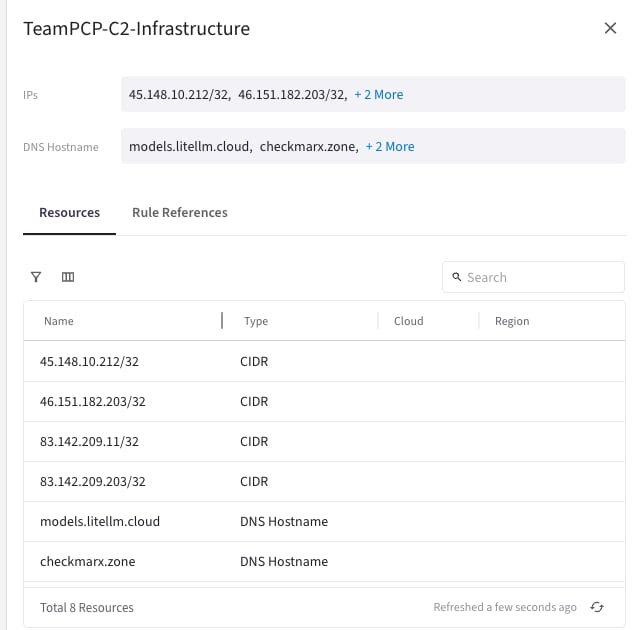
You must enter the DNS Hostname resource type as an FQDN (for example,
api.example.com). Entering just a hostname without a domain is not
supported. The FQDN can only include characters that are valid in DNS
hostnames. Wildcards are not supported.How Hostname Resolution Works
Aviatrix gateways resolve hostname SmartGroup entries proactively — not at the time traffic arrives. This means:- When a DCF policy containing a hostname SmartGroup is pushed to a gateway, the gateway immediately resolves all configured FQDNs using forward DNS (A record) lookups.
- The resolved IP addresses are installed as /32 CIDR entries in the gateway’s firewall rules.
- The gateway periodically re-resolves each FQDN before its DNS cache entry expires, keeping the firewall rules current as IP addresses change.
TTL and Refresh Behavior
The gateway respects DNS TTL (Time to Live) values from the authoritative DNS server, with the following bounds:
If a DNS server returns a TTL below 60 seconds, the gateway caches the result
for 60 seconds. If the TTL exceeds 3600 seconds, the gateway re-resolves after 1
hour regardless of the advertised TTL.
When a hostname SmartGroup is first deployed to a gateway, there is a brief
window (typically a few seconds) while the initial DNS resolution completes.
During this window, traffic to the hostname destination may not yet match the
DCF rule.
Resolution Limitations
- A records only — The gateway resolves IPv4 (A) records. IPv6 (AAAA) records are not supported.
- No CNAME chasing — If a hostname resolves to a CNAME, only the final A record addresses are used for rule enforcement. Intermediate CNAME targets are not independently tracked.
- Forward DNS only — Reverse DNS (PTR) lookups are not performed.
DNS Server Configuration
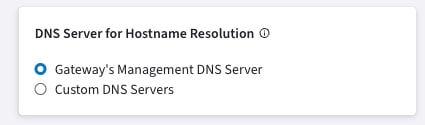
By default, hostname SmartGroup entries are resolved using each gateway’s individually configured management DNS server. You can override this with custom DNS servers that apply globally to all gateways enforcing hostname SmartGroup rules.
To configure the DNS server for hostname resolution:
- In CoPilot, go to Groups > Settings.
- In the DNS Server for Hostname Resolution card, select Custom DNS Servers.
- Enter up to 2 DNS server IP addresses.
Edge gateways use the DNS server configured in their own gateway settings and do not use the custom DNS server setting configured in Groups > Settings.
When to Use Hostname SmartGroups vs WebGroups
Hostname SmartGroups and WebGroups both let you write DCF policies using domain names, but they work differently and apply to different traffic types.Feature Availability
See Distributed Cloud Firewall Supported
Capabilities by Controller Version for the full feature matrix.
Limitations
- No wildcard support — You must enter exact FQDNs. Patterns like
*.example.comare not supported. - A records only — Only IPv4 addresses are resolved. AAAA (IPv6) records are not supported.
- Global DNS configuration — Custom DNS server settings apply to all gateways. Per-gateway or per-SmartGroup DNS configuration is not available.
- Edge gateway DNS — Edge gateways use their own gateway DNS settings and do not use the custom DNS server configured in Groups > Settings.
- Initial resolution delay — When a hostname SmartGroup is first deployed, there is a brief delay while DNS resolution completes.
AWS GuardDuty Considerations
If you use AWS GuardDuty in the same account as your Aviatrix gateways, GuardDuty may generate DNS-related findings (such asTrojan:EC2/DNSDataExfiltration or Backdoor:EC2/DenialOfService.Dns) for the
gateway instances. This is expected behavior — the Aviatrix gateway is
performing periodic DNS lookups to resolve the FQDNs configured in your hostname
SmartGroups and keep firewall rules current.
These DNS queries originate from the gateway’s elastic network interface (ENI)
and are a normal part of hostname SmartGroup enforcement.
Recommendations:
- Suppress findings for the Aviatrix gateway ENIs in GuardDuty to reduce noise.
- Use custom DNS servers — If you configure custom DNS servers for hostname resolution, the gateway queries go to your specified servers instead of the VPC default resolver, which may reduce GuardDuty findings related to VPC DNS.
Terraform Support
You can manage hostname SmartGroups using theaviatrix_smart_group resource in
the
Aviatrix Terraform Provider.
Use the fqdn key in match_expressions to specify DNS Hostname entries:
Related Topics
- Managing SmartGroups
- About WebGroups
- Distributed Cloud Firewall Overview
- Groups UI Reference (create SmartGroups, ExternalGroups, WebGroups; Groups Settings)
- DNS Server Configuration for Aviatrix Services
- DNS Server Configuration for Aviatrix Gateways
- DCF Supported Capabilities by Controller Version