

57. Field Notice
New CDN IPs Added to cdn.aviatrix.com – Action Required to Allow IPs on Edge Management Interface
Date: June 3, 2026 Severity: HighIssue Description
Aviatrix has added two new IP addresses (Hong Kong) to the FQDNcdn.aviatrix.com for the APAC region. Customers who restrict outbound access
on their Edge Management interface by IP allowlist must add these new IPs to
their firewall or security group rules to maintain uninterrupted connectivity to
Aviatrix CDN services.
New IPs added to cdn.aviatrix.com:
18.162.118.17016.162.153.248
Who is Impacted?
All Aviatrix customers who use Aviatrix Edge Gateways in the APAC region with IP-based allowlists or firewall rules on the Edge Management interface that control outbound access to external services.Symptoms
If the new CDN IPs are not allowed on the Edge Management interface, you may observe:- Edge Gateway software or image downloads from
cdn.aviatrix.comfailing or timing out, resulting in upgrade failures.
Trigger
This issue is triggered when the Edge Management interface attempts to reachcdn.aviatrix.com and DNS resolves to one of the two newly added IPs
(18.162.118.170 or 16.162.153.248), which are not yet present in the
customer’s IP allowlist.
Impact
CDN-dependent operations on the Aviatrix Edge Gateway — including software upgrades, image pulls, and CDN-hosted resource retrieval — may fail or be unavailable until the new IPs are permitted on the Edge Management interface. There is no impact to data plane traffic or existing tunnels.Actions Required to Be Taken
Customers with IP-based allowlists on their Edge Management interface must add the two new IPs before their next CDN access attempt to avoid disruption. Add the CDN IPs to the allowlist on your Edge Management interface firewall or security group rules:18.162.118.17016.162.153.248
What to Do If Impacted
If you are already experiencing upgrade failures, immediately add18.162.118.170 and 16.162.153.248 to the outbound allowlist on your Edge
Management interface.
56. Field Notice (FN-2026-AZ-001)
Azure MANA Driver Compatibility – Action Required for All Azure Gateways
Date: May 28, 2026 Field Notice Last Updated: 24 August 2026 Severity: HighUpdate, 6 July 2026: MANA long-term fix now available. The MANA-compatible
Aviatrix gateway releases are now GA: 8.0.70, 8.1.40, 8.2.20, 9.0.10, and
all subsequent releases (10.0.1 and future releases). Perform a gateway
image upgrade to the patched release for your train (8.0.x → 8.0.70, 8.1.x →
8.1.40, 8.2.x → 8.2.20, 9.0.x → 9.0.10). If you are already on 10.0.1 or a
later release, MANA support is included by default — no patch upgrade is
required. Keep the
LegacyVMNVA tag applied through the upgrade, then remove
the tag after the patched image is verified healthy. See Long-Term Fix:
MANA-Compatible Images and Upgrade
Groups for the
recommended sequence.
Additional regions announced via Azure Service Health on May 29, 2026. Tracking
ID: 5RWW-K4G.
Summary
Microsoft is rolling out MANA (Microsoft Azure Network Adapter) hardware across Azure regions starting May 26, 2026. All Aviatrix gateways running on currently shipping software may experience intermittent performance degradation if placed on MANA hardware. Aviatrix has a validated short-term fix available today and a permanent fix now available as of June 23, 2026 in gateway releases 8.0.70, 8.1.40, 8.2.20, 9.0.10, and all subsequent releases (10.0.1 and future releases).What To Do
-
Apply the
LegacyVMNVAtag now (validated by Aviatrix). Assign the built-in Azure Policy (e87a87f5-e6dd-4919-be21-abb0a4ea4630) at Management Group or Subscription scope. Set the Tag Value parameter totrue(not blank). -
Activate the tag in a maintenance window, starting with your active rollout
regions. The tag does not take effect until the VM is re-applied or
stop/deallocated/started. Schedule maintenance windows in the currently
active rollout regions (West Central US, East Asia, Norway West, Spain
Central) and re-apply immediately. Through Aviatrix’s partnership with
Microsoft, Microsoft has shared that
az vm reapplymay cause a VM reboot or redeployment on some hosts. Perform this action in a planned maintenance window. Bothreapplyand stop-deallocate-start achieve the same outcome. This field notice will be updated with additional guidance as Microsoft delivers improvements to the reapply process. - Image upgrade to the MANA-compatible release (now GA as of June 23, 2026: 8.0.70, 8.1.40, 8.2.20, 9.0.10, and all subsequent releases including 10.0.1 and future releases). Aviatrix CoPilot’s Upgrade Groups feature rolls out the upgrade fleet-wide with automatic failover and fail-back between HA pairs. No user-managed per-gateway maintenance windows are required.
Issue Description
Microsoft is progressively deploying MANA hardware, the next-generation network adapter for Azure VMs, across Azure data centers. MANA replaces the Mellanox (mlx5) SR-IOV adapters used by prior VM generations and is required for all new Azure Boost / Gen 6 SKUs. Aviatrix gateways on all currently shipping releases (8.0.x, 8.1.x, 8.2.x, 9.0.x, and earlier) are not yet MANA-compatible. Gateway VMs placed on MANA hardware may exhibit intermittent performance degradation. Gateway versions below 8.0 are End of Life and will not receive a MANA-compatible patch.Scope: Which Aviatrix Components Are Affected?
This field notice applies to all Aviatrix gateway types running on Microsoft Azure across Intel v5, V6/Cobalt 100, and V2-V4 VM families, including Transit Gateways, Spoke Gateways, Specialty Gateways, and their HA peers. See Microsoft’s VM family list for the full transition matrix. Aviatrix Controller and CoPilot instances running in Azure are not affected by this issue. This field notice applies only to Aviatrix gateway VMs.When Am I Exposed?
A gateway VM is exposed to MANA placement whenever it is provisioned, stop/deallocated and restarted, redeployed, image-upgraded, scaled, or service-healed in a MANA-enabled region. This applies whether the action is initiated by:- Azure: planned maintenance, host health events, hardware failure.
- Aviatrix Controller or CoPilot: image upgrade, scaling, HPE or BGPoLAN enable/disable.
- An Azure administrator out-of-band: manual stop/start from the portal or CLI.
LegacyVMNVA tag at subscription or management-group scope
protects every one of these paths once activated.
For live regional rollout status, monitor Azure Service Health (Tracking ID:
5RWW-K4G).
Short-Term Fix: LegacyVMNVA Opt-Out Tag
Through Aviatrix’s partnership with Microsoft, Microsoft has shared that
reapply may still cause a reboot or redeployment on some hosts and should be
performed during a planned maintenance window. Plan this as a maintenance event
for both reapply and stop-deallocate-start.
Aviatrix is actively working with Microsoft. This field notice will be updated
with additional information to reduce disruption as Microsoft delivers
improvements to the reapply process, including the forthcoming VM
impact-assessment tooling (see FAQ).
Aviatrix has independently validated the opt-out process and the efficacy of the
LegacyVMNVA tag against shipping gateway images on 8.0.60, 8.1.30, 8.2.10, and
9.0.0. The tag survives image upgrades and gateway lifecycle operations. Apply
it now.
-
Assign the Azure Policy. Apply policy ID
e87a87f5-e6dd-4919-be21-abb0a4ea4630at Management Group or Subscription scope. Set the Tag Value parameter totrue(Microsoft’s default is blank; Aviatrix requires a non-empty value). Aviatrix is on Microsoft’s recognized NVA publisher list. The policy tags Aviatrix gateway VMs automatically. -
Activate the tag on existing VMs in active rollout regions first during a
maintenance window using either:
az vm reapply(preferred; Microsoft has shared with Aviatrix that this method is intended to reduce operational impact compared with stop/deallocate/start)- Stop-deallocate-start (predictable maintenance event)
reapplydirectly. Use Azure CLI, PowerShell, REST API, or SDK for bulk execution. Once active regions are covered, schedule maintenance windows for the remaining regions ahead of Microsoft’s August 1, 2026 global cutover.
Long-Term Fix: MANA-Compatible Images and Upgrade Groups
The MANA-compatible Aviatrix gateway releases are now GA as of June 23, 2026: 8.0.70, 8.1.40, 8.2.20, 9.0.10, and all subsequent releases (10.0.1 and future releases). Perform a gateway image upgrade to the patched release for your train. If you are already on 10.0.1 or a later release, MANA support is included by default — no patch upgrade is required. The Upgrade Groups feature in Aviatrix CoPilot rolls out the upgrade fleet-wide on your behalf, with automatic failover and fail-back between HA pairs at each step. CoPilot handles ordering, health checks, and rollback. You do not need to plan per-gateway maintenance windows. Recommended upgrade sequence:- Keep the
LegacyVMNVAtag applied through the upgrade so gateways stay off MANA hardware while still running a pre-patch image. - Upgrade the gateway image to the patched release for your train using Aviatrix CoPilot Upgrade Groups.
- Verify that gateways are healthy and running the patched release.
- Remove the
LegacyVMNVAtag. After the patched image is verified healthy, remove the tag and gateways return to a fully MANA-supported configuration. Removing the tag alone does not move the gateway; areapply(az vm reapplyor stop-deallocate-start) is required for the VM to move onto MANA hardware, and whether it does so depends on SKU and region availability. Because the gateway is now on a MANA-compatible image, this transition is safe.
LegacyVMNVA opt-out tag remains a valid
alternative. Keep the tag applied and your gateways stay off MANA hardware until
you are ready to upgrade. The tag is honored through May 31, 2027.
For release availability and detailed changelogs, see the
Aviatrix Controller and Gateway Image Release Notes
.
Important Dates
Frequently Asked Questions
How can I verify if my gateway is already running on MANA hardware? Contact Aviatrix Support and reference this field notice. Support can verify the current hardware configuration of your gateways. Does theLegacyVMNVA tag protect new (greenfield) gateway deployments?
Azure Policy applies the tag at VM creation time. Aviatrix is awaiting
Microsoft’s confirmation that the tag is applied early enough in the
provisioning pipeline to influence initial host placement. This notice will be
updated once confirmed. Azure Policy remains the recommended approach today.
Reapply vs. stop-deallocate-start: which should I use?
Both methods activate the tag and produce the same outcome. Use reapply for
lower operational impact during a maintenance window. Use stop-deallocate-start
if you prefer a predictable maintenance event or if reapply fails on a
specific VM.
Through Aviatrix’s partnership with Microsoft, Microsoft has shared that
reapply is intended as an alternative to stop/deallocate/start that reduces
operational impact while achieving the same outcome, but that it may still cause
a reboot or redeployment on some hosts and should be used during planned
maintenance windows. Microsoft has not yet published dedicated reapply
documentation. Aviatrix will link to it here once it is available.
Is there tooling to determine whether reapply will reboot a specific VM
before I run it?
Through Aviatrix’s partnership with Microsoft, Microsoft has shared that two
pieces of tooling are in active development. GA dates have not been provided:
- A solution to identify VMs that may be impacted by
reapplyactions (results will be point-in-time). - A query to identify VMs that have changes staged that would cause a reboot
under
reapply.
reapply as potentially disruptive
and schedule a maintenance window. This field notice will be updated when the
tooling becomes available so you can reduce maintenance-window impact on later
region waves.
What about V6 / Cobalt 100 SKUs?
V6 SKUs, including MANA compatibility, are supported starting with release
10.0.1. Performance benchmarking for V6 SKUs is available as of release
10.1. If you are running gateways today on V2-V5 family SKUs, follow the
short-term and long-term fix guidance in this notice.
When does the LegacyVMNVA tag stop working?
May 31, 2027. All Azure gateways must be on a MANA-compatible Aviatrix release
before that date. Aviatrix strongly recommends completing the upgrade to
MANA-compatible images well in advance of May 31, 2027. Do not run the deadline
close. Aviatrix Upgrade Groups in CoPilot handles the fleet-wide rollout of the
patched images (GA June 23, 2026: 8.0.70, 8.1.40, 8.2.20, 9.0.10, and all
subsequent releases including 10.0.1 and future releases), making it
straightforward to migrate the entire fleet on your timeline rather than at the
last minute.
Are Aviatrix Controller and CoPilot affected?
No. The MANA driver update applies to the data plane only. Aviatrix Controller
and CoPilot do not run data plane functions and are not affected by this issue.
Additional Information
- Microsoft Azure MANA Overview
- MANA Support for Existing VM Sizes
- MANA NVA Opt-Out (Azure Policy)
- Azure Service Health, Tracking ID: 5RWW-K4G
Support
If you have questions about this field notice or need assistance planning your upgrade, contact Aviatrix Support:- Support Portal: support.aviatrix.com
- Documentation: docs.aviatrix.com
55. Field Notice
CoPilot Appliance Version 2 (Ubuntu 16) and Earlier – End of Software Updates
Date: 16 March 2026 Severity: HighIssue Description
CoPilot deployments running Appliance Version 1 or Appliance Version 2 are built on Ubuntu 16.04 LTS, which has reached end-of-life (EOL) with Canonical and no longer receives security patches or updates. To ensure continued access to software updates and maintain a secure, supported environment, customers running these appliance versions must migrate to CoPilot Appliance Version 3. CoPilot instances running Appliance Version 1 or Appliance Version 2 will continue to operate, but they will no longer receive future software updates once support ends. The tentative release date for CoPilot version 4.32.0 is the week of April 20, 2026.Who is impacted?
Customers running Aviatrix CoPilot on Appliance Version 2 (Ubuntu 16.04) or earlier, including Appliance Version 1. Customers can verify their CoPilot appliance version directly from the CoPilot UI. Navigate to the top-right corner of the CoPilot UI and click on the dropdown (triangle) icon next to the user/profile icon to view the appliance version details.Required Actions
Customers running CoPilot Appliance Version 1 or Appliance Version 2 must complete migration to Appliance Version 3 at the earliest, or before April 20, 2026, in order to receive CoPilot version 4.32.0 and future software updates and security fixes.Migration Instructions
To migrate your CoPilot instance to Appliance Version 3, please follow the instructions in the Aviatrix documentation: Migrate CoPilot to Appliance Version 3. We strongly recommend completing this migration prior to the CoPilot 4.32.0 release (week of April 20, 2026) to avoid disruption to future upgrade paths. If you have questions or require assistance with the migration process, please contact Aviatrix Support.- Customers who do not migrate to Appliance Version 3 before the CoPilot 4.32.0 release will remain on their current installed version.
- Customers on unmigrated appliances will not receive future software updates, security patches, or feature enhancements from Aviatrix.
Field Notice 54
CloudFormation Template Version Guidance for Aviatrix Controller High Availability in AWS
Date: 26 January 2026 Severity: MediumIssue Description
Aviatrix Engineering has identified a version compatibility issue between AWS Controller High Availability (HA) CloudFormation templates and Aviatrix Controller software versions. Using an incompatible CloudFormation template version may result in unsupported or unstable HA deployments.Who is impacted?
Customers deploying Aviatrix Controller High Availability (HA) on AWS using CloudFormation templates that are incompatible with their Controller software version. Impacted scenarios include:- Controllers running 7.1 or earlier deployed using CloudFormation template v3
- Controllers running 7.2 or later deployed using CloudFormation template v2
Required Actions
Customers must use the correct CloudFormation template version based on their Controller software version.Controllers 7.1 and Earlier
Use CloudFormation template v2: https://aviatrix-cloudformation-templates.s3.us-west-2.amazonaws.com/aviatrix-aws-existing-controller-ha.json Follow the steps below if currently deployed using template v3:- Delete the existing HA CloudFormation stack created using template v3.
- Re-deploy Controller HA using template v2.
- After upgrading the Controller to the latest 7.2 release, customers may migrate to template v4.
Controllers 7.2 and Later
Customers may use CloudFormation template v3 or later. Recommended: Use CloudFormation template v4, which includes additional security enhancements.- v3 template: https://aviatrix-cloudformation-templates.s3.us-west-2.amazonaws.com/aviatrix-aws-existing-controller-ha-v3.json
- v4 template (recommended): https://aviatrix-cloudformation-templates.s3.us-west-2.amazonaws.com/aviatrix-aws-existing-controller-ha-v4.json
- If currently deployed using template v3, upgrade directly to v4 using a
CloudFormation stack update.
- There is no requirement to wait for Controller 8.x.
- Template v4 is fully supported on Controller versions 7.2 and above.
- Controller HA CloudFormation templates v3 and earlier are deprecated, except where version requirements mandate v2 for Controllers 7.1 and earlier.
- Documentation under Controller HA for AWS has been updated to reflect correct template usage.
- Template v4 resolves an issue in v3 where the Lambda function URL was publicly accessible by restricting access to VPC internal endpoints.
53. Field Notice
Aviatrix Controllers, Gateways and CoPilot in Azure - Basic SKU Public IP Address discontinuation by Azure
Date: 16 July 2025 Severity: HighIssue Description
Azure announced the retirement of Basic SKU public IP addresses will occur on September 30, 2025. To ensure uninterrupted service, upgrade to Standard SKU public IP addresses. More details can be found in Azure’s official announcement, see Azure Updates.Who is impacted?
All customers using the Aviatrix Controller, Gateways, or CoPilot UI in Azure using Basic SKU public IP addresses.Required Actions
Upgrade your Basic SKU public IP addresses to Standard SKU IP addresses on your Aviatrix Controller, Gateways, or CoPilot UI in Azure by September 30, 2025, to avoid service disruption.Aviatrix Controller with Basic SKU public IP address in Azure
- Stop the Aviatrix Controller VM. This is a mandatory step to avoid traffic disruption. From the Azure portal, stop the Aviatrix Controller VM to prevent traffic disruption.
- Upgrade Public IP Address. Follow Azure’s instructions to upgrade the Basic SKU public IP address to a Standard SKU public IP address. For more information, see Upgrade a public IP address using the Azure portal, Azure CLI, or Azure PowerShell.
- Associate Public IP Address with Controller VM. After upgrading, associate the new Standard SKU public IP address with the Aviatrix Controller VM.
- Start the Aviatrix Controller VM. After the previous steps are completed, start the Aviatrix Controller VM from the Azure portal.
Any gateway deployed in Azure after June 2020 including releases v6.0, v6.1
are deployed by Aviatrix with Standard SKU IP addresses. If your gateway has
been deployed before June 2020, you might either have to rebuild the gateway
or perform an image_upgrade of the Gateway while Aviatrix Controller is
running version 7.2.5090 or 8.0.0 and the software will automatically upgrade
the public IP address SKU from Basic to Standard.
52. Field Notice
IPSec Tunnel Flaps on Aviatrix Transit Gateways with High Tunnel Count (AVX-62067)
Date: 10 July 2025 Severity: HighIssue Description
Aviatrix Transit Gateways with a large number of tunnels and running for a long time could encounter an issue where the IPSec process becomes unresponsive leading to all IPsec tunnels going into a DOWN state. The cause of this is an internal counter reaching its maximum value and overflowing. To recover, the transit gateway needs to be rebooted. While it is not possible to specify the exact number of tunnels and length of time it would take for the internal counter to overflow, the few customers who encountered this issue had greater than 200 IPsec tunnels and had an uptime of three to four months on their transit gateways before encountering this issue. The number of IPsec tunnels on the transit gateway can be viewed in the Copilot UI under Diagnostics > Cloud Routes > Gateway Routes. In the Gateway Routes window, search for your transit gateways and check the Tunnels count.Who is impacted?
Customers who have Transit Gateways with large numbers of tunnels and are running one of the following Controller versions:- 7.2.5012, 7.2.4996, 7.2.4820
- 7.1.4191, 7.1.4183, 7.1.4139, 7.1.4105, 7.1.3958
Symptoms
- All IPsec tunnels on the Transit Gateway will be in a DOWN state.
- The IPsec process becomes unresponsive.
Triggers
- High tunnel volume environments with aggressive rekeying or frequent status checks.
- Internal counter overflow when reaching the maximum value (2^32), causing a freeze in IPsec activity.
Required Actions
Customers running the affected versions and having greater than 200 IPSec tunnels, must perform all the following:- Upgrade Software to one of the software releases with the fix which are 7.1.4208, 7.2.5090 and 8.0.0 . Upgrading directly to 8.0.0 requires Aviatrix Support assistance.
- Perform a transit gateway image upgrade.
How to Recover if Impacted
To recover from the unresponsive IPsec process, STOP and then START the impacted Aviatrix Transit Gateways.51. Field Notice
Date: 13 February 2025Severity
HighWho is impacted?
All Aviatrix customers with:- Azure Gateways running versions lower than 7.1.4101, regardless of where the Controller and CoPilot are hosted.
- Controller or CoPilot in Azure running Controller versions lower than 7.1.4101.
- CoPilot appliance versions lower than 3.
Issue Description
Microsoft Azure has flagged images associated with Aviatrix Controller and Gateway versions lower than 7.1.4101 and CoPilot appliance versions lower than version 3 as having security vulnerabilities due to using an operating system that has reached end-of-support. Microsoft has indicated plans to permanently remove these older images from availability. Once these images are removed from Azure, they cannot be reinstated. If you do not upgrade to Controller and Gateway version 7.1.4101 or greater, and CoPilot appliance version 3 or greater, you risk being unable to maintain or upgrade your instances.Symptoms
New Gateway deployments or image upgrades below Controller and Gateway version 7.1.4101 will fail. Impact: If you do not upgrade to Controller and Gateways versions 7.1.4101 or greater and Copilot appliance versions 3 or greater before Azure removes older images may face severe operational disruptions, including being unable to upgrade or maintain their deployments.Impact
Traffic connectivity will be disrupted, as tunnels on the gateway that failed to resize are not restored.Workaround
There is no viable workaround once Azure removes the older images. You must proactively upgrade your instances to avoid potential service disruptions.Recommendations
- Immediate Action: All impacted customers are advised to upgrade your Controller and Gateway instances to version 7.1.4101 or greater and CoPilot appliances to version 3 or greater.
- Target Deadline: Complete the upgrade as soon as possible and no later than Oct 31st, 2025 to ensure a secure and supported environment.
- Important Note: Although the images associated with version 7.1.4101 include security patches, Microsoft Azure may still classify them as insecure and proceed with their removal. Therefore, upgrading to versions higher than 7.1.4101 is essential to avoid being stranded.
50. Field Notice
Date: 7 January 2025Severity
HighIssue Description
CVE-2024-50603 - Critical Vulnerability Security Patch.Recommendations
Please review CVE-2024-50603 and take action as described in Remote Code Execution Vulnerability in Aviatrix Controllers . If you have any questions, please contact the Aviatrix Support team.49. Field Notice
Date: 6 November 2024Severity
ModerateWho is impacted?
Customers using Controller versions lower than 7.1.4105 and attempting to resize their HPE-enabled Gateways.Issue Description
When attempting to resize a gateway on anAviatrix Controller running versions older (lower) than 7.1.4105 with HPE enabled, the controller will fail to restore peering tunnels if a resize operation fails. For example, due to insufficient CSP resources to support the resize.Symptoms
The Aviatrix Controller will display a notification indicating that the resize operation failed, along with error messages. As a result, routes to the peer will be missing from the gateway’s routing table.Impact
Traffic connectivity will be disrupted, as tunnels on the gateway that failed to resize are not restored.Trigger
Resizing of HPE enabled gateways. This issue can occur when running a Controller version older (lower) than 7.1.4105 with HPE enabled gateways and the gateway resize fails due to any errors, such as a CSP resource issue, not enough IPs available, etc.Workaround
No workaround available. Contact the Aviatrix Support team prior to performing a Gateway resize activity if you are running a release that is impacted.Recommendations
Contact the Aviatrix Support team prior to performing a Gateway resize activity if you are running a release that is impacted. If you have any further questions, please contact the Aviatrix Support team.48. Field Notice
Date: 1 August 2024Attention: Deprecation of V1 Controller API
Who is impacted: This deprecation notice is only relevant to users who directly consume the Aviatrix Controller API. Terraform and UI usage is not affected. The V1 Controller API is being deprecated with the announcement of this field notice, and it will be removed with the release of Controller version 8.0 expected early in 2025. You can find out if you are using the V1 Controller API by searching for “https://<controller_ip>/v1/api/” in your configuration.Action Required
- Adopt V2 API Before Upgrading: Anyone currently using the V1 API should transition to the V2 API before upgrading to Controller v8.0 to ensure uninterrupted service.
- V2 API Availability: The V2 API is already available for organizations that are running Controller version 7.0 or later, and we encourage you to start the migration process as soon as possible.
Support and Information
- Migration method: The V2 API provides a superset of the V1 API capabilities published in the Postman collection, which should make the migration relatively straightforward. The migration can generally be achieved by changing the base URL from https://<controller_ip>/v1/api/ to https://<controller_ip>/v2/api/.
- Testing and Reporting Issues: We recommend thoroughly testing your integration with the V2 API as part of your migration and reporting any issues to the Aviatrix Support team promptly.
- API Documentation: For access to the V1 and V2 API Postman collections, please contact the Aviatrix Support team.
- Migration Support: For further information and assistance regarding the V2 API, please reach out to the Aviatrix Support team.
- Continued Use of V1 API: You can continue using the V1 API until you are ready to upgrade to Controller version 8.0, but you must migrate to API V2 before upgrading to Controller version 8.0.
- V1 API Availability on 7.2: The V1 API will remain available on Controller version 7.2 and will be supported until version 7.2 reaches its end of support cycle.
Migrating from Controller API V1 to V2
When migrating from Controller API V1 to API V2, in most instances there is a direct equivalent API operation in V2 and simply changing the base URL from /v1/ to /v2/ is sufficient for a successful migration. There are a few exceptions where there is no equivalent V2 API operation. In some cases, there is no direct equivalent operation available. In other cases, a different operation must be used to achieve the same outcome. These exceptions are listed in the table below. Changed Operation Exceptions47. Field Notice
Date: 27 June 2024Advisory: Explore capabilities with Aviatrix CoPilot
Aviatrix CoPilot offers many features to simplify Day-0 and Day-2 operations, including:- Automation of Controller Migration to latest image.
- Improved Gateway Management Page with the ability to download gateway configuration details and metrics (CPU and memory usage) in .csv or .xlsx format.
- The Upgrade Plan & Upgrade Groups feature allows you to better plan gateway upgrades based on Region, Cloud or Environment, etc.
- Simplification of Spoke & Transit Gateway deployment with fewer steps.
- Up to 15 high availability (HA) spoke gateway instances for each Spoke Gateway.
Spoke Gateways with HA enabled do not support BGP, Site2Cloud, SNAT, DNAT, or
FQDN.
- External Monitoring with the Metrics and Status APIs allows you to retrieve network metric and status data across your Aviatrix data plane for integration with third-party tools for data analysis and visualization of the performance and health of your Aviatrix-managed resources.
- Practical and useful tools to view Gateway Performance and to configure Alert Notifications for Gateway health.
46. Field Notice
Date: 02 Nov 2023, revised 26 June 2024Issue Description:
Extension of End-of-Support and End-of-Life Dates for Aviatrix Software Releases
To better serve our customers, Aviatrix has decided to provide a one-time extension to the End-of-Support (EOS) and End-of-Life (EOL) dates for Controllers running release 6.9, 7.0, and 7.1. Related to this extension, we will also be releasing an additional patch for releases 6.9 and 7.0 before they reach EOL. This patch will provide extended time outside of the 2023 holiday window to support our customers in upgrading to our latest releases. The previous EOS/EOL timeline was as follows:
The updated EOS/EOL Timeframe is as follows:
* Dates have been adjusted by this Field Notice.
** 7.1 EOL has been deferred and will be announced upon the
availability of our next major release. After 7.1 EOL Aviatrix will provide at
least an additional 6 months of support before EOS.
Always reference the Aviatrix EOS/EOL policy for the most up-to-date
information. The EOS/EOL policy is
here.
For any clarifications on this Field Notice or for upgrade assistance, please
contact Aviatrix Support.
45. Field Notice
Date: 28 October 2023 Severity: HighImage upgrade and new gateway deployment fails.
A gateway state on an Aviatrix Controller might change to “Config_fail” when it is created or just after the image is upgraded. This could occur if the setup had previously applied a patch named “Remove unnecessary packages from gateway” under the Controller’s Software patches section. This issue does not always occur in all regions and clouds, but out of an abundance of caution we recommend all users who have applied the “Remove unnecessary packages from gateway” patch take action.What is the impact?
Customers who applied the “Remove unnecessary packages from gateway” patch need to update the patches before deploying or upgrading gateways. Otherwise, the gateways might move into a “Config_fail” state.Who is impacted?
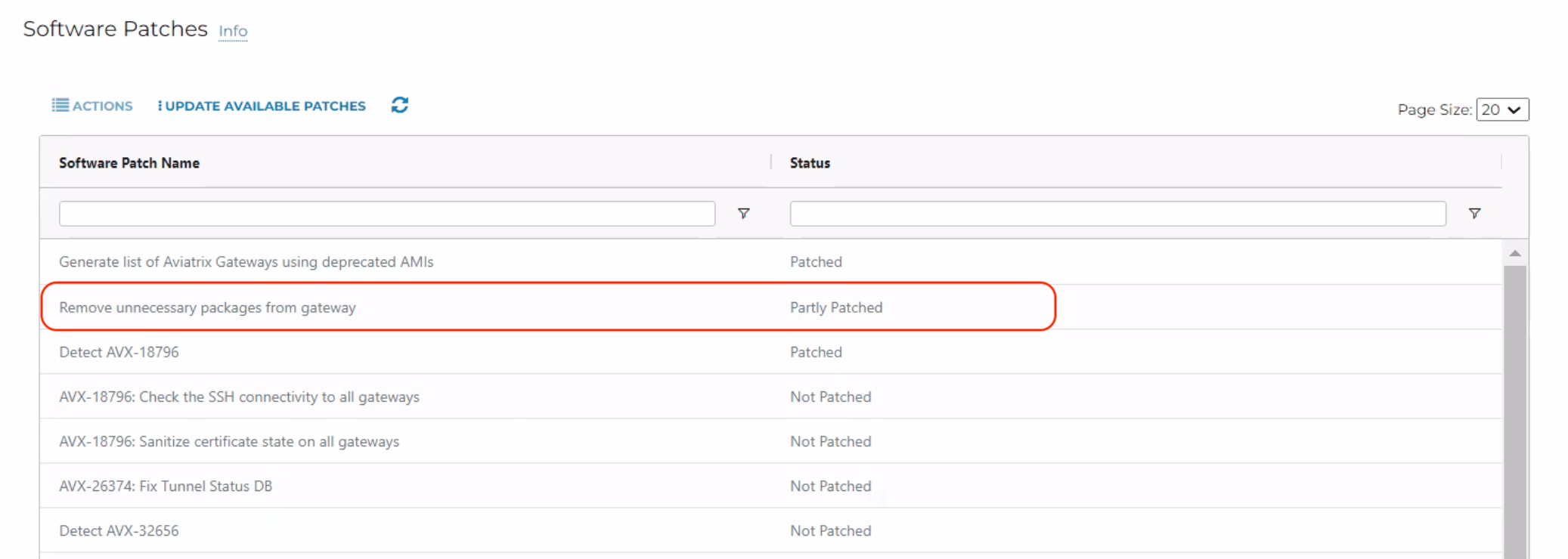
To encounter this problem, the below conditions should be met: The “Remove unnecessary packages from gateway” patch should show as Patched or Partly Patched on the Controller. To verify the status, go to Aviatrix Controller > Settings > Maintenance > Software Patches.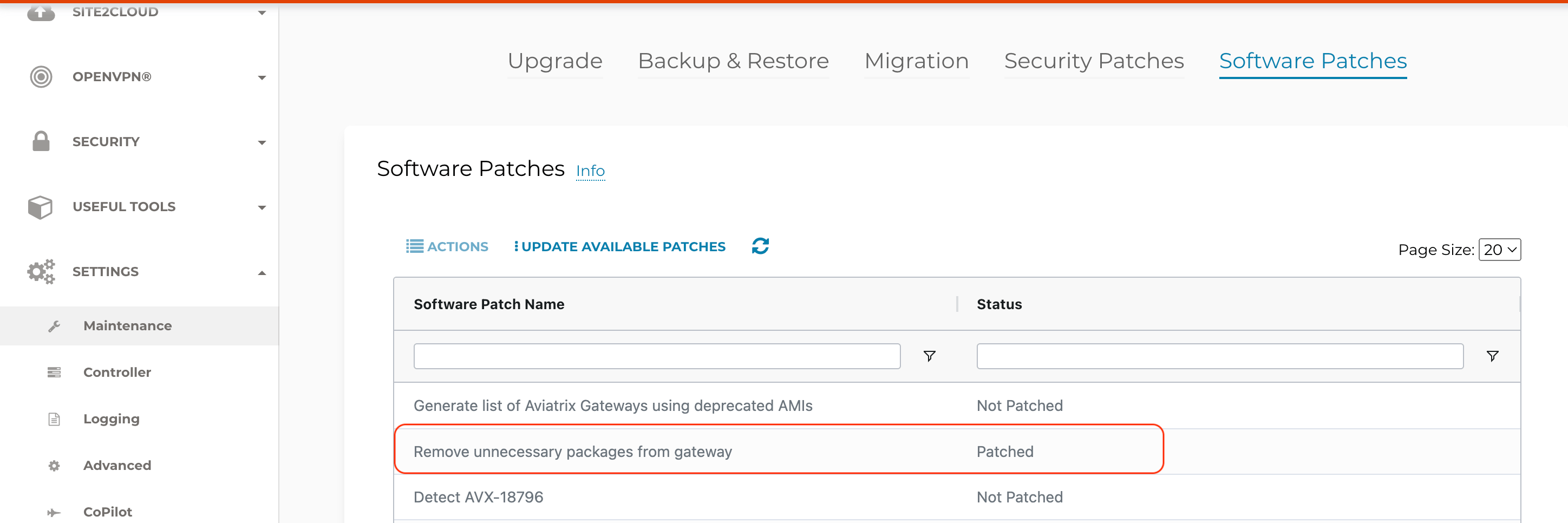
What is the recommendation?
Aviatrix Systems has updated the patch, and it is now available as a Software Patch.How to detect the issue?
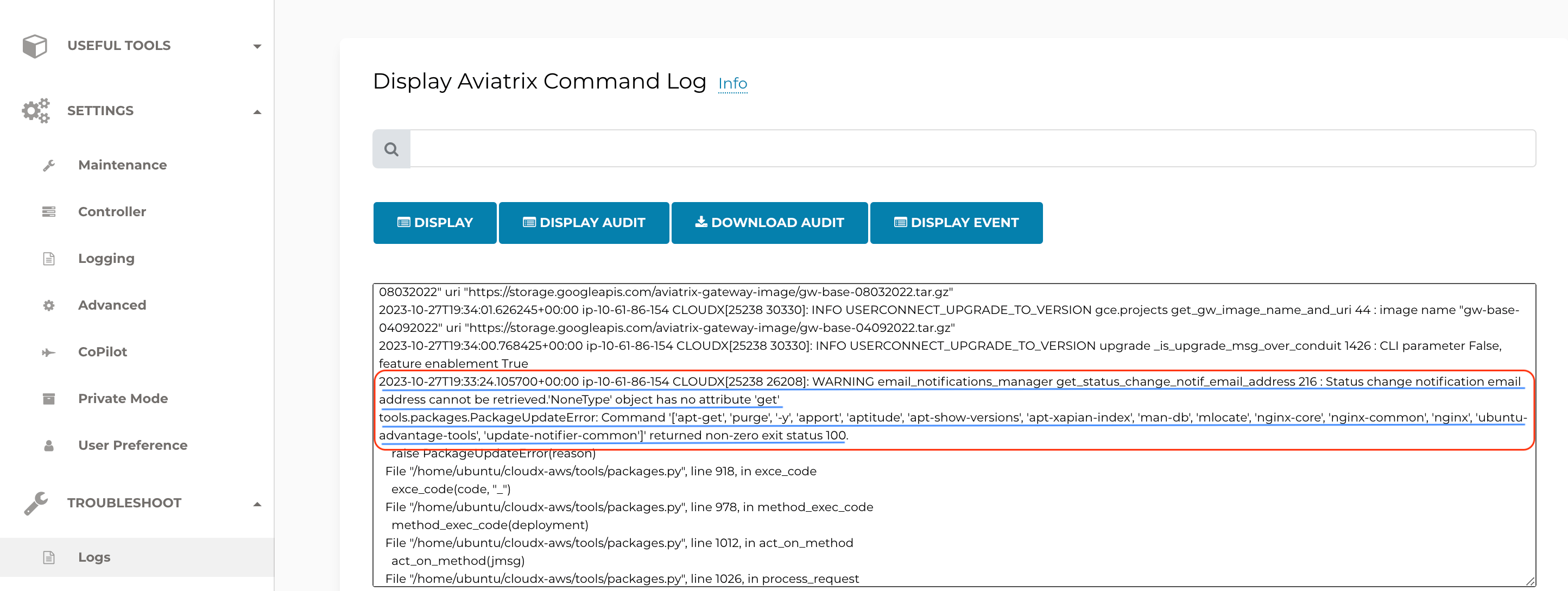
The gateway will display the config_fail state in the gateway page of the Controller: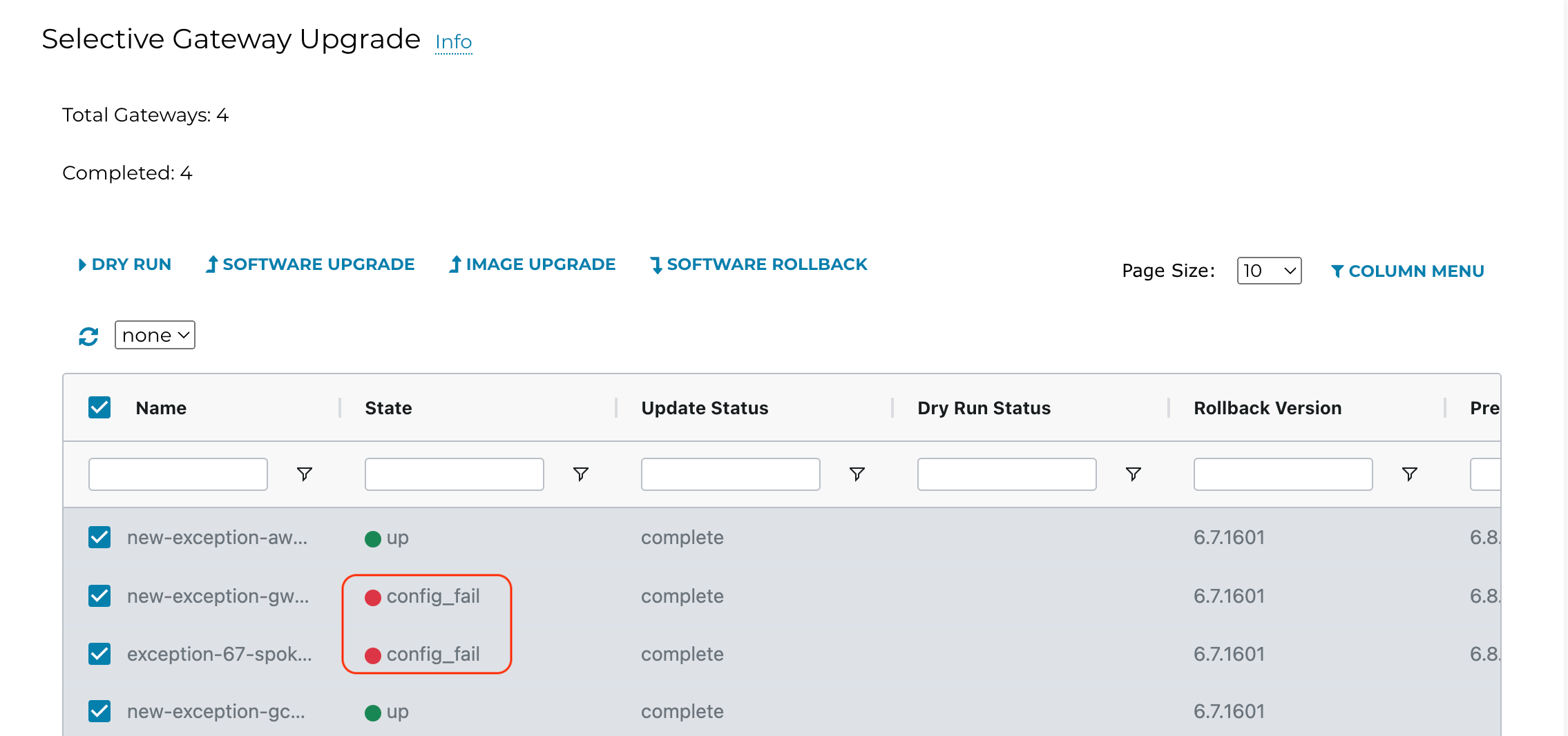
How to fix and avoid the issue?
Aviatrix has updated the “Remove unnecessary packages from gateway” patch.- Prior to performing an image upgrade or deploying a gateway in the current release, please go to Aviatrix Controller > Settings > Maintenance > Software Patches and click on UPDATE AVAILABLE PATCHES. Once the patches are updated, a gateway image upgrade or gateway deployment can be performed. The update of the available patches is required to be done one time per Controller unless a Controller upgrade or a Controller migration is performed.
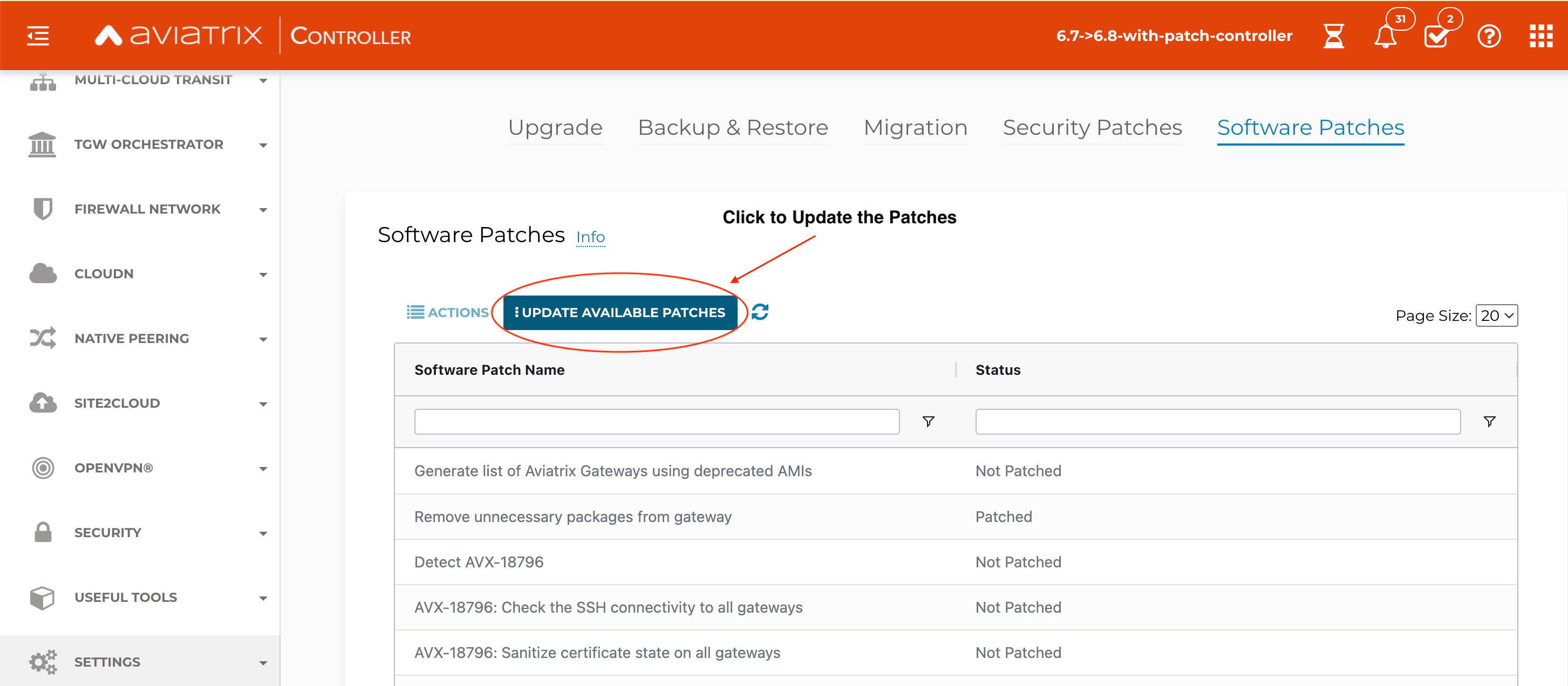
- Whenever a Controller software upgrade (Platform Upgrade) is performed, you are required to Update Available Patches again before performing an image upgrade or gateway deployment. Please go to Aviatrix Controller > Settings > Maintenance > Software Patches and click on UPDATE AVAILABLE PATCHES.
- Whenever a Controller Migration is performed, once the backup restore completes on the new Controller and all gateways are connected to it, you are required to Update Available Patches again before performing an image upgrade or gateway deployment. Please go to Aviatrix Controller > Settings > Maintenance > Software Patches and click on UPDATE AVAILABLE PATCHES.
How to fix the issue if you have already hit it.
Perform Step 1 in the previous How to fix and avoid the issue section, then perform a gateway image upgrade.44. Field Notice
Date: 25 October 2023 Who is impacted: Customers modifying rules in the Egress FQDN Filtering featureIssue Description:
A critical issue identified within the Aviatrix Controller may impact your rule modifications in the Egress FQDN Filtering feature. In versions 7.1.1710, 7.1.1794, and 7.1.1906, when you attempt to edit an existing FQDN Egress rule under a specific tag and click Save and Update, the Controller removes other rules with the same tag. This unexpected behavior can lead to an outage that may impact your business operations.Workaround
To avoid encountering this issue, we recommend adding or deleting rules instead of modifying existing rules. If you do need to modify an existing rule, use the following workaround:- Export the rules.
- Modify the rules as needed in the text file.
- Make sure no filters are in use in the Edit screen for the rules. Then, import the file with the modified rules.
- Click Save and Update.