> ## Documentation Index
> Fetch the complete documentation index at: https://docs.aviatrix.com/llms.txt
> Use this file to discover all available pages before exploring further.
# Transparent DCF Protection with AWS Transit Gateway
> Aviatrix Distributed Cloud Firewall inspects East-West and egress traffic across AWS spoke VPCs without modifying the existing AWS Transit Gateway architecture.
## Overview
Transparent DCF Protection with AWS Transit Gateway (also called
Bump-in-the-Wire, or BITW) lets Aviatrix Distributed Cloud Firewall (DCF)
inspect East-West and egress traffic across AWS spoke VPCs without changing the
existing AWS Transit Gateway architecture. Aviatrix spoke gateways are deployed
inside the user's VPCs and inserted into the traffic path through automated
route programming. There is no Transit Gateway replacement, no re-IP, and no
downtime.
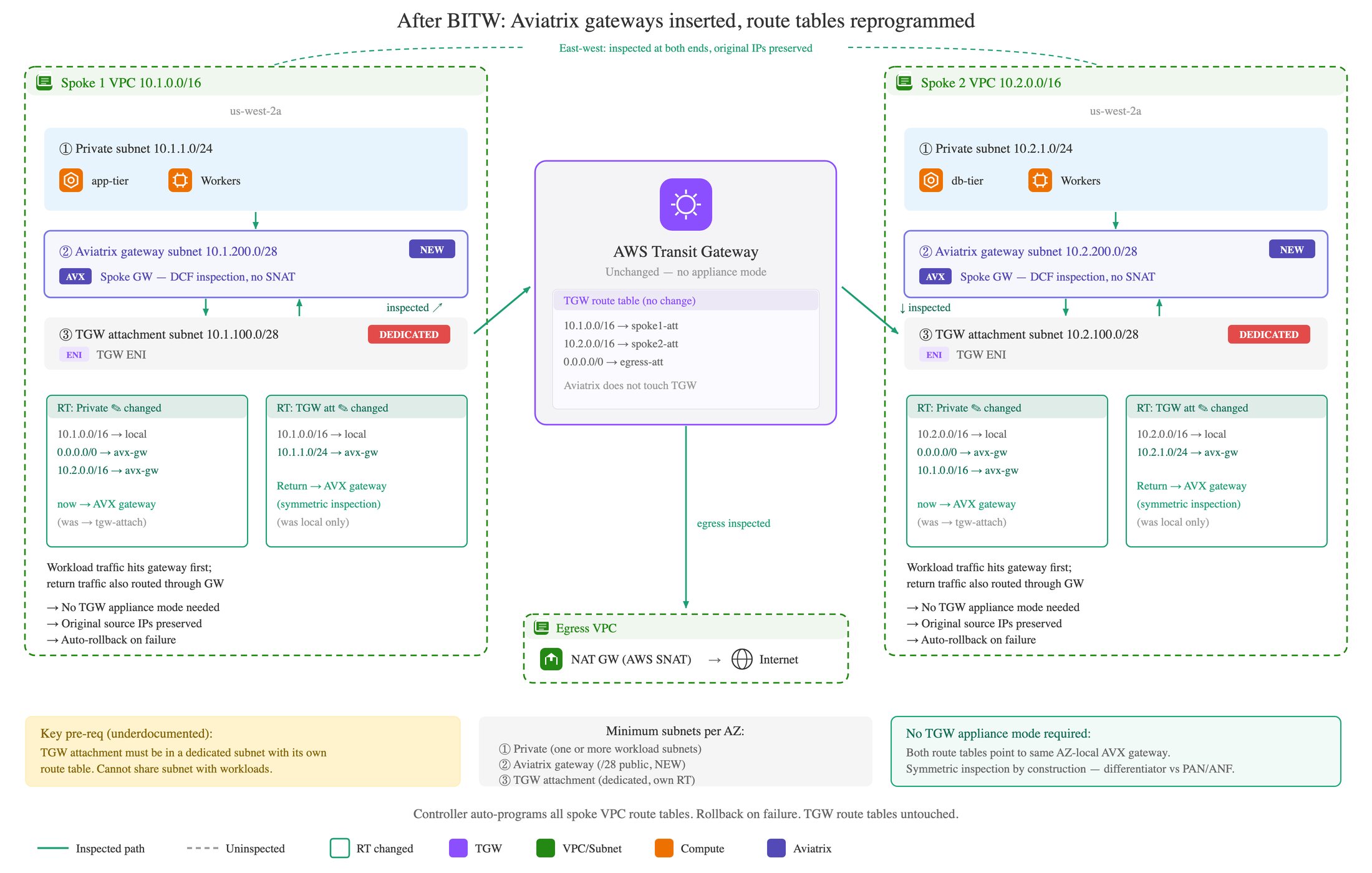
The Aviatrix Controller programs two sets of route tables in each enrolled spoke
VPC:
| Route table | Effect |
| ---------------------------------- | ----------------------------------------------------------------------------------------------------------------------------------------------------------------------- |
| Private subnet route tables | The default route is pointed to the Aviatrix spoke gateway ENI in the same Availability Zone instead of the TGW attachment, so workload traffic hits the gateway first. |
| TGW attachment subnet route tables | Return traffic from the TGW is sent back through the gateway, so traffic is inspected symmetrically. |
Because the TGW keeps routing context and symmetric flow is enforced at the
attachment level, the Aviatrix gateway does not SNAT inspected traffic. The
original source IP is preserved in both directions, so security policies and
logs see the actual workload IPs, not the gateway address. IP-based application
controls (auth, rate-limiting, geo-fencing) keep working.
In 9.0, BITW also supports selective egress NAT. The Controller analyzes spoke
VPC route tables to find which internet-bound traffic needs NAT, so operators no
longer have to maintain large internet CIDR block lists. This works across three
or more Availability Zones and supports East-West inspection and egress
inspection at the same time.
The AWS NAT Gateway in your egress VPC continues to perform AWS SNAT to its
Elastic IP for internet-bound flows. That is expected AWS behavior; the
Aviatrix gateway itself does not SNAT.
## Prerequisites
* Aviatrix Controller 9.0 or later.
* Gateway software 9.0 or later.
* An AWS account onboarded to the Aviatrix Controller.
* An existing user-managed AWS Transit Gateway with the spoke VPCs already
attached.
* Aviatrix spoke gateways deployed in each spoke VPC you want to enroll for
inspection.
* A dedicated public subnet of at least `/28` in each enrolled spoke VPC and
Availability Zone for the Aviatrix spoke gateway. AWS reserves 5 addresses per
subnet, so a `/28` gives 11 usable addresses (one gateway plus headroom).
* A dedicated TGW attachment subnet of at least `/28` in each enrolled spoke VPC
and Availability Zone. The TGW attachment ENI must reside in this subnet, and
the subnet must have its own route table. It cannot share a subnet or route
table with workloads, because the Controller programs return-path routes on
this route table to direct traffic through the Aviatrix gateway for symmetric
inspection. See
[Subnet Layout Per Availability Zone](#subnet-layout-per-availability-zone).
* IAM permissions to modify EC2 route tables and security group ingress rules in
the enrolled VPCs.
* DCF policy already configured at the appropriate scope (see
DCF Overview
).
### Subnet Layout Per Availability Zone
Each enrolled spoke VPC must have at least three distinct subnet tiers in every
Availability Zone where you want inspection. Two of the tiers are dedicated
Aviatrix requirements; the third covers your existing workloads.
| Subnet tier | Minimum size | Purpose | Requirement |
| ------------------------- | ------------- | --------------------------------------------------------------- | ----------------------------------------------------------------------------------------------------------------------------- |
| Workload (private) subnet | Existing size | Hosts your application workloads. A VPC may have more than one. | Existing; the Controller updates its route table to send the default route to the Aviatrix gateway. |
| Aviatrix gateway subnet | `/28` public | Hosts the Aviatrix spoke gateway ENI. | New. Must be dedicated to the gateway and not shared with workloads. |
| TGW attachment subnet | `/28` | Hosts the TGW attachment ENI. | Dedicated. Must have its own route table so the Controller can program return-path routes without affecting workload routing. |
Workload subnets can vary in number and size to fit your applications. The
Aviatrix gateway subnet and the TGW attachment subnet must each be dedicated,
separate from workload subnets, and separate from each other.
## How It Works
### Symmetric Inspection without SNAT
Stateful firewall inspection requires both directions of a flow to traverse the
same firewall instance. AWS TGW preserves routing context across attachments,
and Transparent DCF Protection programs both the private subnet route tables and
the attachment subnet route tables in each spoke VPC. As a result, outbound and
return traffic land on the same Aviatrix gateway in the same Availability Zone,
so the gateway can inspect statefully without doing SNAT.
### Controller Orchestration
When you enable Transparent DCF Protection on a spoke VPC, the Controller runs
the following orchestration. If any step fails, all changes are rolled back
automatically.
1. Validates that Aviatrix spoke gateways are deployed in the VPC and eligible
for traffic inspection.
2. Classifies each VPC route table as a private subnet route table, a TGW
attachment subnet route table, or a gateway subnet route table.
3. Updates private subnet route tables so the default route points to the
AZ-aligned Aviatrix spoke gateway instead of the TGW attachment.
4. Updates TGW attachment subnet route tables so return traffic from the TGW
flows back through the spoke gateway.
5. Adds gateway route table entries so the gateway can forward traffic to
workload destinations.
6. Adds gateway security group ingress rules for the workload CIDRs detected in
the private route tables.
To change which route tables are enrolled later, resubmit the request. The
Controller computes the delta and applies only the necessary changes without
disrupting existing inspection routes.
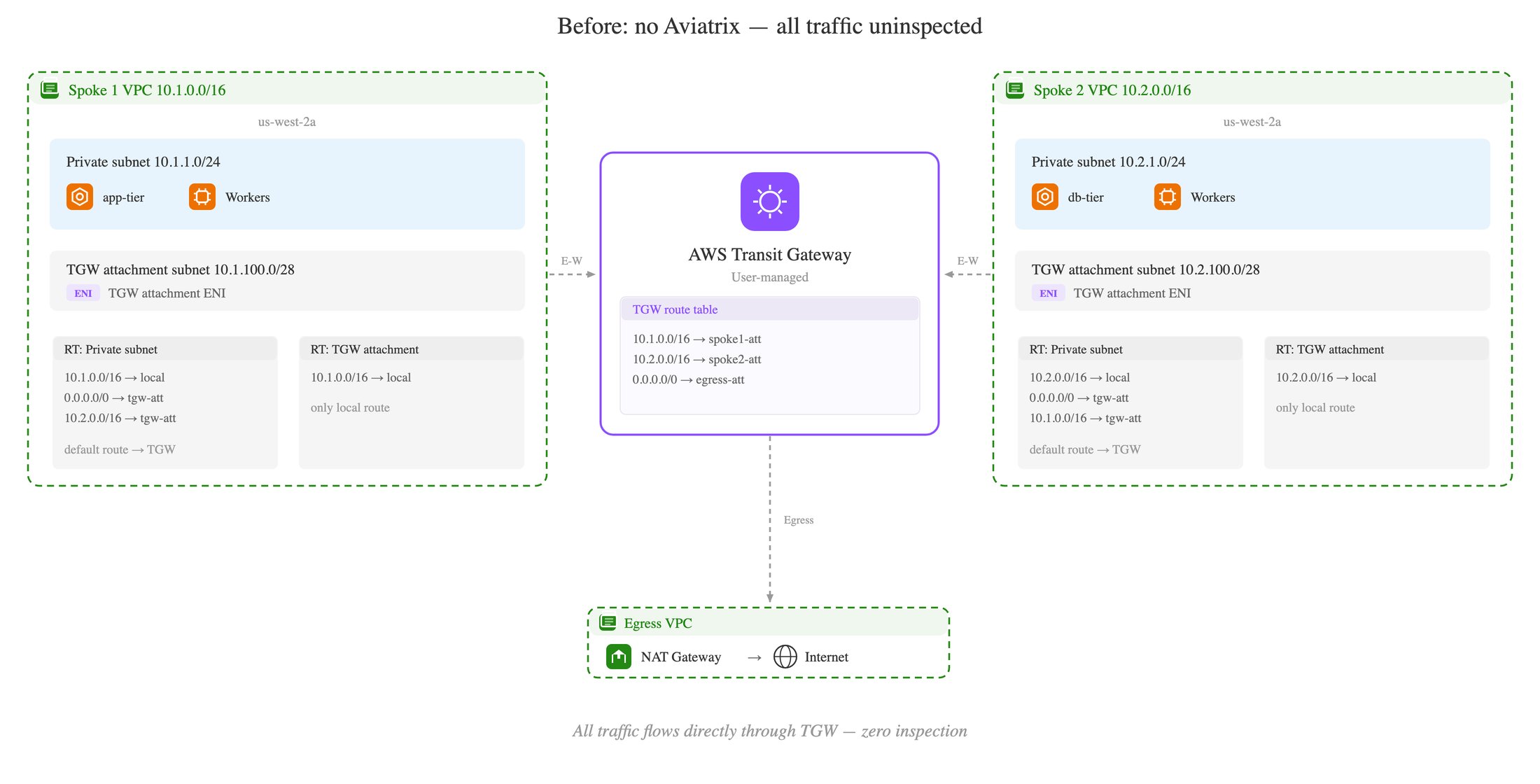
#### Route Table Changes: Before and After
Use the following comparison to validate a spoke VPC's route tables before
enabling Transparent DCF Protection and to verify the Controller's programming
after enablement.
| Route table | Entry | Before | After |
| ---------------------------- | ----------------------------------- | -------------- | ------------------------------------------------ |
| Private (workload) subnet RT | Default route (`0.0.0.0/0`) | TGW attachment | Aviatrix gateway ENI (AZ-aligned) |
| Private (workload) subnet RT | Cross-spoke CIDRs | TGW attachment | Aviatrix gateway ENI (AZ-aligned) |
| TGW attachment subnet RT | Workload subnet CIDRs (return path) | Not present | Aviatrix gateway ENI (AZ-aligned) |
| Aviatrix gateway subnet RT | Workload destination CIDRs | Not present | Local / next-hop entries added by the Controller |
The Controller preserves any existing routes it does not manage. Only the
entries above are added or updated; other routes on the same tables are left in
place.
### Per-VPC Granularity
Transparent DCF Protection is enabled per-VPC. VPCs attached to the same TGW
that are not enrolled keep forwarding traffic unchanged.
### Default Route Table Selection
By default, every route table in the spoke VPC whose next hop is the TGW
attachment is enrolled. All TGW-attached subnets in the spoke VPC are inspected
at the same time. To enroll only a subset of the route tables, customize the
selection during enablement.
### Traffic Paths
| Scenario | Before Transparent DCF Protection | After Transparent DCF Protection |
| ---------------------------------- | ---------------------------------------------------------------- | ------------------------------------------------------------------------------------------------------------------------------------------------------------------------------------------- |
| East-West (Spoke A → Spoke B) | Workload → TGW → Spoke B workload | Workload → Aviatrix gateway in Spoke A (inspected, no SNAT) → TGW → Aviatrix gateway in Spoke B (inspected, no SNAT) → Spoke B workload. The destination sees the original spoke source IP. |
| Internet egress (Spoke → Internet) | Workload → TGW → centralized egress VPC → NAT Gateway → Internet | Workload → Aviatrix gateway (inspected, no SNAT) → TGW → centralized egress VPC → NAT Gateway (AWS SNAT to Elastic IP) → Internet |
 ### Selective Egress NAT
When egress NAT is enabled, the Controller analyzes each enrolled VPC's route
tables to find which internet-bound CIDRs need NAT, distributes NAT
responsibilities across the spoke gateways in the VPC for even per-AZ load, and
programs gateway-level NAT for the selected CIDRs. This replaces the older
pattern of maintaining a manual list of public CIDRs and works across three or
more Availability Zones without the cross-AZ NAT cost.
### Automatic Failover
If a spoke gateway becomes unhealthy or enters maintenance, the Controller
restores the affected route tables to their original TGW attachment next-hop
entries. Traffic resumes flowing without inspection until the gateway recovers,
at which point the Controller re-applies the inspection routes.
## Best Practices
### Gateway Subnet Sizing
Deploy each Aviatrix spoke gateway in a dedicated public subnet of at least
`/28` in each Availability Zone where you want inspection. Do not co-locate the
gateway with workload ENIs.
### Confirm Subnets Need Inspection
Confirm that all subnets selected for inspection actually need inspection. If a
subnet hosts workloads that should bypass the gateway (for example, monitoring
agents that talk to a private endpoint by VPC peering), exclude its route table
from the enrollment.
## Limitations
* AWS only. Transparent DCF Protection is supported on AWS spoke VPCs in 9.0.
Azure and GCP are not supported.
* User-managed Transit Gateway required. Aviatrix does not modify TGW route
tables; only spoke VPC route tables are reprogrammed.
* No Terraform support in 9.0.
* Brief unprotected window during enablement. While the Controller updates route
tables, in-flight flows take the original transit path and are not inspected.
* Internet egress NAT is performed by the AWS NAT Gateway. The Aviatrix gateway
does not SNAT inspected traffic; AWS SNAT to the NAT Gateway's Elastic IP is
unchanged.
## Related Topics
* DCF Overview
* DCF Settings
### Selective Egress NAT
When egress NAT is enabled, the Controller analyzes each enrolled VPC's route
tables to find which internet-bound CIDRs need NAT, distributes NAT
responsibilities across the spoke gateways in the VPC for even per-AZ load, and
programs gateway-level NAT for the selected CIDRs. This replaces the older
pattern of maintaining a manual list of public CIDRs and works across three or
more Availability Zones without the cross-AZ NAT cost.
### Automatic Failover
If a spoke gateway becomes unhealthy or enters maintenance, the Controller
restores the affected route tables to their original TGW attachment next-hop
entries. Traffic resumes flowing without inspection until the gateway recovers,
at which point the Controller re-applies the inspection routes.
## Best Practices
### Gateway Subnet Sizing
Deploy each Aviatrix spoke gateway in a dedicated public subnet of at least
`/28` in each Availability Zone where you want inspection. Do not co-locate the
gateway with workload ENIs.
### Confirm Subnets Need Inspection
Confirm that all subnets selected for inspection actually need inspection. If a
subnet hosts workloads that should bypass the gateway (for example, monitoring
agents that talk to a private endpoint by VPC peering), exclude its route table
from the enrollment.
## Limitations
* AWS only. Transparent DCF Protection is supported on AWS spoke VPCs in 9.0.
Azure and GCP are not supported.
* User-managed Transit Gateway required. Aviatrix does not modify TGW route
tables; only spoke VPC route tables are reprogrammed.
* No Terraform support in 9.0.
* Brief unprotected window during enablement. While the Controller updates route
tables, in-flight flows take the original transit path and are not inspected.
* Internet egress NAT is performed by the AWS NAT Gateway. The Aviatrix gateway
does not SNAT inspected traffic; AWS SNAT to the NAT Gateway's Elastic IP is
unchanged.
## Related Topics
* DCF Overview
* DCF Settings