> ## Documentation Index
> Fetch the complete documentation index at: https://docs.aviatrix.com/llms.txt
> Use this file to discover all available pages before exploring further.
# Aviatrix UserVPN FAQ
> Aviatrix's VPN Client supports SAML authentication from the VPN client itself and SAML redirection. You can use the Aviatrix VPN Client to authenticate against an IdP (for example, Okta and Azure AD).
## When should I use the Aviatrix VPN Client?
Aviatrix's VPN Client supports SAML
authentication from the VPN client itself and SAML redirection. You can use the
Aviatrix VPN Client to authenticate against an IdP (for example, Okta and Azure
AD).
If you do not need to use SAML and want to use a different authentication type,
you can use a different VPN client such as Tunnelblick.
## Are multiple VPN configuration profiles supported by the Aviatrix VPN client?
Note that this is about the UserVPN configuration file that is installed on end
user machines.
Aviatrix's VPN Client allows you to load
and switch between one or more VPN profiles.
Load multiple configurations:
1. Open the client.
2. Click **Advanced**.
3. Select the **Profile** tab.
4. Click **Add**.
5. Enter a name for the new profile.
6. Select the configuration file.
Switch to a different configuration:
1. Open the client.
2. Click **Connect** button. A dropdown menu appears.
3. Select the profile from the list.
## How can I avoid managing multiple VPN user certificates?
If you have multiple VPC/VNets, do not launch a VPN gateway in each VPC/VNet and
create VPN users, as that will create multiple .ovpn certificates. Instead,
select a design pattern from UserVPN
Designs.
## How do I scale out the VPN solution?
1. First, create a VPN gateway under a load balancer. This gateway can be a default VPN
gateway or a GeoVPN gateway.
If you choose to create a default VPN gateway for this first gateway, under
Load Balancer, make sure to select **ELB**, **Existing UDP Load Balancer**, or
**New UDP Load Balancer**. Do not select **No Load Balancer**, as that setting
will prevent you from using this gateway to scale out.
2. Click **Save** to save this new gateway.
3. Edit this gateway
. In the Edit VPN Gateway window, click **+ Instance** and add multiple
gateway instances. These new instances will use the same load balancer and
same VPC/VNet, providing a scaled-out VPN gateway solution.
4. Click **Save**.
## How do I set up Okta authentication for VPN?
An Aviatrix VPN gateway integrates seamlessly with Okta. It can authenticate VPN
users to Okta service using Okta's OpenVPN® plugin in module. OKTA with MFA is
also supported.
## How do I enable Geo VPN?
If you have a global workforce that needs to access the cloud, Geo VPN offers a
superior solution. Geo VPN enables a VPN user to connect to the nearest VPC/VNet
that hosts an Aviatrix VPN Gateway.
To use Geo VPN, see Creating a Geo VPN
Gateway.
## How do I add a VPN user?
After at least one gateway is created, you can add VPN users. See Creating a UserVPN User.
## What user devices are VPN client software supported?
The Aviatrix VPN Client is a GUI-based software and runs on devices with GUI. It
supports Windows, MAC, Linux on desktop. The VPN Client can be installed on
desktop platforms and is supported on various OS like Windows, Mac, and Linux.
See Downloading the Aviatrix VPN
Client for more information.
## Is NAT capability supported on the gateway?
Yes, NAT capability is automatically enabled for VPN gateways. See VPN Gateway Settings.
## Is full tunnel mode supported on the gateway?
Yes, both split tunnel and full tunnel modes are supported. You can specify the
mode at the gateway launch time.
Full tunnel means all user traffic is carried through the VPN tunnel to the
gateway, including Internet bound traffic.
Split tunnel means only traffic destined to the VPC/VNet and any additional
network range is carried through the VPN tunnel to the gateway. Any Internet
bound traffic does not go through the tunnel.
To enable full tunnel mode, go to the **CloudFabric > UserVPN > Default VPN VPN
gateways > click the Edit icon next to the gateway**. Click on the Split Tunnel
setting to turn it off.
## What is user profile-based security policy?
In VPN access, a user is dynamically assigned a virtual IP address when
connected to a gateway. It is highly desirable to define resource access
policies based on the users. For example, you may want to have a policy for all
employees, a different policy for partners and a still different policy for
contractors. You may even give different policies to different departments and
business groups.
The profile-based security policy lets you define security rules to a target
address, protocol and ports. The default rule for a profile can be configured as
deny all or allow all during profile creation. This capability allows flexible
firewall rules based on the users, instead of a source IP address.
The security policy is dynamically pushed to the landing VPN gateway when a VPN
user connects. It is only active when a VPN user is connected. When a VPN user
disconnects, the security policy is deleted from the VPN gateway.
## What if I want to change profile policies?
You can change profile policies any time.
However, users who are currently active in the session will not receive the new
policy. The user will need to disconnect and reconnect to VPN for the new policy
to take effect.
## How do I change a user's profile programmatically?
The Aviatrix Controller provides an API which can be invoked to change a user's
profile. Refer to the API documentation under the Help menu.
During this operation, the user's existing VPN session will be terminated. The
new profile policy will take effect when he or she logs in again.
The use case for this feature is to allow an administrator to quarantine a VPN
user for security reasons.
## Is Duo multi-factor authentication supported?
Yes. If your enterprise has a Duo account with multi-factor authentication, it
can be integrated into the VPN solution. See UserVPN Duo
Authentication.
## How do I configure LDAP authentication?
See LDAP Authentication.
## Can I combine LDAP and Duo authentication?
Yes. When you create a gateway,
under Authentication, select LDAP + Duo as the authentication method.
## How does Policy-Based Routing (PBR) work?
Policy-Based Routing (PBR) is only supported for gateways in standard AWS
cloud.
When PBR is enabled at gateway launch time, all VPN user traffic that arrives at
the gateway will be forwarded to a specified IP address defined as the PBR
default gateway. You must specify the PBR Subnet, which in AWS must be in the
same availability zone as the Ethernet 0 interface of the gateway.
Another use case for Policy-Based Routing is routing all Internet-bound traffic
back to your own firewall device on Prem, or logging all UserVPN traffic to a
specific logging device.
## Does the Aviatrix UserVPN solution support SAML client?
Yes. The Aviatrix VPN client is the only OpenVPN® based client software that
supports SAML authentication from the client software itself. For more
information, see UserVPN SAML Authentication.
## What is "Client Certificate Sharing"?
This setting is disabled by default.
By enabling the client certificate sharing, all VPN users share one .ovpn file.
You must have MFA (such as SAML, Duo + LDAP) configured to make VPN access
secure.
## What IP Address is used for NAT'ing the VPN Clients?
If the destination is another instance within the cloud provider, then the
UserVPN gateway's private IP address is used to NAT the UserVPN Client's
traffic. But if the destination is outside the cloud provider (the Internet),
then the public IP address of the UserVPN Gateway is used.
## Where do I find the log for the Aviatrix Client?
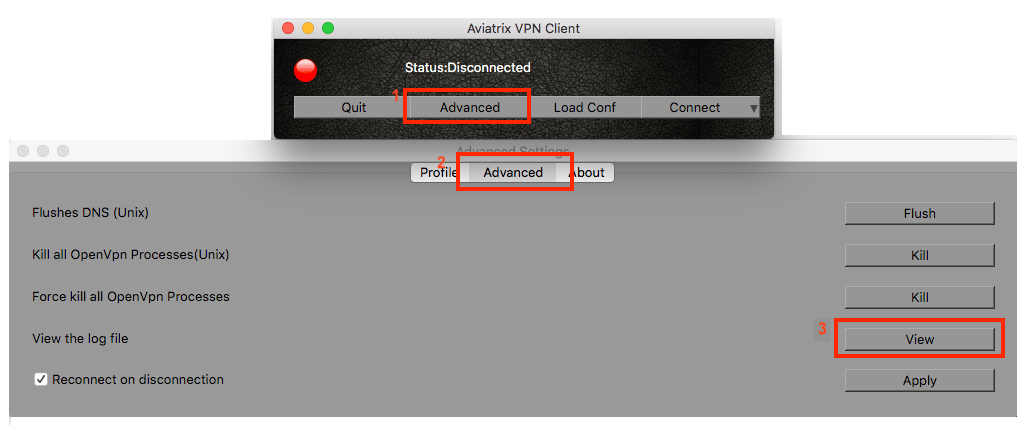
Open the **Aviatrix VPN Client > Settings > click View the log file**.