> ## Documentation Index
> Fetch the complete documentation index at: https://docs.aviatrix.com/llms.txt
> Use this file to discover all available pages before exploring further.
# Load Balancing Traffic Between Different Firewalls
> In AWS Transit FireNet, you can either allow the Aviatrix Transit gateways to perform the load balancing (inherent/default function, configured when you create the FireNet gateway), or you can enable AWS GWLB (Gateway Load Balancer) when you create a FireNet in an AWS Transit Gateway (AWS...
## AWS
In AWS Transit FireNet, you can either allow the Aviatrix Transit gateways to
perform the load balancing (inherent/default function, configured when you
create the FireNet gateway), or you can enable AWS GWLB (Gateway Load Balancer)
when you create a FireNet in
an AWS Transit Gateway (AWS TGW). Typically you select the latter to allow
for scaling of firewalls without affecting established sessions.
Transit FireNet load balances the traffic across different firewalls using
five-tuple hash (Source IP/Source Port/Destination IP/Destination Port/Protocol
Type). The same five-tuple hash is used in reverse for the response to the
firewall; the hashing is symmetrical and considers both directions of the flow.
The algorithm provides stickiness only within a transport session. Packets that
are in the same session are directed to the same firewall. When the client
starts a new session from the same source IP, the source port changes and causes
the traffic to go to a different firewall.
## Azure and GCP
Transit FireNet supports two- and five-tuple hash to load balance the traffic
across different firewalls. You can change the hashing algorithm in the Azure or
GCP portal. Load balancers are created automatically in Azure/GCP after Transit
FireNet is enabled.
Hashing algorithms available in Azure cloud to load balance the traffic across
different firewalls include
[Hash-based distribution mode (five-tuple hash)](https://learn.microsoft.com/en-us/azure/load-balancer/load-balancer-distribution-mode?tabs=azure-portal#hash-based-distribution-mode)
and
[Source IP affinity mode (two- or three-tuple hash)](https://learn.microsoft.com/en-us/azure/load-balancer/load-balancer-distribution-mode?tabs=azure-portal#source-ip-affinity-mode).
Although the Azure load balancer supports three-tuple hash, the Aviatrix
Controller does not.
1. Log in to Microsoft Azure's Portal and Go to Load balancer under Azure
services.
2. Click the Transit FireNet where Load balancing algorithm needs to be changed.
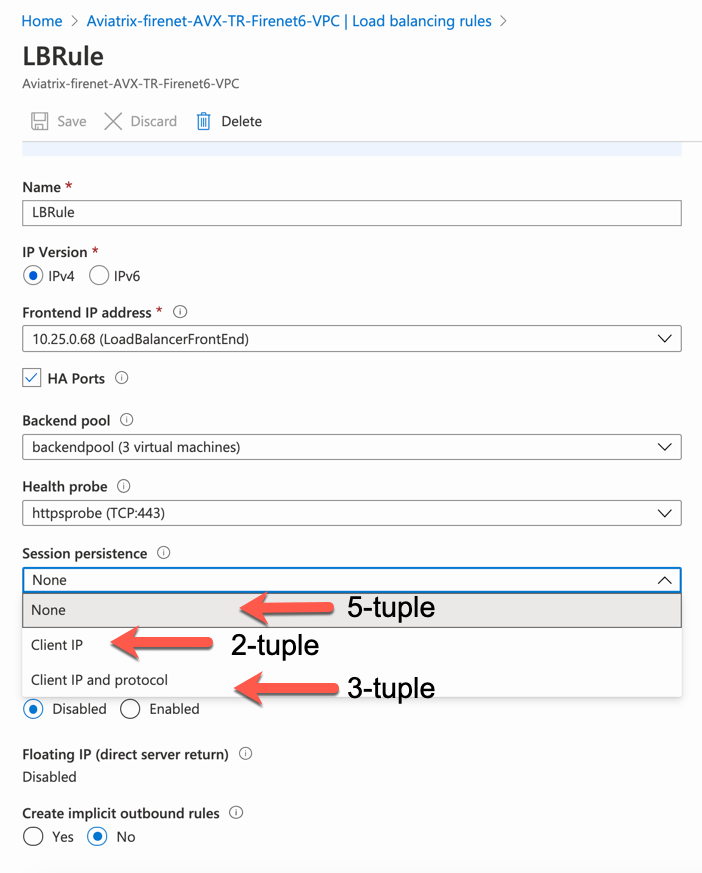
3. Go to Load Balancing rules under Settings and click **LBRule**.
4. Select hashing algorithm under Session persistence.
1. None > Default five-tuple (source IP, source port, destination IP,
destination port and protocol type) hashing algorithm.
2. Client IP > This mode uses a two-tuple (source IP and destination IP).
3. Client IP and protocol > three-tuple uses source IP, destination IP, and
protocol type.