> ## Documentation Index
> Fetch the complete documentation index at: https://docs.aviatrix.com/llms.txt
> Use this file to discover all available pages before exploring further.
# High Performance Encryption Performance Benchmarks
> Aviatrix High Performance Encryption is available on AWS, Azure, GCP, and OCI.
Aviatrix High Performance Encryption is available on AWS, Azure, GCP, and OCI.
## AWS Performance Test Results
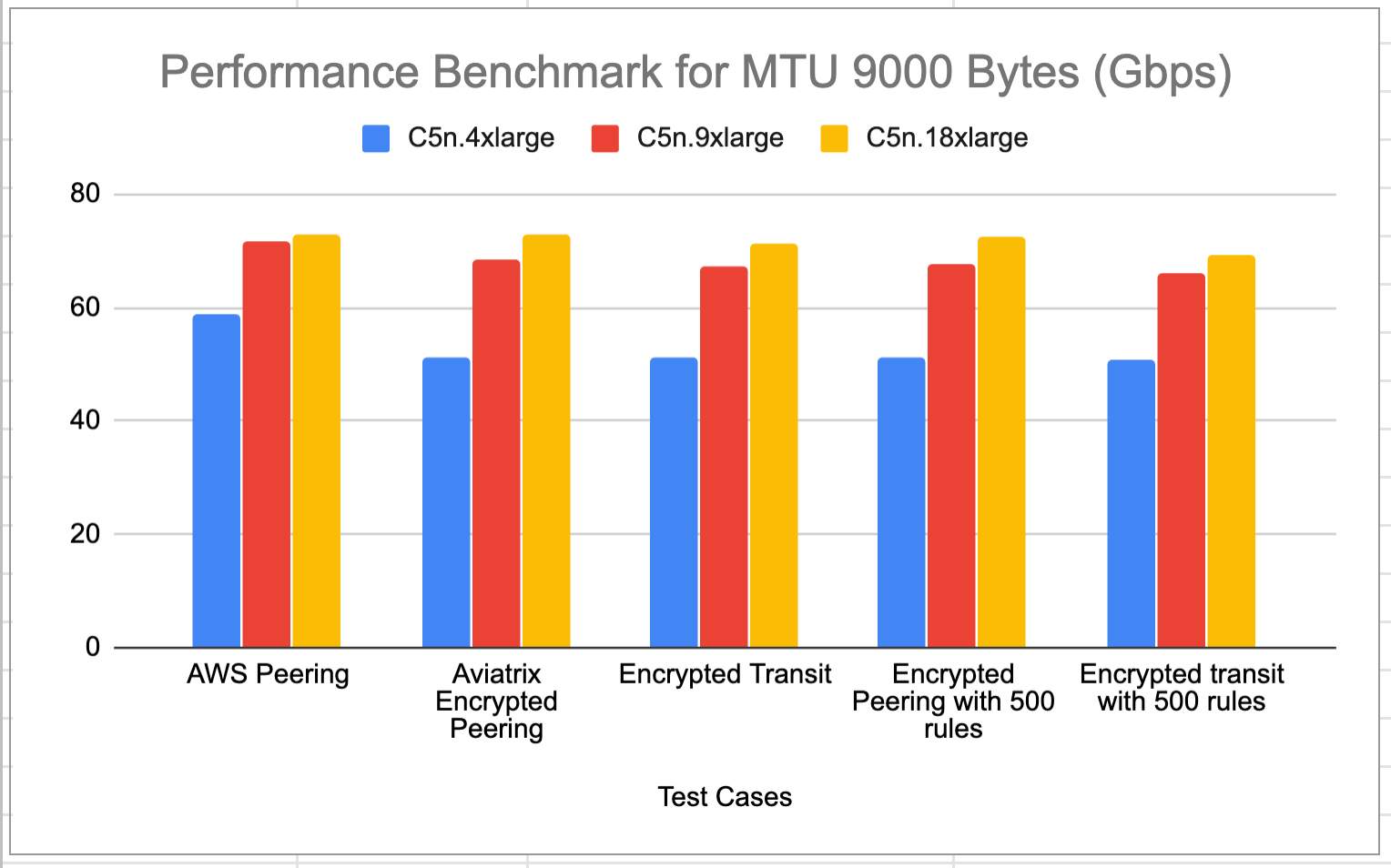
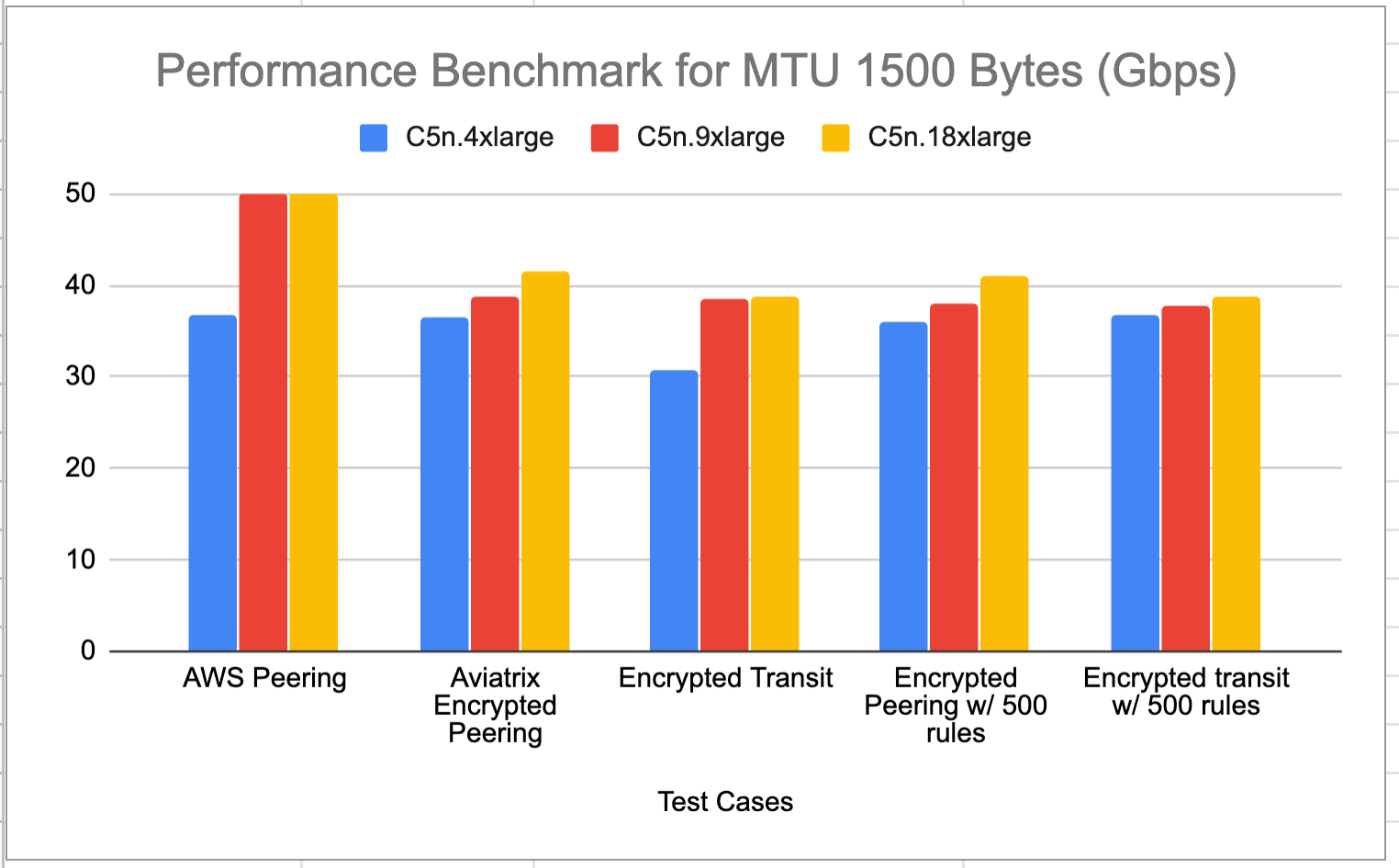
Aviatrix ActiveMesh HPE achieves line rate performance with encryption in AWS
when Jumbo Frames are deployed (the default setting for AWS instances). The test
benchmark baseline is the native AWS peering where no Aviatrix Gateways are
deployed in the VPCs. Adding 500 stateful firewall rules have little impact to
the performance.
The test topologies are shown below.
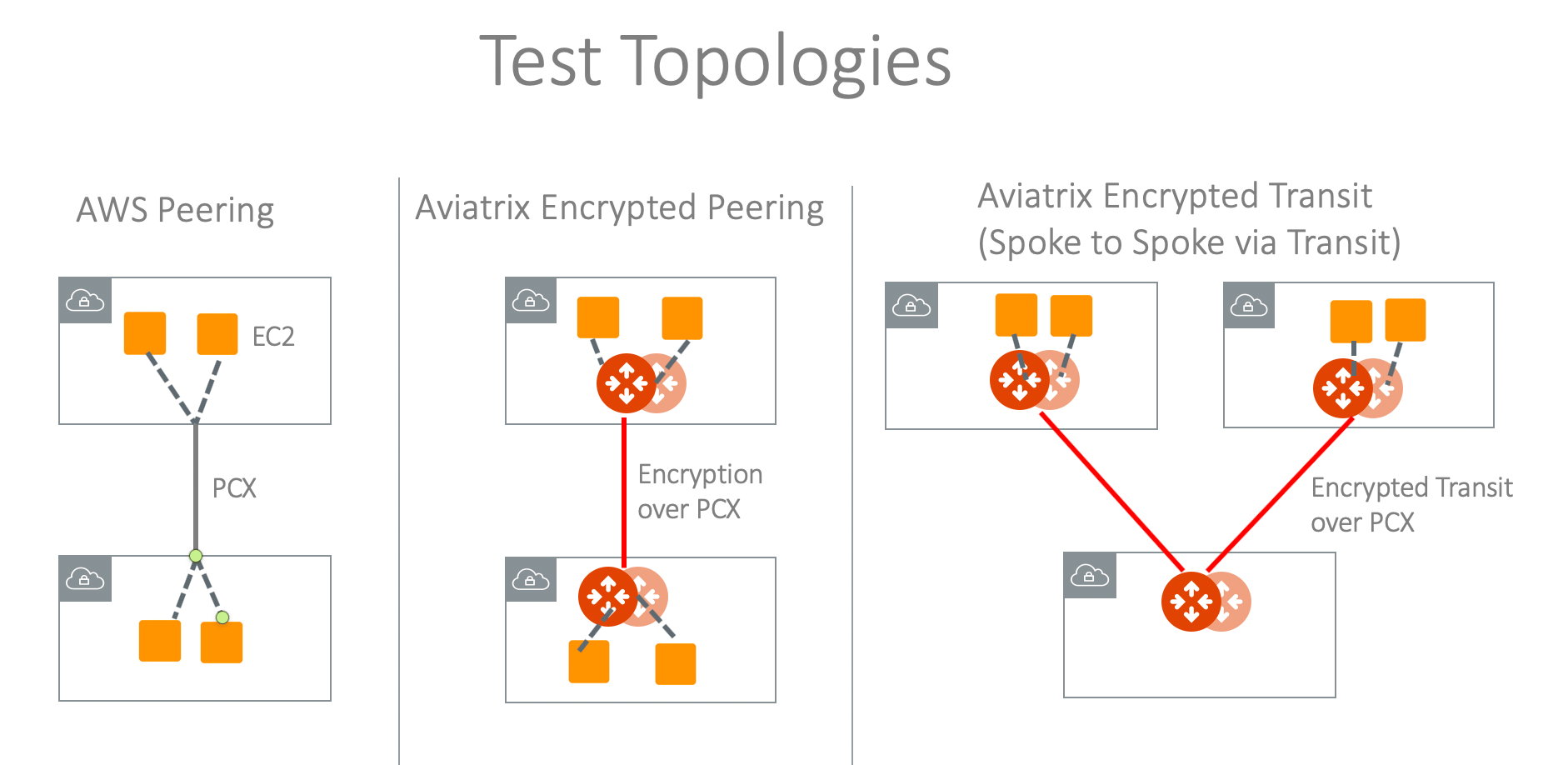 The test is conducted by using iperf3 tool with TCP 128 streams. The two VPCs
are in the same region.
### MTU = 9000 Bytes (AWS default setting)
The test is conducted by using iperf3 tool with TCP 128 streams. The two VPCs
are in the same region.
### MTU = 9000 Bytes (AWS default setting)
 ### MTU = 1500 Bytes
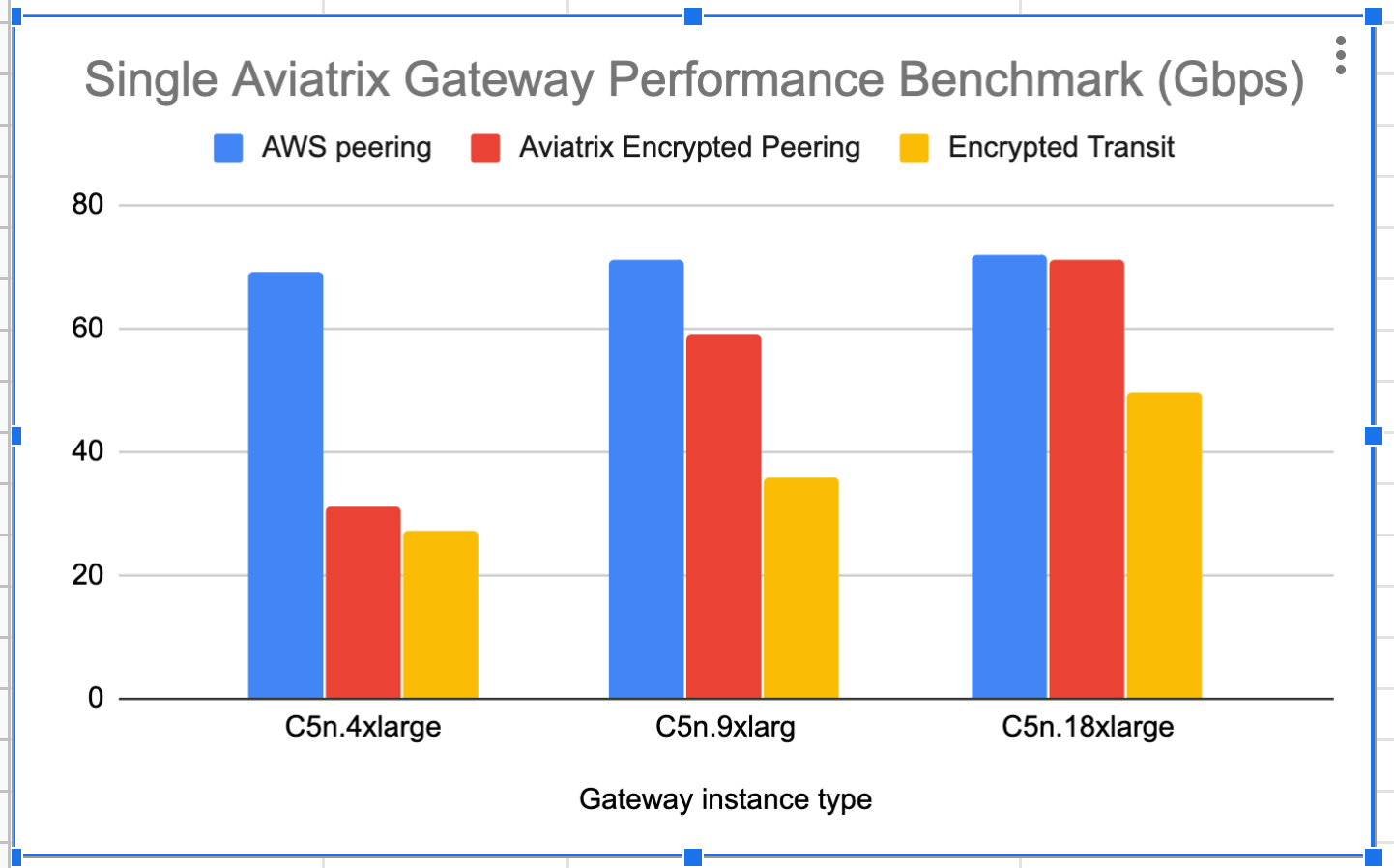
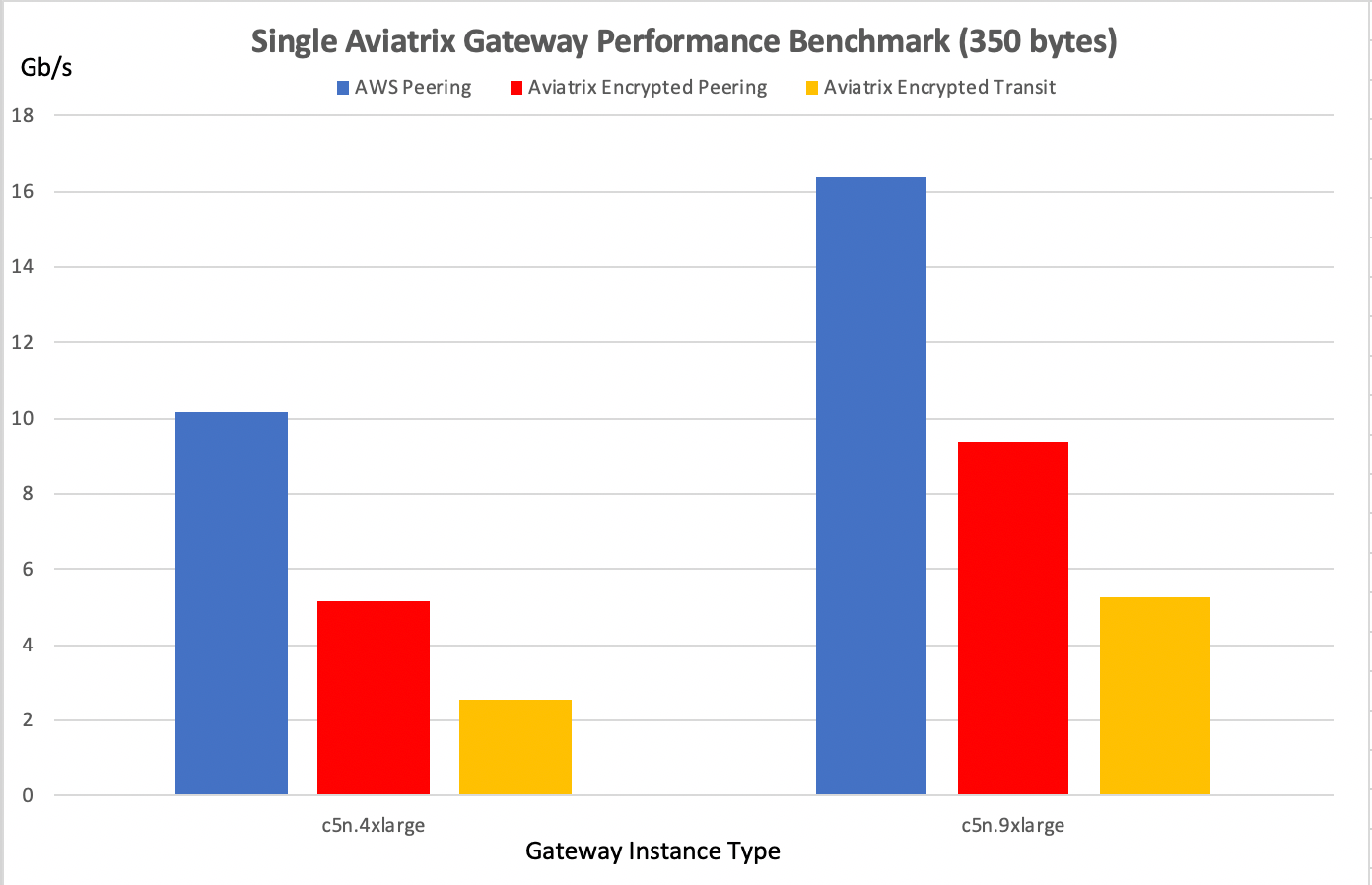
 ### Single Gateway in AWS Performance Test Results
This test is done without HA enabled in either Spoke or Transit Gateways. The
traffic is end-to-end from user instance > Spoke Gateway > Multi-Cloud Transit
Gateway > Spoke Gateway> Instance.
For MTU = 9000 Bytes, the result is shown in the diagram below.
### Single Gateway in AWS Performance Test Results
This test is done without HA enabled in either Spoke or Transit Gateways. The
traffic is end-to-end from user instance > Spoke Gateway > Multi-Cloud Transit
Gateway > Spoke Gateway> Instance.
For MTU = 9000 Bytes, the result is shown in the diagram below.
 For MTU = 350 Bytes, the result is shown in the diagram below.
 ### T3 Instance Series Performance
| **Spoke Gateway** | **Throughput Gbps (MTU 1500B)** | **Throughput Gbps (MTU 9600B)** |
| ----------------- | ------------------------------- | ------------------------------- |
| t3a.xlarge | 6.12 | 9.82 |
| t3a.medium | 2.33 | 8.85 |
| t3a.small | 2.7 | 8.52 |
| t3.large | 3.34 | 9.5 |
| t3.medium | 3.03 | 9.6 |
| t3.small | 3.35 | 9.96 |
## Azure Performance Test Results
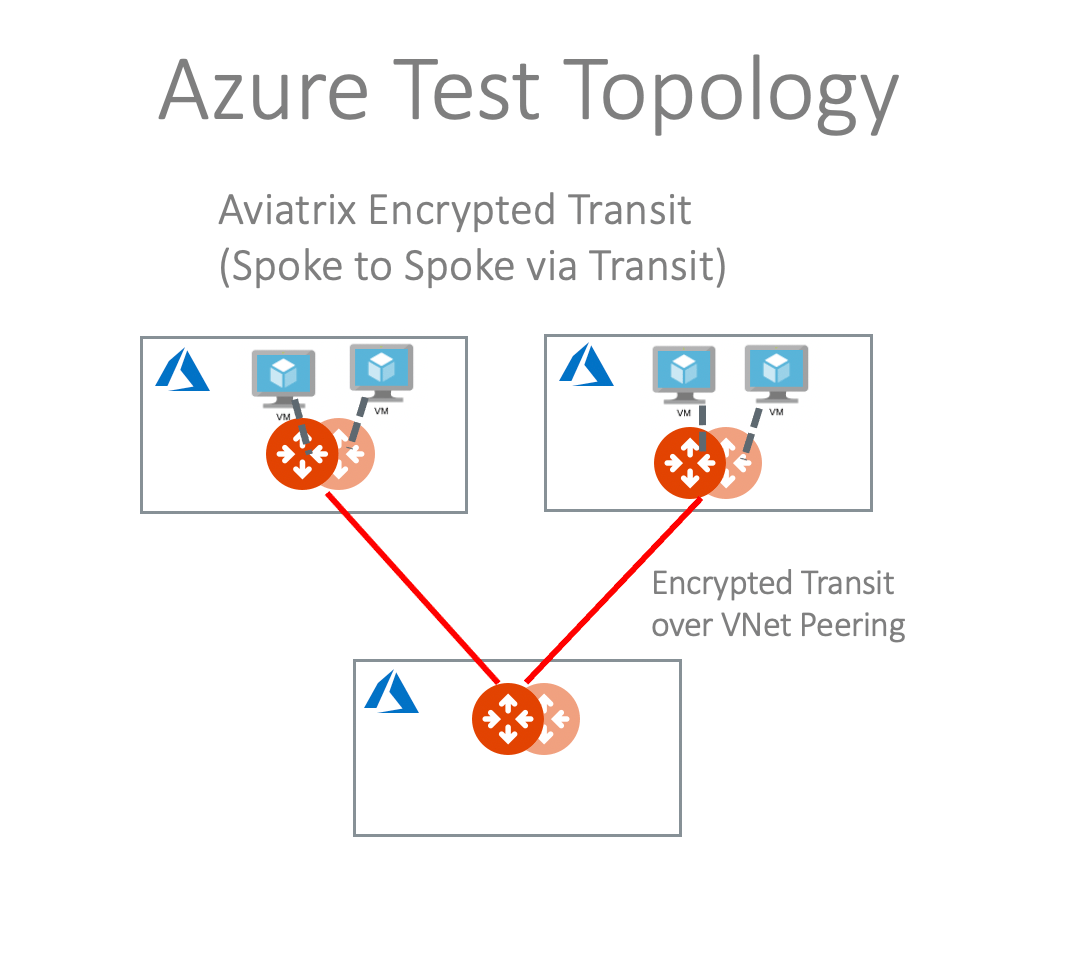
The performance results below are from tests conducted with the topology of Test
VMs > Spoke > Transit > Spoke > Test VMs in the same region with active-mesh
deployment.
Test VMs' route tables are load balanced to point to either primary Spoke
Gateways or HA Spoke Gateways to take advantage of the active-mesh deployment.
The test topology is shown below.
### T3 Instance Series Performance
| **Spoke Gateway** | **Throughput Gbps (MTU 1500B)** | **Throughput Gbps (MTU 9600B)** |
| ----------------- | ------------------------------- | ------------------------------- |
| t3a.xlarge | 6.12 | 9.82 |
| t3a.medium | 2.33 | 8.85 |
| t3a.small | 2.7 | 8.52 |
| t3.large | 3.34 | 9.5 |
| t3.medium | 3.03 | 9.6 |
| t3.small | 3.35 | 9.96 |
## Azure Performance Test Results
The performance results below are from tests conducted with the topology of Test
VMs > Spoke > Transit > Spoke > Test VMs in the same region with active-mesh
deployment.
Test VMs' route tables are load balanced to point to either primary Spoke
Gateways or HA Spoke Gateways to take advantage of the active-mesh deployment.
The test topology is shown below.
 | **Transit Gateway** | **Throughput with MTU 1500B** |
| ------------------- | ----------------------------- |
| Standard\_F48s\_v2 | 24.52Gbps |
| Standard\_F32s\_v2 | 21.56Gbps |
| Standard\_D32\_v3 | 20.47Gbps |
| Standard\_D5\_v2 | 20.56Gbps |
## GCP Performance Test Results
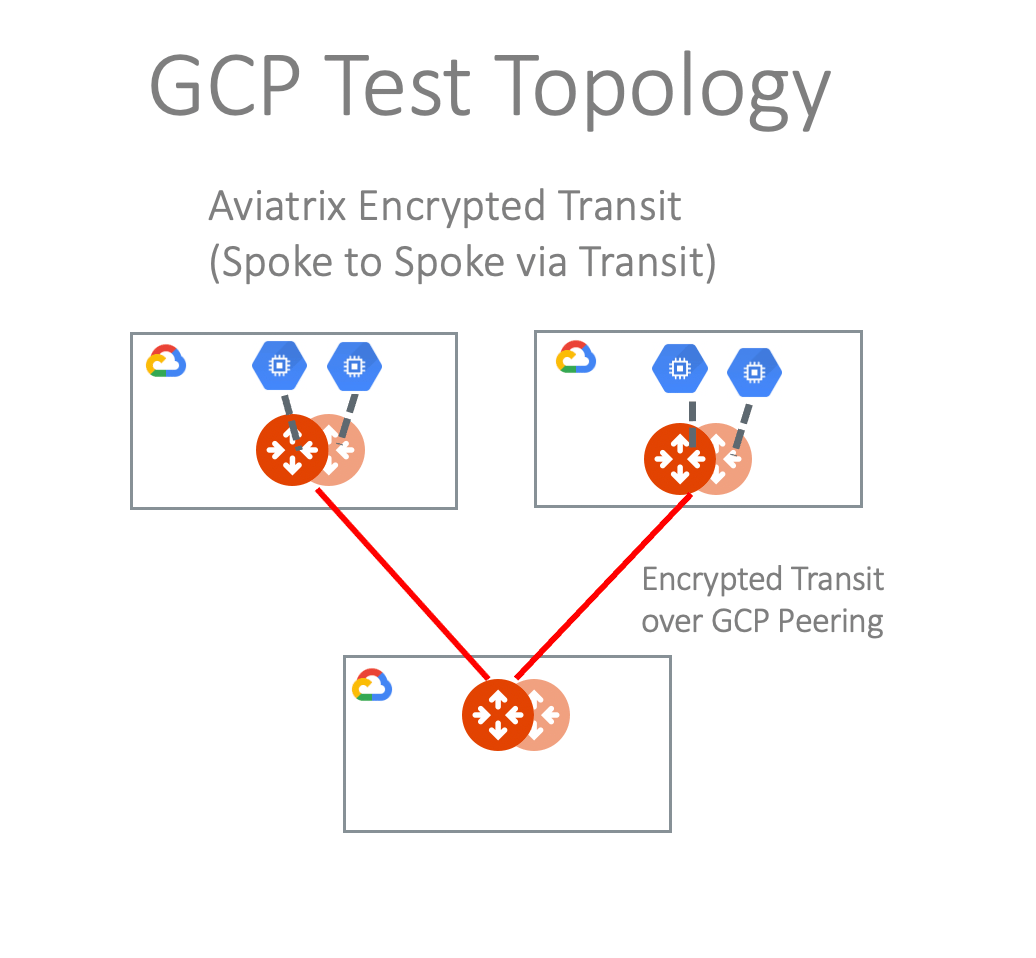
The test topology is shown below with the following conditions:
* VM - Spoke - Transit - Spoke - VM
* HA enabled
* HPE mode enabled
| **Transit Gateway** | **Throughput with MTU 1500B** |
| ------------------- | ----------------------------- |
| Standard\_F48s\_v2 | 24.52Gbps |
| Standard\_F32s\_v2 | 21.56Gbps |
| Standard\_D32\_v3 | 20.47Gbps |
| Standard\_D5\_v2 | 20.56Gbps |
## GCP Performance Test Results
The test topology is shown below with the following conditions:
* VM - Spoke - Transit - Spoke - VM
* HA enabled
* HPE mode enabled
 ### N1 Series Performance
| **Transit Gateway** | **Throughput Gbps (MTU 1500B)** |
| ------------------- | ------------------------------- |
| n1-highcpu-4 | 3.12 |
| n1-highcpu-8 | 6.54 |
| n1-highcpu-16 | 11.58 |
| n1-highcpu-32 | 19.97 |
### N2 Series Performance
| **Transit Gateway** | **Throughput Gbps (MTU 1500B)** |
| ------------------- | ------------------------------- |
| n2-highcpu-4 | 5.063 |
| n2-highcpu-8 | 10.2 |
| n2-highcpu-16 | 14.98 |
| n2-highcpu-32 | 25.549 |
### C2 Series Performance
| **Transit Gateway** | **Throughput Gbps (MTU 1500B)** |
| ------------------- | ------------------------------- |
| c2-standard-4 | 5.792 |
| c2-standard-8 | 9.44 |
| c2-standard-16 | 18.48 |
| c2-standard-30 | 25.52 |
| c2-standard-60 | 32 |
To deploy Aviatrix Gateways with N2 or C2 series successfully, you need to
apply [CPU Quota Increase](https://cloud.google.com/compute/resource-usage)
request to GCP support first.
## OCI Performance Test Results
The performance results below are from tests conducted with the topology of Test
VMs > Spoke > Transit > Spoke > Test VMs in the same region with active-mesh
deployment.
Test VMs' route tables are load balanced to point to either primary Spoke
Gateways or HA Spoke Gateways to take advantage of the active-mesh deployment.
| **Transit Gateway** | **Throughput with MTU 1500B** |
| ------------------- | ----------------------------- |
| VM.Standard2.2 | 0.5092Gbps |
| VM.Standard2.4 | 1.057Gbps |
| VM.Standard2.8 | 2.471Gbps |
| VM.Standard2.16 | 4.99Gbps |
| VM.Standard2.24 | 6.039Gbps |
| **Transit Gateway** | **Throughput with MTU 9000** |
| ------------------- | ---------------------------- |
| VM.Standard2.2 | 2.584Gbps |
| VM.Standard2.4 | 4.878Gbps |
| VM.Standard2.8 | 10.75Gbps |
| VM.Standard2.16 | 20.1199bps |
| VM.Standard2.24 | 24.65Gbps |
## How to Tune Performance
### Check MTU size
To check MTU size, use Trace Path.
1. In Aviatrix Controller, go to **Troubleshoot** > **Diagnostics** >
**Network**.
2. In Gateway Utility, select a gateway and specify a destination host name or
IP address.
3. Click **Trace Path**. The MTU of the devices along the path is shown.
### Tune TCP window size
For Linux machine, follow the
[instructions](https://web.archive.org/web/20160318192545/http://wwwx.cs.unc.edu/~sparkst/howto/network_tuning.php)
to tune TCP window size.
### N1 Series Performance
| **Transit Gateway** | **Throughput Gbps (MTU 1500B)** |
| ------------------- | ------------------------------- |
| n1-highcpu-4 | 3.12 |
| n1-highcpu-8 | 6.54 |
| n1-highcpu-16 | 11.58 |
| n1-highcpu-32 | 19.97 |
### N2 Series Performance
| **Transit Gateway** | **Throughput Gbps (MTU 1500B)** |
| ------------------- | ------------------------------- |
| n2-highcpu-4 | 5.063 |
| n2-highcpu-8 | 10.2 |
| n2-highcpu-16 | 14.98 |
| n2-highcpu-32 | 25.549 |
### C2 Series Performance
| **Transit Gateway** | **Throughput Gbps (MTU 1500B)** |
| ------------------- | ------------------------------- |
| c2-standard-4 | 5.792 |
| c2-standard-8 | 9.44 |
| c2-standard-16 | 18.48 |
| c2-standard-30 | 25.52 |
| c2-standard-60 | 32 |
To deploy Aviatrix Gateways with N2 or C2 series successfully, you need to
apply [CPU Quota Increase](https://cloud.google.com/compute/resource-usage)
request to GCP support first.
## OCI Performance Test Results
The performance results below are from tests conducted with the topology of Test
VMs > Spoke > Transit > Spoke > Test VMs in the same region with active-mesh
deployment.
Test VMs' route tables are load balanced to point to either primary Spoke
Gateways or HA Spoke Gateways to take advantage of the active-mesh deployment.
| **Transit Gateway** | **Throughput with MTU 1500B** |
| ------------------- | ----------------------------- |
| VM.Standard2.2 | 0.5092Gbps |
| VM.Standard2.4 | 1.057Gbps |
| VM.Standard2.8 | 2.471Gbps |
| VM.Standard2.16 | 4.99Gbps |
| VM.Standard2.24 | 6.039Gbps |
| **Transit Gateway** | **Throughput with MTU 9000** |
| ------------------- | ---------------------------- |
| VM.Standard2.2 | 2.584Gbps |
| VM.Standard2.4 | 4.878Gbps |
| VM.Standard2.8 | 10.75Gbps |
| VM.Standard2.16 | 20.1199bps |
| VM.Standard2.24 | 24.65Gbps |
## How to Tune Performance
### Check MTU size
To check MTU size, use Trace Path.
1. In Aviatrix Controller, go to **Troubleshoot** > **Diagnostics** >
**Network**.
2. In Gateway Utility, select a gateway and specify a destination host name or
IP address.
3. Click **Trace Path**. The MTU of the devices along the path is shown.
### Tune TCP window size
For Linux machine, follow the
[instructions](https://web.archive.org/web/20160318192545/http://wwwx.cs.unc.edu/~sparkst/howto/network_tuning.php)
to tune TCP window size.