> ## Documentation Index
> Fetch the complete documentation index at: https://docs.aviatrix.com/llms.txt
> Use this file to discover all available pages before exploring further.
# Auto Right-Sizing Maintenance Window
> Use Auto Right-Sizing maintenance windows to determine when resizing actions occur. When an operation starts within a maintenance window it will finish even if the operation takes longer than the time remaining in the maintenance window (if the operation has already begun).
Use Auto Right-Sizing maintenance windows to determine when resizing actions
occur. When an operation starts within a maintenance window it will finish even
if the operation takes longer than the time remaining in the maintenance window
(if the operation has already begun). If an operation has not yet begun, it is
moved to the next scheduled run of the maintenance window.
 ## Maintenance Windows Tab
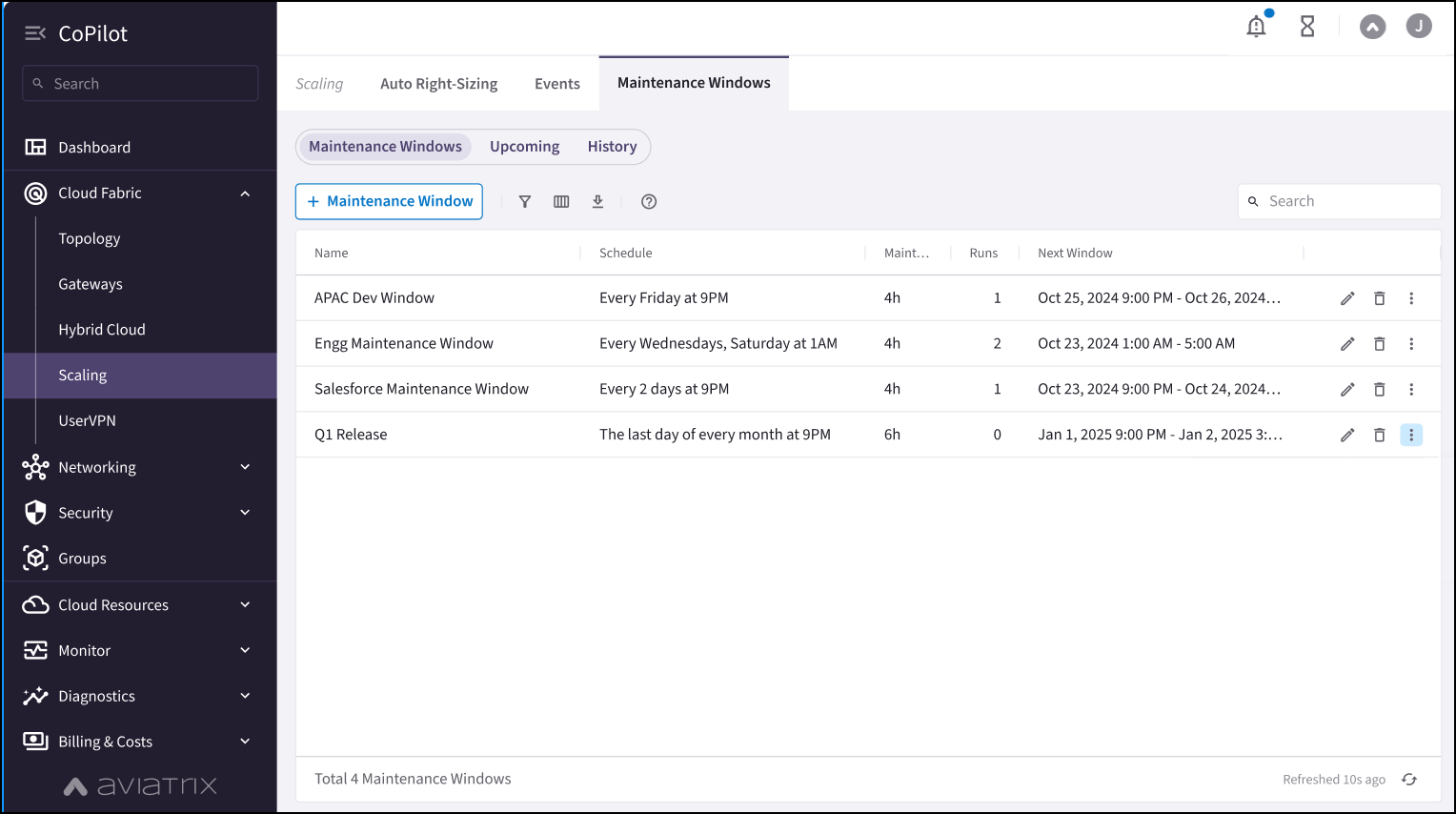
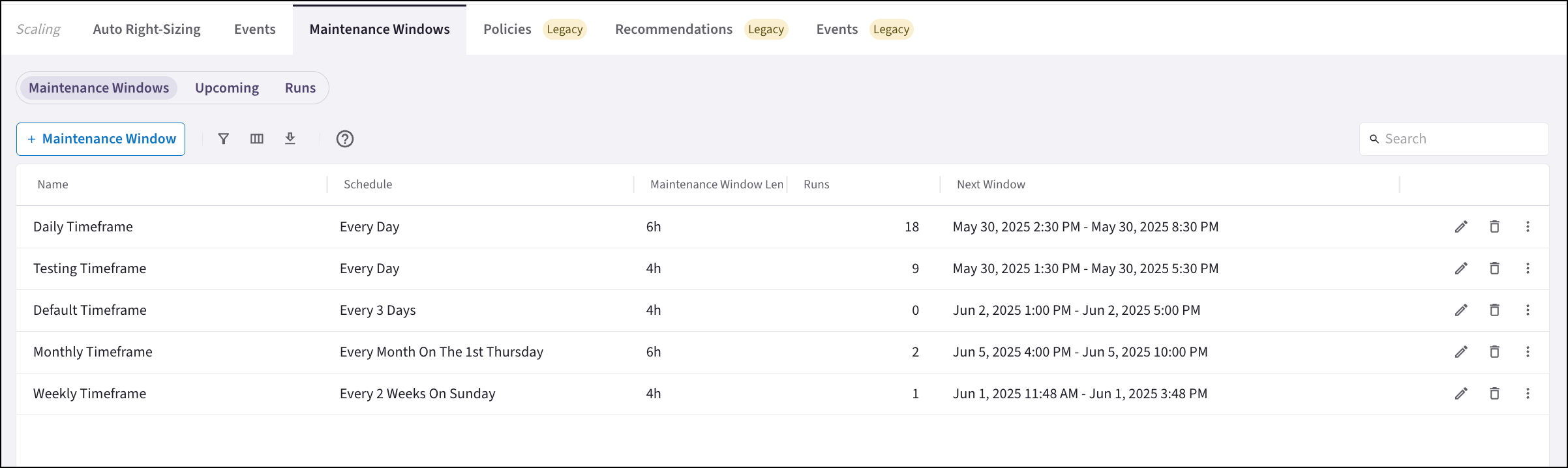
The Maintenance Windows tab shows all scheduled maintenance windows, how many
times the maintenance window has been run, and the next time the maintenance
window is scheduled to run.
## Maintenance Windows Tab
The Maintenance Windows tab shows all scheduled maintenance windows, how many
times the maintenance window has been run, and the next time the maintenance
window is scheduled to run.
 On this sub-tab, you can:
* [Add Auto Right-Sizing maintenance windows](https://legacy.docs.aviatrix.com/documentation/latest/network/auto-right-sizing-create-maint.html?expand=true)
* [Edit Auto Right-Sizing maintenance windows](https://legacy.docs.aviatrix.com/documentation/latest/network/auto-right-sizing-edit-maint.html)
* [Delete Auto Right-Sizing maintenance windows](https://legacy.docs.aviatrix.com/documentation/latest/network/auto-right-sizing-delete-maint.html)
* View upcoming schedules and durations for a maintenance window on the Upcoming
tab: Click the vertical ellipsis
On this sub-tab, you can:
* [Add Auto Right-Sizing maintenance windows](https://legacy.docs.aviatrix.com/documentation/latest/network/auto-right-sizing-create-maint.html?expand=true)
* [Edit Auto Right-Sizing maintenance windows](https://legacy.docs.aviatrix.com/documentation/latest/network/auto-right-sizing-edit-maint.html)
* [Delete Auto Right-Sizing maintenance windows](https://legacy.docs.aviatrix.com/documentation/latest/network/auto-right-sizing-delete-maint.html)
* View upcoming schedules and durations for a maintenance window on the Upcoming
tab: Click the vertical ellipsis
 next to the
maintenance window to view upcoming schedules.
* View runs related to a maintenance window on the Runs tab: Click the vertical
ellipsis next
to the maintenance window to view runs for this maintenance window.
## Upcoming Tab
The Upcoming tab shows the scheduled start time of upcoming maintenance windows.
next to the
maintenance window to view upcoming schedules.
* View runs related to a maintenance window on the Runs tab: Click the vertical
ellipsis next
to the maintenance window to view runs for this maintenance window.
## Upcoming Tab
The Upcoming tab shows the scheduled start time of upcoming maintenance windows.
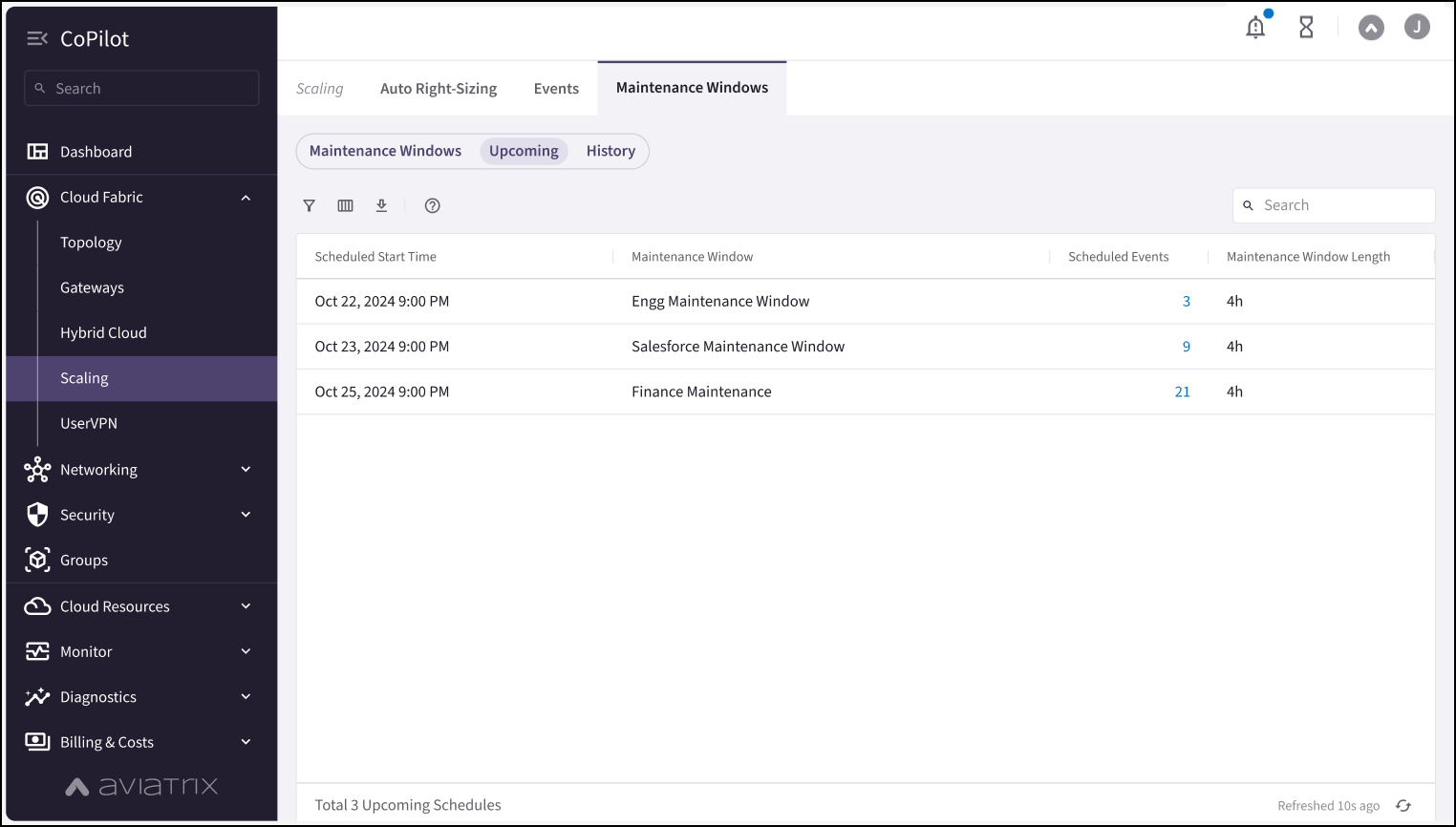 You can click the Scheduled Events link in the maintenance window row to see:
* When the maintenance window is scheduled to start
* The maintenance window length
* The list of gateway instances being resized
* Delete scheduled events from the maintenance window
## Runs Tab
The Runs tab shows the history of all in-progress and completed maintenance
windows, and their associated status.
You can click the Scheduled Events link in the maintenance window row to see:
* When the maintenance window is scheduled to start
* The maintenance window length
* The list of gateway instances being resized
* Delete scheduled events from the maintenance window
## Runs Tab
The Runs tab shows the history of all in-progress and completed maintenance
windows, and their associated status.
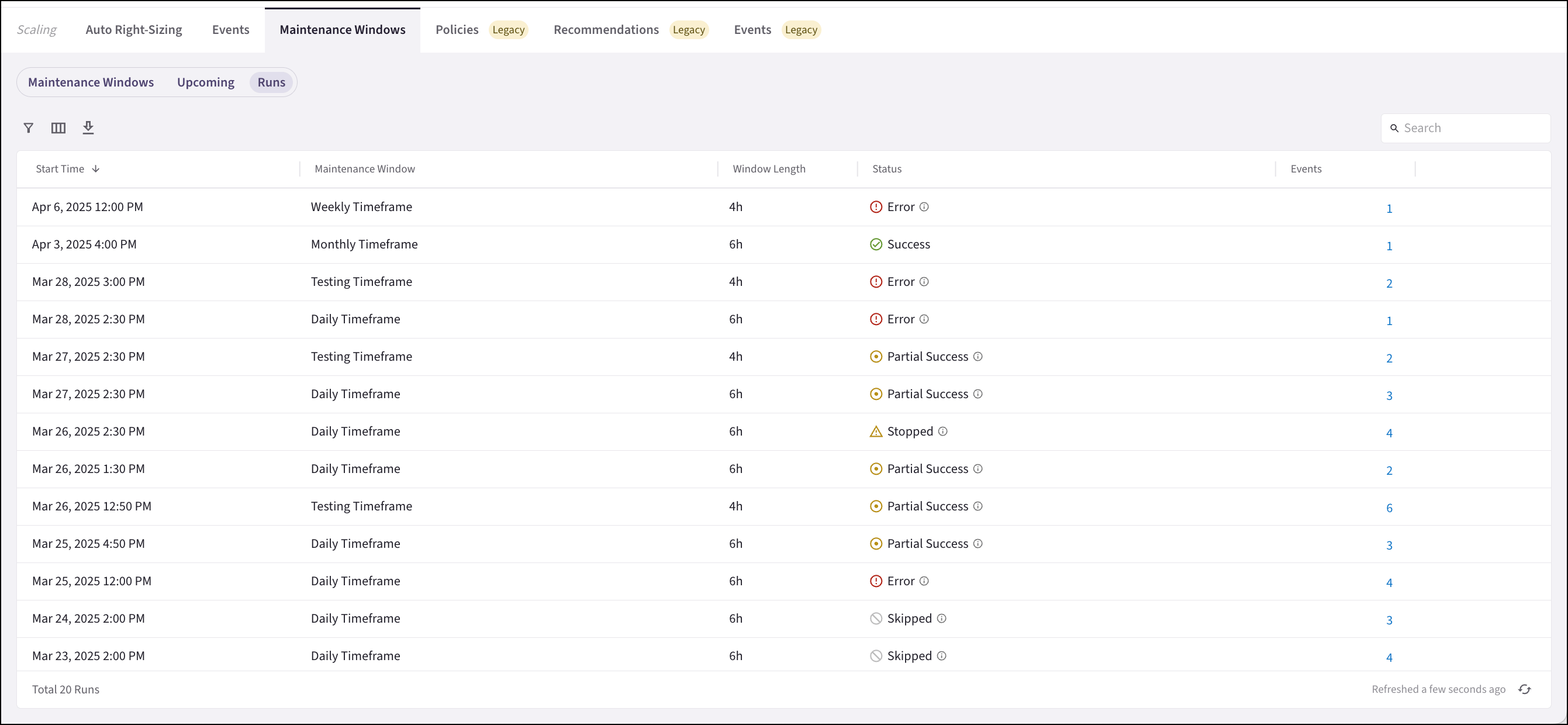 The status types are:
* In Progress: When maintenance begins, the maintenance window schedule moves
from the Upcoming tab to the Runs tab and displays as In Progress.
* Partial Success: At least one operation within the maintenance window
occurred. Operations may be skipped because the maintenance window was not
long enough to complete all tasks, or because a gateway instance was already
at the correct size.
* Skipped: The gateway instance is already at the recommended size, or because
the maintenance window was not long enough to complete all tasks.
* Error: Errors that occurred during resizing. For example, the gateway instance
scheduled to be resized was deleted.
* Success: The maintenance window completed all operations successfully.
* Stopped: The maintenance window was stopped by a user.
Tasks you can perform on the Runs tab are:
* [Stopping a maintenance window](https://legacy.docs.aviatrix.com/documentation/latest/network/auto-right-sizing-stop.html?expand=true)
that is in progress
* [Viewing the events](https://legacy.docs.aviatrix.com/documentation/latest/network/ars-history-events.html)
that occurred during the maintenance window
## Related Topics
* About Auto Right-Sizing
* [Resizing Gateway Instances Based on Auto Right-Sizing Recommendations](https://legacy.docs.aviatrix.com/documentation/latest/network/auto-right-sizing-resizing.html?expand=true)
* [Viewing Auto Right-Sizing Maintenance Window Scheduled Events](https://legacy.docs.aviatrix.com/documentation/latest/network/ars-scheduled-events.html?expand=true)
* [Viewing Auto Right-Sizing Event History](https://legacy.docs.aviatrix.com/documentation/latest/network/ars-history-events.html)
The status types are:
* In Progress: When maintenance begins, the maintenance window schedule moves
from the Upcoming tab to the Runs tab and displays as In Progress.
* Partial Success: At least one operation within the maintenance window
occurred. Operations may be skipped because the maintenance window was not
long enough to complete all tasks, or because a gateway instance was already
at the correct size.
* Skipped: The gateway instance is already at the recommended size, or because
the maintenance window was not long enough to complete all tasks.
* Error: Errors that occurred during resizing. For example, the gateway instance
scheduled to be resized was deleted.
* Success: The maintenance window completed all operations successfully.
* Stopped: The maintenance window was stopped by a user.
Tasks you can perform on the Runs tab are:
* [Stopping a maintenance window](https://legacy.docs.aviatrix.com/documentation/latest/network/auto-right-sizing-stop.html?expand=true)
that is in progress
* [Viewing the events](https://legacy.docs.aviatrix.com/documentation/latest/network/ars-history-events.html)
that occurred during the maintenance window
## Related Topics
* About Auto Right-Sizing
* [Resizing Gateway Instances Based on Auto Right-Sizing Recommendations](https://legacy.docs.aviatrix.com/documentation/latest/network/auto-right-sizing-resizing.html?expand=true)
* [Viewing Auto Right-Sizing Maintenance Window Scheduled Events](https://legacy.docs.aviatrix.com/documentation/latest/network/ars-scheduled-events.html?expand=true)
* [Viewing Auto Right-Sizing Event History](https://legacy.docs.aviatrix.com/documentation/latest/network/ars-history-events.html)