> ## Documentation Index
> Fetch the complete documentation index at: https://docs.aviatrix.com/llms.txt
> Use this file to discover all available pages before exploring further.
# Auto Right-Sizing Metrics and Optimization
> The gateway instance metrics captured by the Auto Right-Sizing feature, along with optimization information such as Performance, Cost Savings, and Urgency, can assist you in analyzing the current state of gateway instances and identifying which ones require resizing.
The gateway instance metrics captured by the Auto Right-Sizing feature, along
with optimization information such as Performance, Cost Savings, and Urgency,
can assist you in analyzing the current state of gateway instances and
identifying which ones require resizing.
By accurately resizing the instances to match workload demands and traffic
patterns, organizations can achieve optimal performance levels. This dynamic
resizing capability helps ensure that the gateway instances are efficiently
utilizing resources, leading to improved overall network performance.
In terms of cost savings, Auto Right-Sizing suggests resizing recommendations
that align with the actual resource requirements of the gateway instances. By
right-sizing the instances based on these recommendations, organizations can
avoid over-provisioning resources, leading to cost savings.
The values in the Urgency column are calculated based on predicted improvements
to gateway instance performance plus the anticipated cost savings. The highest
Urgency recommendations are given to gateways that are unable to handle their
traffic loads, or are significantly oversized.
## Metrics
Click the gateway instance on the Cloud Fabric > Scaling > Auto Right-Sizing tab
to see the metrics gathered for the gateway instance.
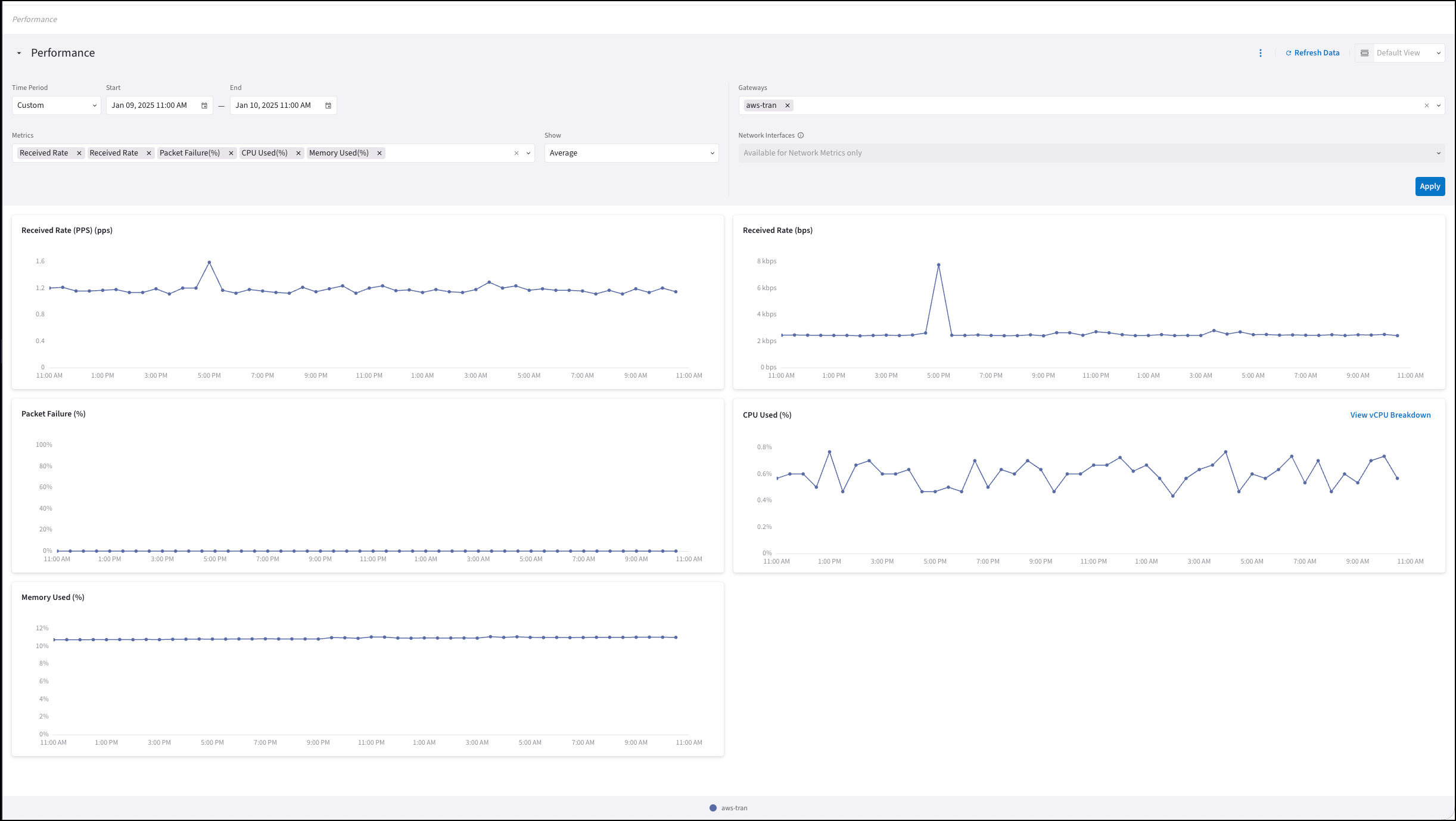 You can click **View Performance** to show the metrics under Monitor >
Performance.
The following items will be pre-selected: gateway; observation period from the
recommendation details; and the Auto Right-Sizing network/system metrics. You
can modify any of these pre-selections if you require additional context.
### Network Metrics
See Metrics Monitored for
Aviatrix Resources for details on these network metrics.
* Received Rate (Packets per Second)
* Received Rate (Bytes per Second)
* Packet Failure (%)
### System Metrics
See Metrics Monitored for
Aviatrix Resources for details on these system metrics.
* CPU Used (%)
* Memory Used (%)
## Auto Right-Sizing Optimization
The Aviatrix Auto Right-Sizing feature offers insights into each gateway
instance's performance and enable you to scale resources in real-time, based on
actual usage. The provided performance metrics and resizing recommendations
enable you to optimize resource allocation, cut unnecessary expenses, and
enhance performance.
On the Scaling > Auto Right-Sizing tab, you can select one of these
preconfigured views to sort the gateway instance sizing recommendations:
* **Active Recommendations**: Identifies gateway instances that have not yet
been resized.
* **Undersized Instances**: Identifies gateway instances that are insufficient
to handle their traffic load or are not utilizing their full capacity to
manage traffic effectively.
* **Cost-Saving Opportunities**: Identifies potential cost-saving opportunities
by displaying gateway instances and the estimated savings achievable if they
are resized according to recommendations.
You can click **View Performance** to show the metrics under Monitor >
Performance.
The following items will be pre-selected: gateway; observation period from the
recommendation details; and the Auto Right-Sizing network/system metrics. You
can modify any of these pre-selections if you require additional context.
### Network Metrics
See Metrics Monitored for
Aviatrix Resources for details on these network metrics.
* Received Rate (Packets per Second)
* Received Rate (Bytes per Second)
* Packet Failure (%)
### System Metrics
See Metrics Monitored for
Aviatrix Resources for details on these system metrics.
* CPU Used (%)
* Memory Used (%)
## Auto Right-Sizing Optimization
The Aviatrix Auto Right-Sizing feature offers insights into each gateway
instance's performance and enable you to scale resources in real-time, based on
actual usage. The provided performance metrics and resizing recommendations
enable you to optimize resource allocation, cut unnecessary expenses, and
enhance performance.
On the Scaling > Auto Right-Sizing tab, you can select one of these
preconfigured views to sort the gateway instance sizing recommendations:
* **Active Recommendations**: Identifies gateway instances that have not yet
been resized.
* **Undersized Instances**: Identifies gateway instances that are insufficient
to handle their traffic load or are not utilizing their full capacity to
manage traffic effectively.
* **Cost-Saving Opportunities**: Identifies potential cost-saving opportunities
by displaying gateway instances and the estimated savings achievable if they
are resized according to recommendations.
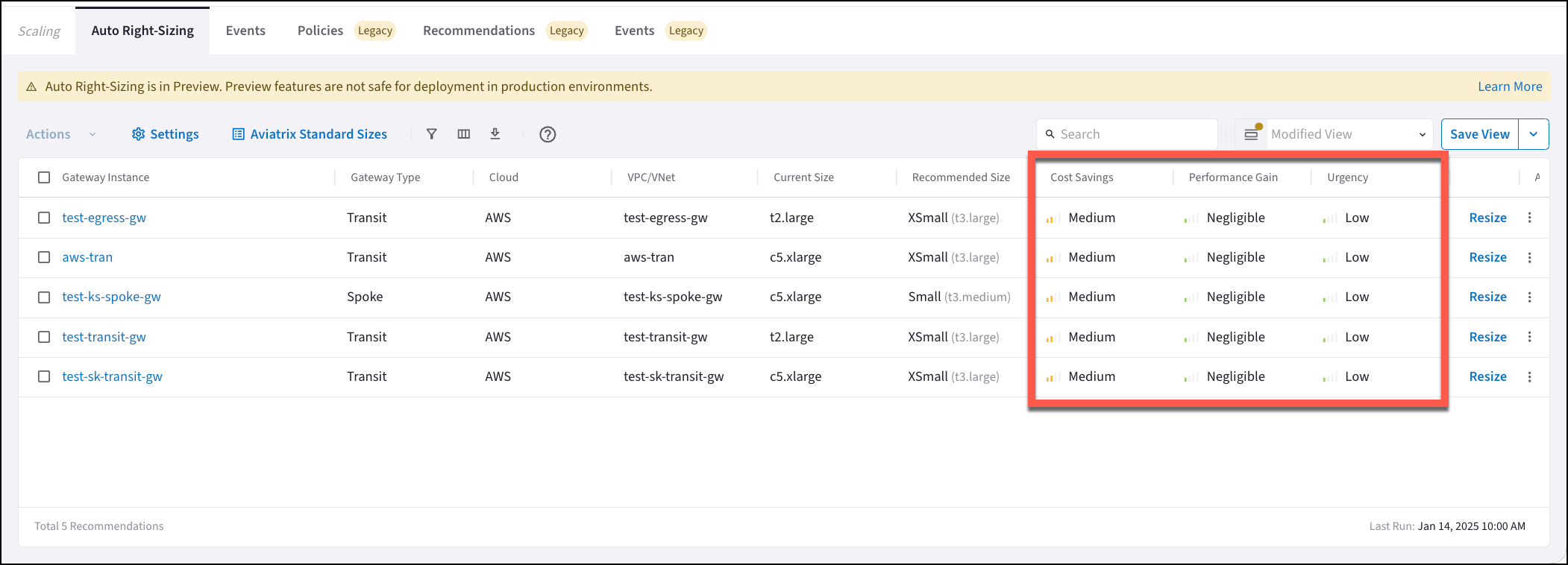 You may see the following permutations, among others, in the Performance Gain,
Urgency, and Cost Savings columns:
* If the current gateway instance size is too small, and you are losing traffic,
the resizing recommendation shows the Cost Savings as None (a larger gateway
instance size will cost more) but the Urgency and Performance Gain shows as
High.
* If the current gateway instance size is drastically oversized for the amount
of traffic, the resizing recommendation shows the Performance Gain as None,
but the Cost Savings shows as High.
### Urgency
The values in the Urgency column are calculated based on predicted improvements
to gateway instance performance plus the anticipated cost savings.
* **High (red)**: The gateway instance should be resized to alleviate overload.
* **Medium (yellow)**: The gateway instance can be resized to more efficiently
manage traffic and resources.
* **Low (green)**: The gateway instance can be resized, but there will only be a
minimal gain in efficiency.
### Performance Gain
* **High (red)**: The gateway instance will experience a high gain in
performance if it is resized according to recommendations.
* **Medium (yellow)**: The gateway instance will experience a moderate gain in
performance if it is resized according to recommendations.
* **Negligible (green)**: The gateway instance will experience a slight gain in
performance if it is resized according to recommendations.
* **None**: The gateway instance will not experience any gain in performance;
None is also displayed if the gateway instance is drastically oversized.
### Cost Savings
* **High (green)**: There will be significant cost savings if you resize the
gateway instance.
* **Medium (yellow)**: There will be some cost savings if you resize the gateway
instance.
* **Low (red)**: The cost savings are negligible if you resize the gateway
instance.
* **None**: There are no cost savings if you resize the gateway instance; None
is also displayed if the resize will cost more.
## Related Topics
* About Auto Right-Sizing
* [Create Auto Right-Sizing Maintenance Windows](https://legacy.docs.aviatrix.com/documentation/latest/network/auto-right-sizing-create-maint.html?expand=true)
You may see the following permutations, among others, in the Performance Gain,
Urgency, and Cost Savings columns:
* If the current gateway instance size is too small, and you are losing traffic,
the resizing recommendation shows the Cost Savings as None (a larger gateway
instance size will cost more) but the Urgency and Performance Gain shows as
High.
* If the current gateway instance size is drastically oversized for the amount
of traffic, the resizing recommendation shows the Performance Gain as None,
but the Cost Savings shows as High.
### Urgency
The values in the Urgency column are calculated based on predicted improvements
to gateway instance performance plus the anticipated cost savings.
* **High (red)**: The gateway instance should be resized to alleviate overload.
* **Medium (yellow)**: The gateway instance can be resized to more efficiently
manage traffic and resources.
* **Low (green)**: The gateway instance can be resized, but there will only be a
minimal gain in efficiency.
### Performance Gain
* **High (red)**: The gateway instance will experience a high gain in
performance if it is resized according to recommendations.
* **Medium (yellow)**: The gateway instance will experience a moderate gain in
performance if it is resized according to recommendations.
* **Negligible (green)**: The gateway instance will experience a slight gain in
performance if it is resized according to recommendations.
* **None**: The gateway instance will not experience any gain in performance;
None is also displayed if the gateway instance is drastically oversized.
### Cost Savings
* **High (green)**: There will be significant cost savings if you resize the
gateway instance.
* **Medium (yellow)**: There will be some cost savings if you resize the gateway
instance.
* **Low (red)**: The cost savings are negligible if you resize the gateway
instance.
* **None**: There are no cost savings if you resize the gateway instance; None
is also displayed if the resize will cost more.
## Related Topics
* About Auto Right-Sizing
* [Create Auto Right-Sizing Maintenance Windows](https://legacy.docs.aviatrix.com/documentation/latest/network/auto-right-sizing-create-maint.html?expand=true)