> ## Documentation Index
> Fetch the complete documentation index at: https://docs.aviatrix.com/llms.txt
> Use this file to discover all available pages before exploring further.
# Secure VPCs Best Practices Guide
> In today's cloud-centric world, securing Virtual Private Clouds (VPCs) and Virtual Networks (VNets) is paramount. Modern cloud architectures leverage the performance and security capabilities of Cloud Service Provider (CSP) networks to allow applications to directly egress and ingress to and...
In today's cloud-centric world, securing Virtual Private Clouds (VPCs) and
Virtual Networks (VNets) is paramount. Modern cloud architectures leverage the
performance and security capabilities of Cloud Service Provider (CSP) networks
to allow applications to directly egress and ingress to and from the Internet
without having to hairpin traffic through on-premises datacenters. This requires
the deployment of public IPs in the cloud for Internet connectivity, in
conjunction with robust security controls to ensure that no services are
improperly exposed.
The Aviatrix solution leverages these capabilities to build a secure multi-cloud
control plane across AWS, Azure, GCP, and OCI. This document aims to explain how
existing Aviatrix features can significantly enhance the security of VPCs and
VNets, focusing on the necessity of public IPs for the control plane and the
accompanying security controls to block unauthorized access.
 ## Aviatrix Public IP Requirement
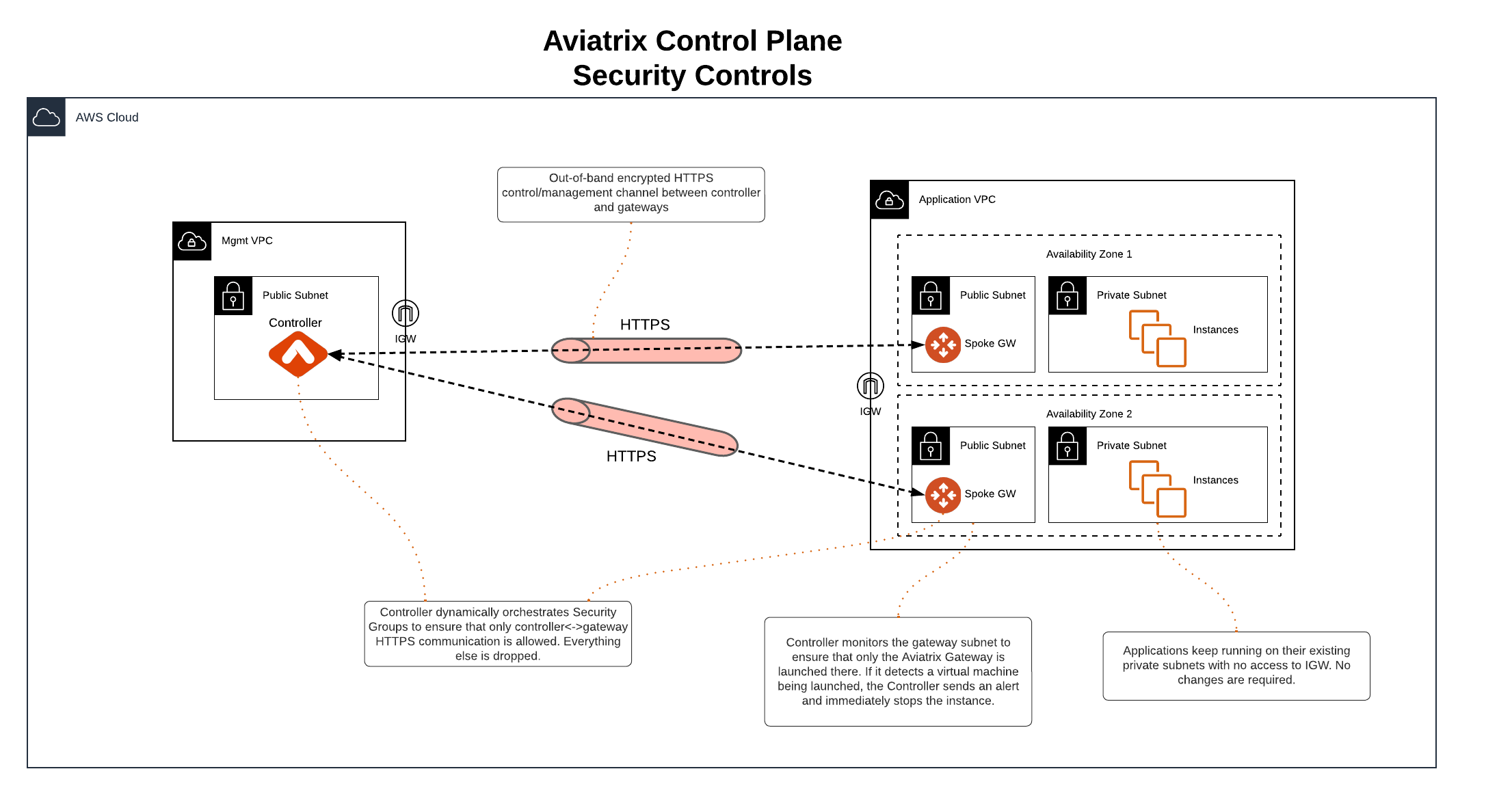
Aviatrix architecture provides a clear separation between control and data plane
functions. The Aviatrix control plane uses public IPs and the HTTPS protocol to
establish an out-of-band encrypted connection between the Aviatrix Controller
and gateways to exchange configuration and state data. This ensures that control
functions, such as software upgrades, can be performed without impacting
service, while configuration and state changes in the data plane do not affect
the control plane.
## Control Plane Security Controls
Aviatrix offers several security controls to protect the control plane:
* **Security Group Management**: Ensures that only Controller and gateway IPs
can connect to each other on TCP/443 for control plane purposes. Security
groups are dynamically updated whenever a new gateway is created or deleted,
or if there is a change to the Controller IP. See
Enable Security Groups
for more information.
* **Isolated Gateway Subnets**: Applications can remain in their existing
private subnets, while Aviatrix gateways are deployed in isolated public
subnets for control plane connectivity. Access to these subnets or the
Internet Gateway (IGW) can be restricted via IAM policies.
* **Gateway Subnet Monitoring (Controller only)**: If one of your company
policies is that no VM instances can be launched on public subnets, this
feature allows you to enforce that no unauthorized virtual machine
(EC2/VM/GCE) instances are being launched on the gateway subnet. The
Controller periodically monitors the selected subnet, sends alerts, and stops
unauthorized instances if detected.
Aviatrix gateways must be launched on a public subnet (AWs, GCP, OCI).
To configure gateway subnet monitoring:
1. In the Controller UI, go to the **Gateway** page.
2. Select a gateway and click **Edit**.
3. Scroll down to **Monitor Gateway Subnets**.
4. Click **Enable**.
5. If necessary, enter the instance ID(s) to exclude. Only do this if you need
to deploy instances in the gateway subnet.
6. Click **OK** when finished.
You can click **Disable** to remove all excluding instance ID(s).
## Aviatrix Public IP Requirement
Aviatrix architecture provides a clear separation between control and data plane
functions. The Aviatrix control plane uses public IPs and the HTTPS protocol to
establish an out-of-band encrypted connection between the Aviatrix Controller
and gateways to exchange configuration and state data. This ensures that control
functions, such as software upgrades, can be performed without impacting
service, while configuration and state changes in the data plane do not affect
the control plane.
## Control Plane Security Controls
Aviatrix offers several security controls to protect the control plane:
* **Security Group Management**: Ensures that only Controller and gateway IPs
can connect to each other on TCP/443 for control plane purposes. Security
groups are dynamically updated whenever a new gateway is created or deleted,
or if there is a change to the Controller IP. See
Enable Security Groups
for more information.
* **Isolated Gateway Subnets**: Applications can remain in their existing
private subnets, while Aviatrix gateways are deployed in isolated public
subnets for control plane connectivity. Access to these subnets or the
Internet Gateway (IGW) can be restricted via IAM policies.
* **Gateway Subnet Monitoring (Controller only)**: If one of your company
policies is that no VM instances can be launched on public subnets, this
feature allows you to enforce that no unauthorized virtual machine
(EC2/VM/GCE) instances are being launched on the gateway subnet. The
Controller periodically monitors the selected subnet, sends alerts, and stops
unauthorized instances if detected.
Aviatrix gateways must be launched on a public subnet (AWs, GCP, OCI).
To configure gateway subnet monitoring:
1. In the Controller UI, go to the **Gateway** page.
2. Select a gateway and click **Edit**.
3. Scroll down to **Monitor Gateway Subnets**.
4. Click **Enable**.
5. If necessary, enter the instance ID(s) to exclude. Only do this if you need
to deploy instances in the gateway subnet.
6. Click **OK** when finished.
You can click **Disable** to remove all excluding instance ID(s).