> ## Documentation Index
> Fetch the complete documentation index at: https://docs.aviatrix.com/llms.txt
> Use this file to discover all available pages before exploring further.
# UserVPN Gateway Guide
> You can review VPN gateways in Aviatrix CoPilot > CloudFabric > UserVPN.
You can review VPN gateways in **Aviatrix CoPilot > CloudFabric > UserVPN**.
See the following documents for instructions for creating, editing, and deleting
UserVPN Gateways:
* Launching a Default VPN Gateway
* Launching a GeoVPN Gateway
* UserVPN Gateway Settings
* Editing a VPN Gateway
* Deleting a VPN Gateway
After creating a Default VPN or Geo VPN Gateway, you can select the vertical
ellipsis  in the
gateway row and run *VPN
Diagnostics* or reload the DHCP Configuration.
Reloading the DHCP configuration refreshes the DNS settings on the gateway via
DHCP and updates the VPN configuration. The DNS settings are pushed to the VPN
client when they reconnect.
## Default VPN vs. Geo VPN Gateways
When you create a VPN Gateway, you can launch a default VPN Gateway or a Geo VPN
gateway. The table below demonstrates the differences between these types of
gateways.
| **Default VPN Gateway** | **GeoVPN Gateway** |
| ---------------------------------------------------------------------------------------------------------------------------------- | ---------------------------------------------------------------------------------------------------------- |
| Routes traffic directly to the gateway over the public Internet, independent of location. | Routes traffic to the closest VPN Gateway to the user's location. |
| Can be launched in AWS, Azure, GCP, or OCI. | Can be launched in AWS only. |
| ELB or load balancer optional. | Requires an ELB or load balancer (selected by default). |
| Can accommodate different types of gateway configurations: gateways for different clouds, cloud accounts, regions, VPC/VNets, etc. | Can only have one deployment: the same AWS region, VPC, and other configuration settings for all gateways. |
Use a default VPN gateway if you:
* Only need to use VPN for a single VPC.
* Have all VPN users located in the same region or country.
* Have peered VPCs that use different VPN gateways, and you want to restrict
logins based on geographic location.
Geo VPN does not allow you to control which specific gateway a VPN user is
routed to, though you can restrict resource access using VPN profiles.
* Need to deploy multiply VPN gateways using Azure, GCP, or OCI, and you use
gateways that do not need load balancing.
* Want more freedom in editing individual gateways.
* Default VPN gateways are grouped by load balancer, and you can only edit the
settings for the entire group.
* Standalone gateways, or gateways that do not use load balancers, can be
edited individually.
Use a GeoVPN gateway if you:
* Have a large deployment across different regions and need to limit latency.
* Have VPN users in different countries.
* Are deploying VPN gateways in AWS and are using a load balancer.
* Want all your gateways to use the same configuration settings: the same AWS
account, region, VPC, and so on. This setup is simpler than having multiple
configurations, but it means that you cannot edit gateways individually.
### Default VPN vs. Geo VPN Deployment Examples
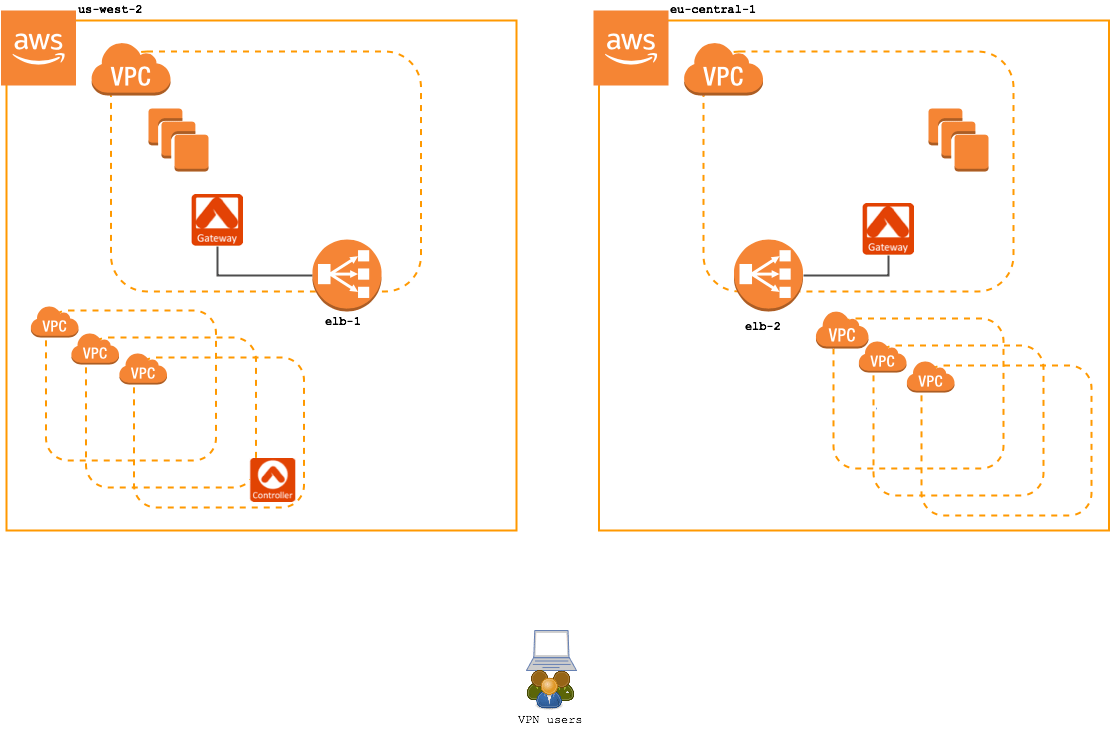
An example deployment in AWS is shown below. In this configuration, there are
two VPN access gateways: one in us-west-2 and another in eu-central-1. Each VPN
access gateway is fronted by a load balancer in AWS.
in the
gateway row and run *VPN
Diagnostics* or reload the DHCP Configuration.
Reloading the DHCP configuration refreshes the DNS settings on the gateway via
DHCP and updates the VPN configuration. The DNS settings are pushed to the VPN
client when they reconnect.
## Default VPN vs. Geo VPN Gateways
When you create a VPN Gateway, you can launch a default VPN Gateway or a Geo VPN
gateway. The table below demonstrates the differences between these types of
gateways.
| **Default VPN Gateway** | **GeoVPN Gateway** |
| ---------------------------------------------------------------------------------------------------------------------------------- | ---------------------------------------------------------------------------------------------------------- |
| Routes traffic directly to the gateway over the public Internet, independent of location. | Routes traffic to the closest VPN Gateway to the user's location. |
| Can be launched in AWS, Azure, GCP, or OCI. | Can be launched in AWS only. |
| ELB or load balancer optional. | Requires an ELB or load balancer (selected by default). |
| Can accommodate different types of gateway configurations: gateways for different clouds, cloud accounts, regions, VPC/VNets, etc. | Can only have one deployment: the same AWS region, VPC, and other configuration settings for all gateways. |
Use a default VPN gateway if you:
* Only need to use VPN for a single VPC.
* Have all VPN users located in the same region or country.
* Have peered VPCs that use different VPN gateways, and you want to restrict
logins based on geographic location.
Geo VPN does not allow you to control which specific gateway a VPN user is
routed to, though you can restrict resource access using VPN profiles.
* Need to deploy multiply VPN gateways using Azure, GCP, or OCI, and you use
gateways that do not need load balancing.
* Want more freedom in editing individual gateways.
* Default VPN gateways are grouped by load balancer, and you can only edit the
settings for the entire group.
* Standalone gateways, or gateways that do not use load balancers, can be
edited individually.
Use a GeoVPN gateway if you:
* Have a large deployment across different regions and need to limit latency.
* Have VPN users in different countries.
* Are deploying VPN gateways in AWS and are using a load balancer.
* Want all your gateways to use the same configuration settings: the same AWS
account, region, VPC, and so on. This setup is simpler than having multiple
configurations, but it means that you cannot edit gateways individually.
### Default VPN vs. Geo VPN Deployment Examples
An example deployment in AWS is shown below. In this configuration, there are
two VPN access gateways: one in us-west-2 and another in eu-central-1. Each VPN
access gateway is fronted by a load balancer in AWS.
 Review the examples below to see the difference between a standard VPN access
service and Geo VPN:
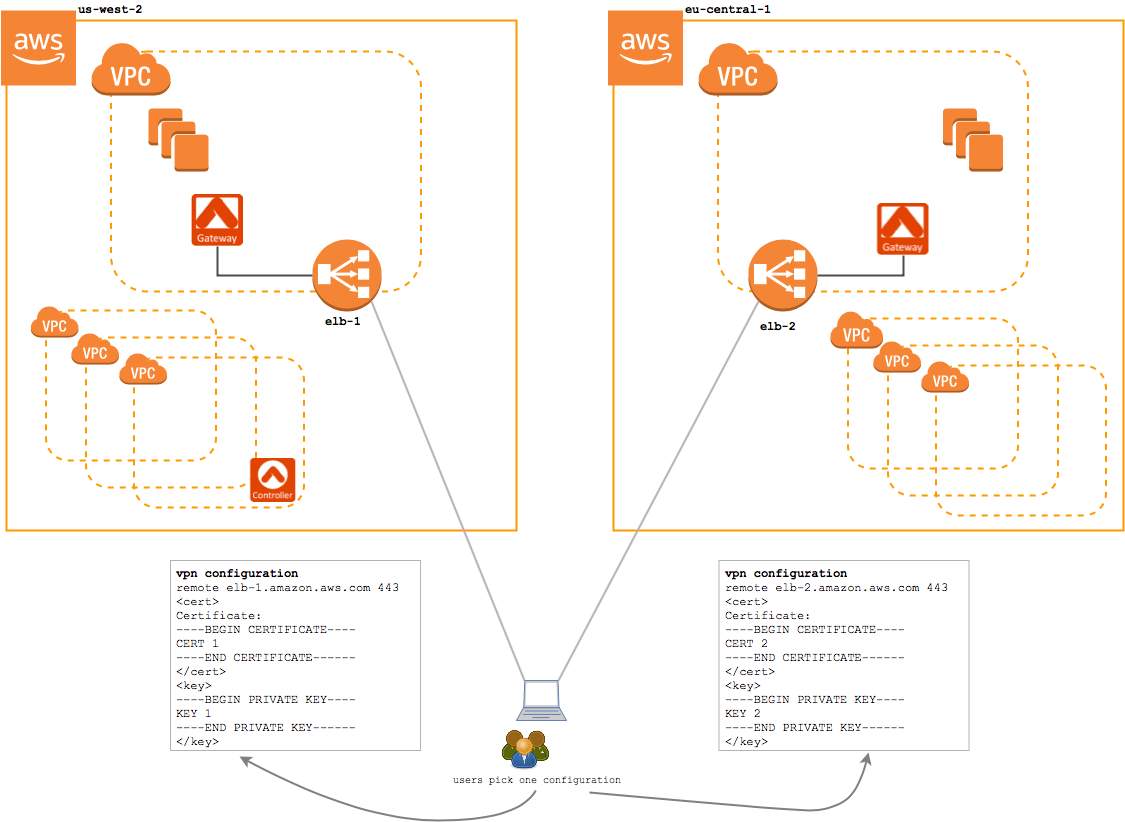
### Standard VPN Service (without geolocation feature enabled) Example
Without the Geolocation feature enabled, when a user connects to the VPN
service, they will connect to one of the two regions' VPN gateway. Each gateway
is independently administered, meaning users need a separate configuration
profile for each region they will access.
In this configuration, an EU-based user would be given a configuration profile
for the eu-central-1 load balancer. And, a US-based user will be provided with a
us-west-2 configuration profile. If either user relocates or travels to the
opposite region, they will need a separate configuration profile in that region
and they will need to manually switch the active configuration profile.
Review the examples below to see the difference between a standard VPN access
service and Geo VPN:
### Standard VPN Service (without geolocation feature enabled) Example
Without the Geolocation feature enabled, when a user connects to the VPN
service, they will connect to one of the two regions' VPN gateway. Each gateway
is independently administered, meaning users need a separate configuration
profile for each region they will access.
In this configuration, an EU-based user would be given a configuration profile
for the eu-central-1 load balancer. And, a US-based user will be provided with a
us-west-2 configuration profile. If either user relocates or travels to the
opposite region, they will need a separate configuration profile in that region
and they will need to manually switch the active configuration profile.
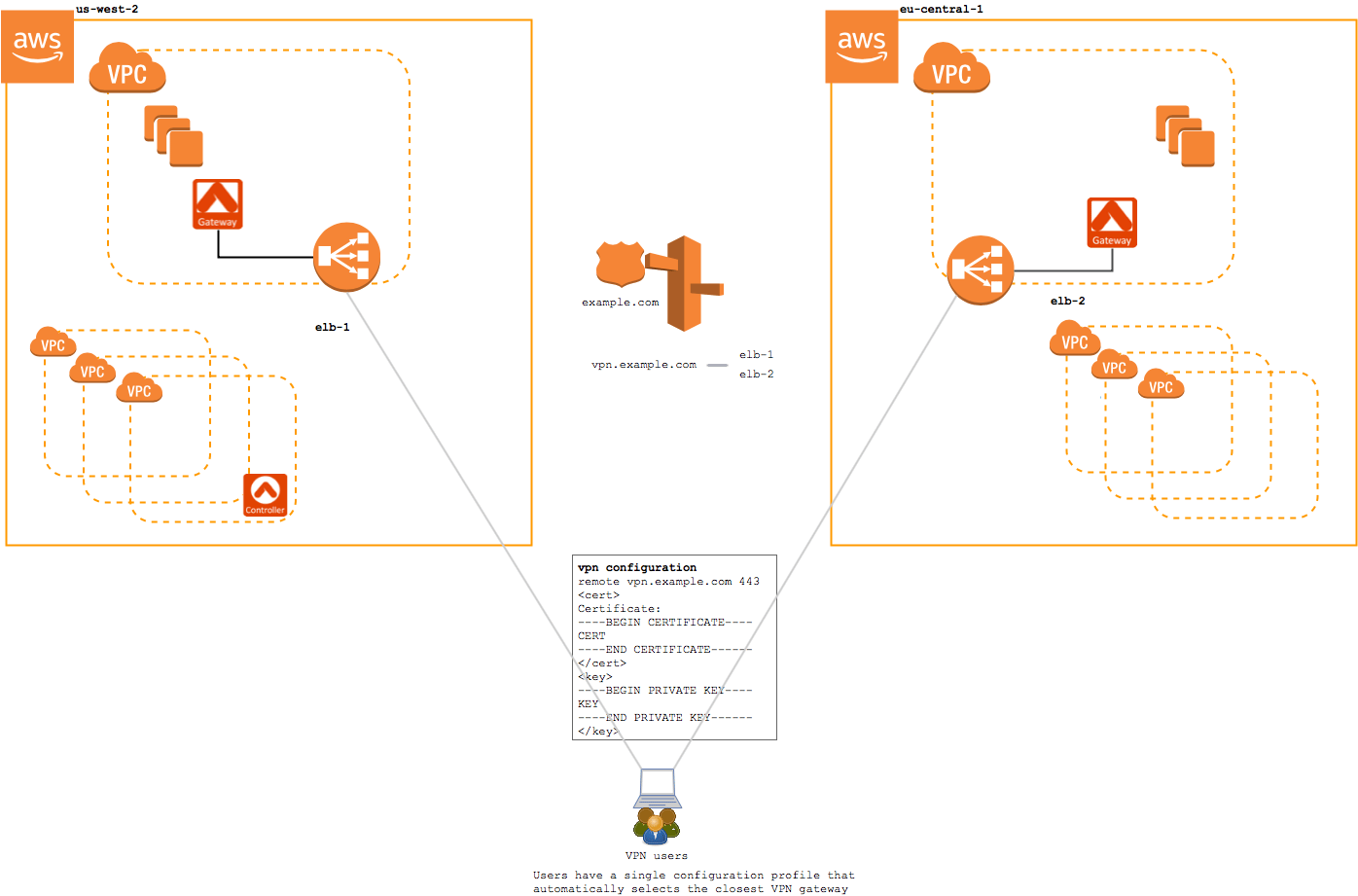
 ### Geo VPN Service Example
With the Geolocation feature enabled, when a user connects to the VPN service,
they are directed to a Route 53 that uses a latency-based routing policy to
choose between the available regions.
In this configuration, both the EU-based user and the US-based user would be
given the same configuration profile. This configuration profile will select the
closest region automatically using a latency-based routing policy defined on the
DNS record.
### Geo VPN Service Example
With the Geolocation feature enabled, when a user connects to the VPN service,
they are directed to a Route 53 that uses a latency-based routing policy to
choose between the available regions.
In this configuration, both the EU-based user and the US-based user would be
given the same configuration profile. This configuration profile will select the
closest region automatically using a latency-based routing policy defined on the
DNS record.
 Note that after creating gateways, you can change the type of any gateway group:
default VPN to GeoVPN or GeoVPN to default VPN. See the Changing VPN Gateway
Types document.
Note that after creating gateways, you can change the type of any gateway group:
default VPN to GeoVPN or GeoVPN to default VPN. See the Changing VPN Gateway
Types document.