> ## Documentation Index
> Fetch the complete documentation index at: https://docs.aviatrix.com/llms.txt
> Use this file to discover all available pages before exploring further.
# Configuring Transit FireNet
> With Aviatrix Transit FireNet you can insert firewalls into the Aviatrix Transit VPC/VNet for any supported cloud. Transit FireNet provides simplified firewall instance deployment and scaling, and allows the firewall instances to inspect East-West traffic (VPC/VNet to VPC/VNet), VPC/VNet to...
With Aviatrix Transit FireNet you can insert firewalls into the Aviatrix Transit
VPC/VNet for any supported cloud. Transit FireNet provides simplified firewall
instance deployment and scaling, and allows the firewall instances to inspect
East-West traffic (VPC/VNet to VPC/VNet), VPC/VNet to Internet traffic (Egress),
and North-South traffic (VPC/VNet to on-prem).
Controller release 7.0.1577 or greater is required to use Transit FireNet in
CoPilot. You can use FireNet in CoPilot to manage your existing Transit
FireNet environment or build a new Transit FireNet environment.
Supported firewall vendors are Palo Alto VM-Series, Check Point CloudGuard,
and Fortinet FortiGate. Panorama is also supported as an IPv4 firewall manager
for Palo Alto VM-Series.
Controller version 9.0 extends IPv6 FireNet vendor support to Fortinet and
Check Point, in addition to Palo Alto Networks (supported from Controller
version 8.2).
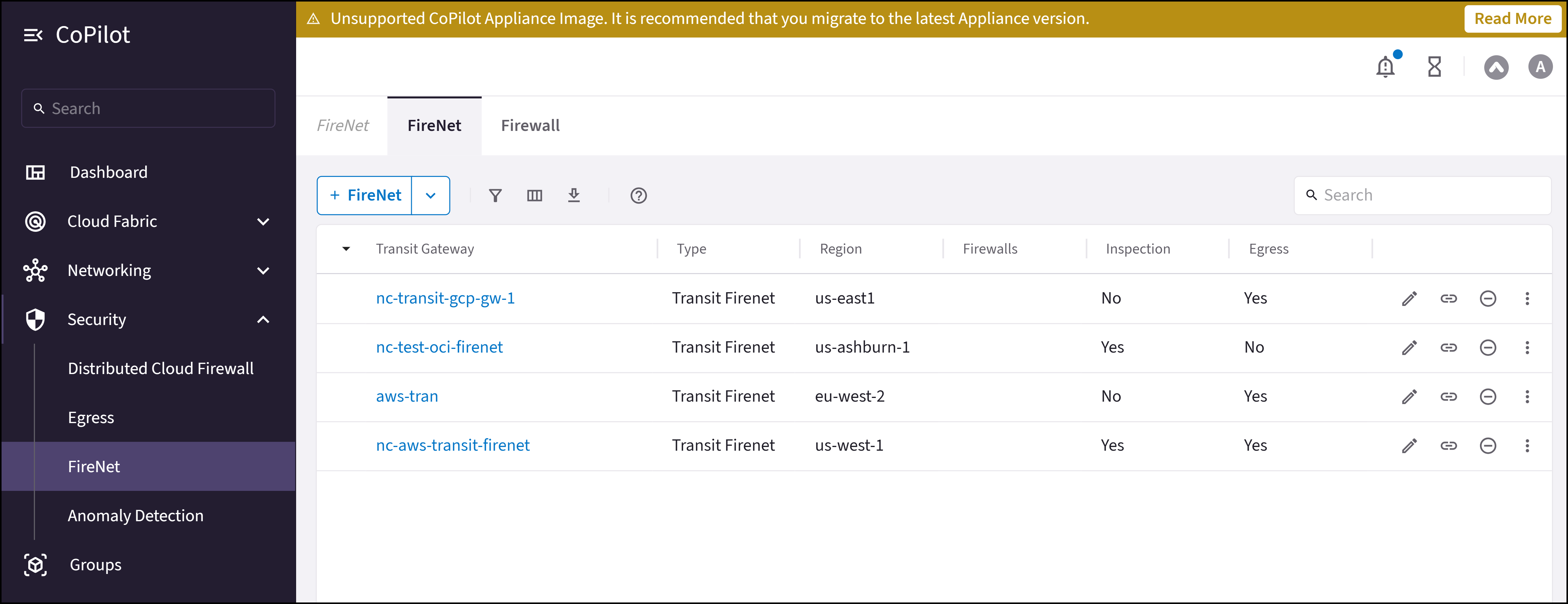
The Security > FireNet > FireNet tab shows the Transit FireNets you have
created, along with their attached firewalls, if any connection polices have
been enabled (Inspection), and if Egress is enabled.
 ## Transit FireNet Prerequisites
* If you want to attach Spokes to your Transit FireNet, you must
[create the Spokes beforehand](https://legacy.docs.aviatrix.com/documentation/latest/network/spoke-gateway-about.html?expand=true).
* Subscribe to the firewall instance (AWS only)
.
* GCP: a minimum of four VPCs (Transit FireNet VPC, Egress VPC, Management VPC,
LAN VPC) is required for the GCP FireNet solution with the Palo Alto VM-Series
firewall. All VPCs should be in the same region.
* Any Transit FireNet connections that use BGP over LAN must also have DNAT or
SNAT configured.
* Transit Gateways cannot have network segmentation enabled.
* Transit Gateways cannot have any pre-existing attachments.
If desired, you can create VPCs/VNets ahead of
time that have the *Transit + FireNet* VPC Function option selected,
ensuring that the necessary subnets and interfaces are already created in those
VPC/VNets in preparation for using the Transit FireNet feature. If when adding
FireNet to a Transit gateway you decide to use a VPC/VNet that does not have the
*Transit + FireNet* function selected, you must subsequently create the
necessary subnets and interfaces in the relevant cloud service provider.
## Workflow
1. [Add one or more FireNets](https://legacy.docs.aviatrix.com/documentation/latest/security/transit-firenet-create.html).
You can create a standard Transit FireNet (where traffic is inspected), an
[Egress FireNet](https://legacy.docs.aviatrix.com/documentation/latest/security/transit-firenet-create.html#egress-firenet),
or an
[AWS TGW FireNet](https://legacy.docs.aviatrix.com/documentation/latest/security/transit-firenet-create.html#aws-tgw-firenet).
Creating a Transit FireNet automatically adds Transit Egress Capability to this Transit gateway. You can check this by going to Cloud Fabric > Gateways > Transit Gateways and clicking the name of the Transit FireNet you just created.
After you create a Transit FireNet, you can select it on the FireNet tab and:
* View any attached firewalls
* View or
[modify connection policies](https://legacy.docs.aviatrix.com/documentation/latest/security/transit-firenet-inspection-policy.html)
* [View the FireNet VPC/VNet routing tables](https://legacy.docs.aviatrix.com/documentation/latest/security/transit-firenet-route-tables.html?expand=true)
* View or
[modify its settings](https://legacy.docs.aviatrix.com/documentation/latest/security/transit-firenet-settings.html)
2. Add a firewall and associate it with a Transit FireNet
3. [Associate an existing firewall with a Transit FireNet](https://legacy.docs.aviatrix.com/documentation/latest/security/firewall-associate-existing.html)
4. [Create connection policies for a FireNet](https://legacy.docs.aviatrix.com/documentation/latest/security/transit-firenet-inspection-policy.html)
5. Configure Vendor Integration (optional)
To turn On IPv6 on an existing FireNet, revoke the existing Vendor
Integration settings, enable IPv6 on the FireNet, and then reconfigure
Vendor Integration.
6. Run Transit FireNet diagnostics (optional)
The following documents describe the available Cloud workflows:
* Transit FireNet Workflow for AWS
* Transit FireNet Workflow for AWS TGW
* Transit FireNet Workflow for Azure
* Transit FireNet Workflow for GCP
* Transit FireNet Workflow for OCI
## Primary and Secondary FireNet (AWS only)
In AWS (not AWS TGW) you can deploy a Transit FireNet architecture that consists
of one Primary and up to ten Secondary Transit FireNet gateways. This allows you
to scale to more than 125 HPE-enabled Spoke gateways and reduce the overall
number of firewall deployments.
The Primary FireNet is the Transit Gateway where firewalls are attached. This
FireNet can have its own Spoke Gateways and Site2Cloud or external connections.
Secondary FireNet Transit Gateways send traffic to the Primary FireNet to be
inspected by the firewall. A Secondary FireNet can only attach to one Primary
FireNet. Secondary FireNets can bypass Primary if the traffic does not require
inspection. Traffic that does not require inspection is routed to the closest
next hop.
### Prerequisites for Primary and Secondary FireNet
* [Segmentation](https://legacy.docs.aviatrix.com/documentation/latest/security/transit-firenet-settings.html/network-segmentation-secured)
must be enabled on the gateways that will function as the Primary and
Secondary FireNets before attachment occurs. You cannot enable segmentation
after attachment.
* SNAT/NAT cannot be configured for the FireNets in a Primary/Secondary FireNet
configuration.
### Prerequisites for Secondary FireNet
* GWLB cannot be enabled
* No firewalls attached
* No
[egress static CIDR](https://legacy.docs.aviatrix.com/documentation/latest/security/transit-firenet-settings.html)
configured
* No
[exclude CIDR](https://legacy.docs.aviatrix.com/documentation/latest/security/transit-firenet-edit.html)
configured
* Local ASN configured
* Network segmentation enabled
Secondary FireNet does not support IPv6.
## Related Topics
* FireNet Design Patterns
* [Editing a Transit FireNet](https://legacy.docs.aviatrix.com/documentation/latest/security/transit-firenet-inspection-policy.html)
* Attaching a Spoke to a Transit FireNet
* [Configuring Transit FireNet Inspection Policies](https://legacy.docs.aviatrix.com/documentation/latest/security/transit-firenet-remove.html)
* [Removing Transit FireNet](https://legacy.docs.aviatrix.com/documentation/latest/security/transit-firenet-route-tables.html)
* [Viewing FireNet Route Table Information](https://legacy.docs.aviatrix.com/documentation/latest/security/firewall-manage-attachments.html)
* Disassociating or Deleting Firewall Association
* [Managing Firewall Attachments](https://legacy.docs.aviatrix.com/documentation/latest/security/firenet-test-connectivity.html)
* Configuring your firewalls to check FireNet traffic flow
## Transit FireNet Prerequisites
* If you want to attach Spokes to your Transit FireNet, you must
[create the Spokes beforehand](https://legacy.docs.aviatrix.com/documentation/latest/network/spoke-gateway-about.html?expand=true).
* Subscribe to the firewall instance (AWS only)
.
* GCP: a minimum of four VPCs (Transit FireNet VPC, Egress VPC, Management VPC,
LAN VPC) is required for the GCP FireNet solution with the Palo Alto VM-Series
firewall. All VPCs should be in the same region.
* Any Transit FireNet connections that use BGP over LAN must also have DNAT or
SNAT configured.
* Transit Gateways cannot have network segmentation enabled.
* Transit Gateways cannot have any pre-existing attachments.
If desired, you can create VPCs/VNets ahead of
time that have the *Transit + FireNet* VPC Function option selected,
ensuring that the necessary subnets and interfaces are already created in those
VPC/VNets in preparation for using the Transit FireNet feature. If when adding
FireNet to a Transit gateway you decide to use a VPC/VNet that does not have the
*Transit + FireNet* function selected, you must subsequently create the
necessary subnets and interfaces in the relevant cloud service provider.
## Workflow
1. [Add one or more FireNets](https://legacy.docs.aviatrix.com/documentation/latest/security/transit-firenet-create.html).
You can create a standard Transit FireNet (where traffic is inspected), an
[Egress FireNet](https://legacy.docs.aviatrix.com/documentation/latest/security/transit-firenet-create.html#egress-firenet),
or an
[AWS TGW FireNet](https://legacy.docs.aviatrix.com/documentation/latest/security/transit-firenet-create.html#aws-tgw-firenet).
Creating a Transit FireNet automatically adds Transit Egress Capability to this Transit gateway. You can check this by going to Cloud Fabric > Gateways > Transit Gateways and clicking the name of the Transit FireNet you just created.
After you create a Transit FireNet, you can select it on the FireNet tab and:
* View any attached firewalls
* View or
[modify connection policies](https://legacy.docs.aviatrix.com/documentation/latest/security/transit-firenet-inspection-policy.html)
* [View the FireNet VPC/VNet routing tables](https://legacy.docs.aviatrix.com/documentation/latest/security/transit-firenet-route-tables.html?expand=true)
* View or
[modify its settings](https://legacy.docs.aviatrix.com/documentation/latest/security/transit-firenet-settings.html)
2. Add a firewall and associate it with a Transit FireNet
3. [Associate an existing firewall with a Transit FireNet](https://legacy.docs.aviatrix.com/documentation/latest/security/firewall-associate-existing.html)
4. [Create connection policies for a FireNet](https://legacy.docs.aviatrix.com/documentation/latest/security/transit-firenet-inspection-policy.html)
5. Configure Vendor Integration (optional)
To turn On IPv6 on an existing FireNet, revoke the existing Vendor
Integration settings, enable IPv6 on the FireNet, and then reconfigure
Vendor Integration.
6. Run Transit FireNet diagnostics (optional)
The following documents describe the available Cloud workflows:
* Transit FireNet Workflow for AWS
* Transit FireNet Workflow for AWS TGW
* Transit FireNet Workflow for Azure
* Transit FireNet Workflow for GCP
* Transit FireNet Workflow for OCI
## Primary and Secondary FireNet (AWS only)
In AWS (not AWS TGW) you can deploy a Transit FireNet architecture that consists
of one Primary and up to ten Secondary Transit FireNet gateways. This allows you
to scale to more than 125 HPE-enabled Spoke gateways and reduce the overall
number of firewall deployments.
The Primary FireNet is the Transit Gateway where firewalls are attached. This
FireNet can have its own Spoke Gateways and Site2Cloud or external connections.
Secondary FireNet Transit Gateways send traffic to the Primary FireNet to be
inspected by the firewall. A Secondary FireNet can only attach to one Primary
FireNet. Secondary FireNets can bypass Primary if the traffic does not require
inspection. Traffic that does not require inspection is routed to the closest
next hop.
### Prerequisites for Primary and Secondary FireNet
* [Segmentation](https://legacy.docs.aviatrix.com/documentation/latest/security/transit-firenet-settings.html/network-segmentation-secured)
must be enabled on the gateways that will function as the Primary and
Secondary FireNets before attachment occurs. You cannot enable segmentation
after attachment.
* SNAT/NAT cannot be configured for the FireNets in a Primary/Secondary FireNet
configuration.
### Prerequisites for Secondary FireNet
* GWLB cannot be enabled
* No firewalls attached
* No
[egress static CIDR](https://legacy.docs.aviatrix.com/documentation/latest/security/transit-firenet-settings.html)
configured
* No
[exclude CIDR](https://legacy.docs.aviatrix.com/documentation/latest/security/transit-firenet-edit.html)
configured
* Local ASN configured
* Network segmentation enabled
Secondary FireNet does not support IPv6.
## Related Topics
* FireNet Design Patterns
* [Editing a Transit FireNet](https://legacy.docs.aviatrix.com/documentation/latest/security/transit-firenet-inspection-policy.html)
* Attaching a Spoke to a Transit FireNet
* [Configuring Transit FireNet Inspection Policies](https://legacy.docs.aviatrix.com/documentation/latest/security/transit-firenet-remove.html)
* [Removing Transit FireNet](https://legacy.docs.aviatrix.com/documentation/latest/security/transit-firenet-route-tables.html)
* [Viewing FireNet Route Table Information](https://legacy.docs.aviatrix.com/documentation/latest/security/firewall-manage-attachments.html)
* Disassociating or Deleting Firewall Association
* [Managing Firewall Attachments](https://legacy.docs.aviatrix.com/documentation/latest/security/firenet-test-connectivity.html)
* Configuring your firewalls to check FireNet traffic flow