> ## Documentation Index
> Fetch the complete documentation index at: https://docs.aviatrix.com/llms.txt
> Use this file to discover all available pages before exploring further.
# Managing Firewalls in Transit FireNet
> FireNet supports three types of firewall vendors: Check Point CloudGuard, Fortinet FortiGate, and Palo Alto VM-Series. Panorama (firewall manager) is also supported for Palo Alto VM-Series firewalls.
FireNet supports three types of firewall vendors: Check Point CloudGuard,
Fortinet FortiGate, and Palo Alto VM-Series. Panorama (firewall manager) is also
supported for Palo Alto VM-Series firewalls.
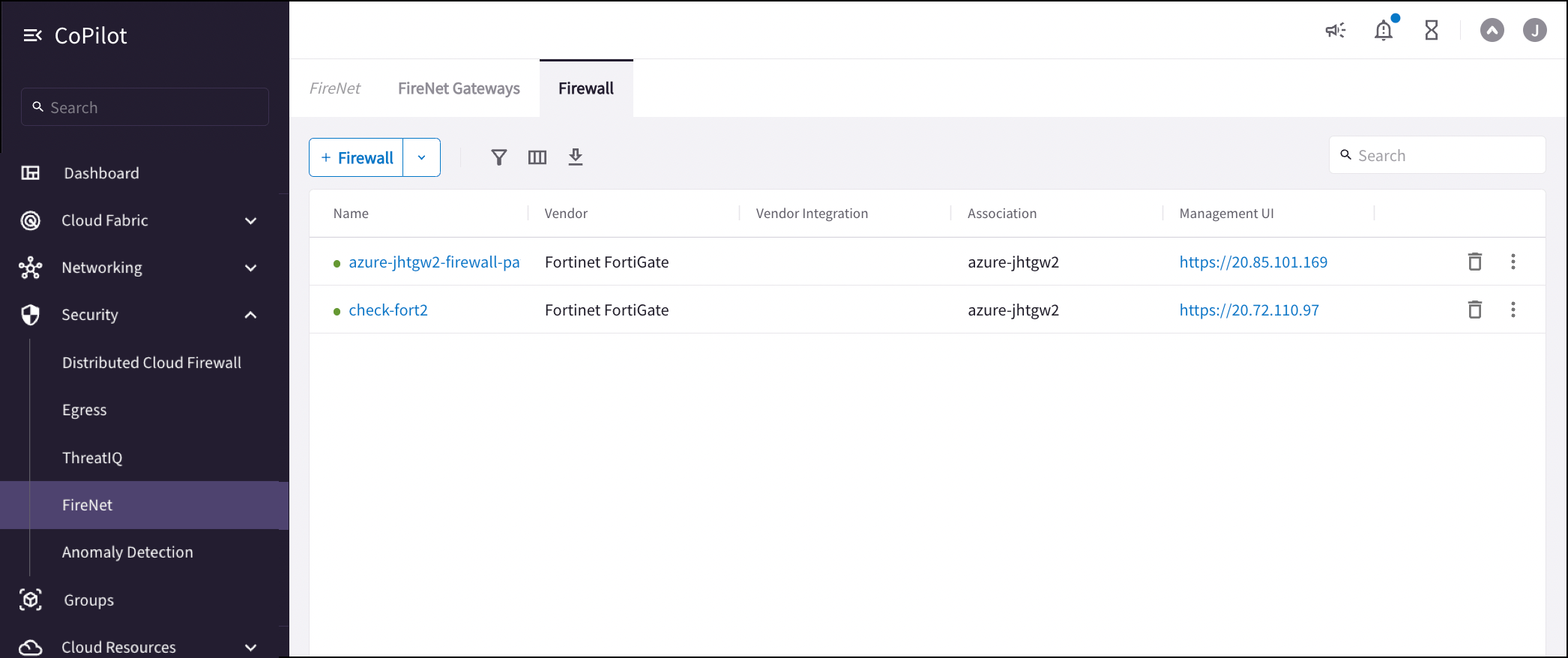
After you deploy firewalls you can
view them on the Security > FireNet > Firewall tab. You can deploy firewalls
from the Firewall tab, or you can
[import an existing cloud-deployed firewall](https://legacy.docs.aviatrix.com/documentation/latest/security/firewall-associate-existing.html).
From here you can also:
* Disable or detach a firewall
* Click the Management UI link to access the firewall UI and configure the
firewall to check that FireNet traffic is flowing as expected. See the below
examples for suggested configurations.
* Click the name of the firewall to view firewall details.
Any firewalls configured with password authentication do not allow for the
downloading of the firewall access key.
## Viewing Firewall Details
Click a firewall name on the Security > FireNet > Firewall tab to see its
details.
 You can click *Sync Routes to Firewall* to ensure that Transit FireNet routes
are synced to the selected firewall.
## Palo Alto
Palo Alto firewall versions greater than 9.1.3 are not supported in the GCP
Transit FireNet configuration. When configuring{" "}
Palo Alto for AWS
, you must download the access key to SSH into the firewall and change the
password.
Palo Alto firewall interface specifications
Supported Palo Alto firewall versions
You can use these example configuration documents to configure your Palo Alto
VM-Series firewall in the following clouds.
The Controller periodically issues Palo Alto API calls to find out if API can
be issued successfully. This is used for route updating purposes, as firewall
route updates requires API to work. If the Palo Alto API fails twice
consecutively, the Controller declares the firewall is in Inaccessible state,
but the firewall should still be attached and be able to forward traffic as
long as its health checks pass.
* Configuring Palo Alto for AWS
* Configuring Palo Alto for Azure
* Configuring Palo Alto for GCP
* Configuring Palo Alto for OCI
* Configuring Panorama Firewall Manager for VM-Series
## Fortinet FortiGate
FortiGate firewall interface specifications
Supported Fortinet firewall versions
You can use these example configuration documents to configure your Fortinet
FortiGate firewall in the following clouds.
* Configuring FortiGate for AWS
* Configuring FortiGate for Azure
* Configuring FortiGate for GCP
## Check Point CloudGuard
Check Point firewall interface specifications
Supported Check Point firewall versions
You can use these example configuration documents to configure your Check Point
CloudGuard firewall in the following clouds.
* Deploying Check Point CloudGuard
* Configuring Check Point for AWS
* Configuring Check Point for Azure
## Related Topics
* Supported Firewall Versions
* Firewall Interface Specifications
* Aviatrix FireNet / AWS Transit Gateway Native Deployment Comparison
* Subscribing to a Firewall Instance (AWS)
* Deploying a Firewall
* Disassociating or Deleting Firewall Association
* [Managing Firewall Attachments](https://legacy.docs.aviatrix.com/documentation/latest/security/firewall-manage-attachments.html)
* Checking the Health of Your Firewall
You can click *Sync Routes to Firewall* to ensure that Transit FireNet routes
are synced to the selected firewall.
## Palo Alto
Palo Alto firewall versions greater than 9.1.3 are not supported in the GCP
Transit FireNet configuration. When configuring{" "}
Palo Alto for AWS
, you must download the access key to SSH into the firewall and change the
password.
Palo Alto firewall interface specifications
Supported Palo Alto firewall versions
You can use these example configuration documents to configure your Palo Alto
VM-Series firewall in the following clouds.
The Controller periodically issues Palo Alto API calls to find out if API can
be issued successfully. This is used for route updating purposes, as firewall
route updates requires API to work. If the Palo Alto API fails twice
consecutively, the Controller declares the firewall is in Inaccessible state,
but the firewall should still be attached and be able to forward traffic as
long as its health checks pass.
* Configuring Palo Alto for AWS
* Configuring Palo Alto for Azure
* Configuring Palo Alto for GCP
* Configuring Palo Alto for OCI
* Configuring Panorama Firewall Manager for VM-Series
## Fortinet FortiGate
FortiGate firewall interface specifications
Supported Fortinet firewall versions
You can use these example configuration documents to configure your Fortinet
FortiGate firewall in the following clouds.
* Configuring FortiGate for AWS
* Configuring FortiGate for Azure
* Configuring FortiGate for GCP
## Check Point CloudGuard
Check Point firewall interface specifications
Supported Check Point firewall versions
You can use these example configuration documents to configure your Check Point
CloudGuard firewall in the following clouds.
* Deploying Check Point CloudGuard
* Configuring Check Point for AWS
* Configuring Check Point for Azure
## Related Topics
* Supported Firewall Versions
* Firewall Interface Specifications
* Aviatrix FireNet / AWS Transit Gateway Native Deployment Comparison
* Subscribing to a Firewall Instance (AWS)
* Deploying a Firewall
* Disassociating or Deleting Firewall Association
* [Managing Firewall Attachments](https://legacy.docs.aviatrix.com/documentation/latest/security/firewall-manage-attachments.html)
* Checking the Health of Your Firewall