> ## Documentation Index
> Fetch the complete documentation index at: https://docs.aviatrix.com/llms.txt
> Use this file to discover all available pages before exploring further.
# Protecting Egress Traffic with the Egress Protection Workflow
> Controller 8.0 and the enablement of the Distributed Cloud Firewall feature is required to protect VPC/VNets with the egress protection workflow.
Controller 8.0 and the enablement of the Distributed Cloud Firewall feature is
required to protect VPC/VNets with the egress protection workflow.
On the Security > Egress > Egress VPC/VNets tab, you can use the egress
protection workflow to protect VPC/VNets that are being monitored, to ensure
that only trusted traffic is going to the Internet.
After VPC/VNets are protected:
* The VPC/VNets continue to be monitored.
* They are added to a Protected VPC/VNets SmartGroup.
* The Protected VPCs rule is added to the Egress Protection Policy List ruleset.
Subsequent protected VPC/VNets are added to the same SmartGroup and Rule.
* A new WebGroup is created for the selected trusted domains.
* A new SmartGroup is created for the selected VPC/VNets.
* A new "permit" rule is created that contains the trusted domains.
* They are included in the Egress Security Score calculation.
To protect VPC/VNet egress traffic:
1. On the Security > Egress > Egress VPC/VNets tab, select one or more monitored
VPC/VNets and click **Protect** in the Actions menu.
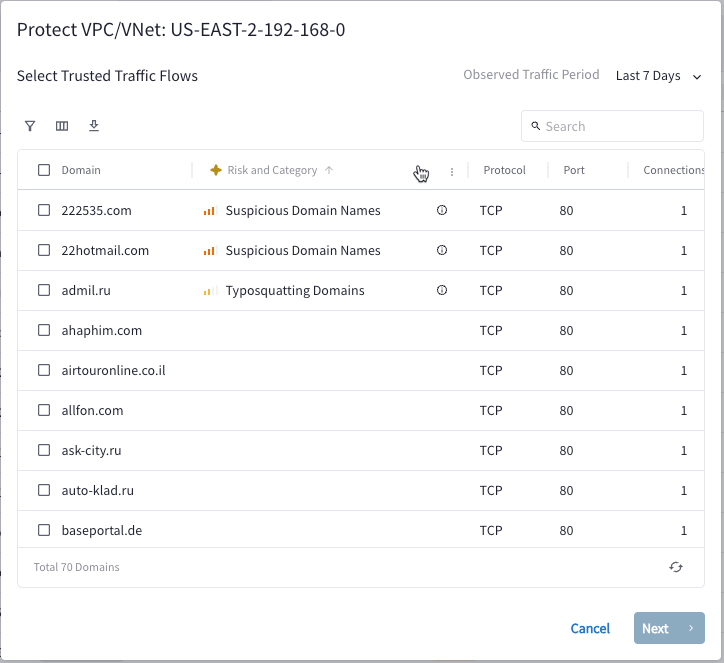
2. The Protect VPC/VNet dialog displays all trusted traffic flows observed in
the selected VPC/VNet. Select one or more trusted flows to continue to allow
traffic to flow to those domains.
If there are no domains listed, you cannot click **Next** to proceed to the next step. If desired, you can manually protect your traffic by creating Distributed Cloud Firewall policies.
You can use the [AI FQDN Analyzer](https://legacy.docs.aviatrix.com/documentation/latest/security/ai-fqdn-analyzer.html) to view details on the domains and determine if you want to trust them.
 3. Click **Next** after selecting trusted traffic flows. The Review Distributed
Cloud Firewall Rule Changes page displays.
3. Click **Next** after selecting trusted traffic flows. The Review Distributed
Cloud Firewall Rule Changes page displays.
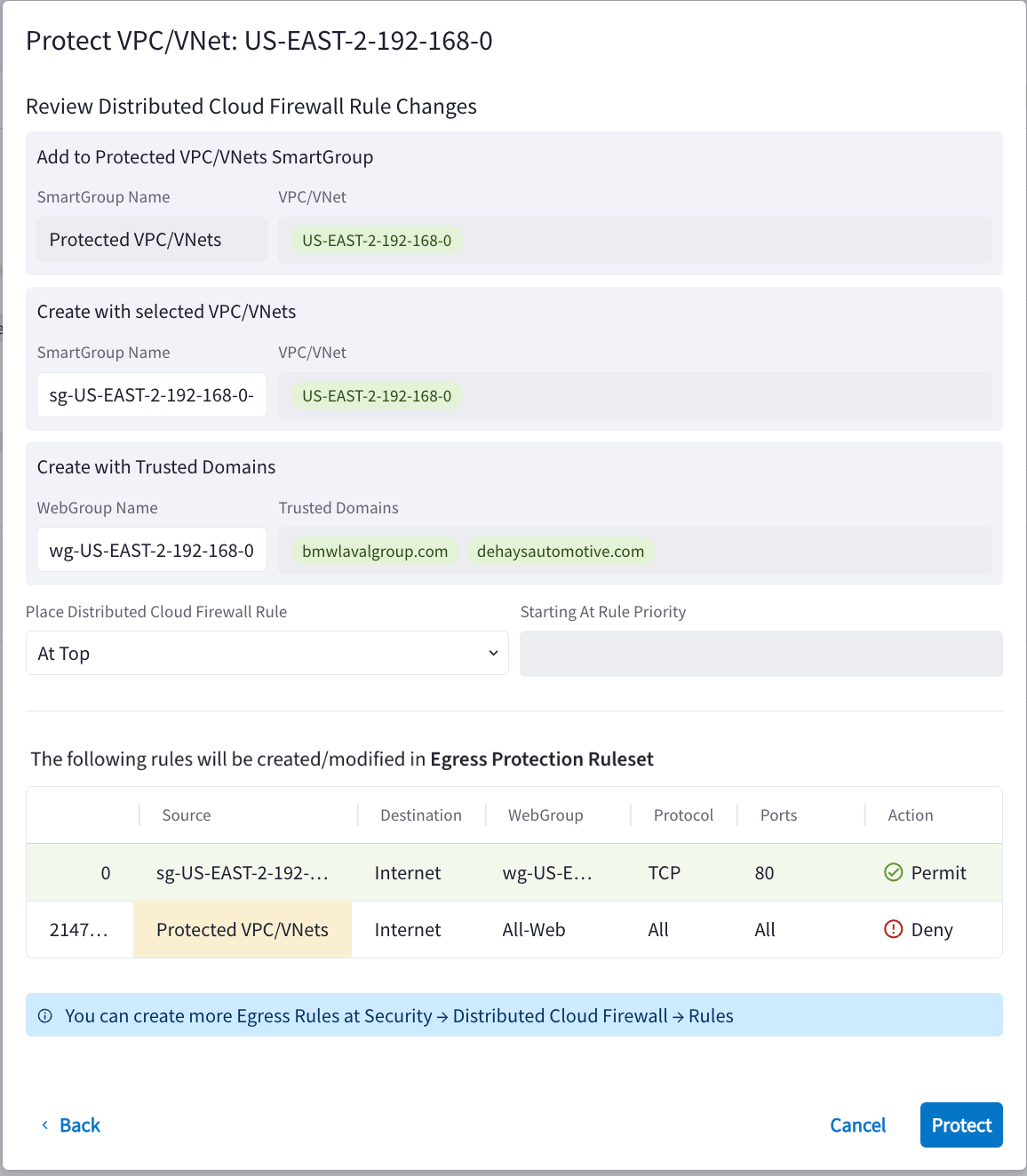 This page displays the changes that will occur after protection is applied.
* The selected VPC/VNets will be added to the Protected VPC/VNets SmartGroup
(and removed from the Monitored-VPCs SmartGroup). This SmartGroup contains all
VPC/VNets that are protected.
* Another SmartGroup is created that contains just the VPC/VNets you selected.
* The selected trusted domains will be added to a new WebGroup.
4. Select where the new DCF policies will be placed. You can also enter a value
for **Starting at Rule Priority** (if applicable).
* A new DCF rule will be created for the selected VPC/VNets that permits
traffic from the VPC/VNets to the trusted domains.
* The Protected VPC/VNets Rule will be updated with the selected VPC/VNets.
This acts as a Default Deny Rule.
5. Click **Protect**.
## Related Topics
* About Egress Security Score
This page displays the changes that will occur after protection is applied.
* The selected VPC/VNets will be added to the Protected VPC/VNets SmartGroup
(and removed from the Monitored-VPCs SmartGroup). This SmartGroup contains all
VPC/VNets that are protected.
* Another SmartGroup is created that contains just the VPC/VNets you selected.
* The selected trusted domains will be added to a new WebGroup.
4. Select where the new DCF policies will be placed. You can also enter a value
for **Starting at Rule Priority** (if applicable).
* A new DCF rule will be created for the selected VPC/VNets that permits
traffic from the VPC/VNets to the trusted domains.
* The Protected VPC/VNets Rule will be updated with the selected VPC/VNets.
This acts as a Default Deny Rule.
5. Click **Protect**.
## Related Topics
* About Egress Security Score