> ## Documentation Index
> Fetch the complete documentation index at: https://docs.aviatrix.com/llms.txt
> Use this file to discover all available pages before exploring further.
# Aviatrix Cloud Firewall Secure Egress Implementation Guide
> The Aviatrix Cloud Firewall™ Secure Egress Implementation Guide outlines the steps required to implement the Aviatrix secure egress use case in Aviatrix CoPilot.
The Aviatrix Cloud Firewall™ Secure Egress Implementation Guide outlines the
steps required to implement the Aviatrix secure egress use case in Aviatrix
CoPilot. The goal is to achieve deep visibility into your traffic and
centralized policy enforcement, ensuring secure, compliant, and optimized
performance and cost efficiency.
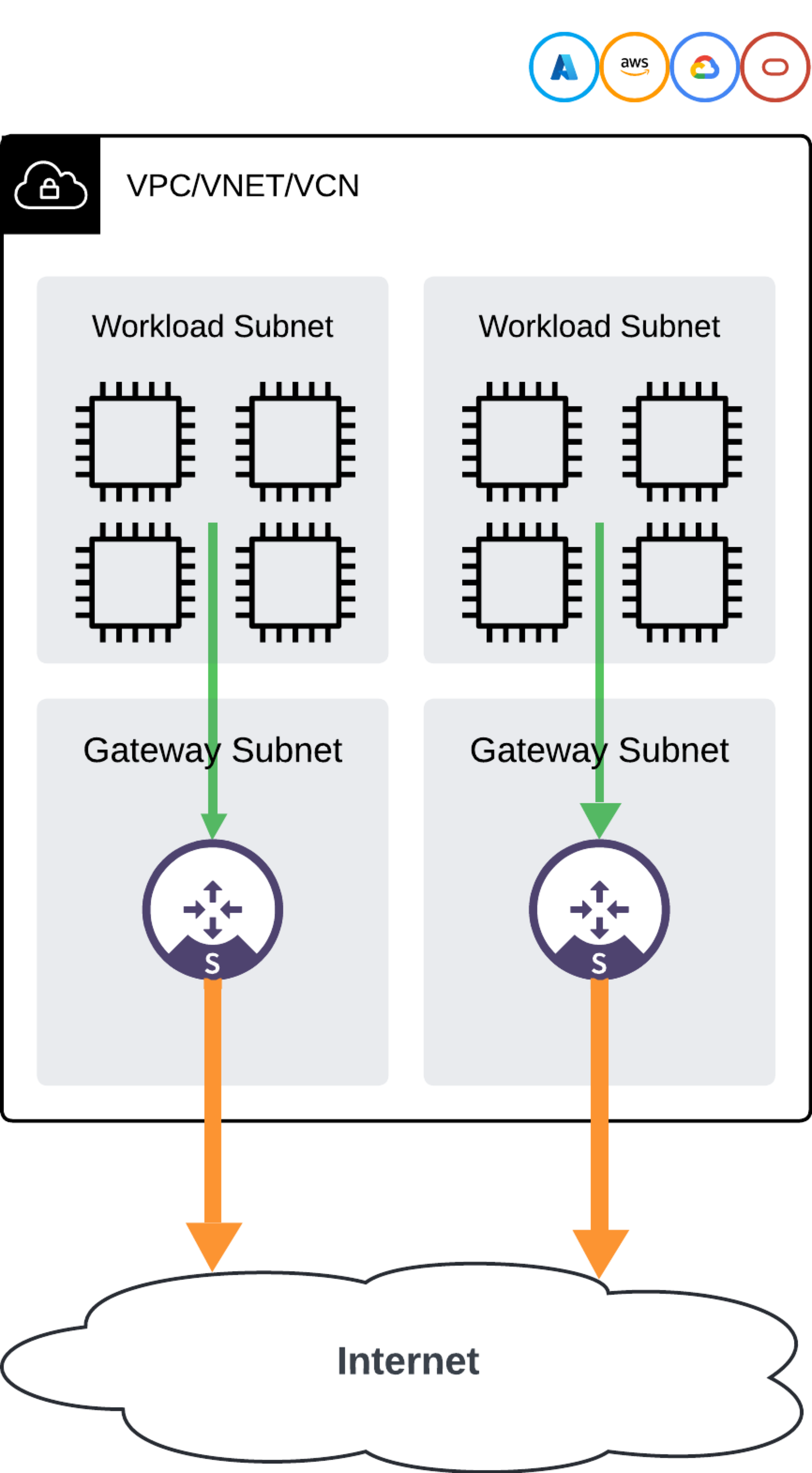 Aviatrix security features enhance the security posture of Spoke gateways and
ensure robust protection for egress traffic.
## Network Design
Aviatrix utilizes a centralized management and control plane to scale management
across multiple VPCs. This enables customers to deploy and manage Spoke
gateways, along with their NAT and security policies, from a single console or
through automation capabilities such as Terraform and API.
You can connect multiple VPC or VNet environments to a central transit hub,
which provides redundancy and centralized control. See
Aviatrix Multicloud Transit Network FAQ
and
Multicloud transit network design
.
## Configuration Steps
Aviatrix recommends following these steps to implement your cloud egress
security.
### 1. Creating and Deploying Spoke Gateways
When creating Spoke gateways, take the following into consideration:
#### Spoke Gateway Sizing
See the
Gateway Sizing Best Practices Guide
for information on common deployments, to assist with pre-deployment planning.
#### Availability Zones and High Availability
Select VPCs and availability zones to deploy egress filtering.
* **Availability Zones**: Deploy
Aviatrix gateways in each Availability Zone (AZ) with workloads to minimize
cross-AZ data transfer charges.
* **High Availability**: The Aviatrix Controller takes care of configuring route
tables to distribute the workload traffic among the available Spoke gateways.
If a Spoke gateway becomes unavailable, Controller automatically reprograms
the route table so that traffic is rerouted over another Spoke gateway within
the same or another availability zone in the VPC.
Dynamic peer discovery in Azure automatically detects changes in peered VNet
CIDRs and updates routes accordingly.
* **[Single AZ HA](https://legacy.docs.aviatrix.com/documentation/latest/network/gateway-single-az-ha.html)**:
Enable single AZ High Availability (HA) for non-production environments. This
feature is enabled by default if the gateway is launched from the Controller
or CoPilot. However, if using Terraform, you must enable the appropriate flag.
### 2. Enabling Local Egress
Enable local egress
for your VPC/VNets.
### 3. Monitoring Traffic
Use the monitoring features in CoPilot to analyze your Spoke gateway traffic and
make improvements. Gateways must be deployed before you can monitor traffic.
* **Egress analysis**:
Refer to the Security > Egress > Analyze tab to see the URLs, domains, and IP
addresses that are being accessed by your egress-enabled VPC/VNets.
* **CoPilot**: Use CoPilot features such as the
[CoPilot dashboard](https://legacy.docs.aviatrix.com/documentation/latest/monitoring/dashboard-views.html)
and topology map to analyze Spoke
gateway traffic and make improvements.
* **Alerts and notifications**:
Configure CoPilot alerts
to monitor gateway CPU and memory utilization. Alerts can be configured based
on various metrics, including gateway status, CPU utilization, and memory
usage.
* **FlowIQ**: Use FlowIQ for detailed traffic flow
analysis and anomaly detection.
### 4. Creating Groups
* **SmartGroups**: Create logical groupings of resources for DCF rules.
SmartGroups
.
* **WebGroups**: Manage outbound Internet traffic with WebGroups.
WebGroups
.
* **ExternalGroups**: Manage external feeds (such as Countries, Threat Feeds,
and SaaS-based services) with ExternalGroups.
ExternalGroups
.
Here are some examples of SmartGroups, WebGroups, and ExternalGroups you can
create:
#### SmartGroups
* Create a SmartGroup named "Marketing-Department" that includes all VMs or
resources tagged with `Department: Marketing`.
* Create a SmartGroup named "Sales-Team" that includes all VMs or resources
tagged with `Team: Sales`.
* Create a SmartGroup named "All-Employees" that includes all VMs or resources
within the organization.
* Create a SmartGroup named "Security-Team" that includes all VMs or resources
tagged with `Team: Security`.
#### WebGroups
* Create a WebGroup named "SaaS-Allowed" that includes the domains
`salesforce.com` and `office.com`.
* Create a WebGroup named "Social-Media-Restricted" that includes the domains
`facebook.com`, `x.com`, and `instagram.com`.
* Create a WebGroup named "Gambling-Sites" that includes the domains
`bet365.com`, `pokerstars.com`, and `888.com`.
#### ExternalGroups
* Create an ExternalGroup named "Blocked-Countries" that includes countries such
as `North Korea` and `Iran`.
### 5. Creating Distributed Cloud Firewall Rules
The Aviatrix Distributed Cloud Firewall (DCF) solution ensures consistent
security policies across cloud platforms by
defining rules
that describe the relationship and trust between resources in different
SmartGroups, WebGroups, and External Groups.
Operating within individual VPCs or VNets, DCF inspects and enforces security
rules directly in the cloud network where the traffic originates, regardless of
its destination. These rules are applied at the point of ingress or egress and
can be customized for inspection, logging, and enforcement, including
configuring IDS and TLS. Rules are evaluated in order and should follow a naming
convention that indicates their intent, allowing you to establish a pattern that
suits your cloud deployment needs.
All of these rules should use the TCP protocol and port 443.
#### Example 1: Restricting Access to Social Media Sites
**Scenario**: You want to restrict access to social media sites for a specific
department within your organization.
Create a DCF rule with the following characteristics:
* Source: "Marketing-Department" SmartGroup
* Destination: "Social-Media-Restricted" WebGroup
* Action: Deny
#### Example 2: Allowing Access to Specific SaaS Applications
**Scenario**: You want to allow access to specific SaaS applications such as
Salesforce and Office 365 for the Sales team.
Create a DCF rule with the following characteristics:
* Source: "Sales-Team" SmartGroup
* Destination: "SaaS-Allowed" WebGroup
* Action: Allow
#### Example 3: Blocking Access to Gambling Sites
**Scenario**: You want to block access to gambling sites for all employees.
Create a DCF rule with the following characteristics:
* Source: "All-Employees" SmartGroup
* Destination: "Gambling-Sites" WebGroup
* Action: Deny
#### Example 4: Allowing Access to External Threat Feeds
**Scenario**: You want to allow access to external threat intelligence feeds for
your security team.
Create a DCF rule with the following characteristics:
* Source: "Security-Team" SmartGroup
* Destination: Default ThreatGroup ExternalGroup: you can also select one or
more threat types and/or severity types
* Action: Allow
#### Example 5: Geoblocking Specific Countries
**Scenario**: You want to block access to specific countries for compliance
reasons.
Create a DCF rule with the following characteristics:
* Source: "All-Employees" SmartGroup
* Destination: "Blocked-Countries" ExternalGroup
* Action: Deny
Aviatrix security features enhance the security posture of Spoke gateways and
ensure robust protection for egress traffic.
## Network Design
Aviatrix utilizes a centralized management and control plane to scale management
across multiple VPCs. This enables customers to deploy and manage Spoke
gateways, along with their NAT and security policies, from a single console or
through automation capabilities such as Terraform and API.
You can connect multiple VPC or VNet environments to a central transit hub,
which provides redundancy and centralized control. See
Aviatrix Multicloud Transit Network FAQ
and
Multicloud transit network design
.
## Configuration Steps
Aviatrix recommends following these steps to implement your cloud egress
security.
### 1. Creating and Deploying Spoke Gateways
When creating Spoke gateways, take the following into consideration:
#### Spoke Gateway Sizing
See the
Gateway Sizing Best Practices Guide
for information on common deployments, to assist with pre-deployment planning.
#### Availability Zones and High Availability
Select VPCs and availability zones to deploy egress filtering.
* **Availability Zones**: Deploy
Aviatrix gateways in each Availability Zone (AZ) with workloads to minimize
cross-AZ data transfer charges.
* **High Availability**: The Aviatrix Controller takes care of configuring route
tables to distribute the workload traffic among the available Spoke gateways.
If a Spoke gateway becomes unavailable, Controller automatically reprograms
the route table so that traffic is rerouted over another Spoke gateway within
the same or another availability zone in the VPC.
Dynamic peer discovery in Azure automatically detects changes in peered VNet
CIDRs and updates routes accordingly.
* **[Single AZ HA](https://legacy.docs.aviatrix.com/documentation/latest/network/gateway-single-az-ha.html)**:
Enable single AZ High Availability (HA) for non-production environments. This
feature is enabled by default if the gateway is launched from the Controller
or CoPilot. However, if using Terraform, you must enable the appropriate flag.
### 2. Enabling Local Egress
Enable local egress
for your VPC/VNets.
### 3. Monitoring Traffic
Use the monitoring features in CoPilot to analyze your Spoke gateway traffic and
make improvements. Gateways must be deployed before you can monitor traffic.
* **Egress analysis**:
Refer to the Security > Egress > Analyze tab to see the URLs, domains, and IP
addresses that are being accessed by your egress-enabled VPC/VNets.
* **CoPilot**: Use CoPilot features such as the
[CoPilot dashboard](https://legacy.docs.aviatrix.com/documentation/latest/monitoring/dashboard-views.html)
and topology map to analyze Spoke
gateway traffic and make improvements.
* **Alerts and notifications**:
Configure CoPilot alerts
to monitor gateway CPU and memory utilization. Alerts can be configured based
on various metrics, including gateway status, CPU utilization, and memory
usage.
* **FlowIQ**: Use FlowIQ for detailed traffic flow
analysis and anomaly detection.
### 4. Creating Groups
* **SmartGroups**: Create logical groupings of resources for DCF rules.
SmartGroups
.
* **WebGroups**: Manage outbound Internet traffic with WebGroups.
WebGroups
.
* **ExternalGroups**: Manage external feeds (such as Countries, Threat Feeds,
and SaaS-based services) with ExternalGroups.
ExternalGroups
.
Here are some examples of SmartGroups, WebGroups, and ExternalGroups you can
create:
#### SmartGroups
* Create a SmartGroup named "Marketing-Department" that includes all VMs or
resources tagged with `Department: Marketing`.
* Create a SmartGroup named "Sales-Team" that includes all VMs or resources
tagged with `Team: Sales`.
* Create a SmartGroup named "All-Employees" that includes all VMs or resources
within the organization.
* Create a SmartGroup named "Security-Team" that includes all VMs or resources
tagged with `Team: Security`.
#### WebGroups
* Create a WebGroup named "SaaS-Allowed" that includes the domains
`salesforce.com` and `office.com`.
* Create a WebGroup named "Social-Media-Restricted" that includes the domains
`facebook.com`, `x.com`, and `instagram.com`.
* Create a WebGroup named "Gambling-Sites" that includes the domains
`bet365.com`, `pokerstars.com`, and `888.com`.
#### ExternalGroups
* Create an ExternalGroup named "Blocked-Countries" that includes countries such
as `North Korea` and `Iran`.
### 5. Creating Distributed Cloud Firewall Rules
The Aviatrix Distributed Cloud Firewall (DCF) solution ensures consistent
security policies across cloud platforms by
defining rules
that describe the relationship and trust between resources in different
SmartGroups, WebGroups, and External Groups.
Operating within individual VPCs or VNets, DCF inspects and enforces security
rules directly in the cloud network where the traffic originates, regardless of
its destination. These rules are applied at the point of ingress or egress and
can be customized for inspection, logging, and enforcement, including
configuring IDS and TLS. Rules are evaluated in order and should follow a naming
convention that indicates their intent, allowing you to establish a pattern that
suits your cloud deployment needs.
All of these rules should use the TCP protocol and port 443.
#### Example 1: Restricting Access to Social Media Sites
**Scenario**: You want to restrict access to social media sites for a specific
department within your organization.
Create a DCF rule with the following characteristics:
* Source: "Marketing-Department" SmartGroup
* Destination: "Social-Media-Restricted" WebGroup
* Action: Deny
#### Example 2: Allowing Access to Specific SaaS Applications
**Scenario**: You want to allow access to specific SaaS applications such as
Salesforce and Office 365 for the Sales team.
Create a DCF rule with the following characteristics:
* Source: "Sales-Team" SmartGroup
* Destination: "SaaS-Allowed" WebGroup
* Action: Allow
#### Example 3: Blocking Access to Gambling Sites
**Scenario**: You want to block access to gambling sites for all employees.
Create a DCF rule with the following characteristics:
* Source: "All-Employees" SmartGroup
* Destination: "Gambling-Sites" WebGroup
* Action: Deny
#### Example 4: Allowing Access to External Threat Feeds
**Scenario**: You want to allow access to external threat intelligence feeds for
your security team.
Create a DCF rule with the following characteristics:
* Source: "Security-Team" SmartGroup
* Destination: Default ThreatGroup ExternalGroup: you can also select one or
more threat types and/or severity types
* Action: Allow
#### Example 5: Geoblocking Specific Countries
**Scenario**: You want to block access to specific countries for compliance
reasons.
Create a DCF rule with the following characteristics:
* Source: "All-Employees" SmartGroup
* Destination: "Blocked-Countries" ExternalGroup
* Action: Deny