> ## Documentation Index
> Fetch the complete documentation index at: https://docs.aviatrix.com/llms.txt
> Use this file to discover all available pages before exploring further.
# Setting up Alibaba Cloud Account Credentials
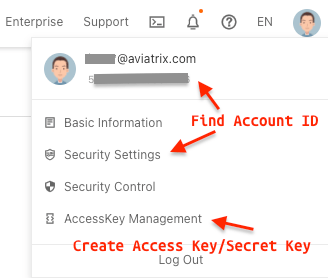
> Access your Alibaba account info in the Alibaba UI. Click on the User Icon so you can access the Alibaba Cloud Account ID, Cloud Access Key ID, and Cloud Secret Key. You need the Alibaba account information to create the Alibaba Primary Access Account in the Aviatrix Controller.
## Creating an Alibaba Primary Access Account
Access your Alibaba account info in the Alibaba UI. Click on the User Icon so
you can access the Alibaba Cloud Account ID, Cloud Access Key ID, and Cloud
Secret Key. You need the Alibaba account information to create the Alibaba
Primary Access Account in the Aviatrix Controller.
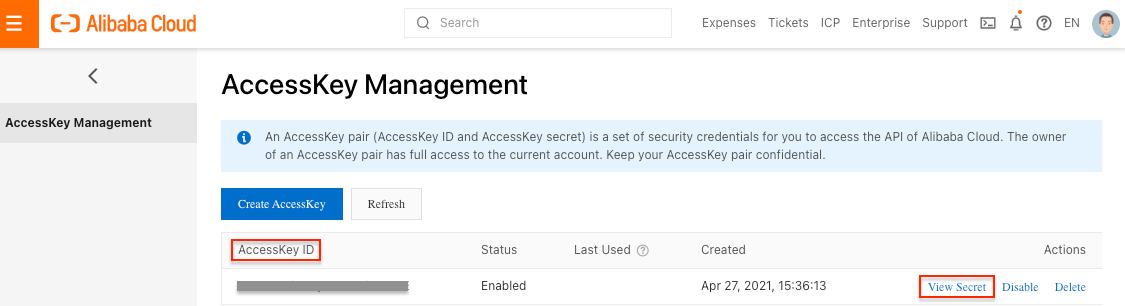
 In the Alibaba UI, create an AccessKey pair for authenticating the Aviatrix
Controller. Click on the User Icon and navigate to AccessKey Management > Create
Access Key.
In the Alibaba UI, create an AccessKey pair for authenticating the Aviatrix
Controller. Click on the User Icon and navigate to AccessKey Management > Create
Access Key.
 In the Aviatrix Controller, navigate to Accounts > Access Accounts and select
Alibaba Cloud. Add an Account Name and enter the Alibaba Cloud Account ID, Cloud
Access Key ID, and Cloud Secret Key. Optional - add any RBAC Groups that should
have access to the Primary Access Account.
## Alibaba Cloud Default Limitations
The EIP bandwidth limit is 200 Mbit/s. The Aviatrix Spoke to Transit and Transit
to Spoke connections maximum bandwidth is 400 Mbit/s. You can purchase different
plans to increase throughput and bandwidth.
A maximum of 48 routes in each route table is supported by default. If you
require more routes in each route table, contact Alibaba Support.
The Alibaba API takes 1-2 seconds to add or delete one route in one VPC route
table. No route update requests are accepted while a route is being added or
deleted.
Outgoing traffic to public non-RFC1918 IP address from an instance with a public
IP does not look at the VPC route table. Even non-RFC1918 routes are configured
on VPC route table. If you want to improve this non-RFC1918 traffic routing
behavior on public instance, contact Alibaba Support.
## Deploying the Aviatrix Gateway in your Alibaba Cloud
You must satisfy the prerequisites in
[Creating an Alibaba Primary Access Account](#creating-an-alibaba-primary-access-account)
before Deploying the Aviatrix Gateway in your Alibaba Cloud.
1. Access your Alibaba account info in the Alibaba UI. Click on the User Icon
and record your Alibaba Account ID.
2. Communicate your Alibaba Account ID to your Aviatrix Support representative.
3. Your Aviatrix Support representative shares the Aviatrix gateway image with
your Alibaba account.
4. Verify your Alibaba account can access the Aviatrix gateway image. Go to
Elastic Compute Service > Instances & Images > Images > Shared Image to view
the image.
In the Aviatrix Controller, navigate to Accounts > Access Accounts and select
Alibaba Cloud. Add an Account Name and enter the Alibaba Cloud Account ID, Cloud
Access Key ID, and Cloud Secret Key. Optional - add any RBAC Groups that should
have access to the Primary Access Account.
## Alibaba Cloud Default Limitations
The EIP bandwidth limit is 200 Mbit/s. The Aviatrix Spoke to Transit and Transit
to Spoke connections maximum bandwidth is 400 Mbit/s. You can purchase different
plans to increase throughput and bandwidth.
A maximum of 48 routes in each route table is supported by default. If you
require more routes in each route table, contact Alibaba Support.
The Alibaba API takes 1-2 seconds to add or delete one route in one VPC route
table. No route update requests are accepted while a route is being added or
deleted.
Outgoing traffic to public non-RFC1918 IP address from an instance with a public
IP does not look at the VPC route table. Even non-RFC1918 routes are configured
on VPC route table. If you want to improve this non-RFC1918 traffic routing
behavior on public instance, contact Alibaba Support.
## Deploying the Aviatrix Gateway in your Alibaba Cloud
You must satisfy the prerequisites in
[Creating an Alibaba Primary Access Account](#creating-an-alibaba-primary-access-account)
before Deploying the Aviatrix Gateway in your Alibaba Cloud.
1. Access your Alibaba account info in the Alibaba UI. Click on the User Icon
and record your Alibaba Account ID.
2. Communicate your Alibaba Account ID to your Aviatrix Support representative.
3. Your Aviatrix Support representative shares the Aviatrix gateway image with
your Alibaba account.
4. Verify your Alibaba account can access the Aviatrix gateway image. Go to
Elastic Compute Service > Instances & Images > Images > Shared Image to view
the image.
 5. Create an Alibaba Primary Access Account in the Aviatrix Controller.
6. Deploy the Aviatrix Gateway in the Alibaba cloud.
5. Create an Alibaba Primary Access Account in the Aviatrix Controller.
6. Deploy the Aviatrix Gateway in the Alibaba cloud.