> ## Documentation Index
> Fetch the complete documentation index at: https://docs.aviatrix.com/llms.txt
> Use this file to discover all available pages before exploring further.
# Upgrade your Controller and Gateways to the Latest Aviatrix Supported Images (AWS and Azure Only)
> This auto-upgrade process only applies to AWS and Azure. Contact Aviatrix Support if your Controller and Gateways are deployed on other cloud service providers.
This auto-upgrade process only applies to AWS and Azure. Contact [Aviatrix
Support](https://support.aviatrix.com) if your Controller and Gateways are
deployed on other cloud service providers.
For single-version Controller and Gateway upgrade, see
Single-Version Upgrade for Controller and Gateways
.
This documentation aims at providing steps on upgrading your Controller and
Gateways to the latest Aviatrix images.
During the upgrade, the process transfers all settings from the old Controller
to the new Controller, which keeps the same public IP (Elastic IP) but gets a
new private IP. This change helps to maintain seamless service during the
transition. After the upgrade is complete, the old Controller is stopped.
Aviatrix recommends terminating the old Controller to avoid unnecessary costs.
## Major Upgrade Paths Overview
The following diagram illustrates the major upgrade paths for the Aviatrix
Controller and Gateways.
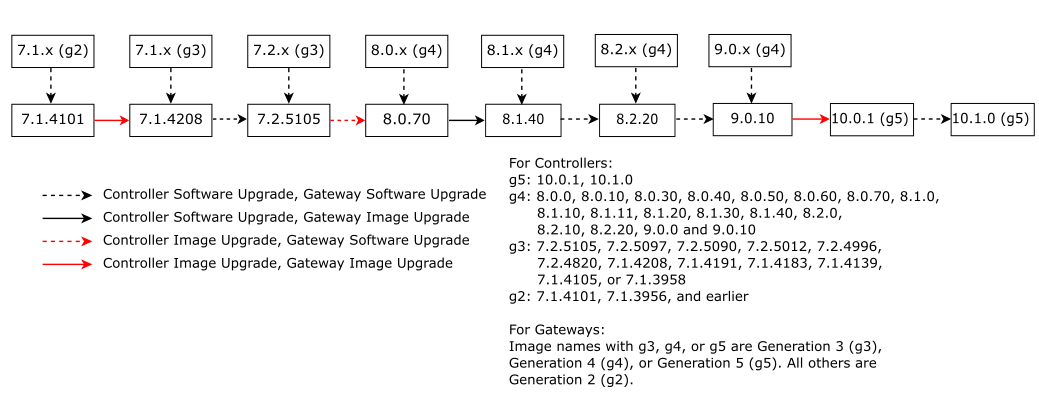 ## Major Upgrade Paths for Controller and Gateways
| Current Version | End Version | Upgrade Path 8 |
| ------------------ | --------------------------------------- | ------------------------------------------------------------------------------------------------------------------------------------------------------------------------------------------------------------------------------------------------------------------------------------------------------------------------------------------------------------------------------------------------------------------------------------------------------------------------------------------------------------------------------------------------------------------------------------------------------------------------------------------------------------------------------------------------------------------------------------------------------------------------------------------------------------------------------------------------------------------------------------------------------------------------------------------------------------------------------------------------------------------------------------------------------------------------------------------------------------------------------------------------------------------------------------------------ |
| 10.0.1 | 10.1.0 (g5) (Latest Controller version) | 10.0.1 → 10.1.0
## Major Upgrade Paths for Controller and Gateways
| Current Version | End Version | Upgrade Path 8 |
| ------------------ | --------------------------------------- | ------------------------------------------------------------------------------------------------------------------------------------------------------------------------------------------------------------------------------------------------------------------------------------------------------------------------------------------------------------------------------------------------------------------------------------------------------------------------------------------------------------------------------------------------------------------------------------------------------------------------------------------------------------------------------------------------------------------------------------------------------------------------------------------------------------------------------------------------------------------------------------------------------------------------------------------------------------------------------------------------------------------------------------------------------------------------------------------------------------------------------------------------------------------------------------------------ |
| 10.0.1 | 10.1.0 (g5) (Latest Controller version) | 10.0.1 → 10.1.0
1. Perform a software upgrade from 10.0.1 to 10.1.0 of the Controller and all the gateways. |
| 9.0.10 | 10.1.0 (g5) (Latest Controller version) | 9.0.10 → 10.0.1 → 10.1.0
1. Perform an image upgrade from 9.0.10 to 10.0.1 of the Controller and an image upgrade of all the gateways. 10.0.1 introduces the g5 Controller and gateway image generation.
2. Perform a software upgrade from 10.0.1 to 10.1.0 of the Controller and all the gateways. |
| 9.0.x 7 | 10.1.0 (g5) (Latest Controller version) | 9.0.x → 9.0.10 → 10.0.1 → 10.1.0
1. Perform a software upgrade from 9.0.x to 9.0.10 of the Controller and all the gateways.
2. Perform an image upgrade from 9.0.10 to 10.0.1 of the Controller and an image upgrade of all the gateways.
3. Perform a software upgrade from 10.0.1 to 10.1.0 of the Controller and all the gateways. |
| 8.2.x 6 | 10.1.0 (g5) (Latest Controller version) | 8.2.x → 8.2.20 → 9.0.10 → 10.0.1 → 10.1.0
1. Perform a software upgrade from 8.2.x to 8.2.20 of the Controller and all the gateways.
2. Perform a software upgrade from 8.2.20 to 9.0.10 of the Controller and all the gateways.
3. Perform an image upgrade from 9.0.10 to 10.0.1 of the Controller and an image upgrade of all the gateways.
4. Perform a software upgrade from 10.0.1 to 10.1.0 of the Controller and all the gateways. |
| 8.1.x 5 | 10.1.0 (g5) (Latest Controller version) | 8.1.x → 8.1.40 → 8.2.20 → 9.0.10 → 10.0.1 → 10.1.0
1. Perform a software upgrade from 8.1.x to 8.1.40 of the Controller and all the gateways.
2. Perform a software upgrade from 8.1.40 to 8.2.20 of the Controller and all the gateways.
3. Perform a software upgrade from 8.2.20 to 9.0.10 of the Controller and all the gateways.
4. Perform an image upgrade from 9.0.10 to 10.0.1 of the Controller and an image upgrade of all the gateways.
5. Perform a software upgrade from 10.0.1 to 10.1.0 of the Controller and all the gateways. |
| 8.0.x 4 | 10.1.0 (g5) (Latest Controller version) | 8.0.x → 8.0.70 → 8.1.40 → 8.2.20 → 9.0.10 → 10.0.1 → 10.1.0
1. Perform a software upgrade from 8.0.x to 8.0.70 of the Controller and all the gateways.
2. Perform a software upgrade from 8.0.70 to 8.1.40 of the Controller and an image upgrade of all the gateways.
3. Perform a software upgrade from 8.1.40 to 8.2.20 of the Controller and all the gateways.
4. Perform a software upgrade from 8.2.20 to 9.0.10 of the Controller and all the gateways.
5. Perform an image upgrade from 9.0.10 to 10.0.1 of the Controller and an image upgrade of all the gateways.
6. Perform a software upgrade from 10.0.1 to 10.1.0 of the Controller and all the gateways. |
| 7.2.x 3 | 10.1.0 (g5) (Latest Controller version) | 7.2.x → 7.2.5105 → 8.0.70 → 8.1.40 → 8.2.20 → 9.0.10 → 10.0.1 → 10.1.0
1. Perform a software upgrade from 7.2.x to 7.2.5105 of the Controller and all the gateways.
2. Perform an image upgrade from 7.2.5105 to 8.0.70 of the Controller and a software upgrade of all the gateways.
3. Perform a software upgrade from 8.0.70 to 8.1.40 of the Controller and an image upgrade of all the gateways.
4. Perform a software upgrade from 8.1.40 to 8.2.20 of the Controller and all the gateways.
5. Perform a software upgrade from 8.2.20 to 9.0.10 of the Controller and all the gateways.
6. Perform an image upgrade from 9.0.10 to 10.0.1 of the Controller and an image upgrade of all the gateways.
7. Perform a software upgrade from 10.0.1 to 10.1.0 of the Controller and all the gateways. |
| 7.1.4105 | 10.1.0 (g5) (Latest Controller version) | 7.1.4105 → 7.1.4208 → 7.2.5105 → 8.0.70 → 8.1.40 → 8.2.20 → 9.0.10 → 10.0.1 → 10.1.0
1. Perform a software upgrade from 7.1.4105 to 7.1.4208 of the Controller and all the gateways.
2. Perform a software upgrade from 7.1.4208 to 7.2.5105 of the Controller and all the gateways.
3. Perform an image upgrade from 7.2.5105 to 8.0.70 of the Controller and a software upgrade of all the gateways.
4. Perform a software upgrade from 8.0.70 to 8.1.40 of the Controller and an image upgrade of all the gateways.
5. Perform a software upgrade from 8.1.40 to 8.2.20 of the Controller and all the gateways.
6. Perform a software upgrade from 8.2.20 to 9.0.10 of the Controller and all the gateways.
7. Perform an image upgrade from 9.0.10 to 10.0.1 of the Controller and an image upgrade of all the gateways.
8. Perform a software upgrade from 10.0.1 to 10.1.0 of the Controller and all the gateways. |
| 7.1.x 2 | 10.1.0 (g5) (Latest Controller version) | 7.1.x → 7.1.4101 → 7.1.4208 → 7.2.5105 → 8.0.70 → 8.1.40 → 8.2.20 → 9.0.10 → 10.0.1 → 10.1.0
1. Perform a software upgrade from 7.1.x to 7.1.4101 of the Controller and all the gateways.
2. Perform an image upgrade from 7.1.4101 to 7.1.4208 of the Controller and all the gateways.
3. Perform a software upgrade from 7.1.4208 to 7.2.5105 of the Controller and all the gateways.
4. Perform an image upgrade from 7.2.5105 to 8.0.70 of the Controller and a software upgrade of all the gateways.
5. Perform a software upgrade from 8.0.70 to 8.1.40 of the Controller and an image upgrade of all the gateways.
6. Perform a software upgrade from 8.1.40 to 8.2.20 of the Controller and all the gateways.
7. Perform a software upgrade from 8.2.20 to 9.0.10 of the Controller and all the gateways.
8. Perform an image upgrade from 9.0.10 to 10.0.1 of the Controller and an image upgrade of all the gateways.
9. Perform a software upgrade from 10.0.1 to 10.1.0 of the Controller and all the gateways. |
| 7.0.x 1 | 10.1.0 (g5) (Latest Controller version) | 7.0.x → 7.0.2250 → 7.1.4101 → 7.1.4208 → 7.2.5105 → 8.0.70 → 8.1.40 → 8.2.20 → 9.0.10 → 10.0.1 → 10.1.0
1. Perform a software upgrade from 7.0.x to 7.0.2250 of the Controller and all the gateways.
2. Perform a software upgrade from 7.0.2250 to 7.1.4101 of the Controller and all the gateways.
3. Perform an image upgrade from 7.1.4101 to 7.1.4208 of the Controller and all the gateways.
4. Perform a software upgrade from 7.1.4208 to 7.2.5105 of the Controller and all the gateways.
5. Perform an image upgrade from 7.2.5105 to 8.0.70 of the Controller and a software upgrade of all the gateways.
6. Perform a software upgrade from 8.0.70 to 8.1.40 of the Controller and an image upgrade of all the gateways.
7. Perform a software upgrade from 8.1.40 to 8.2.20 of the Controller and all the gateways.
8. Perform a software upgrade from 8.2.20 to 9.0.10 of the Controller and all the gateways.
9. Perform an image upgrade from 9.0.10 to 10.0.1 of the Controller and an image upgrade of all the gateways.
10. Perform a software upgrade from 10.0.1 to 10.1.0 of the Controller and all the gateways. |
**Azure gateway users starting at 8.1.x or later**: The software upgrade steps
listed above do not deliver the MANA driver fix. Along your path, the gateway
portion of **at least one** step landing on a MANA-compatible release (8.1.40,
8.2.20, or 9.0.10) must be performed as an **image upgrade** instead of a
software upgrade. For example, on the **8.1.x → 9.0.10** path, replace the
gateway portion of step 1 (to 8.1.40), step 2 (to 8.2.20), **or** step 3 (to
9.0.10) with an image upgrade. This requirement does not apply to AWS-only
environments, or to upgrade paths starting at 8.0.x or earlier (where an image
upgrade is already a required step). For details, see the{" "}
MANA Field Notice (FN-2026-AZ-001)
.
1 7.0.x refers to any 7.0 release earlier than 7.0.2250.
2 7.1.x refers to any 7.1 release earlier than 7.1.4101.
3 7.2.x refers to any 7.2 release earlier than 7.2.5105.
4 8.0.x refers to any 8.0 release earlier than 8.0.70.
5 8.1.x refers to any 8.1 release earlier than 8.1.40.
6 8.2.x refers to any 8.2 release earlier than 8.2.20.
7 9.0.x refers to any 9.0 release earlier than 9.0.10.
8 If you are using a private marketplace in Azure, you must subscribe
to the gateway image offer in the Azure marketplace first. See
Subscribing Gateway Offers to Azure Private Marketplace for Aviatrix
Deployments
.
9 If you are using a private marketplace in Azure, you must subscribe to the controller image offer for 7.2.x in Azure marketplace first. See Subscribing Controller Offers to Azure Private Marketplace for Aviatrix Deployments.
## Major Upgrade Steps
Aviatrix recommends performing all platform software lifecycle management
tasks on the CoPilot UI. If you are not currently using CoPilot, deploy it
before proceeding with any procedures in this documentation.
The following steps summarize the major upgrade process:
1. Perform a software upgrade of your Controller and gateways to the latest
release version within the current release. See
Upgrade of your Controller and gateways within the current release
.
2. Back up your Controller data. See
Back up your Controller data
.
3. Perform a
Controller Image Upgrade Dry Run
to check for potential errors.
4. Resolve any potential errors according to the
[provided solutions](#troubleshooting-your-controller-and-gateway-upgrade).
5. Perform an Image Upgrade of your Controller to the latest Aviatrix supported
image. See
Image Upgrade of your Controller to the Latest Aviatrix Supported Images
.
If your Controller has been upgraded to 7.1.3958 or later, you can perform
a software upgrade to 7.1.4208 (latest 7.1 version). Then perform a
software upgrade to 7.2.5105. If your Controller is already on 7.2.x, skip
this step. Then perform a software upgrade to 7.2.5105 (latest 7.2
version). Then, perform an image upgrade from 7.2.5105 to 8.0.70. Then you
can perform a software upgrade from 8.0.70 to 8.1.40. Then you can perform
a software upgrade to 8.2.20. Then you can perform another software upgrade
to 9.0.10. Then, perform an image upgrade from 9.0.10 to 10.0.1. Then,
perform a software upgrade from 10.0.1 to 10.1.0 (latest Controller
version).
6. Verify your
Controller Upgrade Status
.
7. Perform an Image Upgrade of all your gateways to the latest Aviatrix
supported image. See
Image Upgrade of your Gateways to the Latest Aviatrix Supported Images
.
If your gateways have been upgraded to 7.1.3958 or later, you can perform a
software upgrade to 7.1.4208 for the latest 7.1 software release. If your
Controller is already on 7.2.x, skip this step. You can then perform
another software upgrade to 7.2.5105 for the latest 7.2 software version.
Then you can perform a software upgrade from 7.2.5105 to 8.0.70. Then, you
can perform an image upgrade from 8.0.70 to 8.1.40. Then you can perform a
software upgrade to 8.2.20. Then you can perform another software upgrade
to 9.0.10. Then, perform an image upgrade from 9.0.10 to 10.0.1. Then,
perform a software upgrade from 10.0.1 to 10.1.0 for the latest software
version.
8. Verify your
Gateway Upgrade Status
.
## Prepare for Upgrading your Controller and Gateways to the Latest Aviatrix Supported Images
If you plan to deploy a new Controller from the AWS marketplace or Azure
marketplace before performing the upgrade, make sure to select the correct
Controller version. See{" "}
Aviatrix Controller and Gateway Image Release Notes
for the latest Controller version.
Check the following prerequisites before upgrading your Controller.
* Make sure your Controller and CoPilot are deployed on AWS or Azure. For
deployments on other cloud service providers, contact
[Aviatrix Support](https://support.aviatrix.com) to help you perform the
upgrade.
* Check your Controller version to ensure it meets the version requirements.
Perform a software upgrade of your Controller to make sure the Controller
version is 7.1.4101 or later. See
Upgrade your Controller via CoPilot UI
for more details.
* Ensure that your gateways are in 7.1.4101 version or later. Upgrade any
gateways that are not in 7.1.4101 to 7.1.4101. See
Upgrade your Gateways via CoPilot UI
for details.
* Make sure you have installed the latest CoPilot version (>=4.27). See
Deploy CoPilot
.
* Make sure that you have subscribed to the
Required Aviatrix License and Marketplace Offers
and have a valid customer ID (license) issued by the Aviatrix Cloud Network
License Service. For legacy licenses/listings below, contact [Aviatrix
Support](https://support.aviatrix.com) for the upgrade assistance. \* Aviatrix
Secure Networking Platform - Enterprise Subscription \* Aviatrix Secure
Networking Platform Metered 2208 - Copilot & 24x7 Support \* Aviatrix Secure
Networking Platform PAYG - Metered
* Make sure no CloudN gateways are attached to your Controller. If there are any
CloudN gateways attached to your Controller, you will first need to migrate to
Aviatrix Edge. Contact [Aviatrix Support](https://support.aviatrix.com).
* Make sure you have not enabled
[Private Mode](https://legacy.docs.aviatrix.com/documentation/latest/platform-administration/controller/private-mode.html?expand=true).
If you are using private mode, contact
[Aviatrix Support](https://support.aviatrix.com) for the other upgrade
options.
* For Controller that is configured in HA mode, disable HA before the Controller
upgrade. You will then need to enable HA mode after the Controller upgrade.
See
Controller High Availability in AWS
for details.
## Before your Controller and Gateway Upgrade
Ensure you complete the following before starting your Controller upgrade.
### Check the General Controller and Gateway Upgrade Guidance
* Check the
General Controller and Gateways Upgrade Guidance
.
* Before proceeding with the upgrade in the production environment, perform the
upgrade in a testing environment.
* It is important to upgrade the Controller first, ensuring it is at the desired
release version.
* Once the Controller is successfully upgraded, proceed to upgrade the Gateways.
### Go through Checklist of the Controller and Gateway Upgrade
1. Go through the checklist of Controller and Gateway upgrade. See details in
Upgrade Checklist of the Controller and Gateway Upgrade
.
2. Make sure you have
performed all the pre-upgrade tasks of the Controller and Gateway Upgrade
.
## Upgrade Controller and Gateways to the Latest Aviatrix Supported Images(AWS and Azure Only)
To upgrade Controller and gateways for the latest Aviatrix Supported Images:
1. Upgrade your Controller for the latest Aviatrix Supported Images (AWS and
Azure Only)
2. Upgrade your Gateways for the latest Aviatrix Supported Images (AWS and
Azure Only)
## Troubleshooting your Controller and Gateway Upgrade
If the upgrade of your Controller fails, the system reverts the Controller to
its previous state.
See
Troubleshooting Controller and Gateway Upgrades
for the detailed troubleshooting solutions.