> ## Documentation Index
> Fetch the complete documentation index at: https://docs.aviatrix.com/llms.txt
> Use this file to discover all available pages before exploring further.
# Transit Gateway to Cisco Router over the Internet Workflow
> 2. Create a Transit gateway that will connect to the Cisco Router. 3. To connect the Transit VPC gateway to the Cisco Router, go to Networking > Connectivity > External Connections (S2C) and follow these instructions. 4. Download the configuration. 5.
1. In CoPilot navigate to Cloud Fabric > Gateways > Transit Gateways.
2. Create a Transit gateway
that will connect to the Cisco Router.
3. To connect the Transit VPC gateway to the Cisco Router, go to Networking >
Connectivity > External Connections (S2C) and
[follow these instructions](https://legacy.docs.aviatrix.com/documentation/latest/network/external-connection-create-bgp-over-ipsec.html).
4. [Download the configuration](https://legacy.docs.aviatrix.com/documentation/latest/network/external-connection-download-configuration.html).
5. Ensure that your Cisco Router is configured based on the information in the
downloaded file. The following is a sample configuration based on the
Site2Cloud configuration above.
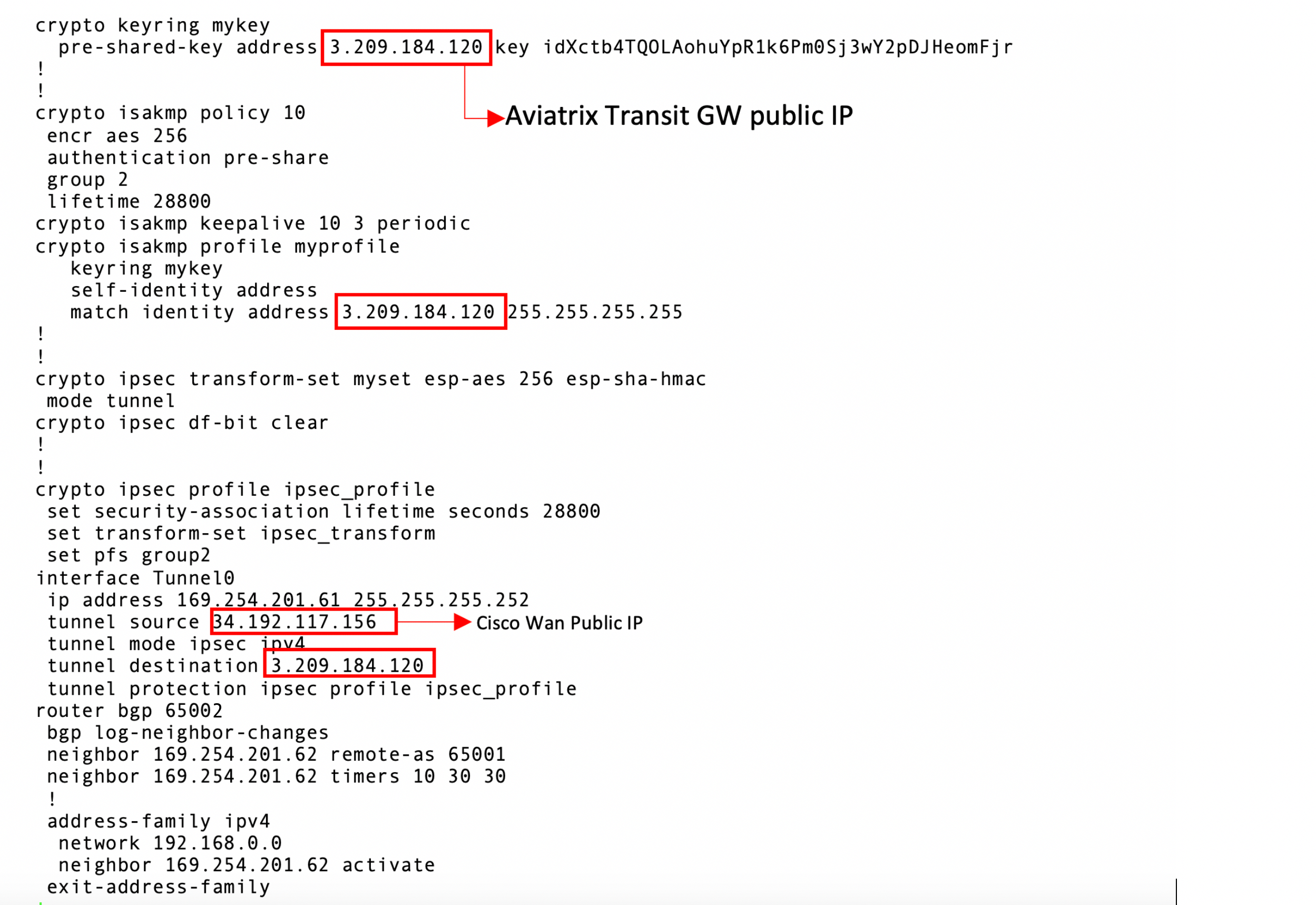 The tunnel IP addresses are configured accordingly with the configuration file
downloaded above.
6. After configuring the Cisco Router, in CoPilot navigate to Diagnostics >
Cloud Routes > External Connections to confirm that the tunnel status has
changed from Down to Up.
7. Navigate to Diagnostics > Cloud Routes > BGP Info to check the BGP routes.
The Status should be Established. If some external connections for the
selected Transit Gateway are Not Established, the overall BGP Status for the
Transit Gateway is Partially Established.
* Transit Gateway to External Devices Workflow
* Transit Gateway to Cisco ASA over the Internet Workflow
The tunnel IP addresses are configured accordingly with the configuration file
downloaded above.
6. After configuring the Cisco Router, in CoPilot navigate to Diagnostics >
Cloud Routes > External Connections to confirm that the tunnel status has
changed from Down to Up.
7. Navigate to Diagnostics > Cloud Routes > BGP Info to check the BGP routes.
The Status should be Established. If some external connections for the
selected Transit Gateway are Not Established, the overall BGP Status for the
Transit Gateway is Partially Established.
* Transit Gateway to External Devices Workflow
* Transit Gateway to Cisco ASA over the Internet Workflow