> ## Documentation Index
> Fetch the complete documentation index at: https://docs.aviatrix.com/llms.txt
> Use this file to discover all available pages before exploring further.
# Aviatrix Integration with Microsoft's SSE Solution
> This document provides instructions on how to build an external connection from an Aviatrix Gateway to Microsoft's Security Service Edge (SSE) Solution.
This document provides instructions on how to build an external connection from
an Aviatrix Gateway to Microsoft's Security Service Edge (SSE) Solution.
The Aviatrix Platform allows Microsoft's SSE Solution integration for remote
sites and hybrid-cloud connectivity for secure access to cloud resources.
## What is Microsoft's SSE Solution?
Microsoft's SSE solution is an identity and access management solution that
allows organizations to implement Zero Trust internet security. Network traffic
from remote sites, such as on-premises, datacenters, colocations, branch
offices, and hybrid cloud environments is forwarded to Microsoft's SSE Solution
cloud proxy for authentication and secure access to cloud resources.
To learn more about Microsoft's SSE Solution, refer to
[Microsoft documentation](https://learn.microsoft.com/en-us/entra/global-secure-access/overview-what-is-global-secure-access).
## What is Aviatrix integration with Microsoft's SSE Solution?
Aviatrix integration with Microsoft's SSE Solution provides a holistic solution
that encompass *data security* and *secure access* for connecting on-premises
and hybrid cloud workloads to cloud resources. In this solution, Aviatrix
Gateways provide the data encryption and High Performance Encryption (HPE) for
high-bandwidth connections for *data security* from remote sites to cloud.
Microsoft's SSE Solution allows to apply network security policies for *secure
access* to the cloud resources. Aviatrix Gateways deployed on VPCs or VNets and
connected to remote sites, for example datacenters, branch offices, or customer
and partner sites, forwards network traffic from the remote sites to Microsoft's
SSE Solution for network security inspections.
Key benefits of Aviatrix integration with Microsoft Entra include:
* **Procurement via Azure Marketplace**: Aviatrix is fully procurable via the
Azure Marketplace. This provides simplified procurement experience for
customers.
* **Cloud service provider intergration**: Aviatrix has tight integration with
cloud service providers for automated deployment and lifecycle management for
simplified user experience.
* **High Performance Encryption**: Aviatrix has a unique patented technology
that allows high-bandwidth connections for customers connecting on-premises
datacenters, large branches, or other cloud environments to Microsoft Entra
SSE.
* **Multiple form factors**: Aviatrix provides physical and virtual form-factors
for deploying Aviatrix Gateways in on-premises locations.
* **Automated deployments**: Aviatrix is an expert in Infrastructure as Code for
accelerating and automating deployments.
### How does Microsoft's SSE Solution integration work?
The Aviatrix Gateways run a BGP session over the internet to Microsoft's SSE
Solution gateway to dynamically exchange routes and establish IPsec tunnels for
forwarding the network traffic.
### What Aviatrix Gateways are Supported?
The following Aviatrix Gateways support connectivity to Microsoft's SSE
Solution.
* **Transit Gateways**
* **Spoke Gateways**
## Deployment Models
You can set up centralized or distributed connectivity from Aviatrix Gateways to
Microsoft's SSE solution.
### Centralized SSE Hub
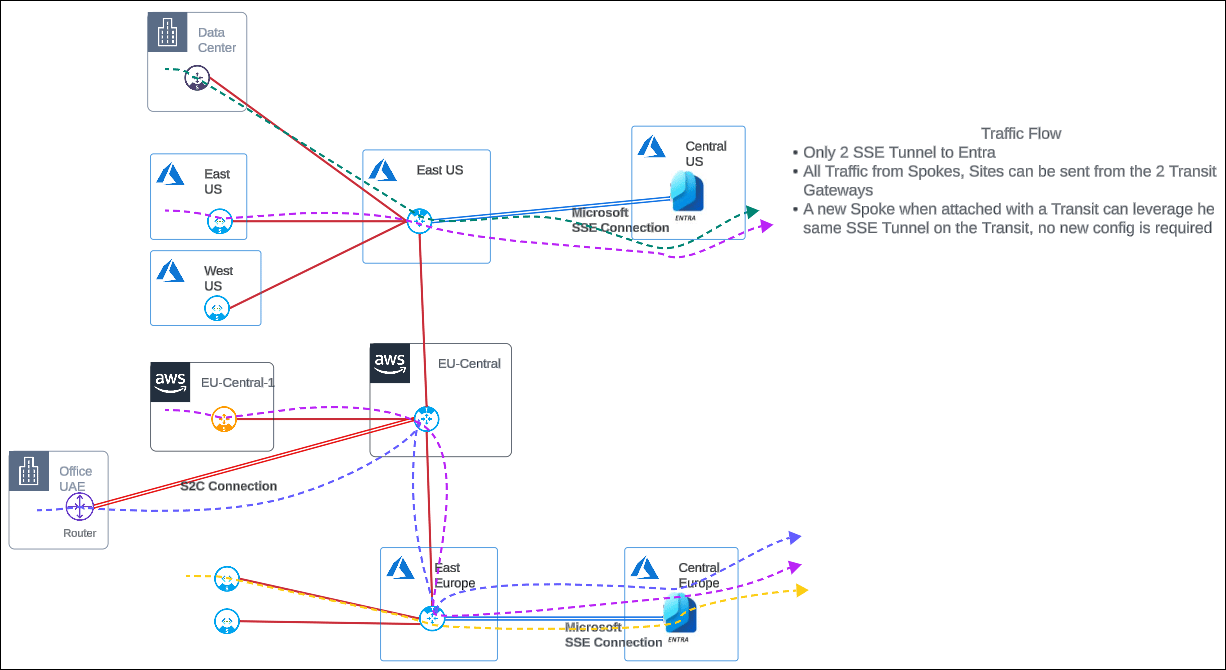
A centralized SSE hub is a hub-and-spoke architecture where remote sites and
cloud workloads (spokes) are connected to Microsoft's SSE Solution via the
Aviatrix Transit Gateway (hub). The Transit Gateway forwards network traffic
destined for the cloud to Microsoft's SSE Solution for security inspections.
Transit Gateways can be deployed across multiple clouds and cloud regions where
Microsoft's SSE Solution access is required.
A key advantage to a centralized hub architecture is that it allows you to
connect new remote sites or cloud workloads and leverage the same connectivity
from the Transit Gateway to Microsoft's SSE Solution for traffic forwarding
without the need to configure additional IPsec tunnels.
Transit Gateway supports redundant active-active peering connections to
Microsoft's SSE Solution for high-availability. All network traffic is forwarded
across both the primary and secondary HA active peering to Microsoft's SSE
Solution.
Transit Gateway provides high performance encrypted connectivity to Microsoft's
SSE Solution across remote sites and clouds for high-bandwidth and higher
aggregated throughput for large sites.
 ### Distributed SSE Connectivity
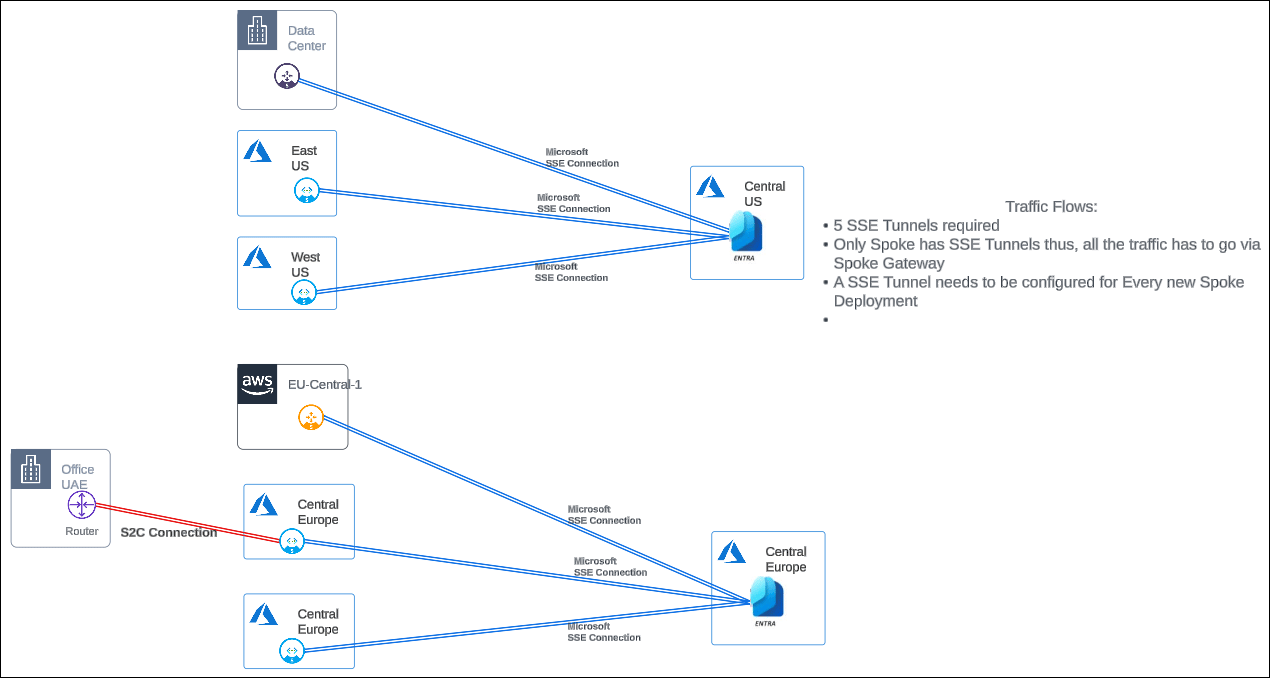
A distributed SSE architecture is where network traffic from the cloud and
remote sites are forwarded to Microsoft's SSE Solution via the Aviatrix Spoke
Gateway. Each Spoke Gateway establishes connectivity with Microsoft's SSE
Solution.Spoke Gateways can be deployed across multiple clouds and cloud regions
where Microsoft's SSE Solution access is required.
In a distributed SSE architecture, to connect new remote sites or cloud
workloads to Microsoft's SSE Solution, you need to configure new IPsec tunnels
for traffic forwarding.
### Distributed SSE Connectivity
A distributed SSE architecture is where network traffic from the cloud and
remote sites are forwarded to Microsoft's SSE Solution via the Aviatrix Spoke
Gateway. Each Spoke Gateway establishes connectivity with Microsoft's SSE
Solution.Spoke Gateways can be deployed across multiple clouds and cloud regions
where Microsoft's SSE Solution access is required.
In a distributed SSE architecture, to connect new remote sites or cloud
workloads to Microsoft's SSE Solution, you need to configure new IPsec tunnels
for traffic forwarding.
 ## Connecting an Aviatrix Gateway to Microsoft's SSE Solution
The following are the steps for connecting an Aviatrix Gateway to Microsoft's
SSE Solution.
### Prerequisites
Before you set up Aviatrix connectivity to Microsoft Entra SSE remote network,
ensure the following prerequisites are met:
1. Ensure that you are running the latest version of Aviatrix CoPilot and
Controller. Aviatrix integration with Microsoft's SSE Solution is supported
with Aviatrix CoPilot 4.15 and Controller version 7.2.4820 and above.
2. Ensure the Aviatrix Gateway is deployed with BGP enabled.
### Configuring BGP over IPsec External Connection to Microsoft's SSE Solution
The following are the high-level steps for building BGP over IPsec tunnel
connection between an Aviatrix Gateway and Microsoft's SSE Solution. When
building an IPsec tunnel, you configure both sides of the tunnel.
1. Configure one side of tunnel from the Aviatrix Gateway by
[creating an external BGP over IPsec connection to Microsoft's SSE Solution](#step-1-configure-bgp-over-ipsec-tunnel-on-the-aviatrix-gateway).
2. Configure the other side of the tunnel
[by creating a remote network in Microsoft's SSE Solution and adding a device link to the Aviatrix Gateway](#step-2-configure-bgp-over-ipsec-tunnel-on-microsofts-sse-solution).
3. [Update the Aviatrix Gateway tunnel configuration](#step-3-update-bgp-remote-configurations-on-the-aviatrix-gateway)
with the remote IP address for Microsoft's SSE Solution.
4. [Verify the BGP session is up](#step-4-verify-the-bgp-session-status).
#### Step 1: Configure BGP over IPsec tunnel on the Aviatrix Gateway
Configure an IPsec tunnel on the Aviatrix Gateway by creating an external BGP
over IPsec connection to Microsoft's SSE Solution.
1. In Aviatrix CoPilot, go to **Networking > Connectivity > External Connections
(S2C)** tab.
2. From the **+ External Connection To** dropdown menu, select **Microsoft's SSE
Solution**.
3. In Create External Connection to Microsoft's SSE Solution, provide the
following information.
| **Field** | **Description** |
| ------------- | ------------------------------------------------------------ |
| Name | A name to identify the connection. |
| Local Gateway | The Aviatrix Gateway to connect to Microsoft's SSE Solution. |
CoPilot shows the attributes of the gateway. Use these attributes to
[create a remote network in Microsoft's SSE Solution and add a device link to the Aviatrix Gateway](#step-2-configure-bgp-over-ipsec-tunnel-on-microsofts-sse-solution).
#### Step 2: Configure BGP over IPsec tunnel on Microsoft's SSE Solution
In Microsoft Entra admin center, configure the other side of the tunnel by
creating a remote network in Microsoft's SSE Solution and adding a device link
to the Aviatrix Gateway.
1. Click **Launch Microsoft's SSE Solution** to launch Microsoft Entra admin
center.
2. Use the attributes below (from
[Step 1](#step-1-configure-bgp-over-ipsec-tunnel-on-the-aviatrix-gateway)) to
create the Microsoft Entra remote network and add a device link to the
Aviatrix Gateway. Refer to the
[Microsoft documentation](https://learn.microsoft.com/en-us/entra/global-secure-access/how-to-create-remote-networks)
for more information on how to create the Microsoft Entra remote network
connection.
| **Field** | **Description** |
| ------------------ | ---------------------------------------------------------------------------------------------------------------------------------------------------------------------------------------------------------------- |
| Region | The cloud region where the Aviatrix Gateway is deployed. |
| Device IP Address | The Public IP address of the Aviatrix Gateway. |
| Device BGP Address | The Private IP address of the Aviatrx Gateway. |
| Device ASN | The BGP AS number assigned to the Aviatrix Gateway. |
| Tunnel Redundancy | **Zone**: Indicates a secondary HA gateway is configured. CoPilot version 4.15 does not support HA gateway connection to Microsoft's SSE Solution. **None**: Indicates a secondary HA gateway is not configured. |
#### Step 3: Update BGP Remote Configurations on the Aviatrix Gateway
In Aviatrix CoPilot, update the Aviatrix Gateway tunnel configuration with the
remote Public IP address and BGP AS Number of Microsoft's SSE Solution remote
network.
1. In **IPsec Configuration**, provide the following information.
| **Field** | **Description** |
| ---------- | --------------------------------------------------------------------------------------------------------------------------------------------------------------------------------------------------------------------------------------------------------------------------------------------------------------------------------------------------------------------------------------------------- |
| Algorithms | The encryption algorithm and protocol to use for authenticating the communication between the Aviatrix Gateway and Microsoft Entra remote network. **Default**: The default Aviatrix-supported encryption algorithms. **Custom**: Allows you to modify the default values. See [Algorithms](https://legacy.docs.aviatrix.com/documentation/latest/network/externaldevice-settings.html#algorithms). |
| IKEv2 | The default protocol used for authentication and encryption of packets between the Aviatrix Gateway and Microsoft's SSE Solution. This setting can not be changed. See [IKEv2](https://legacy.docs.aviatrix.com/documentation/latest/network/externaldevice-settings.html#algorithms). |
2. In **Tunnel Configuration**, provide the following details of the remote
network connectivity that you configured in Microsoft Entra admin center.
You can view the remote network configuration details in Microsoft Entra admin center by going to **Global Secure Access > Connect > Remote Network**. Locate the remote network and click **View configuration**.
The following is an example of a remote network connection details in Microsoft
Entra admin center.
## Connecting an Aviatrix Gateway to Microsoft's SSE Solution
The following are the steps for connecting an Aviatrix Gateway to Microsoft's
SSE Solution.
### Prerequisites
Before you set up Aviatrix connectivity to Microsoft Entra SSE remote network,
ensure the following prerequisites are met:
1. Ensure that you are running the latest version of Aviatrix CoPilot and
Controller. Aviatrix integration with Microsoft's SSE Solution is supported
with Aviatrix CoPilot 4.15 and Controller version 7.2.4820 and above.
2. Ensure the Aviatrix Gateway is deployed with BGP enabled.
### Configuring BGP over IPsec External Connection to Microsoft's SSE Solution
The following are the high-level steps for building BGP over IPsec tunnel
connection between an Aviatrix Gateway and Microsoft's SSE Solution. When
building an IPsec tunnel, you configure both sides of the tunnel.
1. Configure one side of tunnel from the Aviatrix Gateway by
[creating an external BGP over IPsec connection to Microsoft's SSE Solution](#step-1-configure-bgp-over-ipsec-tunnel-on-the-aviatrix-gateway).
2. Configure the other side of the tunnel
[by creating a remote network in Microsoft's SSE Solution and adding a device link to the Aviatrix Gateway](#step-2-configure-bgp-over-ipsec-tunnel-on-microsofts-sse-solution).
3. [Update the Aviatrix Gateway tunnel configuration](#step-3-update-bgp-remote-configurations-on-the-aviatrix-gateway)
with the remote IP address for Microsoft's SSE Solution.
4. [Verify the BGP session is up](#step-4-verify-the-bgp-session-status).
#### Step 1: Configure BGP over IPsec tunnel on the Aviatrix Gateway
Configure an IPsec tunnel on the Aviatrix Gateway by creating an external BGP
over IPsec connection to Microsoft's SSE Solution.
1. In Aviatrix CoPilot, go to **Networking > Connectivity > External Connections
(S2C)** tab.
2. From the **+ External Connection To** dropdown menu, select **Microsoft's SSE
Solution**.
3. In Create External Connection to Microsoft's SSE Solution, provide the
following information.
| **Field** | **Description** |
| ------------- | ------------------------------------------------------------ |
| Name | A name to identify the connection. |
| Local Gateway | The Aviatrix Gateway to connect to Microsoft's SSE Solution. |
CoPilot shows the attributes of the gateway. Use these attributes to
[create a remote network in Microsoft's SSE Solution and add a device link to the Aviatrix Gateway](#step-2-configure-bgp-over-ipsec-tunnel-on-microsofts-sse-solution).
#### Step 2: Configure BGP over IPsec tunnel on Microsoft's SSE Solution
In Microsoft Entra admin center, configure the other side of the tunnel by
creating a remote network in Microsoft's SSE Solution and adding a device link
to the Aviatrix Gateway.
1. Click **Launch Microsoft's SSE Solution** to launch Microsoft Entra admin
center.
2. Use the attributes below (from
[Step 1](#step-1-configure-bgp-over-ipsec-tunnel-on-the-aviatrix-gateway)) to
create the Microsoft Entra remote network and add a device link to the
Aviatrix Gateway. Refer to the
[Microsoft documentation](https://learn.microsoft.com/en-us/entra/global-secure-access/how-to-create-remote-networks)
for more information on how to create the Microsoft Entra remote network
connection.
| **Field** | **Description** |
| ------------------ | ---------------------------------------------------------------------------------------------------------------------------------------------------------------------------------------------------------------- |
| Region | The cloud region where the Aviatrix Gateway is deployed. |
| Device IP Address | The Public IP address of the Aviatrix Gateway. |
| Device BGP Address | The Private IP address of the Aviatrx Gateway. |
| Device ASN | The BGP AS number assigned to the Aviatrix Gateway. |
| Tunnel Redundancy | **Zone**: Indicates a secondary HA gateway is configured. CoPilot version 4.15 does not support HA gateway connection to Microsoft's SSE Solution. **None**: Indicates a secondary HA gateway is not configured. |
#### Step 3: Update BGP Remote Configurations on the Aviatrix Gateway
In Aviatrix CoPilot, update the Aviatrix Gateway tunnel configuration with the
remote Public IP address and BGP AS Number of Microsoft's SSE Solution remote
network.
1. In **IPsec Configuration**, provide the following information.
| **Field** | **Description** |
| ---------- | --------------------------------------------------------------------------------------------------------------------------------------------------------------------------------------------------------------------------------------------------------------------------------------------------------------------------------------------------------------------------------------------------- |
| Algorithms | The encryption algorithm and protocol to use for authenticating the communication between the Aviatrix Gateway and Microsoft Entra remote network. **Default**: The default Aviatrix-supported encryption algorithms. **Custom**: Allows you to modify the default values. See [Algorithms](https://legacy.docs.aviatrix.com/documentation/latest/network/externaldevice-settings.html#algorithms). |
| IKEv2 | The default protocol used for authentication and encryption of packets between the Aviatrix Gateway and Microsoft's SSE Solution. This setting can not be changed. See [IKEv2](https://legacy.docs.aviatrix.com/documentation/latest/network/externaldevice-settings.html#algorithms). |
2. In **Tunnel Configuration**, provide the following details of the remote
network connectivity that you configured in Microsoft Entra admin center.
You can view the remote network configuration details in Microsoft Entra admin center by going to **Global Secure Access > Connect > Remote Network**. Locate the remote network and click **View configuration**.
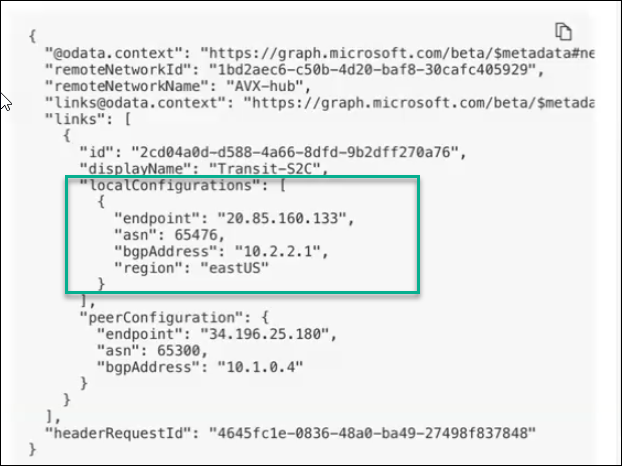
The following is an example of a remote network connection details in Microsoft
Entra admin center.
 CoPilot version 4.15 does not support ActiveMesh connections to Microsoft's
SSE Solution gateway.
| **Field** | **Description** |
| ---------------- | --------------------------------------------------------------------------------------------------------------------------------------------------------------------------------------------------------------- |
| Remote Device IP | The Public IP address of Microsoft's SSE Solution gateway. |
| Remote ASN | The BGP AS Number that Microsoft's SSE Solution gateway will use to exchange routes with Aviatrix Gateway. |
| Local Tunnel IP | The Public IP address of the Aviatrix Gateway, in the format *local\_tunnel\_ip/netmask* (for example, 10.2.2.2/30). |
| Remote Tunnel IP | The BGP address of Microsoft's SSE Solution gateway, in the format *remote\_tunnel\_ip/netmask* (for example, 10.2.2.1/30). |
| Pre-Shared Key | The pre-shared key you specified when adding the device link to the Aviatrix Gateway in Micosoft Entra admin center. The pre-shared key must be the same for the Aviatrix Gateway and Microsoft's SSE Solution. |
3. Click **Save**.
#### Step 4: Verify the BGP Session Status
To verify the connection between the Spoke Gateway and Microsoft Entra SSE
remote network is established:
1. In CoPilot, go to **Diagnostics > Cloud Routes > External Connections** tab.
2. In the table, locate the connection that you created. The **Status** should
be Established.
If the connection is not established, you can run
diagnostics
to perform an analysis or review logs.
CoPilot version 4.15 does not support ActiveMesh connections to Microsoft's
SSE Solution gateway.
| **Field** | **Description** |
| ---------------- | --------------------------------------------------------------------------------------------------------------------------------------------------------------------------------------------------------------- |
| Remote Device IP | The Public IP address of Microsoft's SSE Solution gateway. |
| Remote ASN | The BGP AS Number that Microsoft's SSE Solution gateway will use to exchange routes with Aviatrix Gateway. |
| Local Tunnel IP | The Public IP address of the Aviatrix Gateway, in the format *local\_tunnel\_ip/netmask* (for example, 10.2.2.2/30). |
| Remote Tunnel IP | The BGP address of Microsoft's SSE Solution gateway, in the format *remote\_tunnel\_ip/netmask* (for example, 10.2.2.1/30). |
| Pre-Shared Key | The pre-shared key you specified when adding the device link to the Aviatrix Gateway in Micosoft Entra admin center. The pre-shared key must be the same for the Aviatrix Gateway and Microsoft's SSE Solution. |
3. Click **Save**.
#### Step 4: Verify the BGP Session Status
To verify the connection between the Spoke Gateway and Microsoft Entra SSE
remote network is established:
1. In CoPilot, go to **Diagnostics > Cloud Routes > External Connections** tab.
2. In the table, locate the connection that you created. The **Status** should
be Established.
If the connection is not established, you can run
diagnostics
to perform an analysis or review logs.