> ## Documentation Index
> Fetch the complete documentation index at: https://docs.aviatrix.com/llms.txt
> Use this file to discover all available pages before exploring further.
# Migrating a DIY TGW to Aviatrix Managed TGW Deployment
> Use this document to migrate to an Aviatrix-managed TGW deployment from an existing AWS Transit Gateway (TGW) deployment.
Use this document to migrate to an Aviatrix-managed TGW deployment from an
existing AWS Transit Gateway (TGW) deployment.
The objectives here are:
* Minimum downtime during migration.
* No change to existing VPC infrastructure.
* Minimum change to on-prem network.
This document assumes you have already
deployed Aviatrix CoPilot
.
Before the migration process starts, plan out what network domains you need to
create and which network domains should connect other domains. If you are not
sure and need to transition, proceed with no worries. The network domains can be
added and modified at any time.
## The Solution
There are multiple ways to migrate. For example, you can simply detach a spoke
VPC from the existing TGW and attach it to Aviatrix-managed TGW and then build
hybrid connection if necessary.
In this implementation, the migrated spoke VPCs can communicate with the not yet
migrated VPCs during migration process, and in addition the migrated spoke VPCs
can communicate with on-prem network, thus reducing the downtime, as shown in
the migration architecture below.
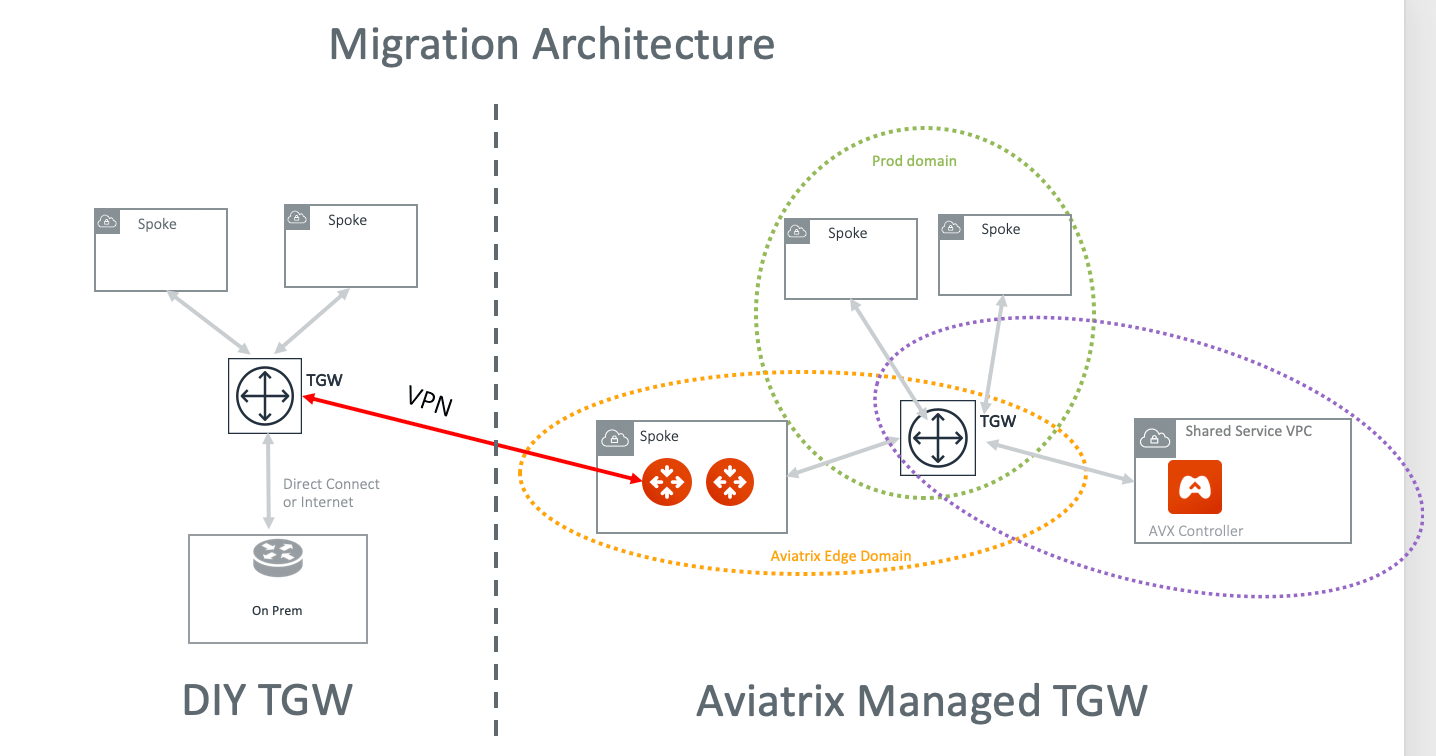 The key idea is to build an IPsec tunnel between TGW VPN and Aviatrix Transit
Gateway, so that migrated VPC can communicate with not yet migrated VPCs and
also to on-prem.
1. [Launch a new AWS Transit Gateway](https://legacy.docs.aviatrix.com/documentation/latest/network/tgw-create.html).
2. If you have plans for custom network domains,
create new network domains
. Then, build your domain connection policies. If you do not intend to build
custom network domains, skip this section.
3. [Launch an Aviatrix Transit GW and enable HA in the Transit Hub VPC](https://legacy.docs.aviatrix.com/documentation/latest/network/tgw-vpc-attachment-create.html).
As a best practice, create a new Transit Hub VPC to deploy the Aviatrix
Transit GW.
Create a TGW VPN Attachment using the steps below.
## Creating TGW VPN Attachment
1. [Create](https://legacy.docs.aviatrix.com/documentation/latest/network/tgw-vpn-connection-create.html)
a VPN attachment.
2. After the attachment is created, download your VPN file. Make sure you select
Vendor *Generic* and download the configuration text file.
## Creating VPN on Aviatrix Transit Gateway
This step is to create the other end of the VPN tunnel that terminates on the
Aviatrix Transit GW.
1. Create an external connection
using the information from the downloaded VPN file.
2. Select BGP as the connection type.
3. Use the downloaded VPN file to enter the following information:
| Information from Downloaded VPN File | Field in External Connection |
| ---------------------------------------------------- | -------------------------------- |
| Customer Gateway ASN | Aviatrix Transit Gateway BGP ASN |
| BGP Remote ASN Number | Virtual Private Gateway ASN |
| Virtual Private Gateway under *Outside* IP Addresses | Remote Device IP |
| Pre-shared Key | Pre-shared Key |
| Customer Gateway | Local Tunnel IP |
| Virtual Private Gateway under *Inside* IP Addresses | Remote Tunnel IP |
## Starting to Migrate VPCs
[Detach](https://legacy.docs.aviatrix.com/documentation/latest/network/tgw-vpc-attachment-detach.html)
your VPCs from the existing TGW
[attach](https://legacy.docs.aviatrix.com/documentation/latest/network/tgw-vpc-attachment-create.html)
them to an Aviatrix-managed TGW.
Before or after you detach a VPC, you may need to clean up the VPC route tables
entries so that they do not have conflict routes entries when later attaching it
to Aviatrix-managed TGW.
Repeat this step to migrate all VPCs.
## Building the Hybrid Connectivity
Once all VPCs have migrated to Aviatrix-managed TGW deployment, the migrated
VPCs communicate with on-prem via Aviatrix Transit GW to the existing TGW and
then to on-prem.
At this point, you can move existing TGW Direct Connect to Aviatrix Transit GW
or to Aviatrix managed TGW directly.
## Deleting DIY TGW
After all VPCs and hybrid connectivity if any are all removed, you can
[delete](https://legacy.docs.aviatrix.com/documentation/latest/network/tgw-detach.html)
the existing TGW.
The key idea is to build an IPsec tunnel between TGW VPN and Aviatrix Transit
Gateway, so that migrated VPC can communicate with not yet migrated VPCs and
also to on-prem.
1. [Launch a new AWS Transit Gateway](https://legacy.docs.aviatrix.com/documentation/latest/network/tgw-create.html).
2. If you have plans for custom network domains,
create new network domains
. Then, build your domain connection policies. If you do not intend to build
custom network domains, skip this section.
3. [Launch an Aviatrix Transit GW and enable HA in the Transit Hub VPC](https://legacy.docs.aviatrix.com/documentation/latest/network/tgw-vpc-attachment-create.html).
As a best practice, create a new Transit Hub VPC to deploy the Aviatrix
Transit GW.
Create a TGW VPN Attachment using the steps below.
## Creating TGW VPN Attachment
1. [Create](https://legacy.docs.aviatrix.com/documentation/latest/network/tgw-vpn-connection-create.html)
a VPN attachment.
2. After the attachment is created, download your VPN file. Make sure you select
Vendor *Generic* and download the configuration text file.
## Creating VPN on Aviatrix Transit Gateway
This step is to create the other end of the VPN tunnel that terminates on the
Aviatrix Transit GW.
1. Create an external connection
using the information from the downloaded VPN file.
2. Select BGP as the connection type.
3. Use the downloaded VPN file to enter the following information:
| Information from Downloaded VPN File | Field in External Connection |
| ---------------------------------------------------- | -------------------------------- |
| Customer Gateway ASN | Aviatrix Transit Gateway BGP ASN |
| BGP Remote ASN Number | Virtual Private Gateway ASN |
| Virtual Private Gateway under *Outside* IP Addresses | Remote Device IP |
| Pre-shared Key | Pre-shared Key |
| Customer Gateway | Local Tunnel IP |
| Virtual Private Gateway under *Inside* IP Addresses | Remote Tunnel IP |
## Starting to Migrate VPCs
[Detach](https://legacy.docs.aviatrix.com/documentation/latest/network/tgw-vpc-attachment-detach.html)
your VPCs from the existing TGW
[attach](https://legacy.docs.aviatrix.com/documentation/latest/network/tgw-vpc-attachment-create.html)
them to an Aviatrix-managed TGW.
Before or after you detach a VPC, you may need to clean up the VPC route tables
entries so that they do not have conflict routes entries when later attaching it
to Aviatrix-managed TGW.
Repeat this step to migrate all VPCs.
## Building the Hybrid Connectivity
Once all VPCs have migrated to Aviatrix-managed TGW deployment, the migrated
VPCs communicate with on-prem via Aviatrix Transit GW to the existing TGW and
then to on-prem.
At this point, you can move existing TGW Direct Connect to Aviatrix Transit GW
or to Aviatrix managed TGW directly.
## Deleting DIY TGW
After all VPCs and hybrid connectivity if any are all removed, you can
[delete](https://legacy.docs.aviatrix.com/documentation/latest/network/tgw-detach.html)
the existing TGW.