> ## Documentation Index
> Fetch the complete documentation index at: https://docs.aviatrix.com/llms.txt
> Use this file to discover all available pages before exploring further.
# Migrating a CSR Transit to AWS Transit Gateway (TGW)
> This document assumes that you have deployed a CSR Transit solution with Transit hub CSR instances and VGWs in Spoke VPCs. The steps below provide instructions to migrate a live CSR deployment to Aviatrix with the Transit Gateway Orchestrator.
This document assumes that you have deployed a
[CSR Transit solution](https://aws.amazon.com/answers/networking/aws-global-transit-network/)
with Transit hub CSR instances and VGWs in Spoke VPCs. The steps below provide
instructions to migrate a live CSR deployment to Aviatrix with the Transit
Gateway Orchestrator.
The objectives here are:
* No change to any on-prem network.
* No change to the connectivity between AWS VGW and on-prem. (either over DX or
over Internet or both)
* Re-use AWS VGW deployed in CSR based Transit hub VPC if possible.
* No change to existing VPC infrastructure.
* Minimum operation downtime.
There are a couple of patterns during the migration phase, consider the one that
meets your requirements.
This document assumes you have already launched an Aviatrix Controller.
Before the migration process starts, plan out what network domains you need to
create and which network domains should connect other domains. If you are not
sure and need to transition, proceed with no worries. The network domains can be
added and modified at any time.
1. [Launch a Transit Gateway](https://legacy.docs.aviatrix.com/documentation/latest/network/tgw-create.html).
2. If you have plans for custom network domains, follow
these instructions
to create them. Then, build connection policies. If you do not intend to
build custom network domains, skip this section.
3. [Launch an Aviatrix Transit GW and enable HA in the Transit hub VPC](https://legacy.docs.aviatrix.com/documentation/latest/network/tgw-vpc-attachment-create.html).
As a best practice, create a new Transit hub VPC to deploy the Aviatrix
Transit GW.
4. This step has two options:
* Option A:
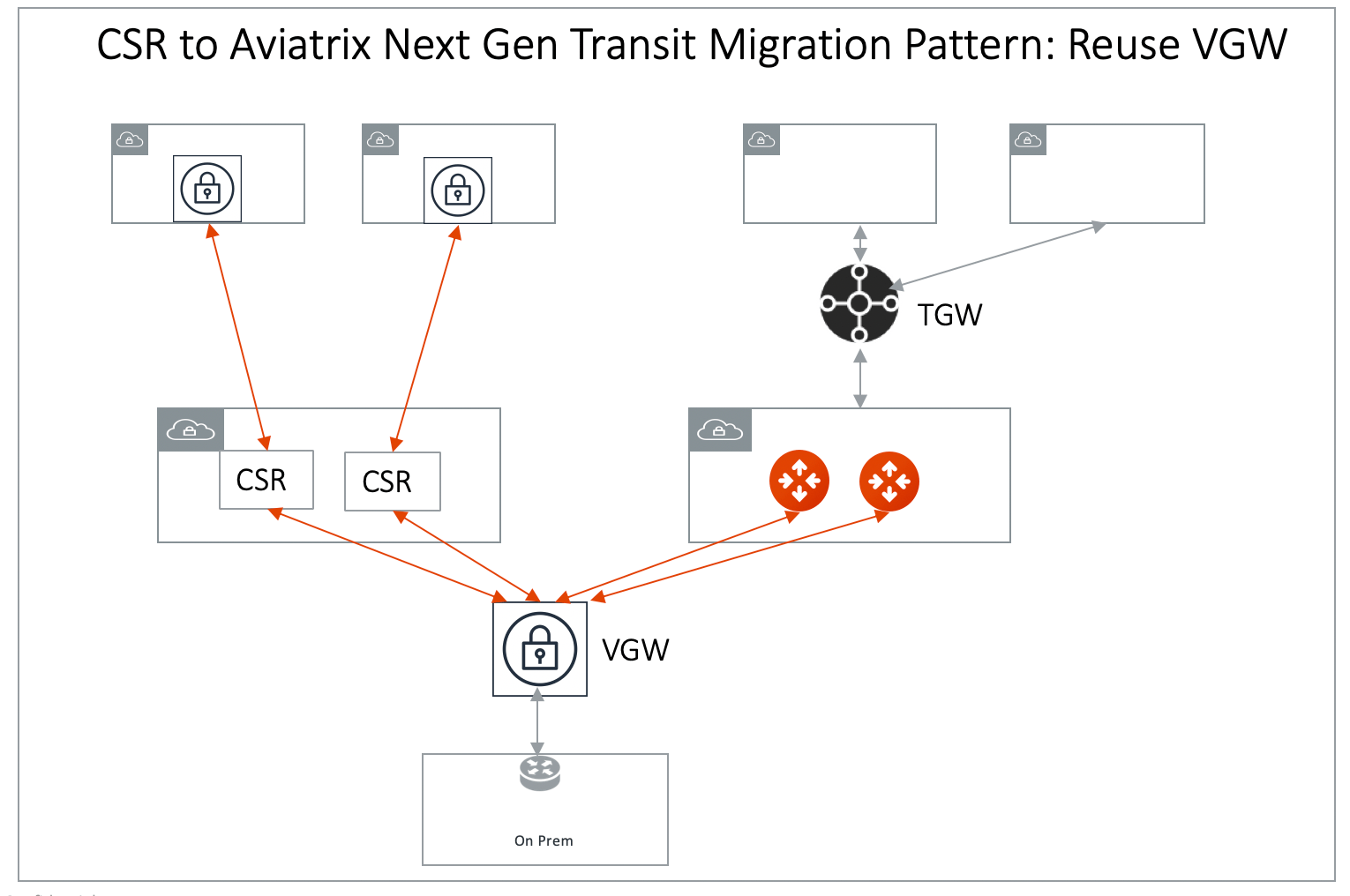
[Connect Aviatrix Transit GW to VGW](https://legacy.docs.aviatrix.com/documentation/latest/network/external-connection-create-aws-vgw.html).
At this point, VGW starts to advertise to the Aviatrix Transit GW. Make sure
you specify a different "AS" number for the BGP session of the Aviatrix
Transit GW connection to the VGW. Also note that if the Transit GW and the VGW
are in the same account and same VPC, VGW must be detached from the VPC.
A diagram for this migration path is shown below:
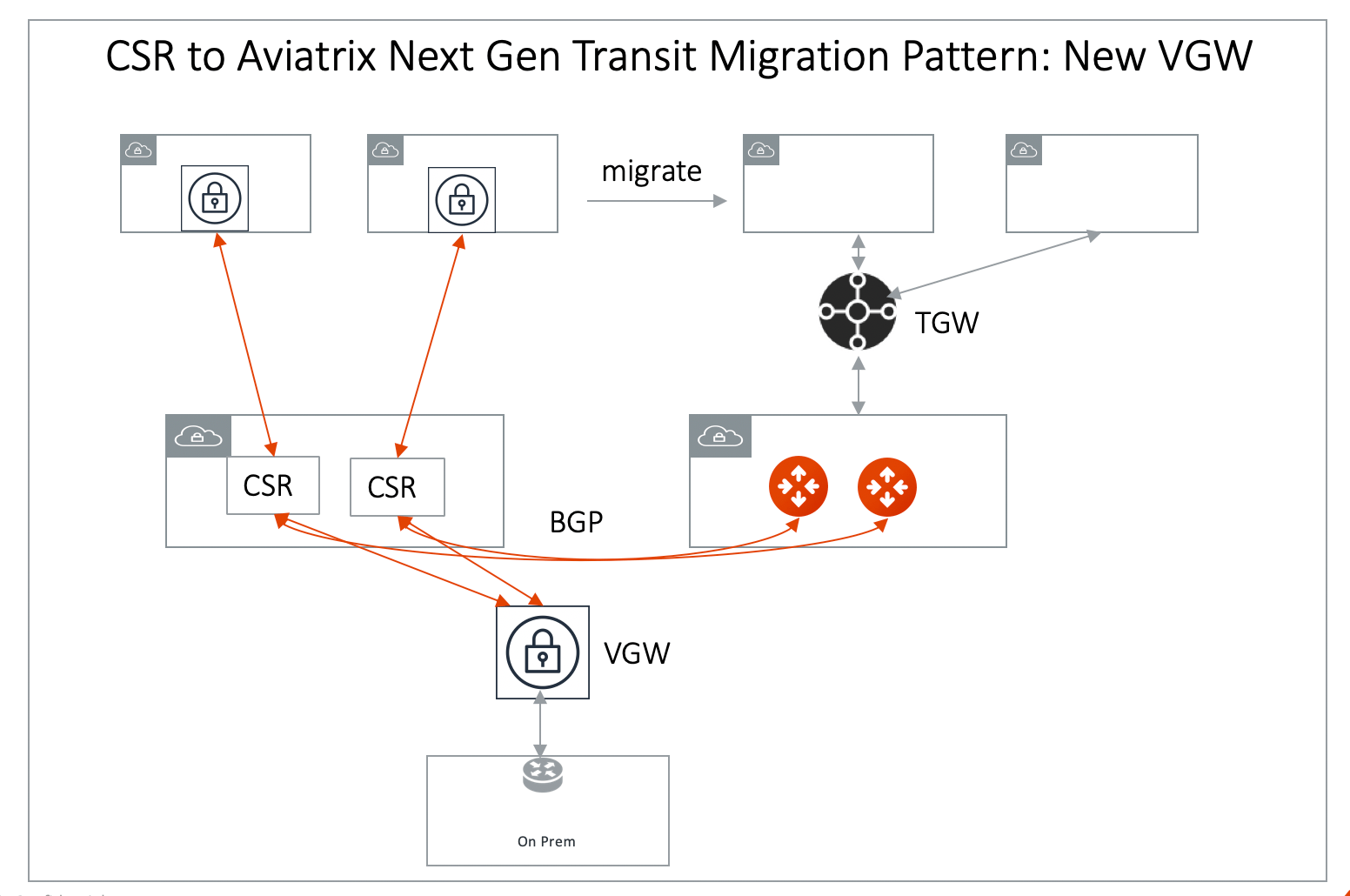
 * Option B: Connect Aviatrix Transit GW to CSR. There are certain situations
where you need to keep the CSR as the connection point to on-prem (for
example, you need to use CSR route summarization feature to control routes to
VGW to be under 100). In such a scenario, use
[External Device](https://legacy.docs.aviatrix.com/documentation/latest/network/transit-externaldevice-connect.html)
option in Transit VPC workflow
to create an IPSec and BGP connection to CSR, as shown in the diagram below.
After all Spoke VPCs are migrated, delete the connection to CSR, connect the
Aviatrix Transit GW to VGW.
* Option B: Connect Aviatrix Transit GW to CSR. There are certain situations
where you need to keep the CSR as the connection point to on-prem (for
example, you need to use CSR route summarization feature to control routes to
VGW to be under 100). In such a scenario, use
[External Device](https://legacy.docs.aviatrix.com/documentation/latest/network/transit-externaldevice-connect.html)
option in Transit VPC workflow
to create an IPSec and BGP connection to CSR, as shown in the diagram below.
After all Spoke VPCs are migrated, delete the connection to CSR, connect the
Aviatrix Transit GW to VGW.
 5. Remove a Spoke VPC. Select one Spoke VPC that has VGW deployed. Remove the
VPC Transit Network tag. This will effectively detach the Spoke VPC from the
CSR Transit Network. Make sure the above Spoke VPC CIDR route entry has been
removed from the Transit Network.
6. [Attach a Spoke VPC](https://legacy.docs.aviatrix.com/documentation/latest/network/tgw-vpc-attachment-create.html)
to the corresponding network domain.
7. Repeat steps 5 and step 6 for the remaining Spoke VPCs.
8. Remove the Transit Hub VGW CSR tag after all Spoke VPCs have been migrated to
Aviatrix Transit GW. This effectively detaches the VGW from CSR.
The effective operation downtime for each Spoke VPC is the time between the
Transit Network tag being removed for the Spoke VPC and the Spoke VPC being
attached to Aviatrix Transit GW. It should be a few minutes.
5. Remove a Spoke VPC. Select one Spoke VPC that has VGW deployed. Remove the
VPC Transit Network tag. This will effectively detach the Spoke VPC from the
CSR Transit Network. Make sure the above Spoke VPC CIDR route entry has been
removed from the Transit Network.
6. [Attach a Spoke VPC](https://legacy.docs.aviatrix.com/documentation/latest/network/tgw-vpc-attachment-create.html)
to the corresponding network domain.
7. Repeat steps 5 and step 6 for the remaining Spoke VPCs.
8. Remove the Transit Hub VGW CSR tag after all Spoke VPCs have been migrated to
Aviatrix Transit GW. This effectively detaches the VGW from CSR.
The effective operation downtime for each Spoke VPC is the time between the
Transit Network tag being removed for the Spoke VPC and the Spoke VPC being
attached to Aviatrix Transit GW. It should be a few minutes.