> ## Documentation Index
> Fetch the complete documentation index at: https://docs.aviatrix.com/llms.txt
> Use this file to discover all available pages before exploring further.
# Configure VRF End-to-End Propagation
> Step-by-step instructions for enabling VRF end-to-end propagation across spoke-transit and transit-transit peerings in Aviatrix CoPilot, and for verifying that segment identity and traffic isolation carry through the transit layer.
Virtual Routing and Forwarding (VRF) end-to-end propagation extends an existing
first-hop VRF configuration so that a spoke's segment identity carries through
the transit layer to the remote side of a spoke-transit or transit-transit
peering, instead of terminating at the first transit hop. This guide covers
enabling that propagation in Aviatrix CoPilot, verifying that segment identity
propagated successfully, and validating that traffic between different VRF
segments remains isolated.
## Prerequisites
Before you enable VRF end-to-end propagation, confirm the following.
* Controller version: Aviatrix Controller is running version 10.1 or later.
* Gateway software version: Both gateways in each peering you plan to
configure (the spoke or Edge Spoke gateway and its peer Transit Gateway, or
the two Transit Gateways in a transit-transit peering) must be running gateway
software 10.1 or later.
* Existing first-hop VRF configuration: A
first-hop VRF configuration
from Controller 9.0 must already be in place: VRF support enabled at the
controller level, with spoke gateways attached to their segmentation domains.
* Supported cloud service providers: AWS, Azure, and GCP are supported.
On Azure, VRF end-to-end propagation does not support spoke VPCs or VNets
that have overlapping CIDR ranges.
* Existing spoke-transit or transit-transit peering: At least one peering
already established between the gateways you want to propagate VRF end-to-end
across.
* Administrative access: Access to **Networking** > **Network
Segmentation** > **Settings** in CoPilot.
## Enable VRF End-to-End Propagation
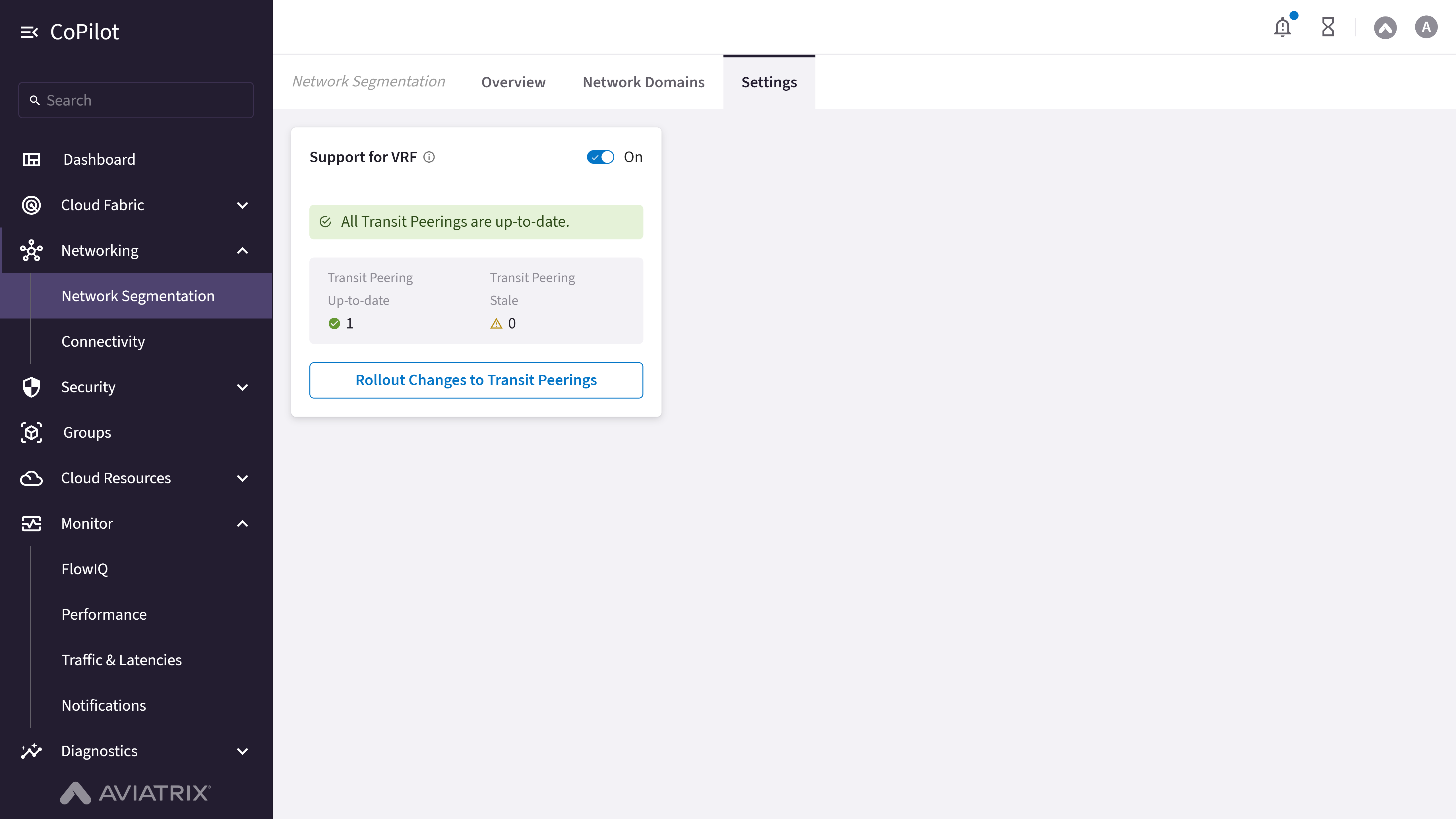 In Aviatrix CoPilot, go to **Networking** > **Network Segmentation** >
**Settings**.
Locate the **Support for VRF** card and confirm the toggle switch is set
to **On**. This reflects the first-hop VRF configuration from the
[Prerequisites](#prerequisites). If the toggle is **Off**, VRF has not
been enabled at the controller level, and you must complete
that configuration
before continuing.
In the **Support for VRF** card, review the **Transit Peering
Up-to-date** and **Transit Peering Stale** counts. A peering counted as
stale has not yet had VRF end-to-end propagation applied.
Click **Rollout Changes to Transit Peerings**. The **Rollout Support for
VRF** dialog opens, listing every eligible peering with its **Transit/Edge
Spoke Gateway**, **Peering Type** (Intra-Group, Transit-Transit, Edge
Spoke-Transit, or BGP Spoke-Transit), and **Transit Gateway Instance**.
Select the checkbox next to each spoke-transit (Edge Spoke-Transit or BGP
Spoke-Transit) or transit-transit peering where you want to enable VRF
end-to-end propagation. Clear the checkbox for any peering where you want
to disable it.
Click **Rollout**. CoPilot applies the change to every selected peering.
Disabling **Support for VRF** entirely (turning the card's main toggle
**Off**) affects every peering at once and causes all transit peerings to
become stale. Do not turn off the main toggle unless you intend to remove VRF
end-to-end propagation across your entire environment.
## Verify Segment Identity in CoPilot
After you roll out the change, confirm that segment identity is propagating
end-to-end across the peerings you selected.
Return to **Networking** > **Network Segmentation** > **Settings** and
open the **Support for VRF** card. Confirm that the peerings you enabled
now count toward **Transit Peering Up-to-date** rather than **Transit
Peering Stale**.
Confirm that each spoke's segmentation domain (its VRF identity) is still
correctly reflected on **Networking** > **Network Segmentation** >
**Network Domains** after propagation.
## Validate Traffic Isolation
VRF end-to-end propagation is only correctly configured if traffic within a
segment still reaches its intended destinations and traffic across different
segments remains blocked.
From a workload in one spoke, confirm connectivity to a workload in
another spoke that shares the same VRF segment across the peering you
configured. Connectivity should succeed.
From the same workload, attempt connectivity to a workload in a spoke
that belongs to a different VRF segment across the same peering. The
connection should fail, confirming that traffic isolation between
segments is preserved end-to-end.
To inspect the underlying tunnel traffic instead of only its
connectivity outcome, go to **Diagnostics** > **Diagnostic Tools** >
**Gateway Diagnostics** > **Packet Capture** and select the gateway
whose tunnel you want to inspect. If both the Controller and the
selected gateway are on 10.1 or later, a **Skip Aviatrix Headers**
toggle appears; enabling it strips the Aviatrix VRF tunnel headers from
the capture so filters and saved captures show the original inner
packets instead of the VRF-tagged outer headers.
## Related Resources
* VRF Multi-Tenancy
* VRF Design Patterns
In Aviatrix CoPilot, go to **Networking** > **Network Segmentation** >
**Settings**.
Locate the **Support for VRF** card and confirm the toggle switch is set
to **On**. This reflects the first-hop VRF configuration from the
[Prerequisites](#prerequisites). If the toggle is **Off**, VRF has not
been enabled at the controller level, and you must complete
that configuration
before continuing.
In the **Support for VRF** card, review the **Transit Peering
Up-to-date** and **Transit Peering Stale** counts. A peering counted as
stale has not yet had VRF end-to-end propagation applied.
Click **Rollout Changes to Transit Peerings**. The **Rollout Support for
VRF** dialog opens, listing every eligible peering with its **Transit/Edge
Spoke Gateway**, **Peering Type** (Intra-Group, Transit-Transit, Edge
Spoke-Transit, or BGP Spoke-Transit), and **Transit Gateway Instance**.
Select the checkbox next to each spoke-transit (Edge Spoke-Transit or BGP
Spoke-Transit) or transit-transit peering where you want to enable VRF
end-to-end propagation. Clear the checkbox for any peering where you want
to disable it.
Click **Rollout**. CoPilot applies the change to every selected peering.
Disabling **Support for VRF** entirely (turning the card's main toggle
**Off**) affects every peering at once and causes all transit peerings to
become stale. Do not turn off the main toggle unless you intend to remove VRF
end-to-end propagation across your entire environment.
## Verify Segment Identity in CoPilot
After you roll out the change, confirm that segment identity is propagating
end-to-end across the peerings you selected.
Return to **Networking** > **Network Segmentation** > **Settings** and
open the **Support for VRF** card. Confirm that the peerings you enabled
now count toward **Transit Peering Up-to-date** rather than **Transit
Peering Stale**.
Confirm that each spoke's segmentation domain (its VRF identity) is still
correctly reflected on **Networking** > **Network Segmentation** >
**Network Domains** after propagation.
## Validate Traffic Isolation
VRF end-to-end propagation is only correctly configured if traffic within a
segment still reaches its intended destinations and traffic across different
segments remains blocked.
From a workload in one spoke, confirm connectivity to a workload in
another spoke that shares the same VRF segment across the peering you
configured. Connectivity should succeed.
From the same workload, attempt connectivity to a workload in a spoke
that belongs to a different VRF segment across the same peering. The
connection should fail, confirming that traffic isolation between
segments is preserved end-to-end.
To inspect the underlying tunnel traffic instead of only its
connectivity outcome, go to **Diagnostics** > **Diagnostic Tools** >
**Gateway Diagnostics** > **Packet Capture** and select the gateway
whose tunnel you want to inspect. If both the Controller and the
selected gateway are on 10.1 or later, a **Skip Aviatrix Headers**
toggle appears; enabling it strips the Aviatrix VRF tunnel headers from
the capture so filters and saved captures show the original inner
packets instead of the VRF-tagged outer headers.
## Related Resources
* VRF Multi-Tenancy
* VRF Design Patterns