> ## Documentation Index
> Fetch the complete documentation index at: https://docs.aviatrix.com/llms.txt
> Use this file to discover all available pages before exploring further.
# Multi-Region Multicloud Transit Gateway Peering Workflow
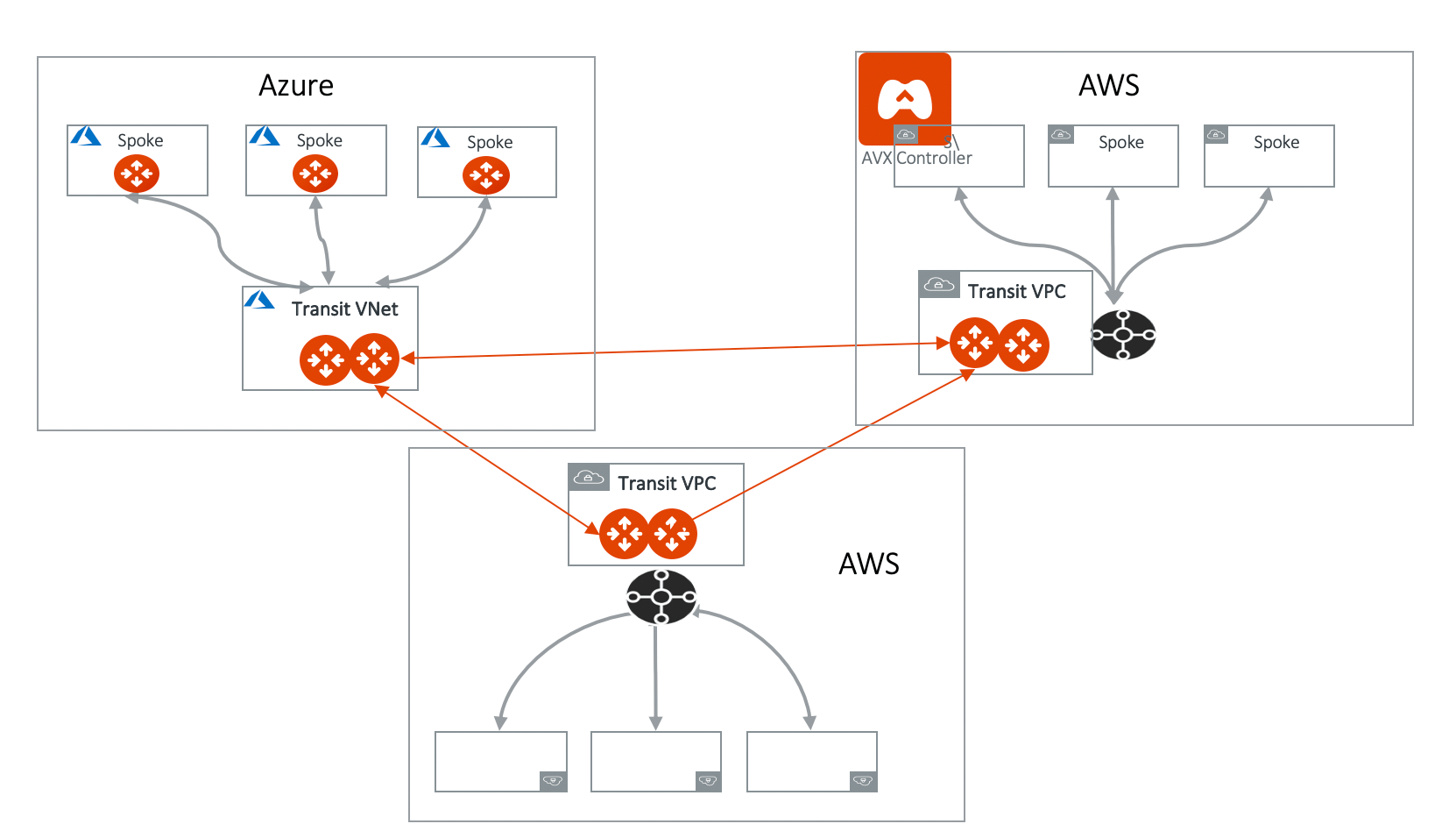
> Aviatrix Transit Gateway Peering enables connectivity across two or more Aviatrix Transit Gateways for communication between groups of Spoke VPCs or VNets across single or multiple clouds and regions.
Aviatrix Transit Gateway Peering enables connectivity across two or more
Aviatrix Transit Gateways for communication between groups of Spoke VPCs or
VNets across single or multiple clouds and regions.
In the diagram below, the Aviatrix Transit Gateways are deployed in AWS and
Azure, where each Transit Gateway connects a group of Spoke VPCs/VNets. As a
result of Transit Gateway Peering, the Spoke VPC/VNet CIDRs and on-premises
routes are dynamically propagated throughout the network, which allows the
groups of Spoke VPCs/VNets to communicate with each other via the Transit
Gateways.
 Aviatrix High Performance Encryption (HPE)
is supported for Transit Gateway Peering. To create Transit Gateway Peering with
HPE, you must first create the Transit Gateways with HPE mode enabled, then
create the Transit Gateway peering connection.
## Creating a Transit Gateway Peering Connection
To create Transit Gateway peering, do the following:
1. [**Create the Transit Gateways**](https://legacy.docs.aviatrix.com/documentation/latest/network/transit-gateway-about.html?expand=true)
The Transit Gateways can be in a single or multiple clouds and regions.
Aviatrix High Performance Encryption (HPE) mode is supported on Transit
Gateway Peering. To enable Transit Gateway Peering HPE, you must create the
Transit Gateways with HPE mode enabled.
2. [**Attach the Transit Gateways**](https://legacy.docs.aviatrix.com/documentation/latest/network/transit-gateway-attachments.html#transit-to-transit-attachment).
## Excluded Network CIDRs
Excluded Network CIDRs enables you to filter CIDRs to exclude from being
propagated to the peering Transit Gateway.
One use case is when there are conflicting or identical CIDRs on both sides of
the Transit Gateways, the peering action will be rejected. Using the filter
option prevents the overlapped CIDRs from being propagated to the other Transit
Gateway.
By default, a Transit Gateway propagates all learned routes from Spoke VPCs and
VNets and on-premises.
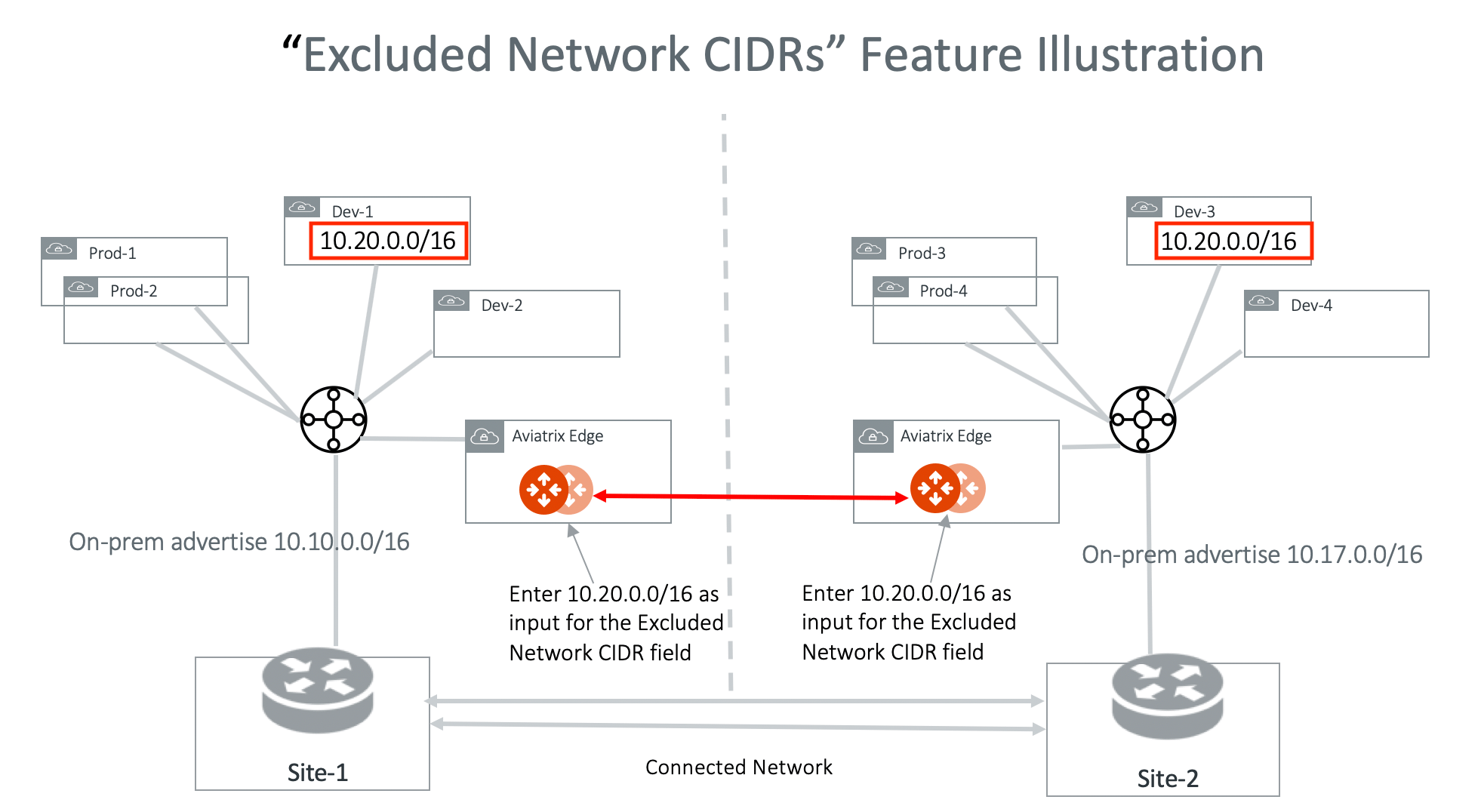
The diagram below illustrates how Excluded Network CIDRs can be used in a two
region deployment. In this case, 10.20.0.0/16 appears on both sides as VPC/VNet
CIDR. To allow Transit Peering to proceed, configure on both Transit Gateways
Excluded Network CIDRs with 10.20.0.0/16.
Aviatrix High Performance Encryption (HPE)
is supported for Transit Gateway Peering. To create Transit Gateway Peering with
HPE, you must first create the Transit Gateways with HPE mode enabled, then
create the Transit Gateway peering connection.
## Creating a Transit Gateway Peering Connection
To create Transit Gateway peering, do the following:
1. [**Create the Transit Gateways**](https://legacy.docs.aviatrix.com/documentation/latest/network/transit-gateway-about.html?expand=true)
The Transit Gateways can be in a single or multiple clouds and regions.
Aviatrix High Performance Encryption (HPE) mode is supported on Transit
Gateway Peering. To enable Transit Gateway Peering HPE, you must create the
Transit Gateways with HPE mode enabled.
2. [**Attach the Transit Gateways**](https://legacy.docs.aviatrix.com/documentation/latest/network/transit-gateway-attachments.html#transit-to-transit-attachment).
## Excluded Network CIDRs
Excluded Network CIDRs enables you to filter CIDRs to exclude from being
propagated to the peering Transit Gateway.
One use case is when there are conflicting or identical CIDRs on both sides of
the Transit Gateways, the peering action will be rejected. Using the filter
option prevents the overlapped CIDRs from being propagated to the other Transit
Gateway.
By default, a Transit Gateway propagates all learned routes from Spoke VPCs and
VNets and on-premises.
The diagram below illustrates how Excluded Network CIDRs can be used in a two
region deployment. In this case, 10.20.0.0/16 appears on both sides as VPC/VNet
CIDR. To allow Transit Peering to proceed, configure on both Transit Gateways
Excluded Network CIDRs with 10.20.0.0/16.
 To configure excluded network CIDRs, see
[Creating a Transit Gateway to Transit Gateway Attachment](https://legacy.docs.aviatrix.com/documentation/latest/network/transit-gateway-attachments.html#transit-to-transit-attachment).
## Excluded TGW Connections
Excluded TGW Connections applies to TGW hybrid connections. This is because AWS
TGW does not preserve BGP information in its learned routes.
When you use AWS Transit Gateway (TGW) to connect to on-premises via DXGW or
VPN, there are situations where on-premises advertise the same network CIDRs to
TGW in two different regions. When you connect the two regions by the Aviatrix
Transit Gateway peering, overlapping network CIDRs will occur.
Excluded TGW Connections enables you to not advertise certain TGW hybrid
attachment (DXGW and VPN) to the remote Aviatrix Transit Gateway and therefore
the remote TGW.
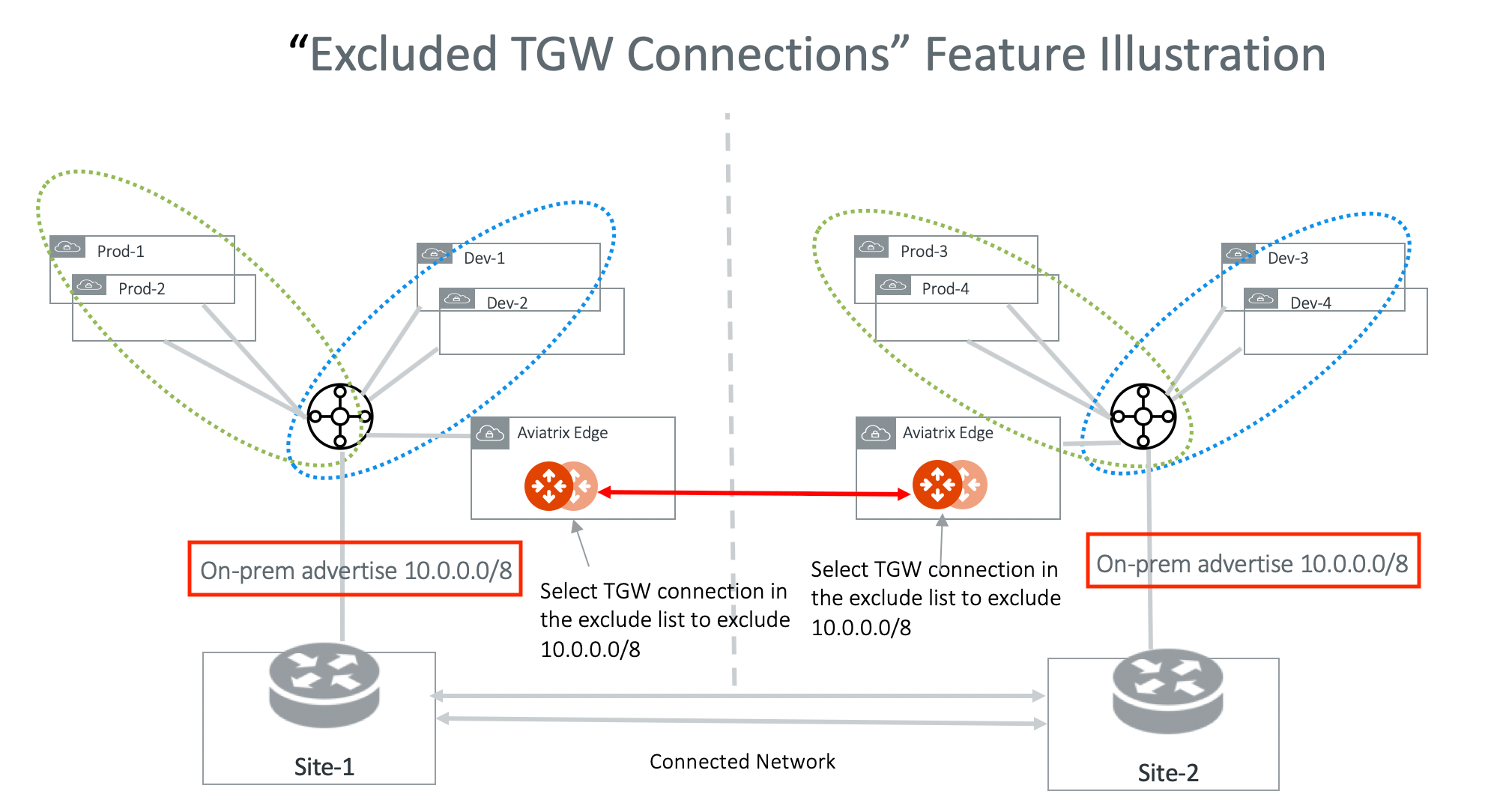
The diagram below illustrates one use case. In the diagram, both on-premises
connects to TGW and advertise 10.0.0.0/8. Transit Gateway Peering will fail
because of the conflicting routes. To solve the problem, configure on both
Transit Gateways to exclude 10.0.0.0/8. With this configuration, Site-1 still
accesses Prod-1/Prod-2 and Dev-1/Dev-2 via the local regional TGW and Site-2
accesses Prod-3/Prod-4 and Dev-3/Dev-4 via its local regional TGW.
To configure excluded network CIDRs, see
[Creating a Transit Gateway to Transit Gateway Attachment](https://legacy.docs.aviatrix.com/documentation/latest/network/transit-gateway-attachments.html#transit-to-transit-attachment).
## Excluded TGW Connections
Excluded TGW Connections applies to TGW hybrid connections. This is because AWS
TGW does not preserve BGP information in its learned routes.
When you use AWS Transit Gateway (TGW) to connect to on-premises via DXGW or
VPN, there are situations where on-premises advertise the same network CIDRs to
TGW in two different regions. When you connect the two regions by the Aviatrix
Transit Gateway peering, overlapping network CIDRs will occur.
Excluded TGW Connections enables you to not advertise certain TGW hybrid
attachment (DXGW and VPN) to the remote Aviatrix Transit Gateway and therefore
the remote TGW.
The diagram below illustrates one use case. In the diagram, both on-premises
connects to TGW and advertise 10.0.0.0/8. Transit Gateway Peering will fail
because of the conflicting routes. To solve the problem, configure on both
Transit Gateways to exclude 10.0.0.0/8. With this configuration, Site-1 still
accesses Prod-1/Prod-2 and Dev-1/Dev-2 via the local regional TGW and Site-2
accesses Prod-3/Prod-4 and Dev-3/Dev-4 via its local regional TGW.
 To configure excluded TGW connections, see
[Creating a Transit Gateway to Transit Gateway Attachment](https://legacy.docs.aviatrix.com/documentation/latest/network/transit-gateway-attachments.html#transit-to-transit-attachment).
## Peering over Private Network
Peering over Private Network feature enables you to build Aviatrix Transit
Gateway peering connections with High Performance Encryption (HPE) over
multicloud where there is a private network connectivity. For example, one
Transit Gateway is in AWS and the other in Azure.
One use case is two Aviatrix Transit Gateways are deployed in different public
clouds where each has its private connectivity, such as AWS Direct Connect and
Azure ExpressRoute, connecting to on-premises or a co-location. By building a
Transit Gateway private peering, Aviatrix Transit Gateway forwards traffic over
the private links to the other Aviatrix Transit Gateway and beyond.
For an example configuration workflow, see Transit
Gateway Peering over Private Network Workflow.
### Single-Tunnel mode
Single-Tunnel mode applies to Transit Gateway peering over private network when
two Transit Gateways are launched in different clouds with High Performance
Encryption Mode. For example, one Transit Gateway is in AWS and the other in
Azure.
When Single-Tunnel mode is selected, only a single tunnel connection is
established between the two multicloud Transit Gateways (instead of building up
to 50 IPSec tunnels as in Aviatrix High Performance Encryption Mode).
One use case is where the underlying private network is a low speed (up to
4Gbps) link across the two cloud types. By using the Single-Tunnel mode, you do
not pay the High Performance Encryption Mode license charges.
When the multicloud Transit Gateways enable HA on both cloud types, the
aggregate throughput via Single-Tunnel mode can reach 4Gbps.
## Peering over Public Network
Aviatrix Transit Gateway Peering over the public network expands Transit Gateway
peering connections across cloud service providers over the internet by using
Aviatrix High Performance Encryption (HPE) tunneling. Aviatrix HPE enables high
throughput performance and high performance encrypted peered connections between
the intercloud Transit Gateways.
To create Transit Gateway peering over the internet, see Transit
Gateway Peering over Public Network Workflow.
For more information about Aviatrix HPE tunneling, see About High-Performance
Encryption.
## Default Route Propagation Behavior
If centralized egress is enabled by local TGW FireNet or Transit FireNet, the
default route 0.0.0.0/0 is **not** propagated to the remote Aviatrix Transit
Gateway via Transit Peering.
On the other hand, if on-premises advertises the default route to the Aviatrix
Transit Gateway, this default route is propagated to the remote Aviatrix Transit
Gateway via Transit Peering.
To configure excluded TGW connections, see
[Creating a Transit Gateway to Transit Gateway Attachment](https://legacy.docs.aviatrix.com/documentation/latest/network/transit-gateway-attachments.html#transit-to-transit-attachment).
## Peering over Private Network
Peering over Private Network feature enables you to build Aviatrix Transit
Gateway peering connections with High Performance Encryption (HPE) over
multicloud where there is a private network connectivity. For example, one
Transit Gateway is in AWS and the other in Azure.
One use case is two Aviatrix Transit Gateways are deployed in different public
clouds where each has its private connectivity, such as AWS Direct Connect and
Azure ExpressRoute, connecting to on-premises or a co-location. By building a
Transit Gateway private peering, Aviatrix Transit Gateway forwards traffic over
the private links to the other Aviatrix Transit Gateway and beyond.
For an example configuration workflow, see Transit
Gateway Peering over Private Network Workflow.
### Single-Tunnel mode
Single-Tunnel mode applies to Transit Gateway peering over private network when
two Transit Gateways are launched in different clouds with High Performance
Encryption Mode. For example, one Transit Gateway is in AWS and the other in
Azure.
When Single-Tunnel mode is selected, only a single tunnel connection is
established between the two multicloud Transit Gateways (instead of building up
to 50 IPSec tunnels as in Aviatrix High Performance Encryption Mode).
One use case is where the underlying private network is a low speed (up to
4Gbps) link across the two cloud types. By using the Single-Tunnel mode, you do
not pay the High Performance Encryption Mode license charges.
When the multicloud Transit Gateways enable HA on both cloud types, the
aggregate throughput via Single-Tunnel mode can reach 4Gbps.
## Peering over Public Network
Aviatrix Transit Gateway Peering over the public network expands Transit Gateway
peering connections across cloud service providers over the internet by using
Aviatrix High Performance Encryption (HPE) tunneling. Aviatrix HPE enables high
throughput performance and high performance encrypted peered connections between
the intercloud Transit Gateways.
To create Transit Gateway peering over the internet, see Transit
Gateway Peering over Public Network Workflow.
For more information about Aviatrix HPE tunneling, see About High-Performance
Encryption.
## Default Route Propagation Behavior
If centralized egress is enabled by local TGW FireNet or Transit FireNet, the
default route 0.0.0.0/0 is **not** propagated to the remote Aviatrix Transit
Gateway via Transit Peering.
On the other hand, if on-premises advertises the default route to the Aviatrix
Transit Gateway, this default route is propagated to the remote Aviatrix Transit
Gateway via Transit Peering.