> ## Documentation Index
> Fetch the complete documentation index at: https://docs.aviatrix.com/llms.txt
> Use this file to discover all available pages before exploring further.
# Deploy an Edge Transit Gateway on the Aviatrix Edge Platform
> This document provides instructions to deploy a primary and secondary highly available (HA) Edge Transit Gateways on the Aviatrix Edge platform.
This document provides instructions to deploy a primary and secondary highly
available (HA) Edge Transit Gateways on the Aviatrix Edge platform.
For an overview of Aviatrix Edge, see
About Aviatrix Hybrid Cloud Edge
.
## Topology
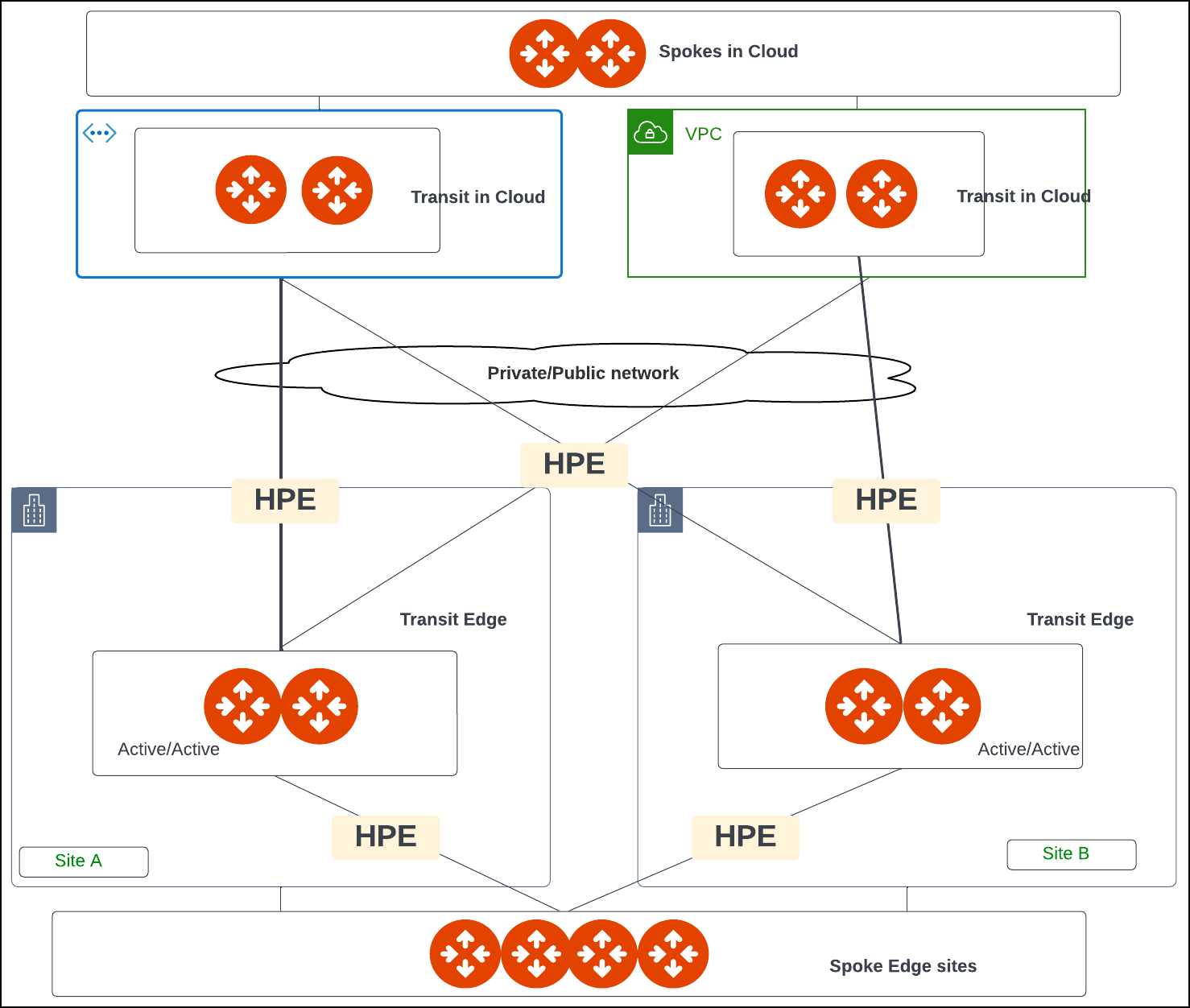
The following diagram shows an example of network connectivity for Edge Transit
Gateway to Transit Gateways in the cloud and Edge Spoke Gateways at remote
sites.
 ## Prerequisites
Before you deploy an Edge Transit Gateway on the Aviatrix Edge Platform, ensure
the
prerequisite steps
are complete.
## Create the Primary and Secondary Edge Transit Gateway (Aviatrix Edge Platform)
Follow the steps below to create and deploy a primary and secondary highly
available (HA) Edge Transit Gateways on the Aviatrix Edge platform.
### Step 1: Gateway Configuration
In Aviatrix CoPilot, go to **Cloud Fabric > Hybrid Cloud > Edge Gateways >
Transit Gateways** tab.
Click **+ Transit Gateway**, then provide the following information.
| Field | Description |
| ------------------------- | --------------------------------------------------------------------------------------------------------------------------------------------------------------------------------------------------------------------------------------------- |
| **Name** | A name for the Edge Gateway. The name must begin with a letter, may include only letters, numbers, and dashes (excluding special characters or spaces), and must not exceed 50 characters in length. |
| **Platform** | The platform account where you want to deploy the Edge gateway. You can create and edit platform accounts in CoPilot by going to **Cloud Fabric** > **Hybrid Cloud** > **Platforms** tab. |
| **Site** | Identifies the edge location. You can select an existing name or enter a new name for the edge location. |
| **High Availability** | The high availability mode. **Off** creates only the primary Edge gateway with one active peering. **On (Active Active Mode)** enables Edge gateway connections with all active peerings to perform load sharing and forward network traffic. |
| **Primary Device** | The edge device where you want to deploy the primary Edge Gateway. |
| **Secondary Device** | The edge device where you want to deploy the secondary (HA) Edge Gateway. The primary and secondary devices must have the same hardware configuration. |
| **Gateway Resource Size** | The gateway size. **Small** - 2 vCPU - 4GB. **Medium** - 4 vCPU - 8GB. **Large** - 8 vCPU - 16GB. **X-Large** - 16 vCPU - 32GB. |
Click **Next** to
[configure the gateway interfaces](#step-2-interface-configuration).
### Step 2: Interface Configuration
In the Interface Configuration section, configure the WAN and Management
interfaces. By default, an Edge Transit Gateway has two interfaces: one WAN
interface on eth0 and one Management interface on eth2.
You will need
these configuration information
to configure the interfaces.
If High Availability mode is selected, then configure both the primary and
secondary Edge gateway interfaces.
#### Configure the WAN Interface
Edge Transit Gateway on the Aviatrix Edge Platform supports up to 4 WAN
interfaces.
In **Interface Configuration**, click **WAN**, then provide the following
information.
| Field | Description |
| ----------------------------- | ---------------------------------------------------------------------------------------------------------------------------------------------------------------------------------------------------------------------------------------------------------------------------------------------------------------------------------------------------------------------------------------------------------------------------------------------------------------------------------------------------------------------------------------------------------------------------------- |
| **Interface** | This is set to the Edge Gateway's logical interface. Adding multiple WAN interfaces is applicable when the Edge Gateway is set up for BGP underlay to cloud service provider (CSP) or other Edge Transit Gateways. A maximum of four WAN interfaces per Edge Gateway is supported. Add an interface per CSP underlay (such as Direct Connect or Express Route). When Edge Gateway is not terminating CSP underlay, use one interface per Edge Gateway to connect to upstream router. |
| **IP Assignment** | The default is **Static** for static IP assignment. **DHCP** for dynamic IP address assignment is not supported. |
| **Interface Labels** | A name to identify the WAN interface. |
| **BGP** | Enables BGP underlay connection to cloud service provider (CSP) or other Edge Transit Gateways on the WAN interface. Set BGP toggle **On** to set up BGP connection to cloud routers such as VGW, VNG, and Google cloud router. Edge Gateway WAN support for BGP underlay to CSP is supported for AWS, Azure, and GCP. |
| **Interface Primary CIDR** | The CIDR for the WAN interface. **DHCP** for dynamic IP address assignment is not supported. Interface CIDR must be in the format interface\_ip/netmask (for example, 192.18.20.1/24). Interface CIDR cannot be link-local CIDR. If you need to create a BGP underlay connection to cloud service provider (CSP) with a link-local IP address, you must enter the link-local IP address in the **Link-local Underlay CIDR** setting of the WAN interface. |
| **Interface Secondary CIDRs** | The secondary CIDRs for the WAN interface. Interface CIDR must be in the format interface\_ip/netmask (for example, 192.18.20.1/24). The secondary CIDRs are used for High Performance Encryption (HPE) attachment peering connections over a private network between the Edge Transit Gateway to another Edge Transit Gateway or Edge Spoke Gateway. The secondary IP addresses (based on the secondary CIDRs) are automatically assigned to create the peering connections. You can define /32 CIDR for specific secondary IP address. Secondary CIDR cannot be link-local CIDR. |
| **Default Gateway IP** | The Default Gateway IP address for the WAN interface. For CSP underlay, this is the remote side IP address of the BGP session on CSP VNG or VGW. If **Link-Local Underlay CIDR** is configured, the Default Gateway IP should be in the same subnet as the Link-Local Underlay CIDR, otherwise, it should be in the same subnet as the WAN Interface CIDR. |
| **Public IP** | The public IP for the WAN interface. The public IP of the WAN interface is used for peering connections over the public network. |
If BGP is turned On, provide the following information.
| Field | Description |
| --------------------------------------- | ---------------------------------------------------------------------------------------------------------------------------------------------------------------------------------------------------------------------------------------------------------------------------------------------------------------------------------------------------------------------------------------------------------------------------------------------------------------------------------------------------------------------------------------------------------------------------------------------------------------------------------------------------------------------------------------------------------- |
| **Link-Local Underlay CIDR (GCP only)** | The Link-Local Underlay CIDR is used for BGP underlay connections to cloud service provider (CSP). If you need to create a BGP underlay connection to CSP with a link-local IP address, you must provide the Link-Local Underlay CIDR for the WAN interface in the format of link\_local\_underlay\_ip/netmask (for example 169.254.100.3/24). This is required for GCP. If terminating GCP Interconnect and using BGP underlay on Edge, provide the WAN Default Gateway of the peer IP address. If Link-Local Underlay CIDR is configured, the **Default Gateway IP** should be in the same subnet as the Link-Local Underlay CIDR, otherwise, it should be in the same subnet as the WAN Interface CIDR. |
| **Local ASN** | The **[Local ASN Number](https://legacy.docs.aviatrix.com/documentation/latest/network/bgp-connection-settings.html#local-as-number)** of the Edge Gateway. |
| **Remote ASN** | The AS Number of the CSP side peering connection such as private VIF on VGW (AWS) and VNG ASN (Azure). |
| **Local LAN IP** | The IP address of the Edge Gateway. This is the local peering PTP IP for BGP. |
| **Remote LAN IP** | The IP address of the CSP VNG or VGW peering PTP IP. (GCP is not supported). |
| **Password (optional)** | The MD5 authentication key. |
If BGP is turned On, in **Gateway Configuration**, enter the **Local AS Number**
of the local Edge Gateway.
To add another WAN interface, click **+ WAN Interface** again and provide the
required information.
If a required field is missing, the interface tab is highlighted to indicate
there is an error.
#### Configure the Management Interface
In **Interface Configuration**, click **MGMT**, then provide the following
information.
| Field | Description |
| --------------------------- | -------------------------------------------------------------------------------------------------------------------------------------------------------------------------------------------------------------------------------------------------------------------------------------------------------------------------------------------------- |
| **Interface** | The Edge Gateway's logical interface name. |
| **IP Assignment** | The MGMT interface defaults to **DHCP**. This setting cannot be changed. The Edge Gateway will automatically NAT out of the physical MGMT interface of the edge node when using the Aviatrix Edge platform. |
| **Private Network** | Leave this setting to **Off**. The Edge Gateway on the edge hardware requires public Internet reachability to connect to the Aviatrix Controller and Aviatrix Edge infrastructure in the cloud. |
| **Egress CIDR (Primary)** | The Egress CIDR is the public IP address which the Management interface uses. If the Public IP is used from Edge Gateway Management interface to establish connectivity to Aviatrix Controller, then configure the Public IP as the CIDR. The CIDR is then added to the Controller security group to allow incoming traffic from the Edge Gateway. |
| **Egress CIDR (Secondary)** | The Egress Public IP for the secondary Edge Gateway's Management interface when High Availability is configured. |
If a required field is missing, the interface tab is highlighted to indicate
there is an error.
Click **Next** to [view the interface mapping](#step-3-interface-mapping).
### Step 3: Interface Mapping
Interface Mapping is provided for reference purposes (view only).
The table shows a mapping of the Edge Gateway's logical interface names to the
Edge Gateway's Linux interface names. These interface names are used in the
Aviatrx log files and error messages. When performing diagnostic or
troubleshooting on the Aviatrix Platform, you can refer to this mapping for the
interface name.
| Field | Description |
| ---------------------------------------- | ---------------------------------------------------------------------------------------------------------------------------------------------------------------------------------- |
| **Interface** | The Edge Gateway's logical interface name. |
| **Primary Gateway Ethernet Interface** | The primary Edge Gateway's Linux interface name. |
| **Secondary Gateway Ethernet Interface** | The secondary (HA) Edge Gateway's Linux interface name. The secondary gateway interface mappings are shown only when high availability is configured for the primary Edge Gateway. |
#### Backup Peering
If the Edge Gateway is deployed in Active-Active high availability mode:
In **Backup Peering**, select a **WAN interface** to use to establish the
attachment peering between the primary and HA Edge Gateway.
Select whether the attachment is over a **Private Network** or **Public
Network**.
Click **Done** to create the primary and HA gateways.
### Step 4: Verify the Edge Gateway Creation
See,
[Verify the Edge Gateway Creation](https://legacy.docs.aviatrix.com/documentation/latest/network/edge-create-verify.html).
## Next Steps
* For hybrid, multicloud, or LAN-side connectivity, you can attach the Edge
gateway to multiple Aviatrix gateways. See
Edge Gateway Attachments
.
* For remote site connectivity, you can connect the Edge gateway to remote
devices. See
[Edge Gateway External Connection](https://legacy.docs.aviatrix.com/documentation/latest/network/edge-connect-external-device-eat.html).
## Prerequisites
Before you deploy an Edge Transit Gateway on the Aviatrix Edge Platform, ensure
the
prerequisite steps
are complete.
## Create the Primary and Secondary Edge Transit Gateway (Aviatrix Edge Platform)
Follow the steps below to create and deploy a primary and secondary highly
available (HA) Edge Transit Gateways on the Aviatrix Edge platform.
### Step 1: Gateway Configuration
In Aviatrix CoPilot, go to **Cloud Fabric > Hybrid Cloud > Edge Gateways >
Transit Gateways** tab.
Click **+ Transit Gateway**, then provide the following information.
| Field | Description |
| ------------------------- | --------------------------------------------------------------------------------------------------------------------------------------------------------------------------------------------------------------------------------------------- |
| **Name** | A name for the Edge Gateway. The name must begin with a letter, may include only letters, numbers, and dashes (excluding special characters or spaces), and must not exceed 50 characters in length. |
| **Platform** | The platform account where you want to deploy the Edge gateway. You can create and edit platform accounts in CoPilot by going to **Cloud Fabric** > **Hybrid Cloud** > **Platforms** tab. |
| **Site** | Identifies the edge location. You can select an existing name or enter a new name for the edge location. |
| **High Availability** | The high availability mode. **Off** creates only the primary Edge gateway with one active peering. **On (Active Active Mode)** enables Edge gateway connections with all active peerings to perform load sharing and forward network traffic. |
| **Primary Device** | The edge device where you want to deploy the primary Edge Gateway. |
| **Secondary Device** | The edge device where you want to deploy the secondary (HA) Edge Gateway. The primary and secondary devices must have the same hardware configuration. |
| **Gateway Resource Size** | The gateway size. **Small** - 2 vCPU - 4GB. **Medium** - 4 vCPU - 8GB. **Large** - 8 vCPU - 16GB. **X-Large** - 16 vCPU - 32GB. |
Click **Next** to
[configure the gateway interfaces](#step-2-interface-configuration).
### Step 2: Interface Configuration
In the Interface Configuration section, configure the WAN and Management
interfaces. By default, an Edge Transit Gateway has two interfaces: one WAN
interface on eth0 and one Management interface on eth2.
You will need
these configuration information
to configure the interfaces.
If High Availability mode is selected, then configure both the primary and
secondary Edge gateway interfaces.
#### Configure the WAN Interface
Edge Transit Gateway on the Aviatrix Edge Platform supports up to 4 WAN
interfaces.
In **Interface Configuration**, click **WAN**, then provide the following
information.
| Field | Description |
| ----------------------------- | ---------------------------------------------------------------------------------------------------------------------------------------------------------------------------------------------------------------------------------------------------------------------------------------------------------------------------------------------------------------------------------------------------------------------------------------------------------------------------------------------------------------------------------------------------------------------------------- |
| **Interface** | This is set to the Edge Gateway's logical interface. Adding multiple WAN interfaces is applicable when the Edge Gateway is set up for BGP underlay to cloud service provider (CSP) or other Edge Transit Gateways. A maximum of four WAN interfaces per Edge Gateway is supported. Add an interface per CSP underlay (such as Direct Connect or Express Route). When Edge Gateway is not terminating CSP underlay, use one interface per Edge Gateway to connect to upstream router. |
| **IP Assignment** | The default is **Static** for static IP assignment. **DHCP** for dynamic IP address assignment is not supported. |
| **Interface Labels** | A name to identify the WAN interface. |
| **BGP** | Enables BGP underlay connection to cloud service provider (CSP) or other Edge Transit Gateways on the WAN interface. Set BGP toggle **On** to set up BGP connection to cloud routers such as VGW, VNG, and Google cloud router. Edge Gateway WAN support for BGP underlay to CSP is supported for AWS, Azure, and GCP. |
| **Interface Primary CIDR** | The CIDR for the WAN interface. **DHCP** for dynamic IP address assignment is not supported. Interface CIDR must be in the format interface\_ip/netmask (for example, 192.18.20.1/24). Interface CIDR cannot be link-local CIDR. If you need to create a BGP underlay connection to cloud service provider (CSP) with a link-local IP address, you must enter the link-local IP address in the **Link-local Underlay CIDR** setting of the WAN interface. |
| **Interface Secondary CIDRs** | The secondary CIDRs for the WAN interface. Interface CIDR must be in the format interface\_ip/netmask (for example, 192.18.20.1/24). The secondary CIDRs are used for High Performance Encryption (HPE) attachment peering connections over a private network between the Edge Transit Gateway to another Edge Transit Gateway or Edge Spoke Gateway. The secondary IP addresses (based on the secondary CIDRs) are automatically assigned to create the peering connections. You can define /32 CIDR for specific secondary IP address. Secondary CIDR cannot be link-local CIDR. |
| **Default Gateway IP** | The Default Gateway IP address for the WAN interface. For CSP underlay, this is the remote side IP address of the BGP session on CSP VNG or VGW. If **Link-Local Underlay CIDR** is configured, the Default Gateway IP should be in the same subnet as the Link-Local Underlay CIDR, otherwise, it should be in the same subnet as the WAN Interface CIDR. |
| **Public IP** | The public IP for the WAN interface. The public IP of the WAN interface is used for peering connections over the public network. |
If BGP is turned On, provide the following information.
| Field | Description |
| --------------------------------------- | ---------------------------------------------------------------------------------------------------------------------------------------------------------------------------------------------------------------------------------------------------------------------------------------------------------------------------------------------------------------------------------------------------------------------------------------------------------------------------------------------------------------------------------------------------------------------------------------------------------------------------------------------------------------------------------------------------------- |
| **Link-Local Underlay CIDR (GCP only)** | The Link-Local Underlay CIDR is used for BGP underlay connections to cloud service provider (CSP). If you need to create a BGP underlay connection to CSP with a link-local IP address, you must provide the Link-Local Underlay CIDR for the WAN interface in the format of link\_local\_underlay\_ip/netmask (for example 169.254.100.3/24). This is required for GCP. If terminating GCP Interconnect and using BGP underlay on Edge, provide the WAN Default Gateway of the peer IP address. If Link-Local Underlay CIDR is configured, the **Default Gateway IP** should be in the same subnet as the Link-Local Underlay CIDR, otherwise, it should be in the same subnet as the WAN Interface CIDR. |
| **Local ASN** | The **[Local ASN Number](https://legacy.docs.aviatrix.com/documentation/latest/network/bgp-connection-settings.html#local-as-number)** of the Edge Gateway. |
| **Remote ASN** | The AS Number of the CSP side peering connection such as private VIF on VGW (AWS) and VNG ASN (Azure). |
| **Local LAN IP** | The IP address of the Edge Gateway. This is the local peering PTP IP for BGP. |
| **Remote LAN IP** | The IP address of the CSP VNG or VGW peering PTP IP. (GCP is not supported). |
| **Password (optional)** | The MD5 authentication key. |
If BGP is turned On, in **Gateway Configuration**, enter the **Local AS Number**
of the local Edge Gateway.
To add another WAN interface, click **+ WAN Interface** again and provide the
required information.
If a required field is missing, the interface tab is highlighted to indicate
there is an error.
#### Configure the Management Interface
In **Interface Configuration**, click **MGMT**, then provide the following
information.
| Field | Description |
| --------------------------- | -------------------------------------------------------------------------------------------------------------------------------------------------------------------------------------------------------------------------------------------------------------------------------------------------------------------------------------------------- |
| **Interface** | The Edge Gateway's logical interface name. |
| **IP Assignment** | The MGMT interface defaults to **DHCP**. This setting cannot be changed. The Edge Gateway will automatically NAT out of the physical MGMT interface of the edge node when using the Aviatrix Edge platform. |
| **Private Network** | Leave this setting to **Off**. The Edge Gateway on the edge hardware requires public Internet reachability to connect to the Aviatrix Controller and Aviatrix Edge infrastructure in the cloud. |
| **Egress CIDR (Primary)** | The Egress CIDR is the public IP address which the Management interface uses. If the Public IP is used from Edge Gateway Management interface to establish connectivity to Aviatrix Controller, then configure the Public IP as the CIDR. The CIDR is then added to the Controller security group to allow incoming traffic from the Edge Gateway. |
| **Egress CIDR (Secondary)** | The Egress Public IP for the secondary Edge Gateway's Management interface when High Availability is configured. |
If a required field is missing, the interface tab is highlighted to indicate
there is an error.
Click **Next** to [view the interface mapping](#step-3-interface-mapping).
### Step 3: Interface Mapping
Interface Mapping is provided for reference purposes (view only).
The table shows a mapping of the Edge Gateway's logical interface names to the
Edge Gateway's Linux interface names. These interface names are used in the
Aviatrx log files and error messages. When performing diagnostic or
troubleshooting on the Aviatrix Platform, you can refer to this mapping for the
interface name.
| Field | Description |
| ---------------------------------------- | ---------------------------------------------------------------------------------------------------------------------------------------------------------------------------------- |
| **Interface** | The Edge Gateway's logical interface name. |
| **Primary Gateway Ethernet Interface** | The primary Edge Gateway's Linux interface name. |
| **Secondary Gateway Ethernet Interface** | The secondary (HA) Edge Gateway's Linux interface name. The secondary gateway interface mappings are shown only when high availability is configured for the primary Edge Gateway. |
#### Backup Peering
If the Edge Gateway is deployed in Active-Active high availability mode:
In **Backup Peering**, select a **WAN interface** to use to establish the
attachment peering between the primary and HA Edge Gateway.
Select whether the attachment is over a **Private Network** or **Public
Network**.
Click **Done** to create the primary and HA gateways.
### Step 4: Verify the Edge Gateway Creation
See,
[Verify the Edge Gateway Creation](https://legacy.docs.aviatrix.com/documentation/latest/network/edge-create-verify.html).
## Next Steps
* For hybrid, multicloud, or LAN-side connectivity, you can attach the Edge
gateway to multiple Aviatrix gateways. See
Edge Gateway Attachments
.
* For remote site connectivity, you can connect the Edge gateway to remote
devices. See
[Edge Gateway External Connection](https://legacy.docs.aviatrix.com/documentation/latest/network/edge-connect-external-device-eat.html).