> ## Documentation Index
> Fetch the complete documentation index at: https://docs.aviatrix.com/llms.txt
> Use this file to discover all available pages before exploring further.
# Deploy an Edge Spoke Gateway on Megaport Virtual Edge
> This document provides instructions to deploy a primary Edge Spoke Gateway on Megaport Virtual Edge (MVE).
This document provides instructions to deploy a primary Edge Spoke Gateway on Megaport
Virtual Edge (MVE).
For an overview of Aviatrix Edge, see About Aviatrix
Hybrid Cloud Edge.
## Topology
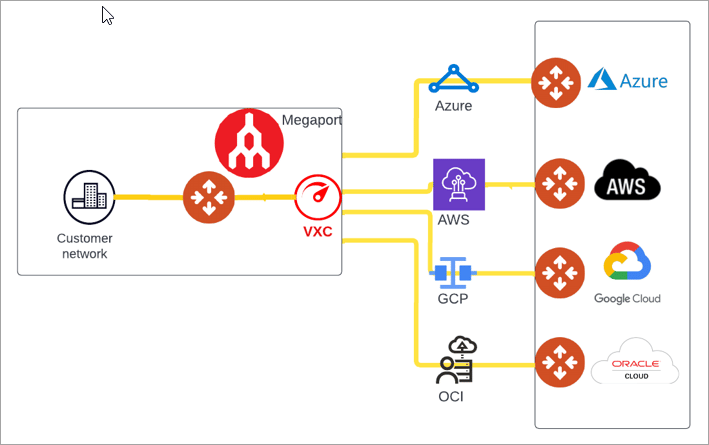
The design below shows a high-level hybrid cloud solution with Aviatrix Edge
leveraging Megaport fabric.
 ## Prerequisites
Before you deploy an Edge Spoke Gateway on the Megaport platform, ensure the prerequisite
steps are complete.
## Deploy the Primary Edge Spoke Gateway (Megaport)
To create and deploy the primary Edge Spoke Gateway in Megaport Virtual Edge
(MVE), perform these steps.
1. [Create the Primary Edge Spoke Gateway ZTP Cloud-Init File (Megaport)](https://legacy.docs.aviatrix.com/documentation/latest/network/edge-spoke-create-megaport.html).
2. [Deploy the Edge Spoke Gateway in MVE using the cloud-init ZTP file](https://legacy.docs.aviatrix.com/documentation/latest/network/edge-vm-create-megaport.html).
3. [Verify the Edge Spoke Gateway creation](https://legacy.docs.aviatrix.com/documentation/latest/network/edge-create-verify.html).
## Next Steps
* For high availability (HA) and redundancy, you can create and deploy HA Edge
Spoke Gateway. See Deploy a HA
Edge Spoke Gateway (Megaport).
* For hybrid, multicloud, or LAN-side connectivity, you can attach the Edge
Spoke Gateway to multiple Aviatrix gateways. See Edge Gateway
Attachments.
* For remote site connectivity, you can connect the Edge Spoke Gateway to remote
devices. See Edge Gateway External
Connection.
## Prerequisites
Before you deploy an Edge Spoke Gateway on the Megaport platform, ensure the prerequisite
steps are complete.
## Deploy the Primary Edge Spoke Gateway (Megaport)
To create and deploy the primary Edge Spoke Gateway in Megaport Virtual Edge
(MVE), perform these steps.
1. [Create the Primary Edge Spoke Gateway ZTP Cloud-Init File (Megaport)](https://legacy.docs.aviatrix.com/documentation/latest/network/edge-spoke-create-megaport.html).
2. [Deploy the Edge Spoke Gateway in MVE using the cloud-init ZTP file](https://legacy.docs.aviatrix.com/documentation/latest/network/edge-vm-create-megaport.html).
3. [Verify the Edge Spoke Gateway creation](https://legacy.docs.aviatrix.com/documentation/latest/network/edge-create-verify.html).
## Next Steps
* For high availability (HA) and redundancy, you can create and deploy HA Edge
Spoke Gateway. See Deploy a HA
Edge Spoke Gateway (Megaport).
* For hybrid, multicloud, or LAN-side connectivity, you can attach the Edge
Spoke Gateway to multiple Aviatrix gateways. See Edge Gateway
Attachments.
* For remote site connectivity, you can connect the Edge Spoke Gateway to remote
devices. See Edge Gateway External
Connection.