> ## Documentation Index
> Fetch the complete documentation index at: https://docs.aviatrix.com/llms.txt
> Use this file to discover all available pages before exploring further.
# Edge Gateway Multi-Peer BGP over LAN Connection
> This document provides information about multi-peer BGP over LAN connections from an Aviatrix Edge gateway to on-premises LAN BGP routers.
This document provides information about multi-peer BGP over LAN connections
from an Aviatrix Edge gateway to on-premises LAN BGP routers.
## Overview
The Aviatrix Platform supports multi-peer BGP over LAN connections on Aviatrix
Edge Transit and Edge Spoke Gateways designed to provide resilient and scalable
architecture.
Multi-Peer BGP over LAN peering allows Edge gateways to establish full mesh BGP
sessions with two highly available (HA) BGP neighbors and provide failover
redundancy. For instance, if an Edge gateway loses connection with one LAN
router, a full mesh peering allows the Edge gateway to route network traffic to
the other LAN router. Without the full mesh capability, traffic would need to be
routed through multiple hops (to another Edge gateway and LAN router) causing
delay in latency.
To create full mesh BGP peering to HA LAN routers, you must enable BGP
ActiveMesh for the Edge gateway connection to the LAN routers. You can set up
the BGP connections from the Edge gateway's LAN interface. The Edge gateway's
LAN interface and the LAN routers IP addresses must be in the same subnet.
## Deployment Models
You can set up multi-peer BGP over LAN connections from the Edge gateway LAN
interfaces towards on-premises router.
### Primary Edge Gateway to HA Remote Devices
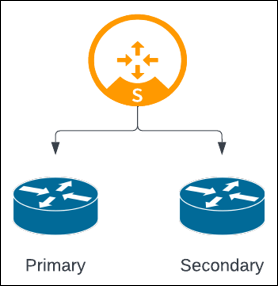 When only the primary Edge gateway is deployed with HA LAN routers:
* With ActiveMesh, two BGP connections are created (Edge gateway to Primary and
Secondary routers).
* Without ActiveMesh, only one BGP connection is created (Edge gateway to
Primary router).
### HA Edge Gateways to HA Remote Devices
Edge gateways can also be deployed in high availability (HA) Active-Active or
Active-Standby mode.
When only the primary Edge gateway is deployed with HA LAN routers:
* With ActiveMesh, two BGP connections are created (Edge gateway to Primary and
Secondary routers).
* Without ActiveMesh, only one BGP connection is created (Edge gateway to
Primary router).
### HA Edge Gateways to HA Remote Devices
Edge gateways can also be deployed in high availability (HA) Active-Active or
Active-Standby mode.
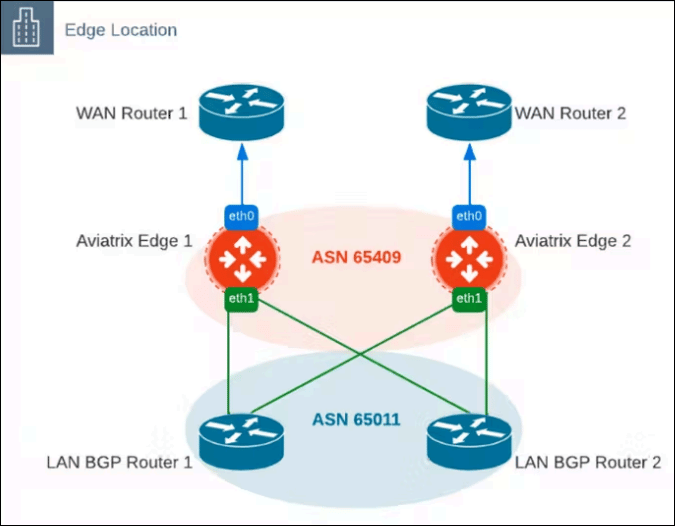 In this architecture:
* With ActiveMesh, four BGP connections are created (Edge 1 to router 1 and 2,
Edge 2 to router 1 and 2).
* Without ActiveMesh, only two BGP connections are created (Edge 1 to router 1,
Edge 2 to router 2).
The Edge gateways must have the same BGP ASN and the LAN BGP Routers must have
the same BGP ASN. If the LAN routers advertise the same routes, then the Edge
gateways consider them to be ECMP. When routes are advertised by only one LAN
router, then the secondary HA Edge gateway functions as a backup route.
## Create Multi-Peer BGP over LAN Connections for Edge Gateway
To create BGP over LAN connections from an Edge gateway to multiple LAN BGP
routers:
1. In Aviatrix CoPilot, go to **Networking > Connectivity > External Connections
(S2C)**.
2. From the **+ External Connection** dropdown menu, select **External Device**.
3. In Create External Connection to External Device, provide the following
information.
| **Field** | **Description** |
| ------------- | ------------------------------------------------------------------------------- |
| Name | A name for the connection. |
| Type | Select **BGP over LAN**. |
| Local Gateway | Select the Edge gateway that you want to connect to the LAN-side remote device. |
4. In the **BGP Configuration** section, provide the following information.
| **Field** | **Description** |
| ---------- | --------------------------------------------------------------------------------------------------------------- |
| Local ASN | The BGP AS Number of the Edge gateway. |
| ActiveMesh | Set ActiveMesh toggle to **On**.
In this architecture:
* With ActiveMesh, four BGP connections are created (Edge 1 to router 1 and 2,
Edge 2 to router 1 and 2).
* Without ActiveMesh, only two BGP connections are created (Edge 1 to router 1,
Edge 2 to router 2).
The Edge gateways must have the same BGP ASN and the LAN BGP Routers must have
the same BGP ASN. If the LAN routers advertise the same routes, then the Edge
gateways consider them to be ECMP. When routes are advertised by only one LAN
router, then the secondary HA Edge gateway functions as a backup route.
## Create Multi-Peer BGP over LAN Connections for Edge Gateway
To create BGP over LAN connections from an Edge gateway to multiple LAN BGP
routers:
1. In Aviatrix CoPilot, go to **Networking > Connectivity > External Connections
(S2C)**.
2. From the **+ External Connection** dropdown menu, select **External Device**.
3. In Create External Connection to External Device, provide the following
information.
| **Field** | **Description** |
| ------------- | ------------------------------------------------------------------------------- |
| Name | A name for the connection. |
| Type | Select **BGP over LAN**. |
| Local Gateway | Select the Edge gateway that you want to connect to the LAN-side remote device. |
4. In the **BGP Configuration** section, provide the following information.
| **Field** | **Description** |
| ---------- | --------------------------------------------------------------------------------------------------------------- |
| Local ASN | The BGP AS Number of the Edge gateway. |
| ActiveMesh | Set ActiveMesh toggle to **On**.
ActiveMesh enables full mesh BGP connections to the remote devices. |
5. In the **LAN Configuration** section, provide the following information.
| **Field** | **Description** |
| ------------------ | -------------------------------------------------------------------------------------------------------------------------- |
| Remote Device 1 IP | The remote device interface IP address. |
| Remote ASN | The BGP AS Number of the remote device.
The Remote ASN should be the same for the Primary and HA Edge gateways. |
| Local LAN IP | The Edge gateway interface IP address. This is auto populated. |
| Remote LAN IP | The remote device interface IP address. |
6. To connect the Edge gateway to another remote device, click **+ Remote
Device**, then provide the IP address and ASN of the remote device.
7. Click **Save**.
## Related Links
* Edge Transit Gateway External Connection Workflow
* Aviatrix Edge Platform