> ## Documentation Index
> Fetch the complete documentation index at: https://docs.aviatrix.com/llms.txt
> Use this file to discover all available pages before exploring further.
# Edge Gateway Image Upgrade and Post-Upgrade Tasks
> This document provides information about Aviatrix Edge Gateway image upgrade and post-upgrade tasks. For complete instructions on upgrading Aviatrix Controller and gateways, see Upgrade Aviatrix Controller and Gateways.
This document provides information about Aviatrix Edge Gateway image upgrade and
post-upgrade tasks. For complete instructions on upgrading Aviatrix Controller
and gateways, see Upgrade Aviatrix
Controller and Gateways.
* [Edge Gateway Image Upgrade](#edge-gateway-image-upgrade)
* [Edge Gateway Post-Upgrade Tasks](#edge-gateway-post-upgrade-tasks)
## Edge Gateway Image Upgrade
### Edge Gateway VM Image Upgrade (Aviatrix Edge Platform)
To upgrade your Edge Gateway VM image, see Upgrade your
Controller and Gateways to the Latest Aviatrix Supported Images (AWS Only).
Edge Gateway VM image upgrade is required for Controller release version
7.1.3958 or later.
### Edge Gateway VM Image Upgrade (Equinix and Self Managed Platforms)
The Edge Gateway VM image upgrade is not supported for Equinix and Self Managed
platforms.
If you have Edge Gateways deployed on VMware ESXi or KVM self-managed hypervisor
or Equinix Network Edge, you will need to delete and re-deploy your Edge
gateways after you upgrade the Avaitrix Controller to the latest supported
images.
For instructions on Edge Gateway deployment, see:
* Deploy an Edge Spoke Gateway on Equinix Network Edge
* Edge Spoke Gateway Deployment Workflow on Self-Managed VMware ESXi and KVM
### Edge Gateway Selective Upgrade (Equinix and Self Managed Platforms)
Aviatrix Hybrid Cloud Edge does not support selective gateway image update and
software rollback for Equinix and Self Managed platforms.
## Edge Gateway Post-Upgrade Tasks
After you upgrade to the lastest Aviatrix Controller version, perform the
following post-upgrade tasks for Edge gateways.
* [Upgrading the Edge Gateway's Platform Type](#upgrading-the-edge-gateways-platform-type)
* [Upgrading Active-Standby Edge Gateways](#upgrading-active-standby-edge-gateways)
### Upgrading the Edge Gateway's Platform Type
You only need to perform this post-upgrade task if you are upgrading from
Controller release versions prior to 7.1.3958 release.
In Aviatrix Controller releases prior to the latest version of 7.1, the Platform
Type for an Edge Spoke Gateway on the Equinix Network Edge Platform was
*Self-Managed*. In the latest Controller release, the Platform Type for an Edge
Spoke Gateway on the Equinix Network Edge Platform is *Equinix*.
There are additional features, such as underlay BGP, supported for Edge Spoke
Gateways with Platform Type as *Equinix*. To be able to use the new features,
after you upgrade your Edge Spoke Gateway, perform the following post-upgrade
task to update the Edge Spoke Gateway's Platform Type from *Self-Managed* to
*Equinix*.
In Aviatrix CoPilot:
1. Go to **Cloud Fabric > Hybrid Cloud > Edge Gateways** tab.
2. Click **Spoke Gateways**.
3. In the table, locate the Edge Spoke Gateway that was migrated and verify the
gateway's **Platform Type** is **Self-Managed**.
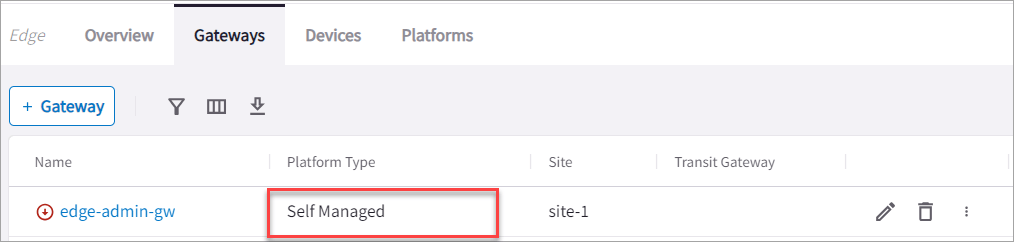 4. Click the gateway's Edit icon on the right side of the row.
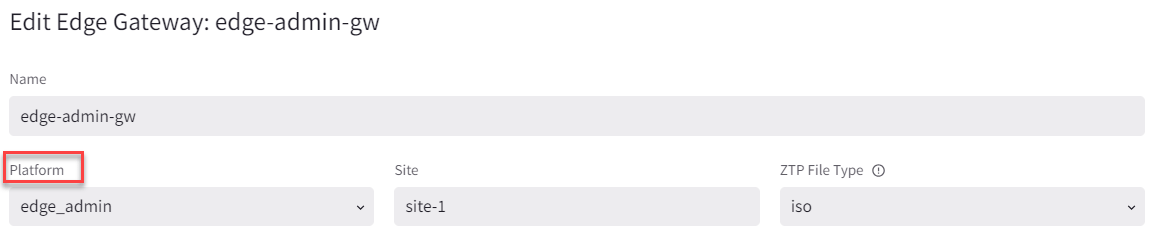
5. In Edit Spoke Gateway, verify **Platform** is **edge\_admin**.
4. Click the gateway's Edit icon on the right side of the row.
5. In Edit Spoke Gateway, verify **Platform** is **edge\_admin**.
 6. Go to **Cloud Fabric > Hybrid Cloud > Platforms** tab.
7. Click **+Platform**.
8. In **Name**, enter a name to identify the Equinix platform account.
9. In **Type**, select **Network Service Provider (NSP)**.
10. From the **Existing Self Managed Equinix Gateways** dropdown menu, select
the Edge Spoke Gateway that was migrated and click **Save**.
This adds a new Equinix platform account to the existing Edge platform
accounts and updates the platform account for the Edge Spoke Gateway that
was migrated to the new Equinix platform account.
### Upgrading Active-Standby Edge Gateways
There are changes with the auto-upgrade of Aviatrix Edge Spoke Gateways from
Aviatrix Controller 7.0 and 7.1 release to the latest version of Controller 7.1.
Due to an architecture change, if you have two Edge Spoke Gateways that are
deployed in *active-standby* mode in the same edge site and perform an upgrade,
the Edge Spoke Gateways are upgraded to *active-active* mode. If the
active-standby gateways were originally in non-preemptive mode, then after the
upgrade they will become preemptive. The primary Edge Spoke Gateway becomes the
active gateway, and to avoid traffic disruption, the Controller prepends the
AS-PATH of the second Edge Spoke Gateway, which causes the gateways to function
in preemptive failover mode.
This behavior is different from an active-standby Edge deployment. You can
continue to run the Edge Spoke Gateways in active-active mode, however, you
may not be able to scale the gateways.
For an active-standby Edge deployment, after you have upgraded the Edge Spoke
Gateways, Aviatrix highly recommends that you enable active-standby high
availability mode for the primary Edge Spoke Gateway to create the new highly
available (HA) gateway, then delete the second Edge Spoke Gateway that was
created during the upgrade.
6. Go to **Cloud Fabric > Hybrid Cloud > Platforms** tab.
7. Click **+Platform**.
8. In **Name**, enter a name to identify the Equinix platform account.
9. In **Type**, select **Network Service Provider (NSP)**.
10. From the **Existing Self Managed Equinix Gateways** dropdown menu, select
the Edge Spoke Gateway that was migrated and click **Save**.
This adds a new Equinix platform account to the existing Edge platform
accounts and updates the platform account for the Edge Spoke Gateway that
was migrated to the new Equinix platform account.
### Upgrading Active-Standby Edge Gateways
There are changes with the auto-upgrade of Aviatrix Edge Spoke Gateways from
Aviatrix Controller 7.0 and 7.1 release to the latest version of Controller 7.1.
Due to an architecture change, if you have two Edge Spoke Gateways that are
deployed in *active-standby* mode in the same edge site and perform an upgrade,
the Edge Spoke Gateways are upgraded to *active-active* mode. If the
active-standby gateways were originally in non-preemptive mode, then after the
upgrade they will become preemptive. The primary Edge Spoke Gateway becomes the
active gateway, and to avoid traffic disruption, the Controller prepends the
AS-PATH of the second Edge Spoke Gateway, which causes the gateways to function
in preemptive failover mode.
This behavior is different from an active-standby Edge deployment. You can
continue to run the Edge Spoke Gateways in active-active mode, however, you
may not be able to scale the gateways.
For an active-standby Edge deployment, after you have upgraded the Edge Spoke
Gateways, Aviatrix highly recommends that you enable active-standby high
availability mode for the primary Edge Spoke Gateway to create the new highly
available (HA) gateway, then delete the second Edge Spoke Gateway that was
created during the upgrade.