> ## Documentation Index
> Fetch the complete documentation index at: https://docs.aviatrix.com/llms.txt
> Use this file to discover all available pages before exploring further.
# AWS Transit Gateway Orchestrator FAQ
> Aviatrix AWS TGW (Transit Gateway) Network Orchestration creates a single hub for transit networks across multiple AWS regions. The AWS TGW feature in Aviatrix CoPilot connects your Aviatrix platform to this AWS feature and enables you to attach Spoke VPCs to your transit network.
Aviatrix AWS TGW (Transit Gateway) Network Orchestration creates a single hub
for transit networks across multiple AWS regions. The AWS TGW feature in
Aviatrix CoPilot connects your Aviatrix platform to this AWS feature and enables
you to attach Spoke VPCs to your transit network.
## AWS TGW Functions
AWS TGW simplifies, abstracts, and extends the latest AWS Transit Gateway
service. The Aviatrix platform makes Transit Gateway-based Transit architecture
deployable by overcoming
[Transit Gateway limitations](https://legacy.docs.aviatrix.com/documentation/latest/network/tgw-limits.html).
* **Functional Completeness** Aviatrix makes AWS Transit Gateway functionally
deployable. This feature programs and updates both VPC route tables and TGW
route tables so the routes are dynamically propagated to the Spoke VPCs. Read
[Why should I use Aviatrix AWS TGW to build a transit network architecture?](#why-should-i-use-aviatrix-aws-tgw-to-build-a-transit-network-architecture)
for more details.
* **Segmentation** The AWS TGW abstracts the route domain and route propagation
concepts in Transit Gateway that allows you to create network segmentation by
policy and intent.
* **Multi-Account** AWS TGW automates the AWS Resource Access Manager (RAM) to
allow you to manage multi account VPC attachments to TGW.
* **Scaling** Aviatrix solution overcomes Transit Gateway route limits to scale
the hybrid deployment to hundreds/thousands of VPCs.
* **Hybrid** AWS TGW extends the Transit Gateway capability to include Direct
Connect support for connecting to on-prem data center.
1. Orchestrates VPC to VPC and on-prem to VPC connectivity via AWS Transit
Gateway.
2. Automates AWS Resource Access Manager (RAM) for multi-account support.
3. Creates security boundaries between groups of VPCs to achieve network
segmentation.
4. Out-of-the-box integration of AWS Transit Gateway and Direct Connect and
Internet to re-use what has been built.
5. Provides
[High Performance Encryption Mode high performance](https://legacy.docs.aviatrix.com/documentation/latest/network/gateway-hpe-enable.html)
and features rich hybrid network for connecting to on-prem.
6. Supports Bring Your Own Firewall to TGW deployment for inline traffic
inspection (Firewall Network).
7. Orchestrate AWS TGW Inter Region Peering and expand the Security Domains to
be global.
8. Advanced mode for end-to-end encryption where Aviatrix Gateways are deployed
in the AWS Spoke VPCs and Azure Spoke VNets.
The AWS TGW is illustrated in the diagram below.
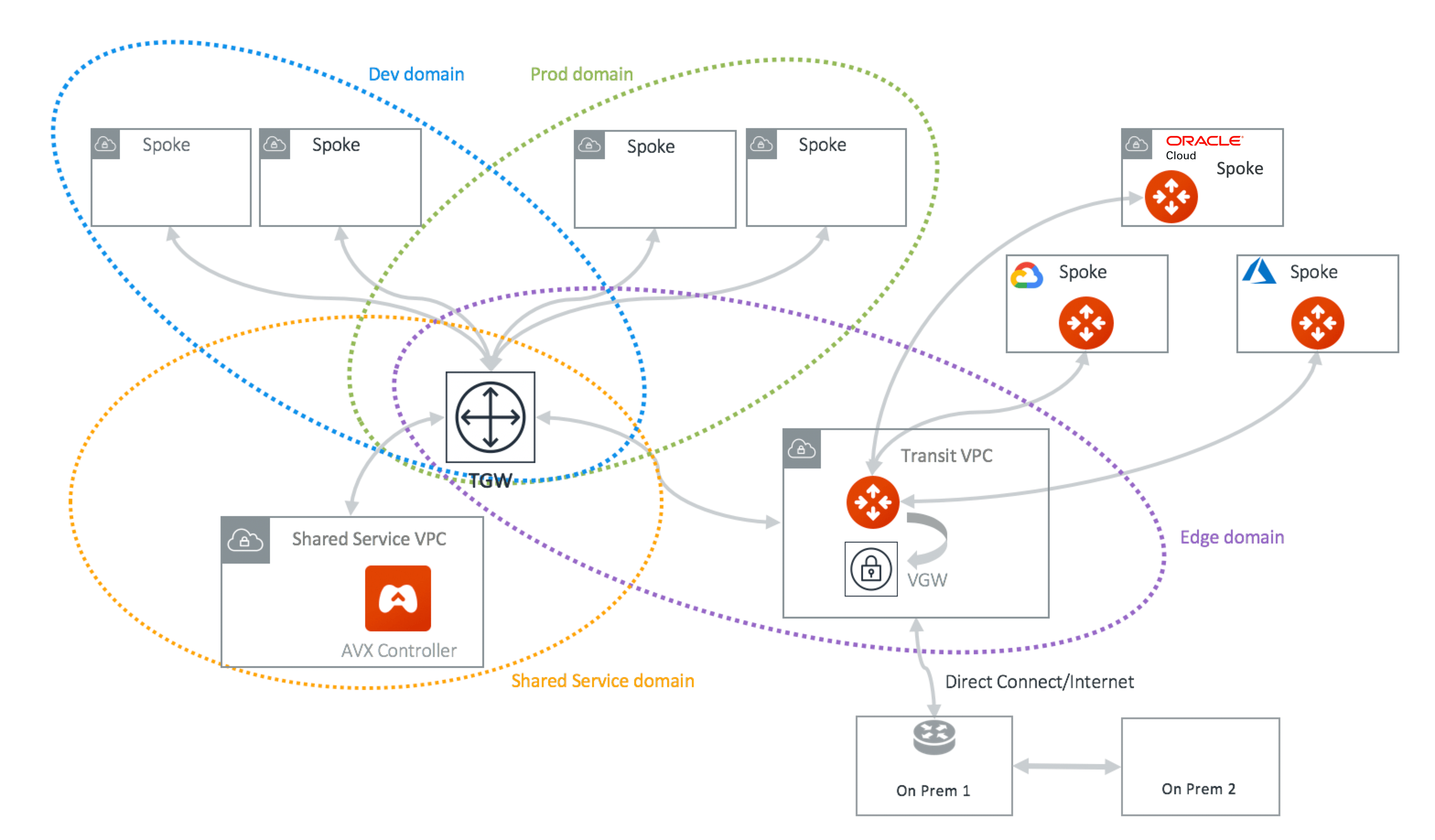 In the above diagram, AWS VPCs are grouped into four domains: Dev domain, Prod
domain, Shared Service domain and Aviatrix Edge domain. Each VPC in the same
domain can communicate with each other via AWS Transit Gateway. VPCs in Prod
domain cannot communicate with VPCs in Dev Domain, while all VPCs in Dev domain
and Prod domain can communicate with Shared service domain and Aviatrix Edge
domain.
Through the Aviatrix Transit GW in the Aviatrix Edge domain, Spoke VPCs can
communicate with on-prem over Direct Connect.
In the deployment, the VPC in the Aviatrix Edge domain is a Spoke VPC from the
Transit Gateway point of view. However, it serves as Transit VPC from the
Aviatrix Transit Network point of view. No Aviatrix gateways are deployed in
Spoke VPCs except in the Transit VPC.
Aviatrix Transit GW serves as hub connecting to Azure and GCP networks.
## Transit Gateway (TGW) complements the AWS Transit Gateway service
* **Dynamic Route Propagation** Using Aviatrix TGW is the only guaranteed way to
ensure your on-prem routes are properly propagated to Spoke VPCs. AWS Transit
Gateway propagates VPC CIDR and IPSec VPN routes to the Transit Gateway route
table. But the routes are not propagated to the VPC route table. It is the
account owner's responsibility to program VPC route tables. The Aviatrix AWS
TGW feature dynamically updates route entries in the VPC route tables.
* **Policy Abstraction** An AWS Transit Gateway provides the capability to allow
two Transit Gateway route tables to propagate routes to each other, but the
actual route entry programming is left to the owner. AWS TGW builds on that
and allows customers to define policies that form a security boundary.
* **Multi-Account Support** Automate the RAM resource sharing process to
seamlessly manage multi-account VPC attachment.
* **Troubleshooting** FlightPath allows a single pane of glass for
troubleshooting connectivity with expert diagnostics capabilities.
* **Hybrid and Multicloud Support** Native AWS Transit Gateway VPN and Direct
Connect support. Furthermore, Aviatrix allows customers to bridge multiple
Transit Gateways together in different and public clouds.
* **Traffic Visibility** Netflow log support for traffic between on-prem and all
VPCs.
* **Stateful Firewall** Enforce security policy for all traffic between on-prem
and all VPCs.
* **10Gbps Transit** Support 10Gbps Transit network throughput.
## How does Transit Gateway work with Transit VPC?
The AWS TGW leverages the Aviatrix Transit Network workflow for the hybrid
connectivity function to an on-prem data center and branches. It enables the AWS
TGW to connect with on-prem over Direct Connect or Internet.
The Aviatrix AWS TGW feature can also be used as a stand-alone function for
orchestrating VPC to VPC connections.
When using the AWS TGW feature for hybrid connectivity, no gateways are deployed
in the Spoke VPCs for hybrid function.
## How does the TGW Transit compare with Aviatrix VPC?
Transit VPC refers to the transit deployment model where an Aviatrix Gateway is
deployed in a Spoke VPC. This is now called "advanced mode" in the AVX Transit.
The AWS TGW can be deployed with some Spoke VPCs run Aviatrix gateways. When is
the right use case to run Aviatrix Spoke gateway?
1. If you need a packet in flight to be encrypted, launch an Aviatrix gateway in
the Spoke VPC.
2. If you need various NAT functions between Spoke and Transit VPC, use an
Aviatrix gateway in the Spoke VPC.
3. If you need to obtain Netflow and log information from the Spoke and Transit,
use Aviatrix gateway.
4. If you want to build a fully isolated Transit network where there is no
inter-VPC connectivity by default.
## There is AWS CloudFormation and Terraform support for Transit Gateway. Why should I use Aviatrix AWS TGW?
AWS CloudFormation for
[Transit Gateway](https://docs.aws.amazon.com/AWSCloudFormation/latest/UserGuide/aws-resource-ec2-transitgateway.html)
is a resource construct for Transit Gateway. So is the
[Terraform example](https://www.terraform.io/docs/providers/aws/r/ec2_transit_gateway_route_table.html).
They are all useful solutions, but these constructs may not be sufficient to run
your network.
For example, a Transit Gateway does not propagate routes from on-prem to the VPC
route table, meaning there is no guarantee that your VPC instances can reach a
specific on-prem server or host. Even if you hard coded the list of CIDRs to
shuffle them down to Transit Gateway, what happens when a new VLAN or Subnet is
stood up on-prem. Who is going to notify you?
A modern distributed network either requires BGP to dynamically propagate the
routes or a CoPilot that dynamically updates the routes. No matter what approach
you use, it is the only way to guarantee the network actually functions. At
Aviatrix, we choose a software defined approach with our platform. Unless you
plan to develop a platform like ours, you should consider using our product.
Learn more about
[Transit Gateway limitations](https://legacy.docs.aviatrix.com/documentation/latest/network/tgw-limits.html).
## TGW/Transit Segmentation Interoperability
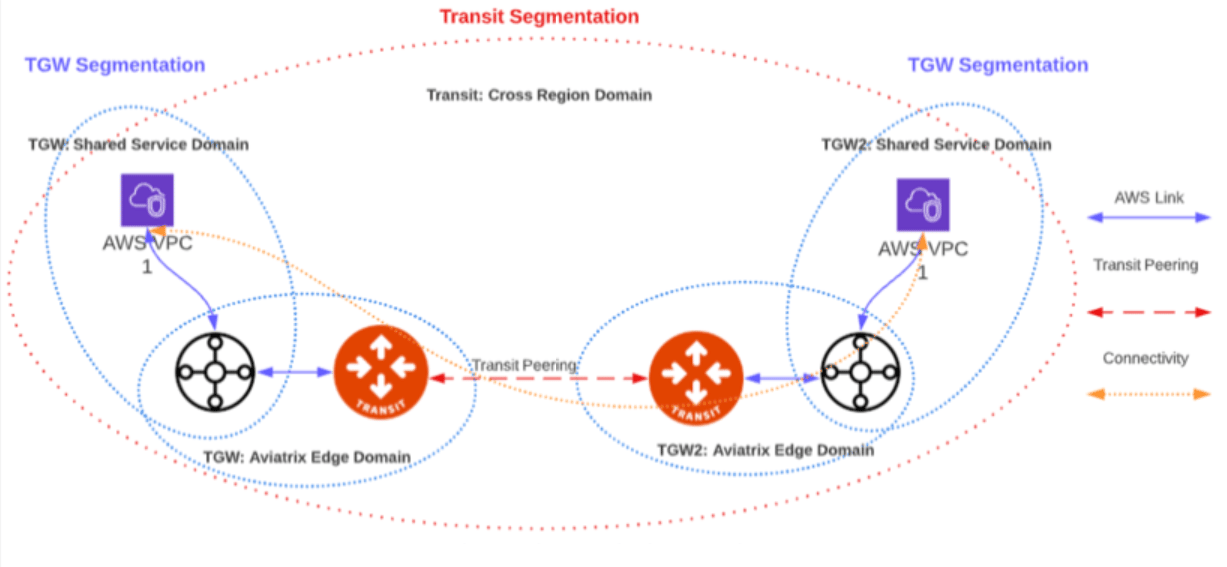
The TGW/Transit Segmentation Interoperability feature enables you to extend your
AWS TGW network domains into other CSPs. When you are setting up your multicloud
transit structure, you can attach an AWS TGW domain to an Aviatrix Transit
network domain. Attachments in the AWS TGW network domains can then communicate
with Aviatrix Spoke gateways and Site2Cloud connections in the same and in
connected Transit network domains.
In the above diagram, AWS VPCs are grouped into four domains: Dev domain, Prod
domain, Shared Service domain and Aviatrix Edge domain. Each VPC in the same
domain can communicate with each other via AWS Transit Gateway. VPCs in Prod
domain cannot communicate with VPCs in Dev Domain, while all VPCs in Dev domain
and Prod domain can communicate with Shared service domain and Aviatrix Edge
domain.
Through the Aviatrix Transit GW in the Aviatrix Edge domain, Spoke VPCs can
communicate with on-prem over Direct Connect.
In the deployment, the VPC in the Aviatrix Edge domain is a Spoke VPC from the
Transit Gateway point of view. However, it serves as Transit VPC from the
Aviatrix Transit Network point of view. No Aviatrix gateways are deployed in
Spoke VPCs except in the Transit VPC.
Aviatrix Transit GW serves as hub connecting to Azure and GCP networks.
## Transit Gateway (TGW) complements the AWS Transit Gateway service
* **Dynamic Route Propagation** Using Aviatrix TGW is the only guaranteed way to
ensure your on-prem routes are properly propagated to Spoke VPCs. AWS Transit
Gateway propagates VPC CIDR and IPSec VPN routes to the Transit Gateway route
table. But the routes are not propagated to the VPC route table. It is the
account owner's responsibility to program VPC route tables. The Aviatrix AWS
TGW feature dynamically updates route entries in the VPC route tables.
* **Policy Abstraction** An AWS Transit Gateway provides the capability to allow
two Transit Gateway route tables to propagate routes to each other, but the
actual route entry programming is left to the owner. AWS TGW builds on that
and allows customers to define policies that form a security boundary.
* **Multi-Account Support** Automate the RAM resource sharing process to
seamlessly manage multi-account VPC attachment.
* **Troubleshooting** FlightPath allows a single pane of glass for
troubleshooting connectivity with expert diagnostics capabilities.
* **Hybrid and Multicloud Support** Native AWS Transit Gateway VPN and Direct
Connect support. Furthermore, Aviatrix allows customers to bridge multiple
Transit Gateways together in different and public clouds.
* **Traffic Visibility** Netflow log support for traffic between on-prem and all
VPCs.
* **Stateful Firewall** Enforce security policy for all traffic between on-prem
and all VPCs.
* **10Gbps Transit** Support 10Gbps Transit network throughput.
## How does Transit Gateway work with Transit VPC?
The AWS TGW leverages the Aviatrix Transit Network workflow for the hybrid
connectivity function to an on-prem data center and branches. It enables the AWS
TGW to connect with on-prem over Direct Connect or Internet.
The Aviatrix AWS TGW feature can also be used as a stand-alone function for
orchestrating VPC to VPC connections.
When using the AWS TGW feature for hybrid connectivity, no gateways are deployed
in the Spoke VPCs for hybrid function.
## How does the TGW Transit compare with Aviatrix VPC?
Transit VPC refers to the transit deployment model where an Aviatrix Gateway is
deployed in a Spoke VPC. This is now called "advanced mode" in the AVX Transit.
The AWS TGW can be deployed with some Spoke VPCs run Aviatrix gateways. When is
the right use case to run Aviatrix Spoke gateway?
1. If you need a packet in flight to be encrypted, launch an Aviatrix gateway in
the Spoke VPC.
2. If you need various NAT functions between Spoke and Transit VPC, use an
Aviatrix gateway in the Spoke VPC.
3. If you need to obtain Netflow and log information from the Spoke and Transit,
use Aviatrix gateway.
4. If you want to build a fully isolated Transit network where there is no
inter-VPC connectivity by default.
## There is AWS CloudFormation and Terraform support for Transit Gateway. Why should I use Aviatrix AWS TGW?
AWS CloudFormation for
[Transit Gateway](https://docs.aws.amazon.com/AWSCloudFormation/latest/UserGuide/aws-resource-ec2-transitgateway.html)
is a resource construct for Transit Gateway. So is the
[Terraform example](https://www.terraform.io/docs/providers/aws/r/ec2_transit_gateway_route_table.html).
They are all useful solutions, but these constructs may not be sufficient to run
your network.
For example, a Transit Gateway does not propagate routes from on-prem to the VPC
route table, meaning there is no guarantee that your VPC instances can reach a
specific on-prem server or host. Even if you hard coded the list of CIDRs to
shuffle them down to Transit Gateway, what happens when a new VLAN or Subnet is
stood up on-prem. Who is going to notify you?
A modern distributed network either requires BGP to dynamically propagate the
routes or a CoPilot that dynamically updates the routes. No matter what approach
you use, it is the only way to guarantee the network actually functions. At
Aviatrix, we choose a software defined approach with our platform. Unless you
plan to develop a platform like ours, you should consider using our product.
Learn more about
[Transit Gateway limitations](https://legacy.docs.aviatrix.com/documentation/latest/network/tgw-limits.html).
## TGW/Transit Segmentation Interoperability
The TGW/Transit Segmentation Interoperability feature enables you to extend your
AWS TGW network domains into other CSPs. When you are setting up your multicloud
transit structure, you can attach an AWS TGW domain to an Aviatrix Transit
network domain. Attachments in the AWS TGW network domains can then communicate
with Aviatrix Spoke gateways and Site2Cloud connections in the same and in
connected Transit network domains.
 ### Prerequisites
Ensure that the following conditions are met before connecting an AWS TGW domain
to a Transit network:
* The AWS TGW domains you want to attach to a Transit Gateway must already be
connected to the [Edge Domain](#what-is-the-aviatrix-edge-domain).
* The network domains must already be created in the Aviatrix CoPilot under
**Networking > Network Segmentation > Network Domains**.
Errors will occur if the prerequisites are not met.
Go to
Associating a Spoke/Edge Gateway or a TGW Domain
for attachment instructions.
### Limitations
* Not supported with TGW FireNet.
* Segmentation is not supported for peered AWS TGWs.
* If duplicate CIDRs exist when associating an AWS TGW domain with a Transit
domain (for example, a TGW domain CIDR is the same as one in a Transit domain,
because now the routes in the main route table are duplicated) an error is
raised.
## What are Network Domains and Connection Policies?
See
Implementing Network Segmentation in an Aviatrix-Managed Network
for information about Network Domains and Connection Policies.
## What is the Default\_Domain?
When an Aviatrix Transit Gateway is created, the Default\_Domain is created and a
route table corresponding to the Default\_Domain is created on the Transit
Gateway. If you do not plan on building any network segmentation, you can use
Default\_Domain for inter Spoke VPC and hybrid communications.
## What is the Shared\_Service\_Domain?
When an Aviatrix Transit Gateway is created, the Shared\_Service\_Domain is
created and a route table corresponding to the Shared\_Service\_Domain is created
on Transit Gateway.
You can attach a Spoke VPC to this domain and host your shared service instances
such as your DevOps tools.
Shared\_Service\_Domain is always connected to Default\_Domain and
Aviatrix\_Edge\_Domain.
## What is the Aviatrix Edge Domain?
When an Aviatrix Transit Gateway is created, the Aviatrix\_Edge\_Domain is created
and a route table corresponding to the Aviatrix\_Edge\_Domain is created on the
Transit Gateway.
Aviatrix\_Edge\_Domain is designated for connecting VPCs managed by the AWS TGW to
on-prem network. There must be one VPC attached to this domain. In the VPC, an
Aviatrix Transit GW is deployed and used for data traffic forwarding between
Spoke VPCs and on-prem network.
Aviatrix\_Edge\_Domain is always connected to the Shared\_Service Domain and the
Default\_Domain.
## Deploy the AWS TGW
For information about how to deploy the AWS TGW in Aviatrix, see
Overview of AWS Transit Gateway Orchestrator Features
.
## AWS TGW deployment scenarios
Here are some
design patterns
that address your requirements.
## Can I change my plan or VPC attachment on AWS TGW?
Yes, you can change your design any time.
## Migration
Unlike a VPC, where once you have created it and launched instances in the VPC
you cannot delete the VPC or move the instances easily, a Transit Gateway and
its attachments can all be changed without making changes to the instances and
VPC CIDRs. Simply detach the VPCs from the current Transit Gateway, launch a new
Transit Gateway, and build it out again.
The Aviatrix AWS TGW manages the entire life cycle of the network, including
Network Domains, all Transit Gateway and attachments should be created and
managed by AWS TGW.
## How does the CSR based Transit VPC solution compare with the Transit Gateway?
Transit Gateway significantly simplifies building VPC connections. But the
Transit Gateway itself is functionally incomplete for hybrid connection. For
example, the Transit Gateway does not propagate routes to Spoke VPCs, which
means using a Transit Gateway alone does not offer a functional hybrid solution.
The example below illustrates how CSR based Transit VPC provides an end-to-end
solution while a Transit Gateway alone leaves Spoke VPC route table all empty.
### Prerequisites
Ensure that the following conditions are met before connecting an AWS TGW domain
to a Transit network:
* The AWS TGW domains you want to attach to a Transit Gateway must already be
connected to the [Edge Domain](#what-is-the-aviatrix-edge-domain).
* The network domains must already be created in the Aviatrix CoPilot under
**Networking > Network Segmentation > Network Domains**.
Errors will occur if the prerequisites are not met.
Go to
Associating a Spoke/Edge Gateway or a TGW Domain
for attachment instructions.
### Limitations
* Not supported with TGW FireNet.
* Segmentation is not supported for peered AWS TGWs.
* If duplicate CIDRs exist when associating an AWS TGW domain with a Transit
domain (for example, a TGW domain CIDR is the same as one in a Transit domain,
because now the routes in the main route table are duplicated) an error is
raised.
## What are Network Domains and Connection Policies?
See
Implementing Network Segmentation in an Aviatrix-Managed Network
for information about Network Domains and Connection Policies.
## What is the Default\_Domain?
When an Aviatrix Transit Gateway is created, the Default\_Domain is created and a
route table corresponding to the Default\_Domain is created on the Transit
Gateway. If you do not plan on building any network segmentation, you can use
Default\_Domain for inter Spoke VPC and hybrid communications.
## What is the Shared\_Service\_Domain?
When an Aviatrix Transit Gateway is created, the Shared\_Service\_Domain is
created and a route table corresponding to the Shared\_Service\_Domain is created
on Transit Gateway.
You can attach a Spoke VPC to this domain and host your shared service instances
such as your DevOps tools.
Shared\_Service\_Domain is always connected to Default\_Domain and
Aviatrix\_Edge\_Domain.
## What is the Aviatrix Edge Domain?
When an Aviatrix Transit Gateway is created, the Aviatrix\_Edge\_Domain is created
and a route table corresponding to the Aviatrix\_Edge\_Domain is created on the
Transit Gateway.
Aviatrix\_Edge\_Domain is designated for connecting VPCs managed by the AWS TGW to
on-prem network. There must be one VPC attached to this domain. In the VPC, an
Aviatrix Transit GW is deployed and used for data traffic forwarding between
Spoke VPCs and on-prem network.
Aviatrix\_Edge\_Domain is always connected to the Shared\_Service Domain and the
Default\_Domain.
## Deploy the AWS TGW
For information about how to deploy the AWS TGW in Aviatrix, see
Overview of AWS Transit Gateway Orchestrator Features
.
## AWS TGW deployment scenarios
Here are some
design patterns
that address your requirements.
## Can I change my plan or VPC attachment on AWS TGW?
Yes, you can change your design any time.
## Migration
Unlike a VPC, where once you have created it and launched instances in the VPC
you cannot delete the VPC or move the instances easily, a Transit Gateway and
its attachments can all be changed without making changes to the instances and
VPC CIDRs. Simply detach the VPCs from the current Transit Gateway, launch a new
Transit Gateway, and build it out again.
The Aviatrix AWS TGW manages the entire life cycle of the network, including
Network Domains, all Transit Gateway and attachments should be created and
managed by AWS TGW.
## How does the CSR based Transit VPC solution compare with the Transit Gateway?
Transit Gateway significantly simplifies building VPC connections. But the
Transit Gateway itself is functionally incomplete for hybrid connection. For
example, the Transit Gateway does not propagate routes to Spoke VPCs, which
means using a Transit Gateway alone does not offer a functional hybrid solution.
The example below illustrates how CSR based Transit VPC provides an end-to-end
solution while a Transit Gateway alone leaves Spoke VPC route table all empty.
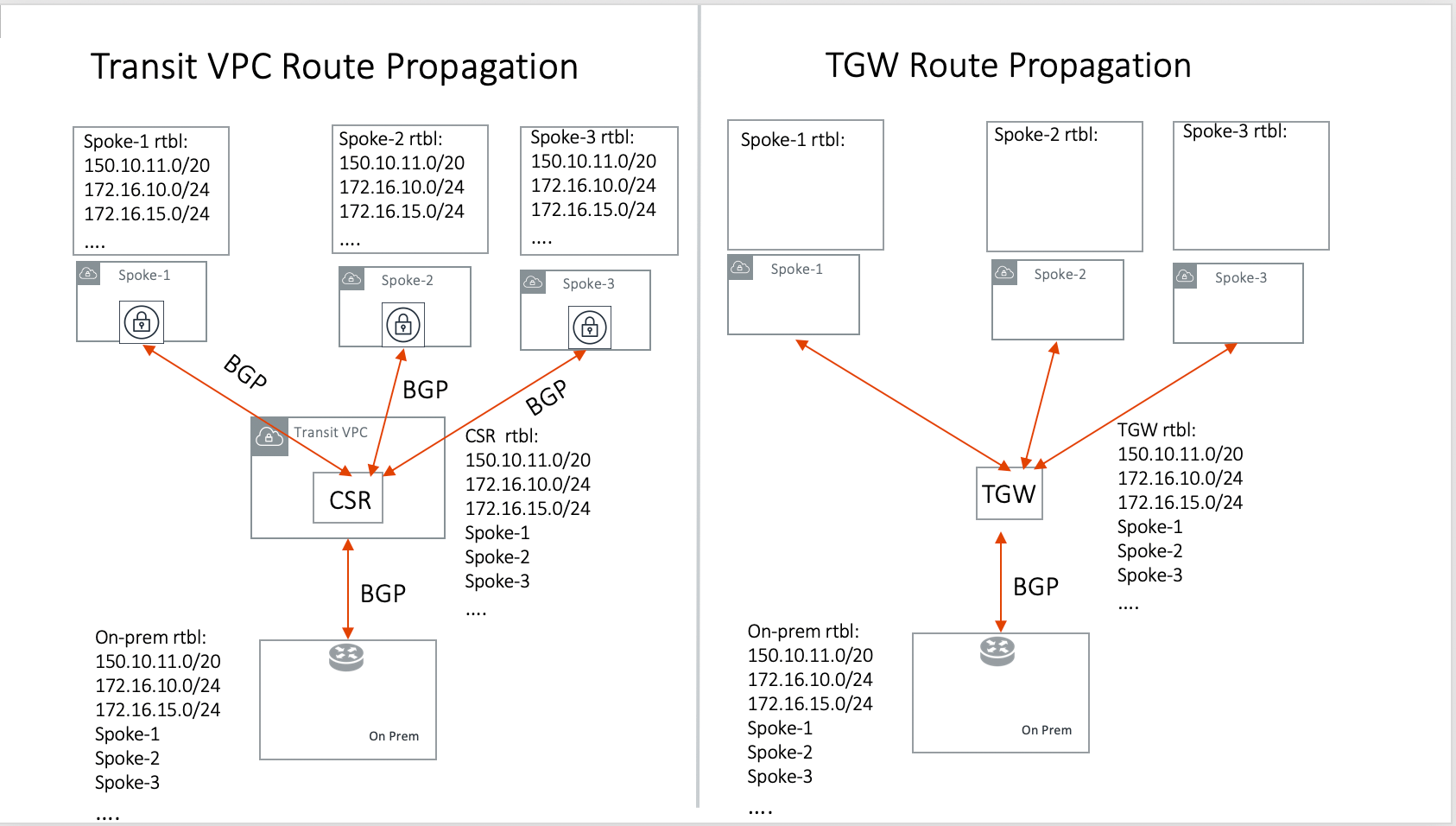 The missing function of Transit Gateway is listed as below:
* Not able to propagate routes from on-prem to the Spoke VPCs.
* Not able to connect with Direct Connect.
* The Transit Gateway VPN has 100 route limits.
* The Transit Gateway route table cannot summarize routes to advertise to
Transit Gateway VPN.
While you may think you can gather the on-prem routes and program the Spoke VPC
tables, it is in reality not so simple. The on-prem routes change from time to
time as new networks are added or removed, which means you need a reliable way
to monitor the route changes, handle exceptions and deal with errors and
duplicate routes — essentially a function carried by BGP or AWS TGW.
## Why should I use Aviatrix AWS TGW to build a transit network architecture?
Aviatrix AWS TGW fulfills the need to propagate on-prem routes to the Spoke
VPCs. This function is either carried by BGP or is software defined. In the
Aviatrix case, it is software defined and performed by the Aviatrix Controller.
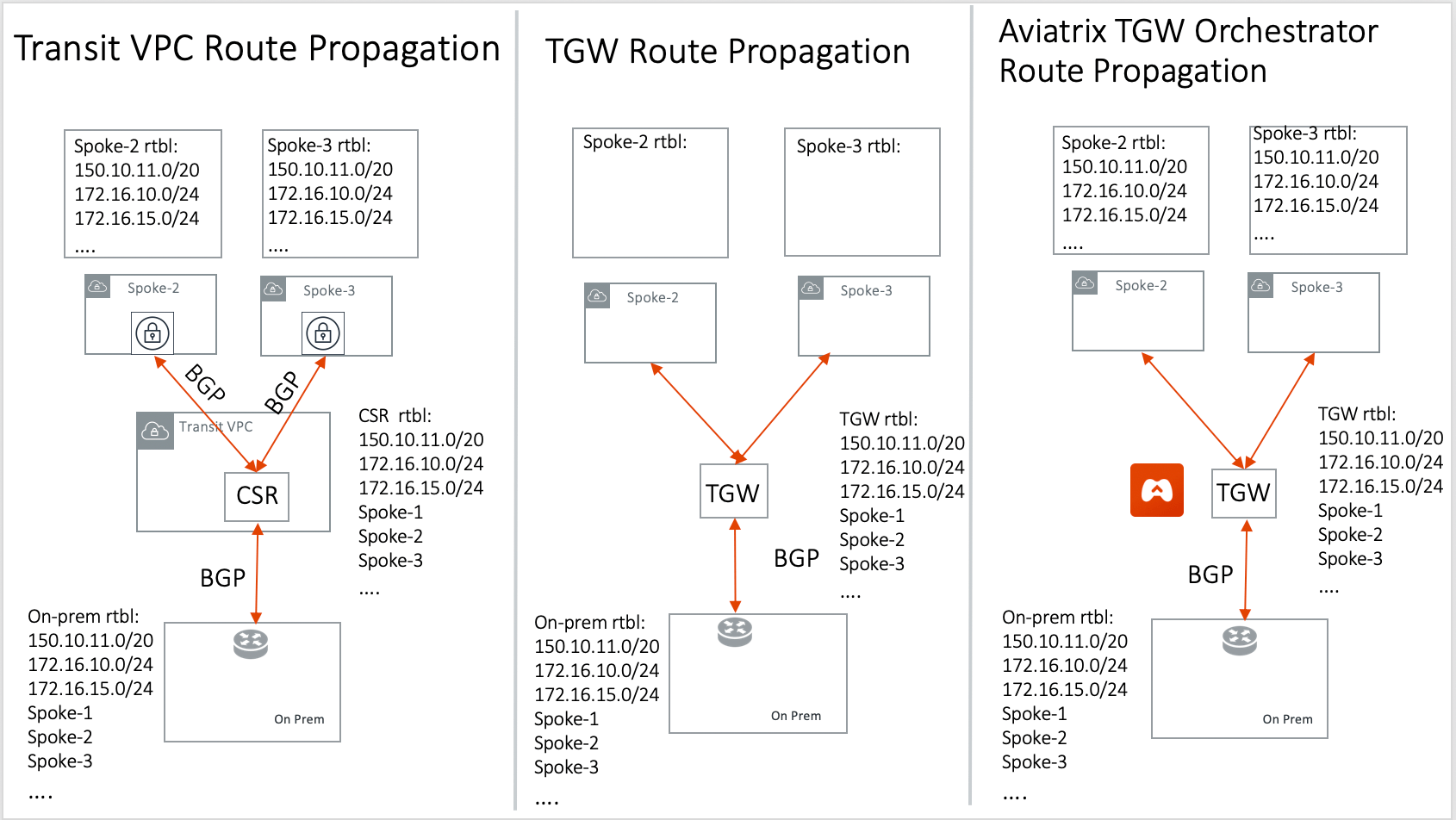
The diagram below shows how the CSR Transit VPC, the Transit Gateway and the
Aviatrix AWS TGW compare for route propagation function. As can be seen, in the
CSR Transit VPC case, CSR propagates on-prem routes to Spoke VPC via BGP to VGW;
the Transit Gateway has no route propagation to Spoke VPC. The Aviatrix
Controller propagates routes to Spoke VPC through a software-defined mechanism.
The missing function of Transit Gateway is listed as below:
* Not able to propagate routes from on-prem to the Spoke VPCs.
* Not able to connect with Direct Connect.
* The Transit Gateway VPN has 100 route limits.
* The Transit Gateway route table cannot summarize routes to advertise to
Transit Gateway VPN.
While you may think you can gather the on-prem routes and program the Spoke VPC
tables, it is in reality not so simple. The on-prem routes change from time to
time as new networks are added or removed, which means you need a reliable way
to monitor the route changes, handle exceptions and deal with errors and
duplicate routes — essentially a function carried by BGP or AWS TGW.
## Why should I use Aviatrix AWS TGW to build a transit network architecture?
Aviatrix AWS TGW fulfills the need to propagate on-prem routes to the Spoke
VPCs. This function is either carried by BGP or is software defined. In the
Aviatrix case, it is software defined and performed by the Aviatrix Controller.
The diagram below shows how the CSR Transit VPC, the Transit Gateway and the
Aviatrix AWS TGW compare for route propagation function. As can be seen, in the
CSR Transit VPC case, CSR propagates on-prem routes to Spoke VPC via BGP to VGW;
the Transit Gateway has no route propagation to Spoke VPC. The Aviatrix
Controller propagates routes to Spoke VPC through a software-defined mechanism.
 ## Solutions that an Aviatrix Gateway provide in the AWS TGW
An Aviatrix Gateway deployed at the edge/transit VPC provides the following
values:
* Ensure the correctness of connectivity by monitoring and dynamically
programming on-prem network address ranges to Spoke VPCs' route tables.
* Avoid network outages by detecting and alerting overlapping and conflicting
network address ranges between on-prem and all VPCs.
* Avoids AWS VGW or Transit Gateway VPN 100 route limits by summarizing Spoke
VPC CIDRs advertisements to on-prem network.
* Provides traffic visibility by supporting Netflow logs between on-prem network
and all VPCs.
* Provides stateful firewall to enforce policy between on-prem network and all
VPCs.
* Out-of-the-box integration to support Direct Connect.
* Connects multi-region Transit Gateway deployment.
* Supports Transit DMZ architecture by inserting third party firewalls at the
edge/transit VPC.
* Supports 10Gbps Transit network throughput.
## When a VPC is attached to a TGW, why can't I simply program the default route in the VPC route table to point to the TGW?
In some cases, you absolutely can. For example, if you have a group of VPCs that
need to be connected to each other, you can attach each VPC to the same TGW
route table with propagation enabled. Then program each VPC route table with the
default route (0.0.0.0/0) to point to TGW.
But in other cases you may not. Using the above example, if there is public
subnet in a Spoke VPC, then you cannot simply program each route table with the
default route pointing to TGW, as a public subnet already must have its default
route pointing to the IGW.
Even a Spoke VPC route table for private subnet may already have the default
route point to an AWS NAT gateway. This is quite a common situation and as it
happens, you cannot program the default route to the TGW.
However, in the example scenarios above, you maybe able to program RFC 1918
(10.0.0.0/8, 172.16.0.0/12, 192.168.0.0/16) routes of the Spoke VPCs to point to
TGW. This is a viable solution you can use to address the issues mentioned above
and one that works in a lot of situations.
## Can the Aviatrix platform orchestrate VPN attachment to AWS Transit Gateway?
Yes. The Aviatrix platform allows you
set up a VPN attachment
from CoPilot directly.
## Can the Aviatrix platform orchestrate Direct Connect Gateway to AWS Transit Gateway?
Yes. If you would like to connect your Direct Connect directly into Transit
Gateway, the Aviatrix platform allows you to
configure
an association between the Direct Connect Gateway and AWS Transit Gateway in
Aviatrix CoPilot.
## Migrate from Aviatrix Transit Gateway to on-prem to TGW + DXGW
1. Create a DirectConnect Gateway on the AWS Console and figure out the cloud
VPCs summary prefixes.
2. Disconnect the Aviatrix Transit Gateway from the VGW.
3. Connect the Aviatrix Transit Gateway to the DirectConnect Gateway.
## How does Aviatrix TGW feature compare with AWS Serverless TGW Orchestrator?
AWS Serverless TGW Orchestrator is a solution published by AWS. It orchestrates
VPC attachment to a TGW by programming both the TGW route table and VPC route
table. The deployment is a Cloudformation Template that contains many AWS
services such as Amazon DynamoDB, Amazon EventBridge, Amazon Simple
Notification, AWS Lambda function.
| Feature | Aviatrix TGW Orchestrator | Serverless TGW Orchestrator |
| -------------------------------------- | ---------------------------- | ----------------------------------------------------------------- |
| Single pane of glass for orchestration | Yes | No. Orchestration is done by VPC tag |
| Single pane of glass for visualization | Yes (View, List) | No. Each region must have its own deployment |
| Inter region peering | Yes | No |
| Orchestration consistency checking | Yes (Audit) | No |
| Configuration for TGW DXGW | Yes | No |
| Configuration for TGW VPN | Yes | No |
| Troubleshooting connectivity | Yes (Test) | No |
| Onboard secondary account | Automated | Manual |
| Connection Policies between Domains | Flexible Connection Policies | 4 Policies defined (Flat, Isolated, Infrastructure & On-premises) |
| Integrate Firewall deployment | Yes | No |
## Edge Segmentation
Edge Segmentation allows you to further specify on each edge connection which
domain it can communicate with.
When you create a Transit Gateway, you can go to **CloudFabric > Gateways >
select the Transit Gateways tab > select the Transit Gateway > select the
Settings tab > open the CSP Related Settings section > find AWS TGW Edge
Segmentation** and click on the Connection dropdown menu to select a connection.
When this option is selected, you can then use
Build Your Domain Connection Policies
to specify which Network Domain this edge connection can communicate with, as
shown in the diagram below.
## Solutions that an Aviatrix Gateway provide in the AWS TGW
An Aviatrix Gateway deployed at the edge/transit VPC provides the following
values:
* Ensure the correctness of connectivity by monitoring and dynamically
programming on-prem network address ranges to Spoke VPCs' route tables.
* Avoid network outages by detecting and alerting overlapping and conflicting
network address ranges between on-prem and all VPCs.
* Avoids AWS VGW or Transit Gateway VPN 100 route limits by summarizing Spoke
VPC CIDRs advertisements to on-prem network.
* Provides traffic visibility by supporting Netflow logs between on-prem network
and all VPCs.
* Provides stateful firewall to enforce policy between on-prem network and all
VPCs.
* Out-of-the-box integration to support Direct Connect.
* Connects multi-region Transit Gateway deployment.
* Supports Transit DMZ architecture by inserting third party firewalls at the
edge/transit VPC.
* Supports 10Gbps Transit network throughput.
## When a VPC is attached to a TGW, why can't I simply program the default route in the VPC route table to point to the TGW?
In some cases, you absolutely can. For example, if you have a group of VPCs that
need to be connected to each other, you can attach each VPC to the same TGW
route table with propagation enabled. Then program each VPC route table with the
default route (0.0.0.0/0) to point to TGW.
But in other cases you may not. Using the above example, if there is public
subnet in a Spoke VPC, then you cannot simply program each route table with the
default route pointing to TGW, as a public subnet already must have its default
route pointing to the IGW.
Even a Spoke VPC route table for private subnet may already have the default
route point to an AWS NAT gateway. This is quite a common situation and as it
happens, you cannot program the default route to the TGW.
However, in the example scenarios above, you maybe able to program RFC 1918
(10.0.0.0/8, 172.16.0.0/12, 192.168.0.0/16) routes of the Spoke VPCs to point to
TGW. This is a viable solution you can use to address the issues mentioned above
and one that works in a lot of situations.
## Can the Aviatrix platform orchestrate VPN attachment to AWS Transit Gateway?
Yes. The Aviatrix platform allows you
set up a VPN attachment
from CoPilot directly.
## Can the Aviatrix platform orchestrate Direct Connect Gateway to AWS Transit Gateway?
Yes. If you would like to connect your Direct Connect directly into Transit
Gateway, the Aviatrix platform allows you to
configure
an association between the Direct Connect Gateway and AWS Transit Gateway in
Aviatrix CoPilot.
## Migrate from Aviatrix Transit Gateway to on-prem to TGW + DXGW
1. Create a DirectConnect Gateway on the AWS Console and figure out the cloud
VPCs summary prefixes.
2. Disconnect the Aviatrix Transit Gateway from the VGW.
3. Connect the Aviatrix Transit Gateway to the DirectConnect Gateway.
## How does Aviatrix TGW feature compare with AWS Serverless TGW Orchestrator?
AWS Serverless TGW Orchestrator is a solution published by AWS. It orchestrates
VPC attachment to a TGW by programming both the TGW route table and VPC route
table. The deployment is a Cloudformation Template that contains many AWS
services such as Amazon DynamoDB, Amazon EventBridge, Amazon Simple
Notification, AWS Lambda function.
| Feature | Aviatrix TGW Orchestrator | Serverless TGW Orchestrator |
| -------------------------------------- | ---------------------------- | ----------------------------------------------------------------- |
| Single pane of glass for orchestration | Yes | No. Orchestration is done by VPC tag |
| Single pane of glass for visualization | Yes (View, List) | No. Each region must have its own deployment |
| Inter region peering | Yes | No |
| Orchestration consistency checking | Yes (Audit) | No |
| Configuration for TGW DXGW | Yes | No |
| Configuration for TGW VPN | Yes | No |
| Troubleshooting connectivity | Yes (Test) | No |
| Onboard secondary account | Automated | Manual |
| Connection Policies between Domains | Flexible Connection Policies | 4 Policies defined (Flat, Isolated, Infrastructure & On-premises) |
| Integrate Firewall deployment | Yes | No |
## Edge Segmentation
Edge Segmentation allows you to further specify on each edge connection which
domain it can communicate with.
When you create a Transit Gateway, you can go to **CloudFabric > Gateways >
select the Transit Gateways tab > select the Transit Gateway > select the
Settings tab > open the CSP Related Settings section > find AWS TGW Edge
Segmentation** and click on the Connection dropdown menu to select a connection.
When this option is selected, you can then use
Build Your Domain Connection Policies
to specify which Network Domain this edge connection can communicate with, as
shown in the diagram below.
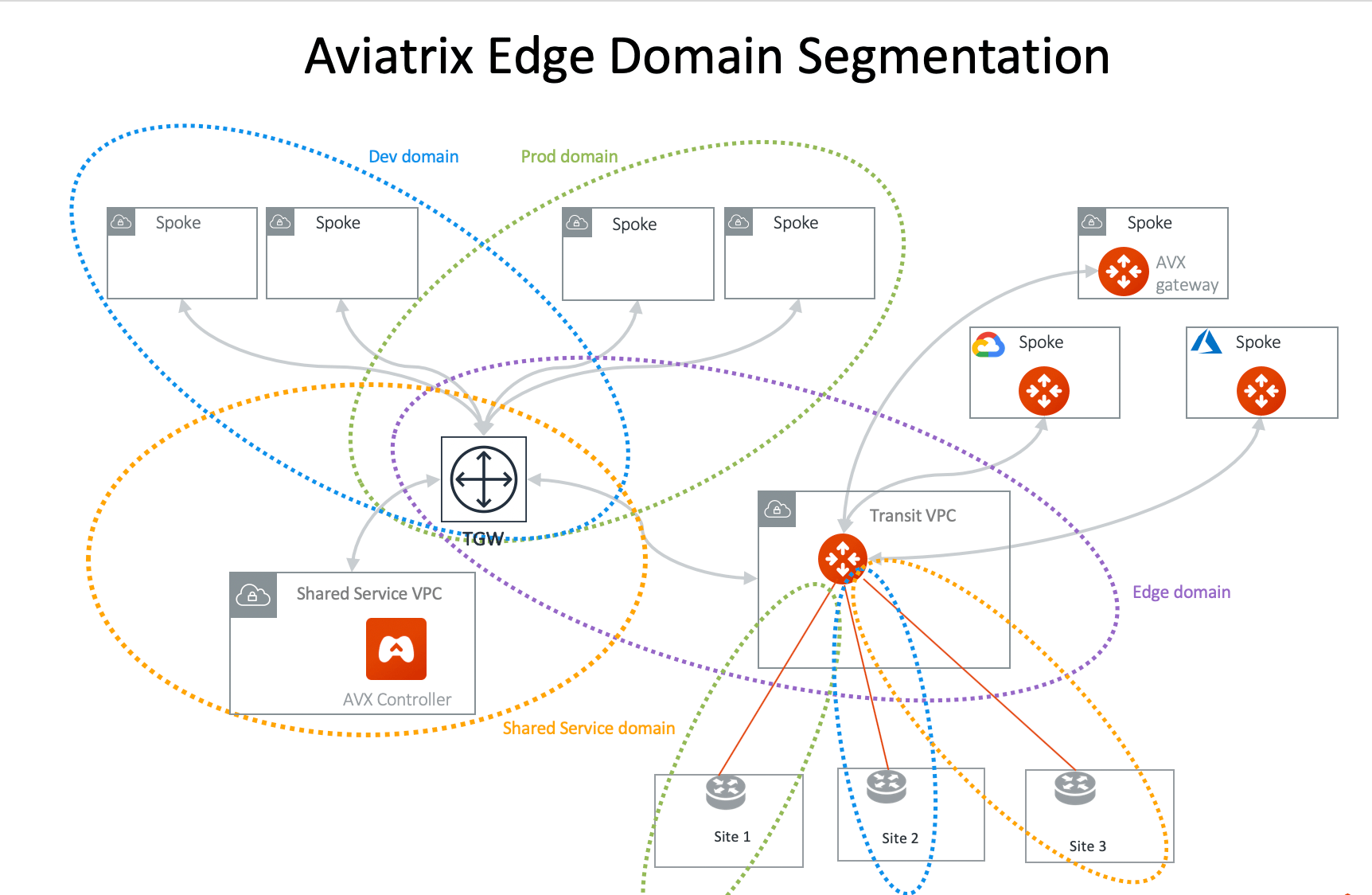 In the above diagram, Site 1 can communicate with Prod domain but not with Dev
domain and Shared Service domain. Site 2 can communicate with Dev domain but not
with Prod domain and Shared Service domain. Site 3 can communicate with Shared
Service domain but not with Dev domain and Prod domain.
Edge Segmentation works across Connection Policies for
AWS TGW Peered
Network Domains.
The Edge Segmentation is only applicable to the Aviatrix AWS TGW deployed
Spoke VPCs. It does not apply to Aviatrix Encrypted Transit. It also does not
apply to Aviatrix Transit Gateway peering.
## Enable multicast capability function on TGW
Multicast capability function is able to be turned on when users launch AWS TGW.
This is API support only.
In the above diagram, Site 1 can communicate with Prod domain but not with Dev
domain and Shared Service domain. Site 2 can communicate with Dev domain but not
with Prod domain and Shared Service domain. Site 3 can communicate with Shared
Service domain but not with Dev domain and Prod domain.
Edge Segmentation works across Connection Policies for
AWS TGW Peered
Network Domains.
The Edge Segmentation is only applicable to the Aviatrix AWS TGW deployed
Spoke VPCs. It does not apply to Aviatrix Encrypted Transit. It also does not
apply to Aviatrix Transit Gateway peering.
## Enable multicast capability function on TGW
Multicast capability function is able to be turned on when users launch AWS TGW.
This is API support only.