> ## Documentation Index
> Fetch the complete documentation index at: https://docs.aviatrix.com/llms.txt
> Use this file to discover all available pages before exploring further.
# Native Peering
> You can use Aviatrix CoPilot to create native peering connections between cloud VPCs or VNets. There are two types of native peering: VPC/VNet to VPC/VNet, and Transit VNet to Spoke VNet (previously referred to as Azure ARM Spoke through Native Peering).
You can use Aviatrix CoPilot to create native peering connections between cloud
VPCs or VNets. There are two types of native peering: VPC/VNet to VPC/VNet, and
Transit VNet to Spoke VNet (previously referred to as Azure ARM Spoke through
Native Peering).
The first type of native peering (AWS VPC peering or Azure VNet peering) allows
you to connect two VPCs or VNets within the same cloud account or across
different cloud accounts, enabling private traffic flow between them. This type
of native peering is ideal for east-west traffic flow, where you want to connect
VPCs or VNets in the same region or across regions without routing traffic
through a Transit Gateway.
The second type of native peering (Transit VNet to Spoke VNet) allows you to
connect a Transit VNet to a Spoke VNet in Azure, enabling private traffic flow
between them. This type of native peering is useful for scenarios where you want
to connect a central hub (Transit VNet) to multiple spoke networks (Spoke VNets)
for centralized management and routing.
Native peering is supported for AWS and Azure.
## AWS VPC Peering
AWS VPC peering allows you to connect VPCs within the same AWS account or across
different AWS accounts. This connection enables private traffic flow between the
VPCs, allowing resources in one VPC to communicate with resources in another VPC
without going through the public internet.
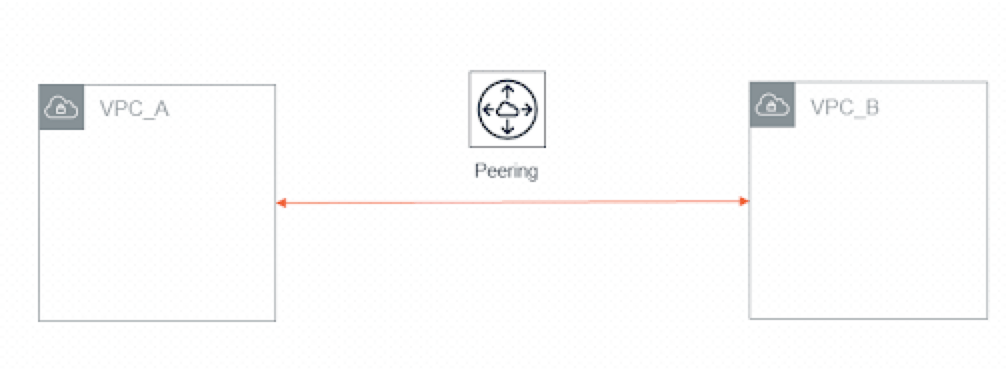
* You can peer two VPCs together.
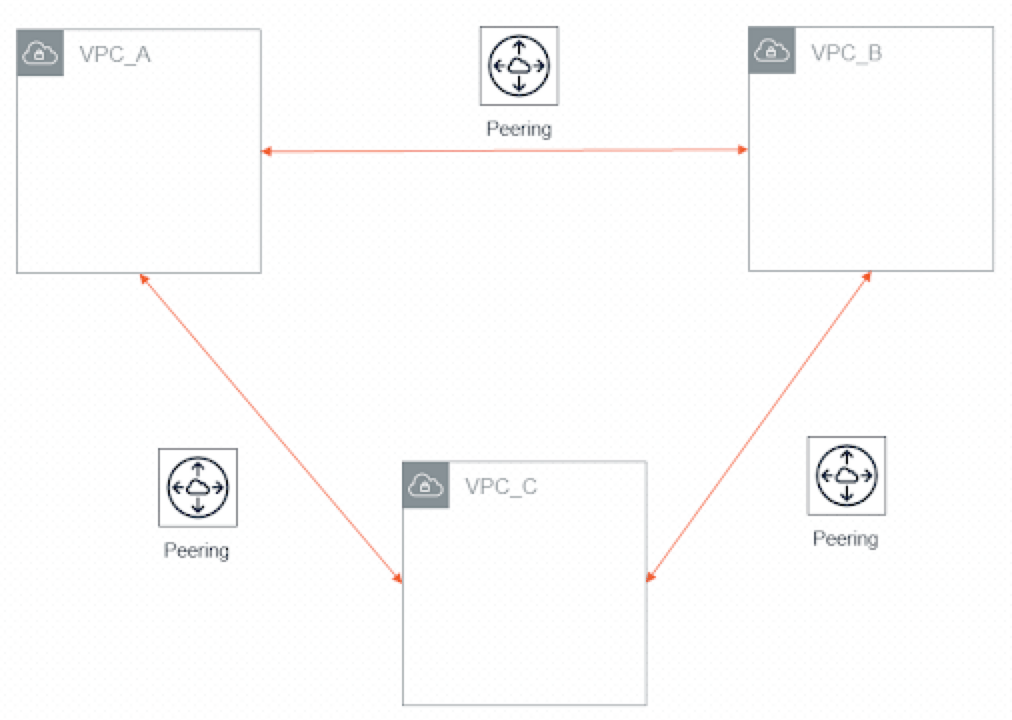
 * You can peer three VPCs together, where each VPC will have access to the
resources from the other two VPCs because of its peering connections.
* You can peer three VPCs together, where each VPC will have access to the
resources from the other two VPCs because of its peering connections.
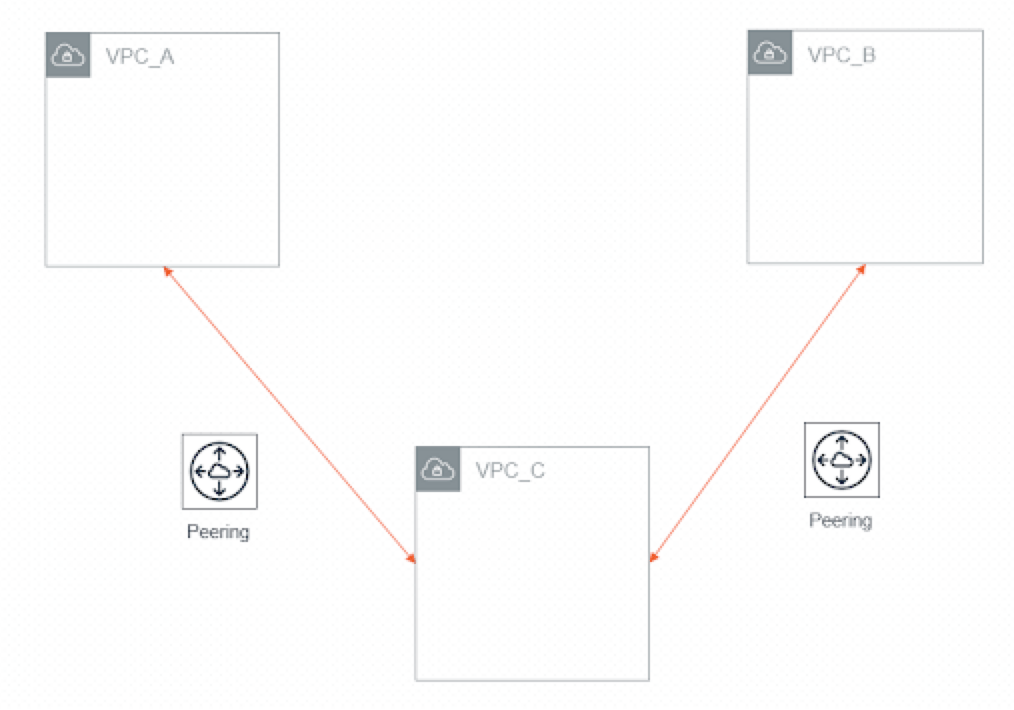
 * You can peer three VPCs together where one is in the middle, meaning that the
middle VPC will have access to the resources from the other two VPCs, but the
other two VPCs will not have access to each other.
* You can peer three VPCs together where one is in the middle, meaning that the
middle VPC will have access to the resources from the other two VPCs, but the
other two VPCs will not have access to each other.
 ### Use Cases for AWS VPC Peering
* **Inter-Departmental Connectivity**: For instance, two different departments
within an organization needing full access to each other's resources.
* **Customer Segregation**: When serving multiple customers, VPC Peering ensures
that each customer's resources remain isolated while still allowing access to
shared resources.
### Example Scenario
* **Inter-Departmental Connectivity**: The Finance and HR departments each have
their own VPCs in different AWS accounts for security and compliance reasons.
By creating a VPC peering connection between these VPCs, both departments can
securely share payroll and benefits data, while keeping their core
applications isolated from each other and the public internet.
Steps to create this VPC peering connection:
1. In CoPilot, navigate to **Connectivity** > **Native Peering** tab, and click
**+ Native Peering**.
2. For **Cloud** type, select **AWS** (choose **Standard**, **GovCloud**, or
**China** as appropriate).
3. From the **VPC/VNet 1** dropdown menu, select the Finance department VPC.
4. From the **VPC/VNet 2** dropdown menu, select the HR department VPC (in the
other AWS account).
5. (Optional) To select custom route tables, turn **Select Route Tables** switch
**On** and choose the route tables to peer for each VPC. Otherwise, leave it
**Off** to peer all VPC CIDRs.
6. Click **Save** to create the peering connection.
The new VPC peering connection will appear in the table, and resources in both
VPCs can now communicate privately for secure data sharing.
## Azure VNet Peering
Azure VNet peering allows you to connect two VNets within the same Azure
subscription or across different Azure subscriptions. This connection enables
private traffic flow between the VNets, allowing resources in one VNet to
communicate with resources in another VNet without going through the public
internet.
### Use Cases for Azure VNet Peering
* **Business Unit Segregation**: When serving multiple business units or
subsidiaries, VNet peering ensures that each unit's resources remain isolated
in their own VNets, while still allowing access to shared services (such as a
central authentication or logging service) hosted in another VNet.
* **Cross-Environment Integration**: For securely connecting environments like
staging and production for testing, migration, or blue/green deployments.
### Example Scenario
* **Business Unit Segregation**: You have a production VNet and a development
VNet in different Azure subscriptions. By creating a VNet peering connection
between them, you enable secure, private communication for application testing
and data sharing, without exposing resources to the public internet.
Steps to create this VNet peering connection:
1. In CoPilot, navigate to **Connectivity** > **Native Peering** tab, and click
**+ Native Peering**.
2. For **Cloud** type, select **Azure** (choose **Global**, **GovCloud**, or
**China** as appropriate).
3. From the **VPC/VNet 1** dropdown menu, select the production VNet.
4. From the **VPC/VNet 2** dropdown menu, select the development VNet (in the
other Azure subscription).
5. Click **Save** to create the peering connection.
The new VNet peering connection will appear in the table, and resources in both
VNets can now communicate privately.
## Transit VNet to Spoke VNet Peering
Previously this was referred to as Azure ARM Spoke through Native Peering.
Transit VNet to Spoke VNet peering enables private connectivity between a
central Transit VNet and one or more Spoke VNets in Azure. This approach is
ideal for centralized management, routing, and secure communication between hub
and spoke networks.
### Use Cases for Transit VNet to Spoke VNet Peering
* **Centralized Network Management**: When you want to manage multiple Spoke
VNets from a central hub (Transit VNet) for consistent routing, security
policies, and monitoring.
* **Scalable Network Architecture**: For scenarios where you need to connect
multiple Spoke VNets to a single Transit VNet, allowing for efficient routing
and management of traffic between them.
### Example Scenario
* **Centralized Security and Routing**: An enterprise has a Transit VNet acting
as a central hub for security inspection, routing, and monitoring. Multiple
Spoke VNets are deployed for different business units or applications. By
peering each Spoke VNet with the Transit VNet, all outbound and inter-spoke
traffic is routed through the Transit VNet, enabling centralized policy
enforcement and simplified management.
Steps to create this Transit VNet to Spoke VNet peering connection:
1. In Aviatrix CoPilot, go to **Cloud Fabric** > **Gateways > Transit
Gateways**.
2. In the table, locate the Azure-based Transit Gateway that will act as the
central hub for security and routing and click the **Manage Gateway
Attachments** icon on the right side of its row.
3. In the Manage Gateway Attachments dialog, click the Azure VNet tab.
4. From the Azure VNets dropdown, select one or more Spoke VNets for specific
business units or applications.
5. Click **Save** to create the attachments (peering connections).
All Spoke VNets will now have private connectivity to the Transit VNet, enabling
centralized security inspection, routing, and monitoring for the enterprise.
## Related Topics
* Creating AWS VPC Peering Connection
* Creating Azure VNet Peering Connection
* [Creating an Azure-Based Transit Gateway to Azure VNet Attachment](https://legacy.docs.aviatrix.com/documentation/latest/network/transit-attach-vnet.html)
* [View an External Connection Details](https://legacy.docs.aviatrix.com/documentation/latest/network/external-connection-details.html)
### Use Cases for AWS VPC Peering
* **Inter-Departmental Connectivity**: For instance, two different departments
within an organization needing full access to each other's resources.
* **Customer Segregation**: When serving multiple customers, VPC Peering ensures
that each customer's resources remain isolated while still allowing access to
shared resources.
### Example Scenario
* **Inter-Departmental Connectivity**: The Finance and HR departments each have
their own VPCs in different AWS accounts for security and compliance reasons.
By creating a VPC peering connection between these VPCs, both departments can
securely share payroll and benefits data, while keeping their core
applications isolated from each other and the public internet.
Steps to create this VPC peering connection:
1. In CoPilot, navigate to **Connectivity** > **Native Peering** tab, and click
**+ Native Peering**.
2. For **Cloud** type, select **AWS** (choose **Standard**, **GovCloud**, or
**China** as appropriate).
3. From the **VPC/VNet 1** dropdown menu, select the Finance department VPC.
4. From the **VPC/VNet 2** dropdown menu, select the HR department VPC (in the
other AWS account).
5. (Optional) To select custom route tables, turn **Select Route Tables** switch
**On** and choose the route tables to peer for each VPC. Otherwise, leave it
**Off** to peer all VPC CIDRs.
6. Click **Save** to create the peering connection.
The new VPC peering connection will appear in the table, and resources in both
VPCs can now communicate privately for secure data sharing.
## Azure VNet Peering
Azure VNet peering allows you to connect two VNets within the same Azure
subscription or across different Azure subscriptions. This connection enables
private traffic flow between the VNets, allowing resources in one VNet to
communicate with resources in another VNet without going through the public
internet.
### Use Cases for Azure VNet Peering
* **Business Unit Segregation**: When serving multiple business units or
subsidiaries, VNet peering ensures that each unit's resources remain isolated
in their own VNets, while still allowing access to shared services (such as a
central authentication or logging service) hosted in another VNet.
* **Cross-Environment Integration**: For securely connecting environments like
staging and production for testing, migration, or blue/green deployments.
### Example Scenario
* **Business Unit Segregation**: You have a production VNet and a development
VNet in different Azure subscriptions. By creating a VNet peering connection
between them, you enable secure, private communication for application testing
and data sharing, without exposing resources to the public internet.
Steps to create this VNet peering connection:
1. In CoPilot, navigate to **Connectivity** > **Native Peering** tab, and click
**+ Native Peering**.
2. For **Cloud** type, select **Azure** (choose **Global**, **GovCloud**, or
**China** as appropriate).
3. From the **VPC/VNet 1** dropdown menu, select the production VNet.
4. From the **VPC/VNet 2** dropdown menu, select the development VNet (in the
other Azure subscription).
5. Click **Save** to create the peering connection.
The new VNet peering connection will appear in the table, and resources in both
VNets can now communicate privately.
## Transit VNet to Spoke VNet Peering
Previously this was referred to as Azure ARM Spoke through Native Peering.
Transit VNet to Spoke VNet peering enables private connectivity between a
central Transit VNet and one or more Spoke VNets in Azure. This approach is
ideal for centralized management, routing, and secure communication between hub
and spoke networks.
### Use Cases for Transit VNet to Spoke VNet Peering
* **Centralized Network Management**: When you want to manage multiple Spoke
VNets from a central hub (Transit VNet) for consistent routing, security
policies, and monitoring.
* **Scalable Network Architecture**: For scenarios where you need to connect
multiple Spoke VNets to a single Transit VNet, allowing for efficient routing
and management of traffic between them.
### Example Scenario
* **Centralized Security and Routing**: An enterprise has a Transit VNet acting
as a central hub for security inspection, routing, and monitoring. Multiple
Spoke VNets are deployed for different business units or applications. By
peering each Spoke VNet with the Transit VNet, all outbound and inter-spoke
traffic is routed through the Transit VNet, enabling centralized policy
enforcement and simplified management.
Steps to create this Transit VNet to Spoke VNet peering connection:
1. In Aviatrix CoPilot, go to **Cloud Fabric** > **Gateways > Transit
Gateways**.
2. In the table, locate the Azure-based Transit Gateway that will act as the
central hub for security and routing and click the **Manage Gateway
Attachments** icon on the right side of its row.
3. In the Manage Gateway Attachments dialog, click the Azure VNet tab.
4. From the Azure VNets dropdown, select one or more Spoke VNets for specific
business units or applications.
5. Click **Save** to create the attachments (peering connections).
All Spoke VNets will now have private connectivity to the Transit VNet, enabling
centralized security inspection, routing, and monitoring for the enterprise.
## Related Topics
* Creating AWS VPC Peering Connection
* Creating Azure VNet Peering Connection
* [Creating an Azure-Based Transit Gateway to Azure VNet Attachment](https://legacy.docs.aviatrix.com/documentation/latest/network/transit-attach-vnet.html)
* [View an External Connection Details](https://legacy.docs.aviatrix.com/documentation/latest/network/external-connection-details.html)