> ## Documentation Index
> Fetch the complete documentation index at: https://docs.aviatrix.com/llms.txt
> Use this file to discover all available pages before exploring further.
# Site2Cloud
> Traditionally enterprises host their IT applications in their own data center or at a co-location. Remote sites typically connect to the data center via an Internet-based IPsec VPN tunnel or MPLS based private network. Such a hub and spoke architecture has been prevalent in the last 15 years.
## Problem: Long Latency or Unstable Internet Connectivity
Traditionally enterprises host their IT applications in their own data center or
at a co-location. Remote sites typically connect to the data center via an
Internet-based IPsec VPN tunnel or MPLS based private network. Such a hub and
spoke architecture has been prevalent in the last 15 years.
A problem with this deployment architecture is long latency or unstable Internet
connectivity suffered by remote sites, especially between those in different
continents. This can cause application time out, resulting in lost productivity
and an unhappy user experience. The solution to this pain point has been to
deploy some form of WAN optimization in both the remote sites and data center to
reduce application latency and reduce data bandwidth. These gears are complex,
expensive and not every enterprise can afford them, and in some cases, they do
not always work well.
## Solution: Bring Application to User
With the many regions in the world available brought by public cloud providers,
such as AWS and Azure, the application latency issue can now be solved in a
brand-new way. By placing applications in a region of public cloud that your
remote sites are closer to than to the data center, the long latency issue is
eliminated altogether. In addition, by moving servers to the cloud, you can
reduce remote sites' footprint and the amount of hardware to manage, thus
reducing cost for ongoing maintenance.
The comparison between the two deployment architectures is described below:
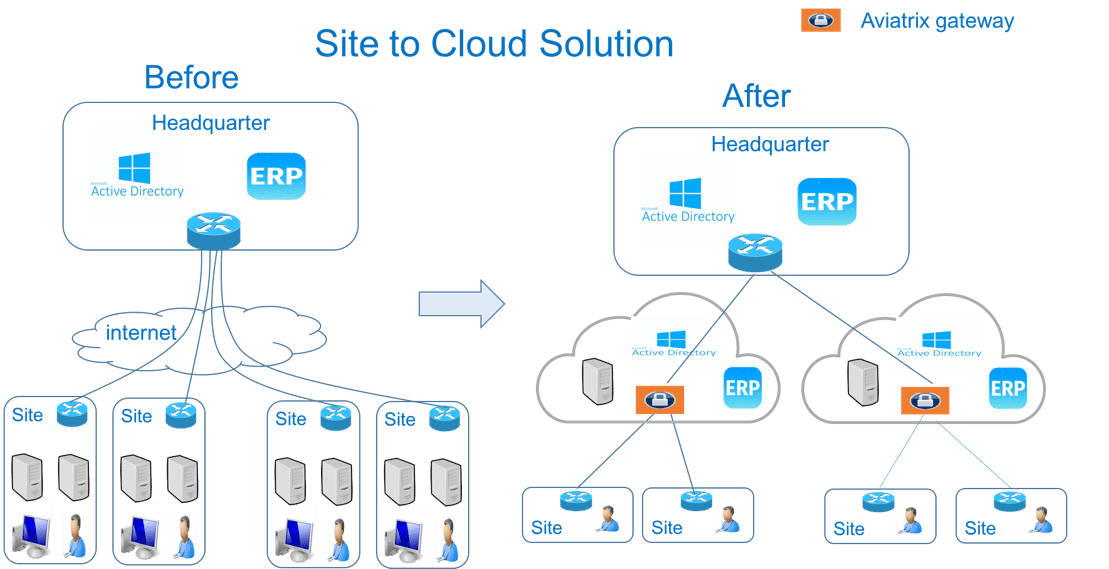 In the diagram above, remote sites or branch offices connect to the
headquarters' data center via IPsec tunnels. International sites across
continents can experience hundreds or more milliseconds in latency and in some
countries, connectivity to headquarters is unstable at times.
The first step in deploying an application close to the user is to build a new
network architecture as shown on the right side of the diagram above. A remote
site now connects via an IPsec tunnel to the closest Aviatrix Gateway in a VPC
or VNet in a region closest to the site. Different remote sites may connect to
different Aviatrix Gateways. For example, sites in China connect to Aviatrix
Gateways in the Azure China region and sites in Europe connect to an Aviatrix
Gateway in a VPC in the AWS eu-west-1 region.
After the new network is deployed, you can now replicate Active Directory to
VPC/VNet and deploy applications such as ERP in the cloud too. The AD
authentication latency and application latency can be reduced to tens of
milliseconds. In addition, the remotes are simpler with fewer hardware equipment
to manage.
For how to set up Site2Cloud, see
Site2Cloud External Connection Workflow
.
## Use Cases for Site2Cloud
Here are common use cases:
* **SaaS provider to its customer site**: If you need to move data continuously
and securely from customer or partner sites to your SaaS service hosted in
AWS, Azure, or Google, building an encrypted tunnel between the customer site
and your SaaS service is required.
* **Branch offices to cloud**: If you have branch offices that need to access
applications hosted in AWS or Azure, using Site2Cloud is the most economical
way to build a secure tunnel. You can use your existing Internet connection
and not have to pay extra to SD-WAN vendors to go through their cloud.
The Aviatrix Site2Cloud solution solves these problems:
* **Overlapping IP addresses** When running a SaaS operation, the CIDR blocks at
customer sites are not within your control. If a customer CIDR block overlaps
with your operation VPC/VNet CIDR, you must find a way to NAT the address. The
cloud provider native solution is not usable in this case. For solutions to
solving overlapping IP addresses, see
[Configuring Overlapping Networks with Customized SNAT and DNAT](https://legacy.docs.aviatrix.com/documentation/latest/network/s2c-overlapping-ip.html).
* **Traffic Black Hole** When the tunnel on the primary gateway is down,
VPC/VNet route entry still points to the primary gateway, it does not point to
the backup gateway.
* **AWS VPN Gateway Limitation** AWS VPN gateway supports 10 connections per
VPC. For deployments with more than 10 sites, the native solution is not
usable.
* **Azure VPN Gateway Limitation** Azure VPN gateway supports only 1 VPN
connection for IKEv1. If the office firewall device only supports IKEv1, the
native solution does not meet this requirement.
* **No Visibility** Cloud provider's VPN gateway is a black box, there is no
visibility for troubleshooting.
* **No Manual** Configuring and managing hundreds or thousands of IPsec tunnels
manually, using traditional vendors such as Cisco ASA and CSR, is not
possible. For configuration to external devices, see
[Site2Cloud Configurations with External Devices](https://legacy.docs.aviatrix.com/documentation/latest/network/s2c-configuration-other-devices.html).
* **Encryption Algorithm Mismatch** As a SaaS operator, you cannot control what
VPN device a customer wishes to use. The VPN termination endpoint needs the
flexibility to interoperate with customer equipment. The native solution does
not have that flexibility.
* **Too Slow to Onboard a Customer** VPN runs on UDP port 500/4500, and
customers have to request that corporate firewall ports open. Is there a way
to run the IPsec tunnel on TCP 443?
* **Traffic Direction Problem** A SaaS service that requires traffic to be
initiated from the cloud to the customer site cannot use AWS VPN gateway for
this traffic pattern. A separate machine must constantly ping to keep the
tunnel up.
* **Downtime Problem** Some appliances force all IPsec tunnels to reset and go
down when a new tunnel is being established, which affects business continuity
and is not acceptable when the number of sites go beyond 10.
* **Skill Problem** Not every organization has a team of CCIEs to handle the
load.
In addition, Aviatrix provides a simple point-and-click user interface for you
to build and manage a large deployment.
To learn how to set up Aviatrix Site2Cloud, see
Site2Cloud External Connection Workflow
.
## Site2Cloud Frequently Asked Questions
### Does Site2Cloud support HA?
You can enable high-availability when you configure a Site2Cloud connection.
### What are the encryption algorithms supported?
| **Type** | **Value** |
| ---------------------- | -------------------------------------------------------------------------------------------------------------------------------------------------------- |
| Phase 1 Authentication | SHA-1, SHA-512, SHA-384, SHA-256 |
| Phase 1 DH Groups | 1, 2, 5, 14, 15, 16, 17, 18, 19, 20, 21 (20 & 21 IKEv2 Only) |
| Phase 1 Encryption | AES-256-CBC, AES-256-GCM-64, AES-256-GCM-96, AES-256-GCM-128, AES-192-CBC, AES-128-CBC, AES-128-GCM-64, AES-128-GCM-96, AES-128-GCM-128, 3DES |
| Phase 2 Authentication | HMAC-SHA-1, HMAC-SHA-512, HMAC-SHA-384, HMAC-SHA-256, NO-AUTH |
| Phase 2 DH Groups | 1, 2, 5, 14, 15, 16, 17, 18, 19, 20, 21 (20 & 21 IKEv2 Only) |
| Phase 2 Encryption | AES-128-CBC, AES-192-CBC, AES-256-CBC, AES-256-GCM-64, AES-256-GCM-96, AES-256-GCM-128, AES-128-GCM-64, AES-128-GCM-96, AES-128-GCM-128, 3DES, NULL-ENCR |
Site2Cloud supports AES-256-GCM and DH21 that comply with the NIST encryption
standards.
### Is IKEv2 supported?
IKEv1 and IKEv2 are supported.
If you already have a Transit to External Device connection using IKEv1, you can
create another one using IKEv2.
For IKEv2, you need to create the first Transit to External Device connection
with IKEv2 enabled. If your current Transit gateway already has a connection
using IKEv1 either is created by attaching the Spoke Gateway or is built in
MultiCloud Transit > Attach/Detach tab, you need to delete it first before
creating the Transit to External Device connection with IKEv2.
For more information, see
About External Connection Settings
.
### How frequently are keys rotated?
Re-key for IKE phase 1 is every 8 hours. Re-key for IKE phase 2 is every hour.
### How to troubleshoot Site2Cloud connection with IKEv2?
Refer to
Troubleshooting IPsec VPN connection with IKEv2
.
### Can you configure a Site2Cloud connection using the same public IP address for the remote gateway and the remote subnet?
In a Site2Cloud connection, the same IP address in the remote gateway peer and
the remote subnet is supported. This is useful when configuring a Site2Cloud
connection to a third-party environment where only one public IP is exposed.
This feature is supported only for policy-based unmapped Site2Cloud connections
in AWS and GCP for standalone gateways, not ActiveMesh gateways.
In the diagram above, remote sites or branch offices connect to the
headquarters' data center via IPsec tunnels. International sites across
continents can experience hundreds or more milliseconds in latency and in some
countries, connectivity to headquarters is unstable at times.
The first step in deploying an application close to the user is to build a new
network architecture as shown on the right side of the diagram above. A remote
site now connects via an IPsec tunnel to the closest Aviatrix Gateway in a VPC
or VNet in a region closest to the site. Different remote sites may connect to
different Aviatrix Gateways. For example, sites in China connect to Aviatrix
Gateways in the Azure China region and sites in Europe connect to an Aviatrix
Gateway in a VPC in the AWS eu-west-1 region.
After the new network is deployed, you can now replicate Active Directory to
VPC/VNet and deploy applications such as ERP in the cloud too. The AD
authentication latency and application latency can be reduced to tens of
milliseconds. In addition, the remotes are simpler with fewer hardware equipment
to manage.
For how to set up Site2Cloud, see
Site2Cloud External Connection Workflow
.
## Use Cases for Site2Cloud
Here are common use cases:
* **SaaS provider to its customer site**: If you need to move data continuously
and securely from customer or partner sites to your SaaS service hosted in
AWS, Azure, or Google, building an encrypted tunnel between the customer site
and your SaaS service is required.
* **Branch offices to cloud**: If you have branch offices that need to access
applications hosted in AWS or Azure, using Site2Cloud is the most economical
way to build a secure tunnel. You can use your existing Internet connection
and not have to pay extra to SD-WAN vendors to go through their cloud.
The Aviatrix Site2Cloud solution solves these problems:
* **Overlapping IP addresses** When running a SaaS operation, the CIDR blocks at
customer sites are not within your control. If a customer CIDR block overlaps
with your operation VPC/VNet CIDR, you must find a way to NAT the address. The
cloud provider native solution is not usable in this case. For solutions to
solving overlapping IP addresses, see
[Configuring Overlapping Networks with Customized SNAT and DNAT](https://legacy.docs.aviatrix.com/documentation/latest/network/s2c-overlapping-ip.html).
* **Traffic Black Hole** When the tunnel on the primary gateway is down,
VPC/VNet route entry still points to the primary gateway, it does not point to
the backup gateway.
* **AWS VPN Gateway Limitation** AWS VPN gateway supports 10 connections per
VPC. For deployments with more than 10 sites, the native solution is not
usable.
* **Azure VPN Gateway Limitation** Azure VPN gateway supports only 1 VPN
connection for IKEv1. If the office firewall device only supports IKEv1, the
native solution does not meet this requirement.
* **No Visibility** Cloud provider's VPN gateway is a black box, there is no
visibility for troubleshooting.
* **No Manual** Configuring and managing hundreds or thousands of IPsec tunnels
manually, using traditional vendors such as Cisco ASA and CSR, is not
possible. For configuration to external devices, see
[Site2Cloud Configurations with External Devices](https://legacy.docs.aviatrix.com/documentation/latest/network/s2c-configuration-other-devices.html).
* **Encryption Algorithm Mismatch** As a SaaS operator, you cannot control what
VPN device a customer wishes to use. The VPN termination endpoint needs the
flexibility to interoperate with customer equipment. The native solution does
not have that flexibility.
* **Too Slow to Onboard a Customer** VPN runs on UDP port 500/4500, and
customers have to request that corporate firewall ports open. Is there a way
to run the IPsec tunnel on TCP 443?
* **Traffic Direction Problem** A SaaS service that requires traffic to be
initiated from the cloud to the customer site cannot use AWS VPN gateway for
this traffic pattern. A separate machine must constantly ping to keep the
tunnel up.
* **Downtime Problem** Some appliances force all IPsec tunnels to reset and go
down when a new tunnel is being established, which affects business continuity
and is not acceptable when the number of sites go beyond 10.
* **Skill Problem** Not every organization has a team of CCIEs to handle the
load.
In addition, Aviatrix provides a simple point-and-click user interface for you
to build and manage a large deployment.
To learn how to set up Aviatrix Site2Cloud, see
Site2Cloud External Connection Workflow
.
## Site2Cloud Frequently Asked Questions
### Does Site2Cloud support HA?
You can enable high-availability when you configure a Site2Cloud connection.
### What are the encryption algorithms supported?
| **Type** | **Value** |
| ---------------------- | -------------------------------------------------------------------------------------------------------------------------------------------------------- |
| Phase 1 Authentication | SHA-1, SHA-512, SHA-384, SHA-256 |
| Phase 1 DH Groups | 1, 2, 5, 14, 15, 16, 17, 18, 19, 20, 21 (20 & 21 IKEv2 Only) |
| Phase 1 Encryption | AES-256-CBC, AES-256-GCM-64, AES-256-GCM-96, AES-256-GCM-128, AES-192-CBC, AES-128-CBC, AES-128-GCM-64, AES-128-GCM-96, AES-128-GCM-128, 3DES |
| Phase 2 Authentication | HMAC-SHA-1, HMAC-SHA-512, HMAC-SHA-384, HMAC-SHA-256, NO-AUTH |
| Phase 2 DH Groups | 1, 2, 5, 14, 15, 16, 17, 18, 19, 20, 21 (20 & 21 IKEv2 Only) |
| Phase 2 Encryption | AES-128-CBC, AES-192-CBC, AES-256-CBC, AES-256-GCM-64, AES-256-GCM-96, AES-256-GCM-128, AES-128-GCM-64, AES-128-GCM-96, AES-128-GCM-128, 3DES, NULL-ENCR |
Site2Cloud supports AES-256-GCM and DH21 that comply with the NIST encryption
standards.
### Is IKEv2 supported?
IKEv1 and IKEv2 are supported.
If you already have a Transit to External Device connection using IKEv1, you can
create another one using IKEv2.
For IKEv2, you need to create the first Transit to External Device connection
with IKEv2 enabled. If your current Transit gateway already has a connection
using IKEv1 either is created by attaching the Spoke Gateway or is built in
MultiCloud Transit > Attach/Detach tab, you need to delete it first before
creating the Transit to External Device connection with IKEv2.
For more information, see
About External Connection Settings
.
### How frequently are keys rotated?
Re-key for IKE phase 1 is every 8 hours. Re-key for IKE phase 2 is every hour.
### How to troubleshoot Site2Cloud connection with IKEv2?
Refer to
Troubleshooting IPsec VPN connection with IKEv2
.
### Can you configure a Site2Cloud connection using the same public IP address for the remote gateway and the remote subnet?
In a Site2Cloud connection, the same IP address in the remote gateway peer and
the remote subnet is supported. This is useful when configuring a Site2Cloud
connection to a third-party environment where only one public IP is exposed.
This feature is supported only for policy-based unmapped Site2Cloud connections
in AWS and GCP for standalone gateways, not ActiveMesh gateways.